 COOL
COOL 


In this article
- 🧠 What semantic caching is
- 🎯 When it helps (and when it doesn't)
- 🧩 Two layers: exact cache and semantic cache
- 🏗️ The solution architecture
- ⬇️ Step 1 · Ollama and the two models
- 🐳 Step 2 · Redis 8, Ollama and MongoDB with Docker Compose
- 🧱 Step 3 · The project and the NuGet packages
- ⚙️ Step 4 · Configuration in appsettings.json
- 🗂️ Step 5 · The typed options
- 🔑 Step 6 · The store: vector index and KNN search on Redis
- ♻️ Step 7 · The semantic cache middleware
- 🔌 Step 8 · Wiring the pipeline with AddSemanticCache
- 🚀 Step 9 · Program.cs: wiring and index at startup
- 📡 Step 10 · The /chat endpoint
- 🧪 Step 11 · Try it from the terminal
- 📈 The three answers side by side
- ✅ Final checklist
- 🎁 Bonus · Redis as an output cache too: the /users API on MongoDB
- 🧩 Bonus · The service layer: a paged query in LINQ
- 🛡️ Bonus · FluentValidation on the paging parameters
- ⚡ Bonus · The /users endpoint with Redis output caching
- 🧹 Bonus · Flushing the cache on demand (and the .http file to try everything)
- 🎲 Bonus · Bogus: realistic fake data (and the job that creates the indexes)
- 🧪 Bonus · Unit tests with xUnit: testing the cache without Redis
- 🔮 Next article · Hybrid search: you pick the database
- 📦 The full project on GitHub
🧠 What semantic caching is
Semantic caching is a cache keyed not on an exact string but on meaning: if a question is semantically close to one already seen, it returns the stored answer instead of re-running the model. It is the difference between "What is Redis?" and "Can you explain what Redis is?": to an LLM they are the same question, to a traditional cache they are not.
The idea is simple. I turn the question into a vector — the embedding — and look for the nearest vector in my store. If the distance is under a threshold it is a hit: I answer from cache. Otherwise I call the model, store the answer with its embedding, and make it available next time.
# on every question
q      = embed(question)          # the question as a vector
hit    = vector_search(q, top=1)  # nearest neighbour in cache
if hit.distance <= threshold:
    return hit.answer             # cache hit: no model call

answer = llm(question)            # cache miss
store(q, question, answer)        # save it for next time
return answer🎯 When it helps (and when it doesn't)
The perfect use case is a flow with recurring questions: assistants over a documentation set, product FAQs, support chatbots, internal search. There the same handful of questions comes back constantly, in a thousand phrasings: the semantic cache catches the rewordings and cuts both latency and per-request cost.
It is not free and not right for everything. Avoid it — or handle it carefully — when the answer depends on the user, on the moment, or on data that changes (prices, weather, order status). Two levers keep the semantic layer's risk in check: a threshold that is not too permissive, and a TTL that expires semantic entries. Better one extra miss than a wrong answer because it was too "close".
- Ideal: FAQs, documentation, support, questions that repeat.
- Avoid: personalized answers, real-time data, content that changes often.
- Two semantic knobs: distance threshold (how "close" counts as a hit) and TTL (how long a semantic entry lives).
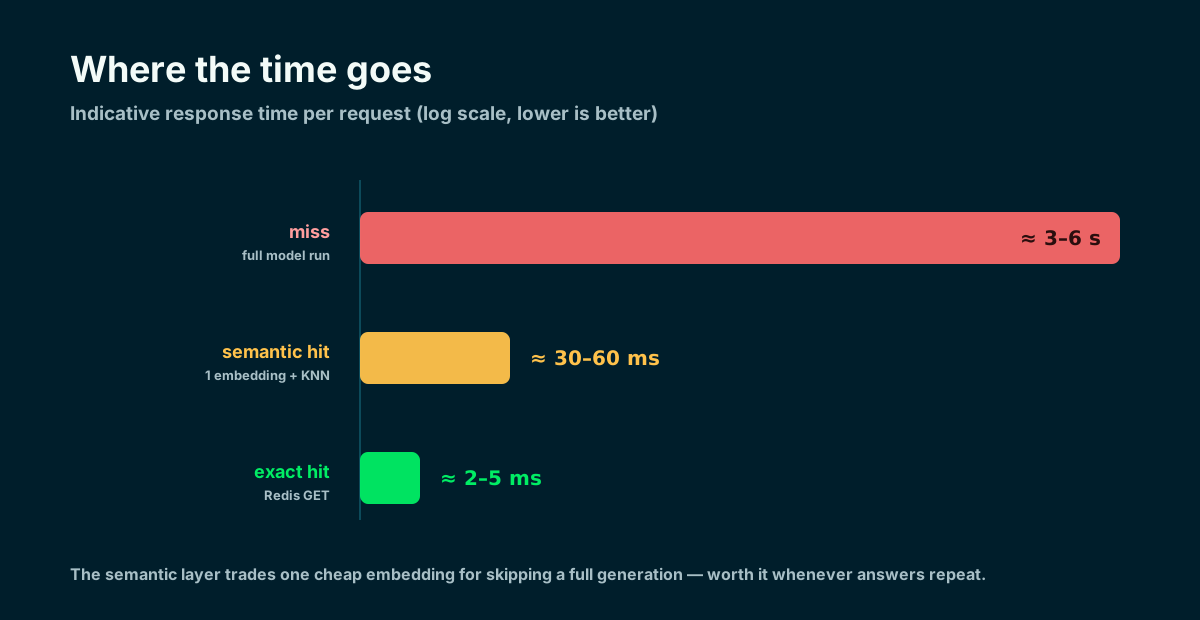
Indicative numbers: a miss pays for full inference, a hit pays a few milliseconds.
🧩 Two layers: exact cache and semantic cache
The outer exact-match layer is Microsoft.Extensions.AI's UseDistributedCache: it hashes the conversation messages and serves an identical request directly from Redis, without generating an embedding. Only an exact miss reaches my semantic layer.
The custom SemanticCachingChatClient embeds the latest user prompt and runs a KNN search on the Redis vector index. A neighbour below MaxDistance returns its stored answer; a true miss reaches Ollama and is then stored. In this demo Ttl expires semantic hashes only: the exact-match entries created by UseDistributedCache have no configured expiry.
Exact cache
- Hash of the messages
- Identical prompts only
- No embedding, minimal latency
- UseDistributedCache, built in
Semantic cache
- Embedding + vector search
- Catches rewordings
- One embedding per request
- Custom middleware (DelegatingChatClient)
Identical prompts stop at the exact layer; paraphrases can stop at the semantic layer; only a true miss reaches Ollama.
🏗️ The solution architecture
I build a Minimal API on .NET 10. The core is Microsoft.Extensions.AI's IChatClient abstraction, wrapped in a middleware pipeline: first UseDistributedCache (exact match), then my SemanticCachingChatClient (semantic), finally the Ollama client that talks to the model. Both cache layers share a single cache dependency: Redis 8.
The elegant part is that the rest of the app knows nothing about any of this: it depends only on IChatClient. Moving from Ollama to OpenAI or Azure requires changing both the chat and embedding registrations; if the embedding dimensions change, I must also recreate cache_idx. The cache middleware can stay in place. Redis does double duty: distributed cache for the exact match and vector index for the semantic one.
- Models: Ollama with llama3.1 (chat) and nomic-embed-text (embeddings, 768 dimensions).
- Cache + vectors: Redis 8, with the Query Engine built in (no separate Redis Stack).
- Packages: Microsoft.Extensions.AI, OllamaSharp, NRedisStack, Microsoft.Extensions.Caching.StackExchangeRedis.
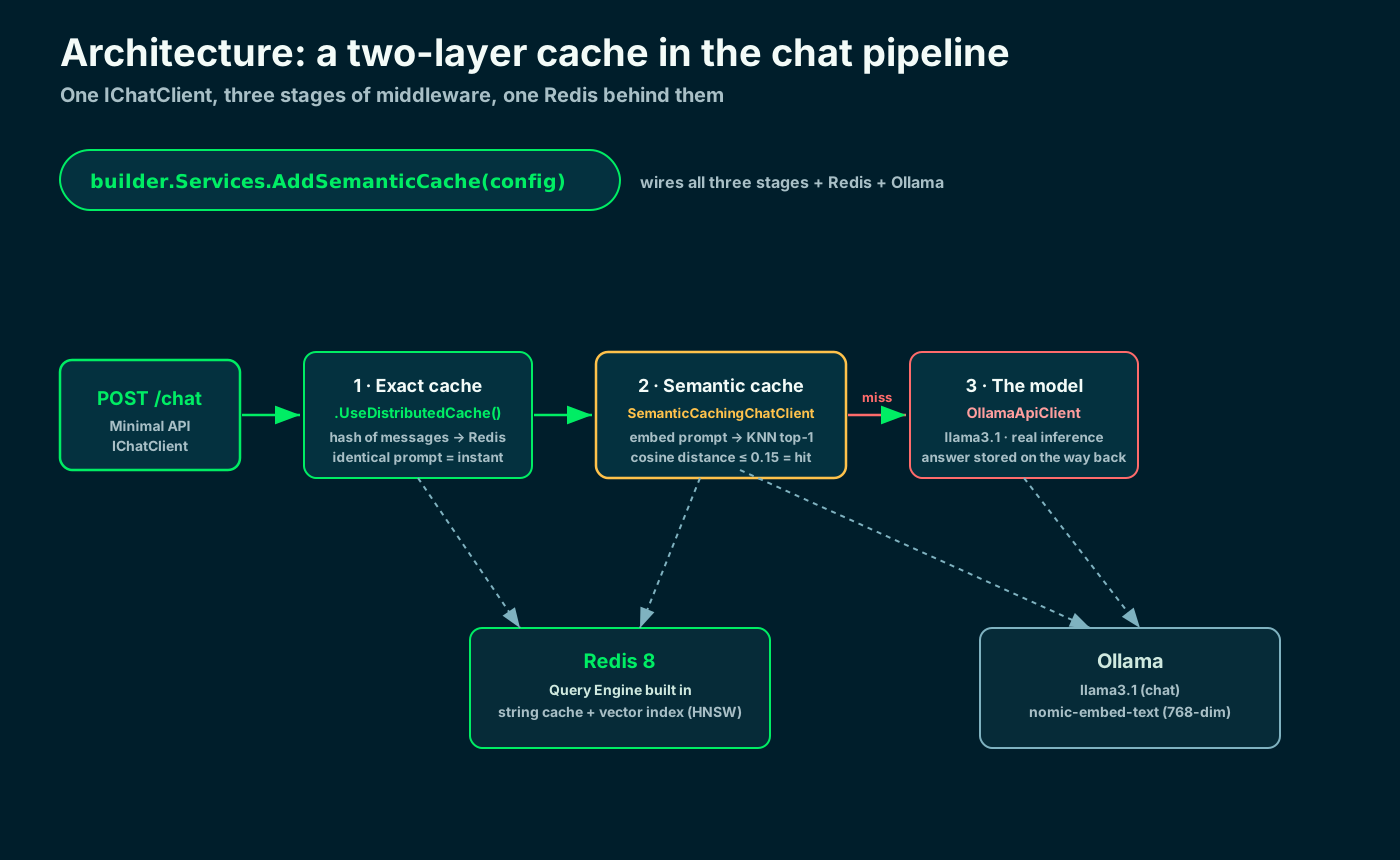
One IChatClient, three stages of middleware, one Redis behind them.
⬇️ Step 1 · Ollama and the two models
Ollama runs models locally and exposes its API on localhost:11434. I need two models: a chat one (llama3.1) and an embedding one (nomic-embed-text, 768 dimensions). The dimension count matters: it must match the Redis vector index.
If I prefer Docker I pull them straight into the container (next step). From the command line, two pulls are enough.
# macOS: brew install ollama --- Linux: curl -fsSL https://ollama.com/install.sh | sh
$ ollama pull llama3.1            # chat model
$ ollama pull nomic-embed-text   # embeddings (768 dimensions)

# try generating an embedding
$ curl http://localhost:11434/api/embed \
-d '{"model":"nomic-embed-text","input":"hello"}'🐳 Step 2 · Redis 8, Ollama and MongoDB with Docker Compose
I put the dependencies in Docker Compose: Redis 8, Ollama and — for the bonus section on output caching — MongoDB. As of Redis 8 the Query Engine (vector and full-text search) is built into the core image: no more separate Redis Stack. A one-shot service pulls the models as soon as Ollama is healthy.
The app runs on the host with dotnet run and talks to the containers on localhost. docker compose up -d starts Redis, Ollama, MongoDB and the one-shot model pull in the background. Before starting the API, run docker compose logs -f ollama-init and wait for that service to exit with code 0: detached mode does not wait for the model downloads to finish.
name: semantic-caching-llm-dotnet-redis

# External dependencies only: the ASP.NET Core app runs on the host with
# dotnet run and talks to these services on localhost. docker compose up -d
# starts Ollama, Redis 8 and MongoDB, and pulls the two models into the Ollama
# volume. MongoDB uses host port 27018 to avoid the common local 27017 conflict.
services:
  ollama:
    image: ollama/ollama:latest
    container_name: semantic-cache-ollama
    ports:
      - "11434:11434"
    volumes:
      - ollama-data:/root/.ollama
    healthcheck:
      test: ["CMD-SHELL", "ollama list >/dev/null 2>&1 || exit 1"]
      interval: 10s
      timeout: 5s
      retries: 15
    restart: unless-stopped

  # One-shot init: waits for Ollama to be healthy, pulls both models, then exits.
  ollama-init:
    image: ollama/ollama:latest
    depends_on:
      ollama:
        condition: service_healthy
    environment:
      - OLLAMA_HOST=ollama:11434
    entrypoint: ["/bin/sh", "-c", "ollama pull llama3.1 && ollama pull nomic-embed-text"]
    restart: "no"

  redis:
    image: redis:8
    container_name: semantic-cache-redis
    ports:
      - "6379:6379"
    volumes:
      - redis-data:/data
    command: ["redis-server", "--save", "60", "1"]
    healthcheck:
      test: ["CMD", "redis-cli", "ping"]
      interval: 10s
      timeout: 5s
      retries: 15
    restart: unless-stopped

  # Backs the /users API: the "pocsemantic-caching-llm" database is created on
  # first write; indexes + Bogus seeding happen in the app's startup job.
  mongodb:
    image: mongo:8
    container_name: semantic-cache-mongodb
    ports:
      - "27018:27017"
    volumes:
      - mongo-data:/data/db
    healthcheck:
      test: ["CMD-SHELL", "mongosh --quiet --eval 'db.runCommand({ ping: 1 }).ok' | grep -q 1"]
      interval: 10s
      timeout: 5s
      retries: 15
    restart: unless-stopped

volumes:
  ollama-data:
  redis-data:
mongo-data:🧱 Step 3 · The project and the NuGet packages
I create a Minimal API and add four packages for the core semantic-cache flow: the Microsoft.Extensions.AI abstractions (which also bring the UseDistributedCache and UseLogging middleware), OllamaSharp to talk to Ollama, NRedisStack for the vector index, and the Redis distributed cache package. The MongoDB/output-cache bonus also needs MongoDB.Driver, Bogus, FluentValidation.DependencyInjectionExtensions and Microsoft.AspNetCore.OutputCaching.StackExchangeRedis.
A note on Ollama: the old Microsoft.Extensions.AI.Ollama package is deprecated. Today you use OllamaSharp, whose OllamaApiClient implements both IChatClient and IEmbeddingGenerator: the same interfaces as any cloud provider.
$ dotnet new web -n SemanticCacheDemo && cd SemanticCacheDemo

$ dotnet add package Microsoft.Extensions.AI
$ dotnet add package Microsoft.Extensions.Caching.StackExchangeRedis
$ dotnet add package NRedisStack
$ dotnet add package OllamaSharp

# Bonus: MongoDB users API + validation + Redis output cache
$ dotnet add package MongoDB.Driver
$ dotnet add package Bogus
$ dotnet add package FluentValidation.DependencyInjectionExtensions
$ dotnet add package Microsoft.AspNetCore.OutputCaching.StackExchangeRedis
Microsoft.Extensions.AI · Microsoft Learn ↗
⚙️ Step 4 · Configuration in appsettings.json
All configuration lives in appsettings.json: the Ollama endpoint, the two models, the embedding dimensions, the Redis connection and — the two semantic knobs — the maximum distance for a hit and the semantic-entry TTL.
Keeping these values here lets me change threshold, model or host without touching the code.
{
  "Logging": {
    "LogLevel": {
      "Default": "Information",
      "Microsoft.AspNetCore": "Warning"
    }
  },
  "AllowedHosts": "*",
  "SemanticCache": {
    "OllamaEndpoint": "http://localhost:11434",
    "ChatModel": "llama3.1",
    "EmbeddingModel": "nomic-embed-text",
    "EmbeddingDimensions": 768,
    "RedisConnection": "localhost:6379",
    "IndexName": "cache_idx",
    "KeyPrefix": "cache:",
    "MaxDistance": 0.15,
    "Ttl": "1.00:00:00"
  },
  "Mongo": {
    "ConnectionString": "mongodb://localhost:27018",
    "DatabaseName": "pocsemantic-caching-llm",
    "EnableLogQueries": false
  }
}🗂️ Step 5 · The typed options
I bind that section to a strongly-typed class, SemanticCacheOptions, so the rest of the code never uses magic strings. One important detail: EmbeddingDimensions must match the model (768 for nomic-embed-text); if I change embedder, I rebuild the index with the new dimensions.
namespace SemanticCacheDemo.Configuration;

// Strongly-typed configuration bound from the "SemanticCache" section of
// appsettings.json. Keeping every knob here means changing model, host or
// threshold never touches the code.
public sealed class SemanticCacheOptions
{
    public const string SectionName = "SemanticCache";

    // Ollama runs both the chat model and the embedding model, locally.
    public string OllamaEndpoint { get; init; } = "http://localhost:11434";
    public string ChatModel { get; init; } = "llama3.1";
    public string EmbeddingModel { get; init; } = "nomic-embed-text";

    // Must match the embedding model: nomic-embed-text returns 768 dimensions.
    public int EmbeddingDimensions { get; init; } = 768;

    // Redis 8 backs both the exact-match distributed cache and the semantic index.
    public string RedisConnection { get; init; } = "localhost:6379";
    public string IndexName { get; init; } = "cache_idx";
    public string KeyPrefix { get; init; } = "cache:";

    // Max cosine distance (0 = identical, 2 = opposite) accepted as a semantic hit.
    // Lower is stricter: 0.15 is a sensible starting point, tune it on your corpus.
    public double MaxDistance { get; init; } = 0.15;

    // How long a semantic-cache entry stays valid before Redis expires it.
    // The exact-match distributed-cache layer has its own independent policy.
    public TimeSpan Ttl { get; init; } = TimeSpan.FromDays(1);
}🔑 Step 6 · The store: vector index and KNN search on Redis
The SemanticCacheStore wraps Redis. It does three things: it creates the vector index once (idempotent), runs the nearest-neighbour KNN search, and saves new question/answer pairs as hashes that the index picks up on its own.
The index uses HNSW, type FLOAT32 and the cosine metric. The KNN query returns the distance (0 = identical): if it is under the threshold, I return the stored answer. I pass the vector as little-endian bytes, exactly the layout Redis expects.
using System.Globalization;
using System.Runtime.InteropServices;
using Microsoft.Extensions.Options;
using NRedisStack.RedisStackCommands;
using NRedisStack.Search;
using NRedisStack.Search.Literals.Enums;
using SemanticCacheDemo.Configuration;
using StackExchange.Redis;

namespace SemanticCacheDemo.Caching;

// Wraps Redis 8 (the Query Engine is built into the core image, no separate
// Redis Stack module) as a semantic cache: it creates the vector index once,
// runs KNN look-ups and persists new prompt/answer pairs.
public sealed class SemanticCacheStore(IConnectionMultiplexer redis, IOptions<SemanticCacheOptions> options)
    : ISemanticCacheStore
{
    private readonly IDatabase _db = redis.GetDatabase();
    private readonly SemanticCacheOptions _opt = options.Value;

    // Idempotent: if the index already exists we leave it untouched.
    public async Task EnsureIndexAsync()
    {
        var indexes = (RedisResult[]?)await _db.ExecuteAsync("FT._LIST") ?? [];
        if (indexes.Any(index => index.ToString() == _opt.IndexName))
            return;

        var schema = new Schema()
            .AddVectorField("embedding", Schema.VectorField.VectorAlgo.HNSW, new Dictionary<string, object>
            {
                ["TYPE"] = "FLOAT32",
                ["DIM"] = _opt.EmbeddingDimensions,
                ["DISTANCE_METRIC"] = "COSINE",
            })
            .AddTextField("prompt")
            .AddTextField("answer");

        var parameters = new FTCreateParams().On(IndexDataType.HASH).Prefix(_opt.KeyPrefix);
        await _db.FT().CreateAsync(_opt.IndexName, parameters, schema);
    }

    // KNN=1 look-up. Returns the cached answer when the nearest neighbour is within
    // the configured cosine distance, otherwise null (a cache miss).
    public async Task<string?> FindAsync(ReadOnlyMemory<float> embedding)
    {
        var query = new Query("*=>[KNN 1 @embedding $vec AS score]")
            .AddParam("vec", ToBytes(embedding))
            .SetSortBy("score")
            .ReturnFields("answer", "score")
            .Limit(0, 1)
            .Dialect(2);

        var result = await _db.FT().SearchAsync(_opt.IndexName, query);
        var match = result.Documents.FirstOrDefault();
        if (match is null)
            return null;

        var distance = double.Parse(match["score"].ToString(), CultureInfo.InvariantCulture);
        return distance <= _opt.MaxDistance ? match["answer"].ToString() : null;
    }

    // Persists a prompt/answer pair as a Redis hash the index picks up automatically.
    public async Task SaveAsync(ReadOnlyMemory<float> embedding, string prompt, string answer)
    {
        var key = $"{_opt.KeyPrefix}{Guid.NewGuid():N}";
        await _db.HashSetAsync(key,
        [
            new HashEntry("embedding", ToBytes(embedding)),
            new HashEntry("prompt", prompt),
            new HashEntry("answer", answer),
        ]);

        if (_opt.Ttl > TimeSpan.Zero)
            await _db.KeyExpireAsync(key, _opt.Ttl);
    }

    // FLOAT32 little-endian is exactly the byte layout the Redis vector index expects.
    private static byte[] ToBytes(ReadOnlyMemory<float> vector) =>
        MemoryMarshal.AsBytes(vector.Span).ToArray();
}♻️ Step 7 · The semantic cache middleware
The SemanticCachingChatClient is the centrepiece: it derives from DelegatingChatClient, so it is an IChatClient that wraps another one and composes with any other middleware in Microsoft.Extensions.AI (distributed cache, logging, function invocation, telemetry).
The logic is linear. For the stateless shape used by /chat — exactly one user message and no ChatOptions — it embeds the prompt and queries the store. Requests with a system prompt, conversation history, tools or provider options bypass semantic caching, because those inputs can change the answer even when the last prompt is identical. On a semantic miss it calls the inner client and stores the fresh answer.
using Microsoft.Extensions.AI;
using SemanticCacheDemo.Mappings;

namespace SemanticCacheDemo.Caching;

// A drop-in IChatClient middleware. Before hitting the model it embeds the prompt
// and looks for a semantically-close answer already in Redis. On a miss it calls
// the inner client and stores the fresh answer for next time. Semantic caching is
// deliberately limited to one user message with no ChatOptions: system prompts,
// history, tools and provider options can change the answer and must not share a
// cache entry based only on the last prompt. Contextual requests pass through.
public sealed class SemanticCachingChatClient(
    IChatClient inner,
    IEmbeddingGenerator<string, Embedding<float>> embedder,
    ISemanticCacheStore store)
    : DelegatingChatClient(inner)
{
    // Serves the last user message from the semantic cache when a close-enough answer
    // exists, otherwise delegates to the inner client and stores the fresh answer.
    public override async Task<ChatResponse> GetResponseAsync(
        IEnumerable<ChatMessage> messages,
        ChatOptions? options = null,
        CancellationToken cancellationToken = default)
    {
        // 1) Guard: this demo's semantic key is only the prompt embedding. Restrict it
        //    to the stateless shape used by POST /chat so different system prompts,
        //    histories, tools or generation options can never collide semantically.
        var messageList = messages as IReadOnlyList<ChatMessage> ?? messages.ToList();
        var prompt = options is null && messageList.Count == 1 && messageList[0].Role == ChatRole.User
            ? messageList[0].Text
            : null;

        if (string.IsNullOrWhiteSpace(prompt))
            return await base.GetResponseAsync(messageList, options, cancellationToken);

        // 2) Embed the prompt and probe the vector store for a semantic neighbour.
        var embedding = await embedder.GenerateVectorAsync(prompt, cancellationToken: cancellationToken);

        var cached = await store.FindAsync(embedding);
        if (cached is not null)
            return cached.ToSemanticCacheResponse();

        // 3) Miss: call the model, then persist the pair so the next close prompt hits.
        var response = await base.GetResponseAsync(messageList, options, cancellationToken);
        await store.SaveAsync(embedding, prompt, response.Text);
        return response;
    }
}
DelegatingChatClient · Microsoft Learn ↗
🔌 Step 8 · Wiring the pipeline with AddSemanticCache
I collect all the wiring in an extension method, AddSemanticCache. It registers Redis (shared by the distributed cache and the store), the Ollama embedding generator and — the heart of it — the chat client pipeline in the right order.
Order matters: outermost to innermost it is exact match → semantic → Ollama. An identical question never reaches the semantic layer; a reworded one skips the exact layer and is caught by the vector search; only a true miss reaches the model.
using Microsoft.Extensions.AI;
using OllamaSharp;
using SemanticCacheDemo.Caching;
using SemanticCacheDemo.Configuration;
using StackExchange.Redis;

namespace SemanticCacheDemo.Extensions;

public static class ServiceCollectionExtensions
{
    // One call wires the whole two-layer cache: Ollama (chat + embeddings), the
    // Redis exact-match distributed cache and the semantic cache middleware.
    public static IServiceCollection AddSemanticCache(this IServiceCollection services, IConfiguration configuration)
    {
        var section = configuration.GetSection(SemanticCacheOptions.SectionName);
        services.Configure<SemanticCacheOptions>(section);
        var options = section.Get<SemanticCacheOptions>() ?? new SemanticCacheOptions();

        // Redis 8, shared by the exact-match distributed cache and the semantic store.
        services.AddSingleton<IConnectionMultiplexer>(_ => ConnectionMultiplexer.Connect(options.RedisConnection));
        services.AddStackExchangeRedisCache(redis => redis.Configuration = options.RedisConnection);
        services.AddSingleton<ISemanticCacheStore, SemanticCacheStore>();

        var endpoint = new Uri(options.OllamaEndpoint);

        // Embeddings: a dedicated Ollama client bound to the embedding model.
        services.AddEmbeddingGenerator(new OllamaApiClient(endpoint) { SelectedModel = options.EmbeddingModel });

        // Chat pipeline, outermost first: exact-match cache -> semantic cache -> Ollama.
        // An identical prompt never reaches the semantic layer; a paraphrase skips the
        // exact layer and is caught by the vector search; only a true miss hits the model.
        services.AddChatClient(new OllamaApiClient(endpoint) { SelectedModel = options.ChatModel })
            .UseDistributedCache()
            .Use((innerClient, provider) => new SemanticCachingChatClient(
                innerClient,
                provider.GetRequiredService<IEmbeddingGenerator<string, Embedding<float>>>(),
                provider.GetRequiredService<ISemanticCacheStore>()))
            .UseLogging();

        return services;
    }
}
IChatClient middleware · Microsoft Learn ↗
🚀 Step 9 · Program.cs: wiring and index at startup
The Program.cs stays small: one call to AddSemanticCache, creation of the Redis index and completion of the MongoDB indexes/seed before Kestrel starts accepting requests. Waiting for the seed avoids caching an empty first /users response.
using FluentValidation;
using SemanticCacheDemo.Caching;
using SemanticCacheDemo.Configuration;
using SemanticCacheDemo.Endpoints;
using SemanticCacheDemo.Extensions;
using SemanticCacheDemo.HostedServices;

var builder = WebApplication.CreateBuilder(args);

// LLM side: Ollama + the two-layer cache (exact match + semantic) on Redis.
builder.Services.AddSemanticCache(builder.Configuration);

// Data side: MongoDB (single database, generic IRepository<>), user service,
// FluentValidation and the startup job that ensures indexes + seeds fake users.
builder.Services.AddMongoInfrastructure(builder.Configuration);
builder.Services.AddValidatorsFromAssemblyContaining<Program>();

// OUTPUT caching on the same Redis: whole HTTP responses, tagged for eviction.
var redisConnection = builder.Configuration
    .GetSection(SemanticCacheOptions.SectionName)[nameof(SemanticCacheOptions.RedisConnection)]!;
builder.Services.AddStackExchangeRedisOutputCache(options => options.Configuration = redisConnection);
builder.Services.AddOutputCache();

var app = builder.Build();

// Create the Redis vector index once, at startup (idempotent).
await app.Services.GetRequiredService<ISemanticCacheStore>().EnsureIndexAsync();

// Finish MongoDB indexes and seed before the server can answer and cache /users.
await app.Services.GetRequiredService<UserCollectionInitializer>()
    .InitializeAsync(app.Lifetime.ApplicationStopping);

app.UseOutputCache();

app.MapChatEndpoints();   // POST /chat          -> two-layer LLM cache
app.MapUserEndpoints();   // GET /users          -> Mongo + Redis output cache
app.MapCacheEndpoints();  // DELETE /cache/output -> flush the output cache

app.Run();📡 Step 10 · The /chat endpoint
A single endpoint, POST /chat. FluentValidation rejects a missing or blank prompt with HTTP 400 before Ollama is touched; valid requests call the chat client already wrapped by the two caches and return a typed DTO with the answer, the source and the elapsed time.
The source is semantic-cache when the vector layer answers, model otherwise. The exact match is transparent: it does not mark the response, but you see it clearly in the collapse of the milliseconds when I repeat an identical question.
using System.Diagnostics;
using FluentValidation;
using Microsoft.Extensions.AI;
using SemanticCacheDemo.Mappings;

namespace SemanticCacheDemo.Endpoints;

// Typed request/response contracts (no anonymous objects on the wire).
public sealed record ChatRequest(string Prompt);
public sealed record ChatReply(string Answer, string Source, long ElapsedMs);

public static class ChatEndpoints
{
    // POST /chat -> ask the cached chat client. "source" is "semantic-cache" when the
    // vector layer served the answer, otherwise "model"; the exact-match layer is
    // transparent, so watch elapsedMs collapse when you repeat an identical prompt.
    public static void MapChatEndpoints(this IEndpointRouteBuilder app) =>
        app.MapPost("/chat", async (
            ChatRequest request,
            IValidator<ChatRequest> validator,
            IChatClient chat,
            CancellationToken ct) =>
        {
            var validation = await validator.ValidateAsync(request, ct);
            if (!validation.IsValid)
                return Results.ValidationProblem(validation.ToDictionary());

            // Time the whole call so the reply can expose how much the cache saved.
            var stopwatch = Stopwatch.StartNew();
            var response = await chat.GetResponseAsync(request.Prompt, cancellationToken: ct);
            stopwatch.Stop();

            // The mapping resolves "source" from the marker the caching layer stamped.
            return Results.Ok(response.ToChatReply(stopwatch.ElapsedMilliseconds));
        });
}🧪 Step 11 · Try it from the terminal
After the model pull finishes, start the app from SemanticCacheDemo with dotnet run --urls http://localhost:5050. Then three curl calls tell the whole story: the first is a model miss, the same question is an exact hit, and a reworded one is caught by the semantic layer.
# 1) first run: the model works (source: model, slow)
$ curl -s localhost:5050/chat -H "Content-Type: application/json" \
    -d '{"prompt":"What is Redis in one sentence?"}'

# 2) exact same question: exact match (elapsedMs collapses)
$ curl -s localhost:5050/chat -H "Content-Type: application/json" \
    -d '{"prompt":"What is Redis in one sentence?"}'

# 3) reworded: semantic cache (source: semantic-cache)
$ curl -s localhost:5050/chat -H "Content-Type: application/json" \
-d '{"prompt":"In a single sentence, describe what Redis is."}'📈 The three answers side by side
Here are the three answers side by side. The same answer, three wildly different costs: the first run pays for full inference; the second is a GET on Redis; the third pays only for one embedding and a KNN search. Neither hit touches the model.
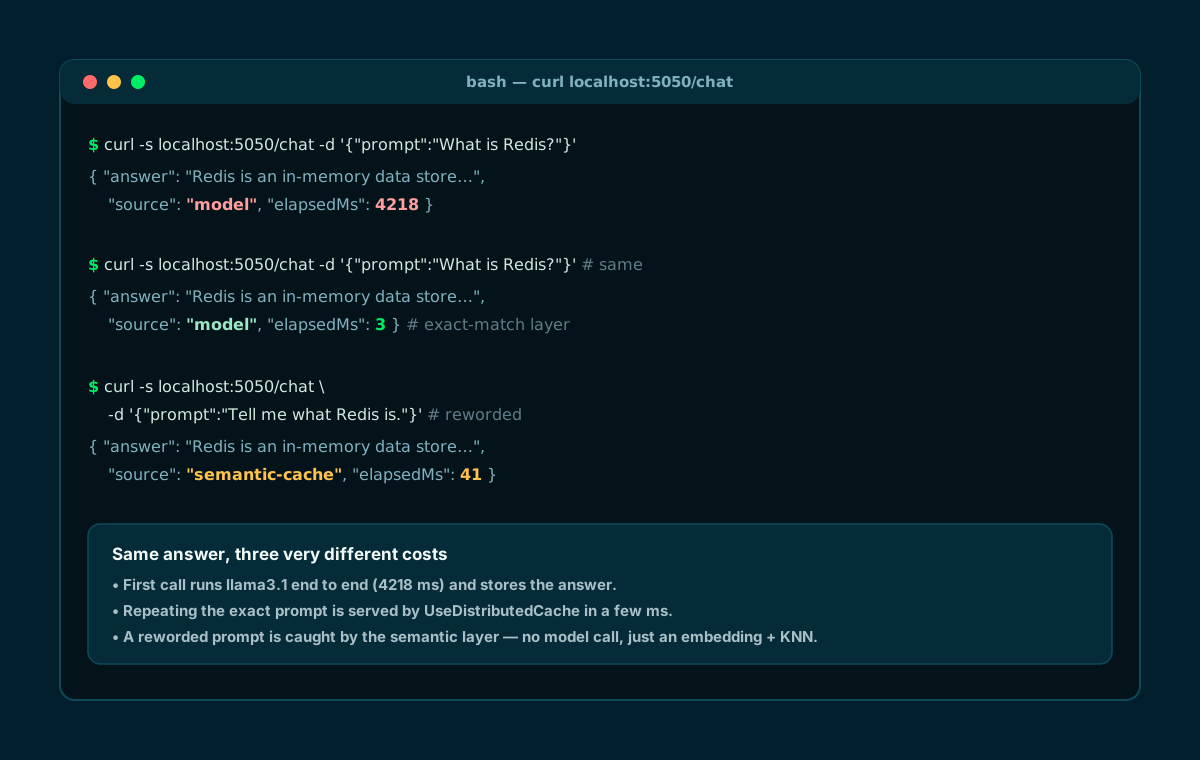
Same answer, three costs: model (4218 ms), exact match (a few ms), semantic (tens of ms).
✅ Final checklist
Let me recap. If you followed the steps, you now have a Minimal API with a two-layer cache in front of a local LLM: repeated and reworded questions cost milliseconds, not seconds.
From here you can level up: metrics on the hit ratio, an adaptive threshold, cache warming with the most frequent questions, or moving the vectors to another store while keeping the same architecture — because you depend on the interfaces, not the providers.
- 01Ollama + modelsllama3.1 + nomic-embed-text
- 02Redis 8 in DockerQuery Engine built in
- 03Project + NuGetExtensions.AI + OllamaSharp + NRedisStack
- 04appsettings + Optionstyped threshold and TTL
- 05SemanticCacheStoreHNSW index + KNN
- 06SemanticCachingChatClientDelegatingChatClient
- 07AddSemanticCacheexact → semantic → model
- 08/chat endpointanswer, source, milliseconds
From here: hit metrics, adaptive threshold, cache warming.
🎁 Bonus · Redis as an output cache too: the /users API on MongoDB
Redis is already there: why use it only for the LLM? The project adds a second use case: output caching for APIs. A GET /users endpoint reads a MongoDB collection and its entire HTTP response is cached on Redis for 60 seconds: subsequent requests touch neither the database nor the endpoint code.
Data access follows the architecture I use in real projects: one generic IRepository<T> over one database (pocsemantic-caching-llm) — no per-collection repository classes: the type is closed on the fly at injection (IRepository<User>) and the collection is resolved from a [BsonCollection] attribute.
- One repository, one database: the open generic IRepository<> → MongoRepository<>, registered once.
- Native driver paging: FindAsync runs a count and a separate sorted, skipped and limited page query.
- UpdateFieldsAsync: partial updates, never whole-document replaces.
using System.Linq.Expressions;
using System.Reflection;
using MongoDB.Bson;
using MongoDB.Driver;
using SemanticCacheDemo.Domain;

namespace SemanticCacheDemo.Persistence;

// Generic Mongo repository: one instance per entity type, all against the single
// "pocsemantic-caching-llm" database injected by DI. The collection name comes
// from [BsonCollection] (or the lowercased pluralised type name as fallback).
public class MongoRepository<T> : IRepository<T> where T : class
{
    // Cached "does T expose a nullable DateTime UpdatedAt?" decision per closed
    // generic T, so UpdateFieldsAsync pays a single boolean branch, not reflection.
    private static readonly bool HasUpdatedAtProperty =
        typeof(T).GetProperty("UpdatedAt")?.PropertyType == typeof(DateTime?);

    private readonly IMongoCollection<T> _collection;

    public MongoRepository(IMongoDatabase database)
    {
        var attr = typeof(T).GetCustomAttribute<BsonCollectionAttribute>();
        var collectionName = attr?.CollectionName ?? typeof(T).Name.ToLowerInvariant() + "s";
        _collection = database.GetCollection<T>(collectionName);
    }

    /// <summary>Exposes the collection as an IQueryable for ad-hoc LINQ queries.</summary>
    public IQueryable<T> GetQueryable() => _collection.AsQueryable();

    public IQueryable<T> FindAllAsQueryable(Expression<Func<T, bool>> predicate) =>
        _collection.AsQueryable().Where(predicate);

    public async Task<T?> GetByIdAsync(string id, CancellationToken ct = default) =>
        await _collection.Find(BuildIdFilter(id)).FirstOrDefaultAsync(ct);

    /// <summary>Server-side paging: total count + one sorted, skipped, limited page.</summary>
    public async Task<(IEnumerable<T> Items, long TotalCount)> FindAsync<TKey>(
        Expression<Func<T, bool>> predicate,
        Expression<Func<T, TKey>> orderBy,
        bool ascending = true,
        int skip = 0,
        int take = 50,
        CancellationToken ct = default)
    {
        var totalCount = await _collection.CountDocumentsAsync(predicate, cancellationToken: ct);

        var fieldDef = new ExpressionFieldDefinition<T, TKey>(orderBy);
        var sort = ascending
            ? Builders<T>.Sort.Ascending(fieldDef)
            : Builders<T>.Sort.Descending(fieldDef);

        var items = await _collection.Find(predicate)
            .Sort(sort)
            .Skip(skip)
            .Limit(take)
            .ToListAsync(ct);

        return (items, totalCount);
    }

    public async Task<T> AddAsync(T entity, CancellationToken ct = default)
    {
        await _collection.InsertOneAsync(entity, cancellationToken: ct);
        return entity;
    }

    public async Task AddManyAsync(IEnumerable<T> entities, CancellationToken ct = default) =>
        await _collection.InsertManyAsync(entities, cancellationToken: ct);

    /// <summary>Partial update by id; stamps UpdatedAt when the entity declares it.</summary>
    public async Task<bool> UpdateFieldsAsync(string id, UpdateDefinition<T> update, CancellationToken ct = default)
    {
        update = AddUpdatedAt(update);
        var result = await _collection.UpdateOneAsync(BuildIdFilter(id), update, cancellationToken: ct);
        return result.MatchedCount > 0;
    }

    public async Task<bool> ExistsAsync(Expression<Func<T, bool>> predicate, CancellationToken ct = default) =>
        await _collection.CountDocumentsAsync(predicate, new CountOptions { Limit = 1 }, ct) > 0;

    public async Task<long> CountAsync(Expression<Func<T, bool>>? predicate = null, CancellationToken ct = default) =>
        predicate is null
            ? await _collection.EstimatedDocumentCountAsync(cancellationToken: ct)
            : await _collection.CountDocumentsAsync(predicate, cancellationToken: ct);

    public async Task DeleteAsync(string id, CancellationToken ct = default) =>
        await _collection.DeleteOneAsync(BuildIdFilter(id), ct);

    // Stamps "UpdatedAt = DateTime.UtcNow" when the entity declares a DateTime? UpdatedAt.
    private static UpdateDefinition<T> AddUpdatedAt(UpdateDefinition<T> update) =>
        !HasUpdatedAtProperty
            ? update
            : Builders<T>.Update.Combine(update, Builders<T>.Update.Set("UpdatedAt", DateTime.UtcNow));

    private static FilterDefinition<T> BuildIdFilter(string id)
    {
        if (!ObjectId.TryParse(id, out var oid))
            throw new ArgumentException($"Invalid ObjectId: {id}", nameof(id));

        return Builders<T>.Filter.Eq("_id", oid);
    }
}🧩 Bonus · The service layer: a paged query in LINQ
The endpoint never talks to the repository directly: in between sits a service (IUserService/UserService) that composes the filter as a typed LINQ expression — Contains on last name, first name and email when a search is present — and hands it to the repository together with sorting and paging. Out comes a typed DTO, PagedResult<UserResponse>, with total count and pages.
Keeping materialization behind IRepository pays off twice: the repository performs the count and paged fetch as two server-side operations, and the service stays unit-testable with a substituted repository (see the tests section).
using System.Linq.Expressions;
using SemanticCacheDemo.Domain;
using SemanticCacheDemo.Mappings;
using SemanticCacheDemo.Models;
using SemanticCacheDemo.Persistence;

namespace SemanticCacheDemo.Services;

// The service injects the SAME generic IRepository<T> everyone else uses, closed
// on User at injection time — no per-collection repository class. It composes the
// filter as a typed LINQ expression and hands it to the repository, which pages
// server-side; keeping materialization behind IRepository is what makes this
// class unit-testable with a substituted repository.
public sealed class UserService(IRepository<User> repository) : IUserService
{
    // Returns one page of users, optionally narrowed by a free-text search, already
    // projected onto the public wire contract.
    public async Task<PagedResult<UserResponse>> GetPagedAsync(GetUsersRequest request, CancellationToken ct = default)
    {
        // 1) Compose the filter as a typed expression: a blank search matches everything,
        //    otherwise the term is looked for across last name, first name and email.
        var search = request.Search;
        Expression<Func<User, bool>> predicate = string.IsNullOrWhiteSpace(search)
            ? _ => true
            : u => u.LastName.Contains(search) ||
                   u.FirstName.Contains(search) ||
                   u.Email.Contains(search);

        // 2) Page server-side — the repository translates skip/take and returns the
        //    filtered total alongside the matching slice.
        var (users, totalCount) = await repository.FindAsync(
            predicate,
            u => u.LastName,
            ascending: true,
            skip: (request.Page - 1) * request.PageSize,
            take: request.PageSize,
            ct: ct);

        // 3) Project entities -> DTOs and wrap them in the paged envelope.
        return users.ToPagedResult(request, totalCount);
    }
}🛡️ Bonus · FluentValidation on the paging parameters
The GET /users parameters come from the query string and must be validated before touching the database: page ≥ 1, pageSize between 1 and 100, search capped at 100 characters. I use FluentValidation: one validator for the request record, registered in bulk with AddValidatorsFromAssemblyContaining.
In the endpoint I just inject IValidator<GetUsersRequest>: if validation fails, I return 400 with a ValidationProblem without running any query.
using FluentValidation;
using SemanticCacheDemo.Models;

namespace SemanticCacheDemo.Validators;

// Validates GET /users input: out-of-range paging surfaces as 400 with a message
// instead of running an absurd query (page=0, pageSize=5000, ...).
public sealed class GetUsersRequestValidator : AbstractValidator<GetUsersRequest>
{
    public GetUsersRequestValidator()
    {
        RuleFor(x => x.Page)
            .GreaterThanOrEqualTo(1)
            .WithMessage("Page must be >= 1");

        RuleFor(x => x.PageSize)
            .InclusiveBetween(1, 100)
            .WithMessage("PageSize must be between 1 and 100");

        RuleFor(x => x.Search)
            .MaximumLength(100)
            .When(x => x.Search is not null)
            .WithMessage("Search cannot exceed 100 characters");
    }
}⚡ Bonus · The /users endpoint with Redis output caching
Here is the full endpoint: typed binding with [AsParameters], validation, service and — the interesting part — .CacheOutput(): the response is stored on Redis (via the Microsoft.AspNetCore.OutputCaching.StackExchangeRedis package), varies by the paging parameters and carries the tag users.
The tag is the key to invalidation: every cached page of /users belongs to the same tag and can be thrown away in one shot.
using FluentValidation;
using SemanticCacheDemo.Models;
using SemanticCacheDemo.Services;

namespace SemanticCacheDemo.Endpoints;

public static class UserEndpoints
{
    // GET /users?page=&pageSize=&search= — validated with FluentValidation, served
    // by the service layer, and OUTPUT-CACHED on Redis for 60 seconds. The cache
    // varies by the paging params and carries the "users" tag so it can be evicted.
    public static void MapUserEndpoints(this IEndpointRouteBuilder app) =>
        app.MapGet("/users", async (
            [AsParameters] GetUsersRequest request,
            IValidator<GetUsersRequest> validator,
            IUserService users,
            CancellationToken ct) =>
        {
            var validation = await validator.ValidateAsync(request, ct);
            if (!validation.IsValid)
                return Results.ValidationProblem(validation.ToDictionary());

            return Results.Ok(await users.GetPagedAsync(request, ct));
        })
        .CacheOutput(policy => policy
            .Expire(TimeSpan.FromSeconds(60))
            .SetVaryByQuery("page", "pageSize", "search")
            .Tag("users"));
}
Output caching · Microsoft Learn ↗
🧹 Bonus · Flushing the cache on demand (and the .http file to try everything)
Sometimes the cache must go now — a bulk import, a manually fixed record. DELETE /cache/output calls IOutputCacheStore.EvictByTagAsync("users") and evicts every cached response with that tag: the next GET re-runs the MongoDB query.
The project also ships a .http file (VS Code REST Client / Rider) with every call ready to run: the three semantic-cache rounds, an invalid chat prompt, paged /users, invalid paging and the cache flush.
@host = http://localhost:5050

### ---------- LLM: two-layer semantic cache ----------

### 1) First call — real model run (source: "model", slow)
POST {{host}}/chat
Content-Type: application/json

{ "prompt": "What is Redis in one sentence?" }

### 2) Identical prompt — exact-match layer (elapsedMs collapses)
POST {{host}}/chat
Content-Type: application/json

{ "prompt": "What is Redis in one sentence?" }

### 3) Reworded prompt — semantic layer (source: "semantic-cache")
POST {{host}}/chat
Content-Type: application/json

{ "prompt": "In a single sentence, describe what Redis is." }

### 4) Missing prompt — rejected as 400 ValidationProblem before Ollama
POST {{host}}/chat
Content-Type: application/json

{}

### ---------- Users: Mongo + Redis OUTPUT cache ----------

### Paged users — first page (MISS on first call, then cached 60s on Redis)
GET {{host}}/users?page=1&pageSize=10

### Paged users — second page
GET {{host}}/users?page=2&pageSize=10

### Paged users — search filter (case-sensitive contains on name/email)
GET {{host}}/users?page=1&pageSize=5&search=an

### Paged users — INVALID paging -> 400 ValidationProblem (FluentValidation)
GET {{host}}/users?page=0&pageSize=500

### ---------- Cache management ----------

### Force-flush the Redis OUTPUT cache (tag "users") -> next GET /users is fresh
DELETE {{host}}/cache/output🎲 Bonus · Bogus: realistic fake data (and the job that creates the indexes)
To page over a collection you need data. I generate it with Bogus (github.com/bchavez/Bogus), the .NET library for realistic fake data: you declare a Faker<T> with one rule per field — names, emails, cities, dates — and ask for as many objects as you want. UseSeed makes Bogus's pseudo-random sequence repeatable and f.UniqueIndex keeps emails unique, but the complete dataset is not fully reproducible because date rules are anchored to DateTime.UtcNow.
A startup initializer performs two idempotent duties: ensuring the collection indexes exist — unique email, lastName+firstName for paging, city — and seeding 500 users only when the collection is empty. Program.cs awaits it before Kestrel starts, so an empty response cannot be output-cached while seeding is still running.
using Bogus;
using MongoDB.Driver;
using SemanticCacheDemo.Domain;
using SemanticCacheDemo.Persistence;

namespace SemanticCacheDemo.HostedServices;

// Startup initializer with two duties, both idempotent:
// 1) make sure the indexes on the users collection exist (unique email,
//    lastName+firstName for the paged sort, city);
// 2) seed 500 realistic fake users with Bogus when the collection is empty.
// Program awaits this service before Kestrel starts accepting requests, preventing an
// empty /users response from being cached while the seed is still running.
public sealed class UserCollectionInitializer(
    IServiceScopeFactory scopeFactory,
    ILogger<UserCollectionInitializer> logger)
{
    public async Task InitializeAsync(CancellationToken cancellationToken = default)
    {
        using var scope = scopeFactory.CreateScope();

        // Index creation has no LINQ equivalent — this is the driver's native API.
        var database = scope.ServiceProvider.GetRequiredService<IMongoDatabase>();
        var collection = database.GetCollection<User>("users");

        var indexes = new List<CreateIndexModel<User>>
        {
            new(Builders<User>.IndexKeys.Ascending(u => u.Email),
                new CreateIndexOptions { Unique = true, Name = "ux_email" }),
            new(Builders<User>.IndexKeys.Ascending(u => u.LastName).Ascending(u => u.FirstName),
                new CreateIndexOptions { Name = "ix_lastname_firstname" }),
            new(Builders<User>.IndexKeys.Ascending(u => u.City),
                new CreateIndexOptions { Name = "ix_city" }),
        };
        await collection.Indexes.CreateManyAsync(indexes, cancellationToken);
        logger.LogInformation("users indexes ensured ({Count})", indexes.Count);

        var repository = scope.ServiceProvider.GetRequiredService<IRepository<User>>();
        if (await repository.CountAsync(ct: cancellationToken) > 0)
            return;

        // Bogus: UseSeed repeats the pseudo-random sequence, while date rules
        // anchored to DateTime.UtcNow still vary between runs;
        // f.UniqueIndex keeps emails unique so the ux_email index never trips.
        var faker = new Faker<User>()
            .UseSeed(1337)
            .RuleFor(u => u.FirstName, f => f.Name.FirstName())
            .RuleFor(u => u.LastName, f => f.Name.LastName())
            .RuleFor(u => u.Email, (f, u) =>
                $"{u.FirstName}.{u.LastName}.{f.UniqueIndex}@example.com".ToLowerInvariant())
            .RuleFor(u => u.City, f => f.Address.City())
            .RuleFor(u => u.Country, f => f.Address.Country())
            .RuleFor(u => u.BirthDate, f => f.Date.Past(60, DateTime.UtcNow.AddYears(-18)))
            .RuleFor(u => u.CreatedAt, f => f.Date.Recent(90));

        await repository.AddManyAsync(faker.Generate(500), cancellationToken);
        logger.LogInformation("users collection seeded with 500 fake users (Bogus)");
    }
}🧪 Bonus · Unit tests with xUnit: testing the cache without Redis
The repo ships a SemanticCacheDemo.Tests project (xUnit + NSubstitute + FluentAssertions) with 19 test methods producing 28 discovered cases across four classes. The trick is in the seams: the middleware depends on ISemanticCacheStore (not on the Redis client) and the service on IRepository<User> — so these unit tests run without Redis, without MongoDB and without Ollama.
What they cover: the chat and paging validators (missing prompt, page/search bounds and boundary values), the service (DTO mapping, skip/take, total-pages ceiling and search predicate) and the semantic middleware (hit, miss, blank prompt, contextual conversation and ChatOptions passthrough). The Redis store and repository remain the integration boundaries, covered by the real flows in the .http file.
- xUnit 2.9 + NSubstitute for substitutes + FluentAssertions for assertions.
- One test per behaviour: Method_Condition_Outcome naming, Theory/InlineData for the bounds.
- dotnet test from the repo root: the whole suite runs in seconds.
using FluentAssertions;
using Microsoft.Extensions.AI;
using NSubstitute;
using SemanticCacheDemo.Caching;
using Xunit;

namespace SemanticCacheDemo.Tests;

// The semantic middleware in isolation: inner chat client, embedding generator and
// store are all substituted. These tests pin the contract — hit answers from cache
// without touching the model, miss calls the model and persists, and a message
// list with no user prompt passes straight through.
public class SemanticCachingChatClientTests
{
    private static readonly float[] Vector = [0.1f, 0.2f, 0.3f];

    private readonly IChatClient _inner = Substitute.For<IChatClient>();
    private readonly IEmbeddingGenerator<string, Embedding<float>> _embedder =
        Substitute.For<IEmbeddingGenerator<string, Embedding<float>>>();
    private readonly ISemanticCacheStore _store = Substitute.For<ISemanticCacheStore>();
    private readonly SemanticCachingChatClient _client;

    public SemanticCachingChatClientTests()
    {
        _embedder.GenerateAsync(
                Arg.Any<IEnumerable<string>>(),
                Arg.Any<EmbeddingGenerationOptions?>(),
                Arg.Any<CancellationToken>())
            .Returns(new GeneratedEmbeddings<Embedding<float>>([new Embedding<float>(Vector)]));

        _inner.GetResponseAsync(
                Arg.Any<IEnumerable<ChatMessage>>(),
                Arg.Any<ChatOptions?>(),
                Arg.Any<CancellationToken>())
            .Returns(new ChatResponse(new ChatMessage(ChatRole.Assistant, "fresh answer")));

        _client = new SemanticCachingChatClient(_inner, _embedder, _store);
    }

    private static List<ChatMessage> Prompt(string text) => [new(ChatRole.User, text)];

    [Fact]
    public async Task GetResponseAsync_SemanticHit_AnswersFromCacheWithoutCallingTheModel()
    {
        _store.FindAsync(Arg.Any<ReadOnlyMemory<float>>()).Returns("cached answer");

        var response = await _client.GetResponseAsync(Prompt("What is Redis?"));

        response.Text.Should().Be("cached answer");
        response.AdditionalProperties!["cacheHit"].Should().Be("semantic");
        await _inner.DidNotReceiveWithAnyArgs().GetResponseAsync(default!, default, default);
        await _store.DidNotReceiveWithAnyArgs().SaveAsync(default, default!, default!);
    }

    [Fact]
    public async Task GetResponseAsync_Miss_CallsTheModelAndPersistsTheFreshAnswer()
    {
        _store.FindAsync(Arg.Any<ReadOnlyMemory<float>>()).Returns((string?)null);

        var response = await _client.GetResponseAsync(Prompt("What is Redis?"));

        response.Text.Should().Be("fresh answer");
        await _inner.ReceivedWithAnyArgs(1).GetResponseAsync(default!, default, default);
        await _store.Received(1).SaveAsync(Arg.Any<ReadOnlyMemory<float>>(), "What is Redis?", "fresh answer");
    }

    [Fact]
    public async Task GetResponseAsync_NoUserMessage_PassesThroughWithoutEmbedding()
    {
        var systemOnly = new List<ChatMessage> { new(ChatRole.System, "You are terse.") };

        var response = await _client.GetResponseAsync(systemOnly);

        response.Text.Should().Be("fresh answer");
        await _embedder.DidNotReceiveWithAnyArgs().GenerateAsync(default!, default, default);
        await _store.DidNotReceiveWithAnyArgs().FindAsync(default);
    }

    [Fact]
    public async Task GetResponseAsync_BlankUserMessage_PassesThroughWithoutEmbedding()
    {
        var response = await _client.GetResponseAsync(Prompt("   "));

        response.Text.Should().Be("fresh answer");
        await _embedder.DidNotReceiveWithAnyArgs().GenerateAsync(default!, default, default);
        await _store.DidNotReceiveWithAnyArgs().FindAsync(default);
    }

    [Fact]
    public async Task GetResponseAsync_ContextualConversation_PassesThroughWithoutSemanticCaching()
    {
        var messages = new List<ChatMessage>
        {
            new(ChatRole.System, "Answer as a security reviewer."),
            new(ChatRole.User, "What is Redis?"),
        };

        var response = await _client.GetResponseAsync(messages);

        response.Text.Should().Be("fresh answer");
        await _inner.Received(1).GetResponseAsync(messages, null, Arg.Any<CancellationToken>());
        await _embedder.DidNotReceiveWithAnyArgs().GenerateAsync(default!, default, default);
        await _store.DidNotReceiveWithAnyArgs().FindAsync(default);
    }

    [Fact]
    public async Task GetResponseAsync_ChatOptionsPresent_PassesThroughWithoutSemanticCaching()
    {
        var options = new ChatOptions();

        var response = await _client.GetResponseAsync(Prompt("What is Redis?"), options);

        response.Text.Should().Be("fresh answer");
        await _inner.ReceivedWithAnyArgs(1).GetResponseAsync(default!, options, default);
        await _embedder.DidNotReceiveWithAnyArgs().GenerateAsync(default!, default, default);
        await _store.DidNotReceiveWithAnyArgs().FindAsync(default);
    }
}🔮 Next article · Hybrid search: you pick the database
The semantic cache in this article uses pure vector search. The natural next step is hybrid search: vectors plus keywords (BM25), fused into a single ranking — the extra gear when prompts contain acronyms, codes and proper names.
In the next article (in a few days) I will show it step by step with a database that supports it. The options are not equivalent: Qdrant supports hybrid queries with RRF fusion; ChromaDB documents BM25/SPLADE sparse-vector hybrid search in its Cloud Search API; MongoDB Community requires self-managed Search on 8.2+ plus a separate mongot process. If you have a favourite, let me know in a comment on the LinkedIn post for this article: I will pick the most requested one.
📦 The full project on GitHub
The complete companion project for this tutorial — Redis store, context-safe semantic middleware, the MongoDB bonus, generic repository, output caching, .http file and xUnit test suite — is public on GitHub. Its README contains the same Docker Compose, dotnet test and dotnet run workflow shown here.
git clone https://github.com/fscamuzzi/semantic-caching-llm-dotnet-redis.git
cd semantic-caching-llm-dotnet-redis
docker compose up -d          # Redis 8 + Ollama + model pull
docker compose logs -f ollama-init  # wait for exit code 0
cd SemanticCacheDemo && dotnet run --urls http://localhost:5050
fscamuzzi/semantic-caching-llm-dotnet-redis · GitHub ↗
Frequently asked questions about semantic caching for LLMs
What is semantic caching for an LLM?
It is a cache keyed on meaning: if a question is semantically close to one already seen — even if reworded — it returns the stored answer instead of re-running the model. It cuts latency and cost on recurring questions.
What is the difference between an exact cache and a semantic cache?
The exact cache (UseDistributedCache) only answers identical prompts, hashing the messages at almost no cost. The semantic one embeds the question and finds the nearest vector, so it also catches rewordings. I use them together, in sequence.
Is UseDistributedCache enough on its own?
It only catches identical prompts. In reality users reword: "What is X?" and "Can you explain X?" do not share a hash. That is why I add the semantic layer, which recognizes them as equivalent.
Do I need Redis Stack or is Redis enough?
Redis 8 is enough: as of version 8 the Query Engine (vector and full-text search) is built into the core image, so there is no separate Redis Stack module. I use NRedisStack as the .NET client.
How do I avoid stale answers or overly aggressive hits?
With two levers: a distance threshold that is not too permissive (lower = stricter) and a TTL that expires semantic entries. In this demo the exact-match layer has no configured expiry. And I avoid caching personalized or time-bound answers. Better one extra miss than a wrong answer.
Can I use it with OpenAI or Azure instead of Ollama?
Yes. The cache depends only on IChatClient and IEmbeddingGenerator: swap the inner client (OpenAI, Azure OpenAI, Azure AI Inference) and the pipeline stays identical. That is the benefit of the Microsoft.Extensions.AI abstractions.
What is the difference between output caching and semantic caching?
Output caching stores the whole HTTP response of an endpoint (here GET /users) for a fixed duration: exact key, zero embeddings. Semantic caching works on the meaning of LLM prompts. In this project they share the same Redis: one for the APIs, the other for the model.
Let's talk
If this topic is relevant to you, write to me: comparing notes on code and AI is always time well spent.


