 COOL
COOL 


In this article
- 🧩 What a skill is (and how it differs from CLAUDE.md and hooks)
- 📁 Anatomy of a skill: folder, SKILL.md and frontmatter
- 🛠️ Building my first skill: changelog-entry
- 🖥️ The skill in action
- 🔒 Pre-approved tools and read-only skills
- 📚 Supporting files and progressive disclosure
- 🧪 Testing a skill with skill-creator
- 📦 Distributing: personal, project, or plugin
- ✅ Wrapping up
🧩 What a skill is (and how it differs from CLAUDE.md and hooks)
A skill is a folder containing a SKILL.md: YAML frontmatter plus markdown instructions. The key difference from CLAUDE.md is when it enters context. CLAUDE.md is always present, on every turn, whether it's needed or not. A skill's body instead loads only when it's invoked: the description alone stays visible to Claude at all times (so it can decide whether to use the skill), while the rest — even hundreds of lines of procedure — costs nothing in tokens until it fires.
Compared to hooks, the role is complementary, not alternative: a hook is deterministic code that always runs, at a precise point of the lifecycle, and can block an action. A skill is knowledge or a procedure that Claude applies when relevant, or that you trigger on command. A hook guarantees an invariant ("never close the turn with red tests"); a skill describes a way of working ("here's how I draft a changelog entry").
CLAUDE.md
- Always in context, on every turn
- Costs tokens even when not needed
- Stable facts: conventions, stack, constraints
- One file, it just keeps growing
Skill
- Loads only when invoked
- Long body, near-zero cost while inactive
- Procedures, checklists, repeated commands
- Many folders, each focused on one task
CLAUDE.md is the memory that's always on; a skill is the manual you open only when you need it.
📁 Anatomy of a skill: folder, SKILL.md and frontmatter
Where you save the folder decides who can use it. A personal skill at ~/.claude/skills/<name>/SKILL.md applies across all your projects; a project skill at .claude/skills/<name>/SKILL.md gets committed to the repo and applies to whoever clones it, agents included. SKILL.md is the only required file: everything else — references, scripts, examples — is optional and loads only if the skill calls for it.
Every frontmatter field is optional; only description is recommended, because it's the signal Claude reads to decide when to apply the skill. The fields I use most in this tutorial:
- description — what it does and when to use it: the sentence Claude matches against the user's request.
- argument-hint — hint shown in autocomplete, e.g. [version].
- disable-model-invocation — true to stop Claude from invoking it on its own: only /skill-name manually.
- allowed-tools — tools pre-approved for the turn that invokes the skill, without asking for confirmation.
- context: fork + agent — runs the skill in an isolated subagent instead of inline in the current conversation.
.claude/skills/changelog-entry/
├── SKILL.md          # required: frontmatter + instructions
├── reference.md      # Keep a Changelog taxonomy, read only if needed
└── scripts/
    └── group-by-type.py
Skills reference · Claude Docs ↗
🛠️ Building my first skill: changelog-entry
I build a skill that drafts a changelog entry from the commits since the last tag. The frontmatter makes three choices: disable-model-invocation: true, because I want to decide when release notes get written, not have Claude do it on its own initiative; allowed-tools scoped to just the git log, git describe and git tag subcommands, not the whole of Bash; argument-hint: [version] as a reminder that the skill is invoked with the version being documented.
The line with !git log ... uses dynamic context injection: Claude Code runs that command before sending the prompt to Claude and replaces the placeholder with its output. It's not something Claude executes: it's preprocessing, and Claude only ever sees the result already inserted. The syntax only fires at the start of a line or after whitespace — KEY= followed by !cmd would stay literal text.
---
name: changelog-entry
description: Draft a changelog entry from the commits since the last tag. Use
  when asked to prepare release notes or "what changed since the last version".
argument-hint: [version]
disable-model-invocation: true
allowed-tools: Bash(git log *) Bash(git describe *) Bash(git tag *)
---

## Commits since the last tag
!`git log $(git describe --tags --abbrev=0 2>/dev/null)..HEAD --pretty=format:"- %s (%h)"`

## Instructions
Group the commits above into Keep a Changelog sections (Added, Changed,
Fixed, Removed) for version $ARGUMENTS. Short sentences, one bullet per
relevant commit; drop "chore" commits and merges.
Skills reference · Claude Docs ↗
🖥️ The skill in action
I type /changelog-entry 1.4.0. Before Claude ever sees the prompt, Claude Code runs git log over the range between the last tag and HEAD and pastes the commit list into the skill's text; $ARGUMENTS becomes 1.4.0. Claude receives everything already prepared and returns a changelog entry grouped by section, ready to paste into CHANGELOG.md.
With disable-model-invocation: true this skill never fires on its own: if I type "prepare the release notes" in chat without the command, Claude doesn't invoke it, because the description isn't even in its context. That's a deliberate choice — I decide when release notes get generated, not a heuristic the model applies.
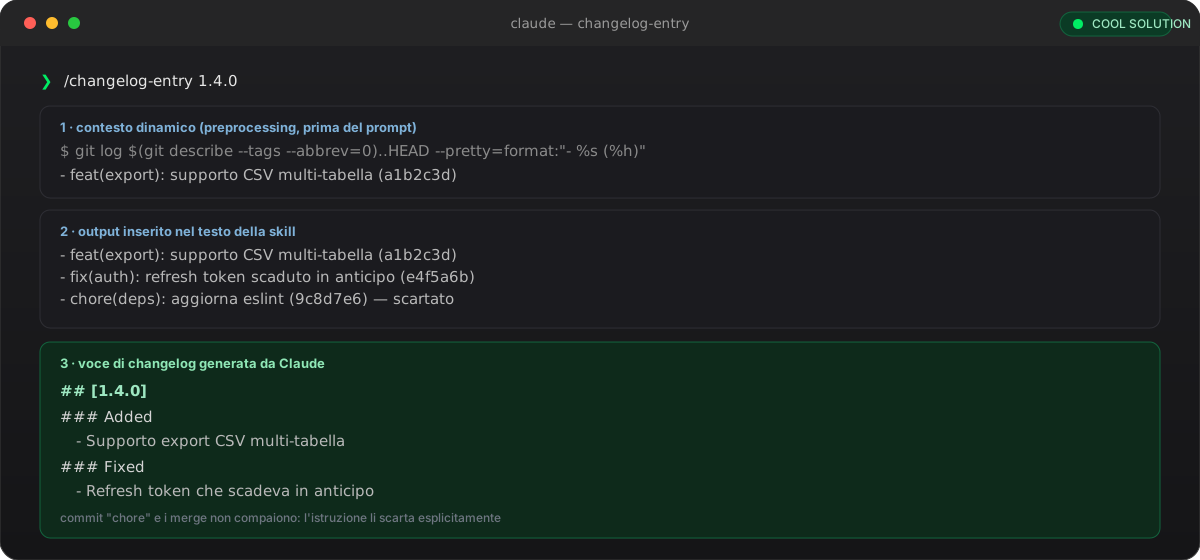
Dynamic context runs first: Claude already sees the commits, it doesn't have to go look for them.
🔒 Pre-approved tools and read-only skills
allowed-tools pre-approves a tool for the turn that invokes the skill: it doesn't remove anything, it adds a green light that skips the manual confirmation. The grant clears on the next message, so it needs to be re-applied on every invocation — it's a permission for that turn, not for the whole session. For the opposite — forbidding a tool while the skill is active, even if the model tries to use it — you need disallowed-tools.
I use it for a second skill, security-scan: it runs in an isolated subagent (context: fork, agent: Explore) and must not be able to write anything, whatever happens during the analysis. disallowed-tools: Edit Write Bash removes those tools from the pool for the whole duration of the skill: even if Claude decided to fix a finding, it couldn't.
---
name: security-scan
description: Search the source code for hardcoded secrets, API keys and
  credentials. Use when asked for a security check on the repo.
context: fork
agent: Explore
disallowed-tools: Edit Write Bash
---

Search the repository for hardcoded secret patterns: API keys, tokens,
passwords, connection strings. For every match report the file, the line
and a short reason. Do not modify any file: analysis only.📚 Supporting files and progressive disclosure
SKILL.md shouldn't contain everything: files like reference.md or scripts under scripts/ stay out of context until the skill explicitly calls for them. It's the same lazy-loading logic applied to documentation: the official guidance recommends keeping SKILL.md under 500 lines and moving detailed material elsewhere, referenced with a markdown link.
For scripts bundled inside the skill's own folder I use ${CLAUDE_SKILL_DIR}: it expands to the folder containing that SKILL.md, regardless of where the skill is installed — personal, project, or inside a plugin. Using the same variable in allowed-tools too makes the pattern match exactly the command the skill's body asks Claude to run, so the script executes without prompting for confirmation.
---
name: changelog-entry
description: Draft a changelog entry from the commits since the last tag.
allowed-tools: Bash(${CLAUDE_SKILL_DIR}/scripts/group-by-type.py *)
---

## References
For the full category taxonomy, see [reference.md](reference.md).

## Automatic categorization
Run `${CLAUDE_SKILL_DIR}/scripts/group-by-type.py` to group commits by
type (feat, fix, chore...) before writing the changelog.
Skills reference · Claude Docs ↗
🧪 Testing a skill with skill-creator
Seeing a skill fire doesn't tell you whether it did the right thing: they're two separate checks. What you need is a baseline comparison — the same prompts, in a fresh session, once with the skill available and once with it disabled (via skillOverrides) — because the context left over from writing the skill masks gaps in the instructions.
The skill-creator plugin automates that comparison: /plugin install skill-creator@claude-plugins-official, then /reload-plugins, then I ask Claude to "evaluate my changelog-entry skill with skill-creator". The plugin stores test cases in evals.json inside the skill's folder, runs an isolated subagent per case, and produces grading.json (pass/fail with evidence) and benchmark.json (pass rate, tokens and time with and without the skill) — so I can see whether the gain is worth the context cost.
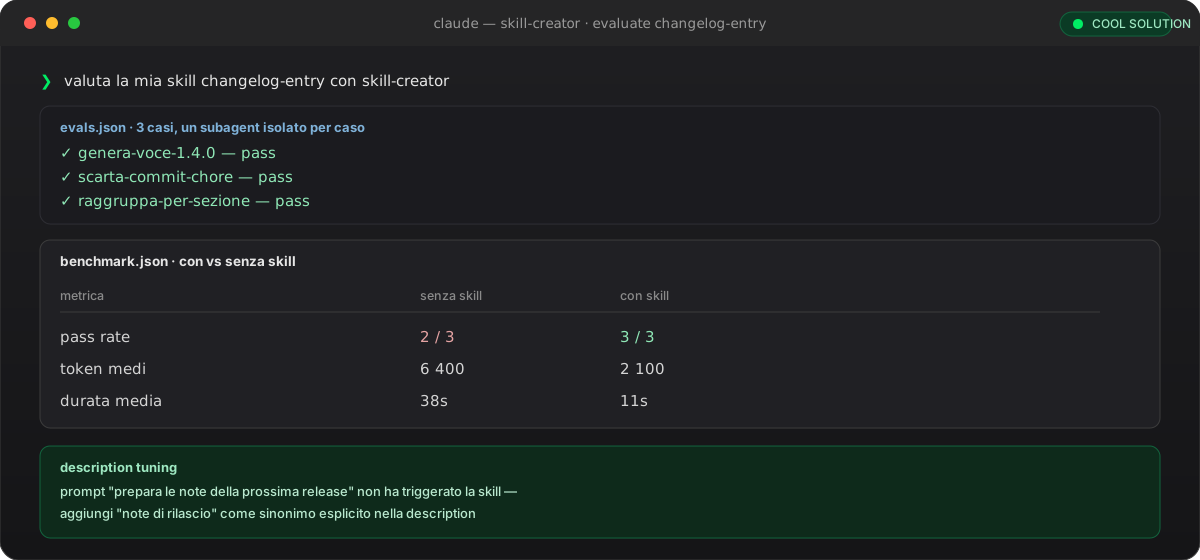
benchmark.json compares pass rate, tokens and time: the skill only wins if the gain outweighs the context cost.
📦 Distributing: personal, project, or plugin
Same SKILL.md format, different scope. A personal skill stays on your machine and applies wherever you work; a project skill gets committed and applies to the whole team, agents included — as long as everyone accepts the trust dialog for the folder the first time. If the same name exists at more than one level, the highest one wins: enterprise, then personal, then project.
To share a skill beyond a single repo — with hooks, subagents or MCP servers bundled in — I package it as a plugin: a skills/ folder inside the plugin, distributed through a marketplace. It's the same mechanism I used to publish this blog's style rules as a personal plugin.
Personal · ~/.claude/skills/
- Applies across all your projects
- Not version-controlled, stays on your machine
- Ideal for your own working habits
- No trust dialog to accept
Project · .claude/skills/
- Applies only to this repository
- Committed: the same skill for the whole team
- Ideal for shared conventions and procedures
- Requires accepting the repo's trust dialog
Same SKILL.md file, different scope: where you save it decides who gets to use it.
✅ Wrapping up
A skill is knowledge or a procedure that enters context only when needed: lighter than CLAUDE.md, complementary to hooks, shareable with the same rigor as any version-controlled file. changelog-entry is deliberately simple, but the pattern — a focused frontmatter, dynamic context, tools pre-approved or forbidden, supporting files loaded on demand — applies to any procedure you repeat often enough to be worth formalizing.
One detail worth remembering: SKILL.md follows the open Agent Skills standard, published by Anthropic in December 2025 and already supported by Codex CLI, Gemini CLI and other agents. A skill written for Claude Code, with a few adjustments, works elsewhere too.
- 01Create the folder~/.claude/skills/<name>/ (personal) or .claude/skills/<name>/ (project, to commit).
- 02Write the frontmatterA clear description, argument-hint if needed, disable-model-invocation for manual-only invocation.
- 03Inject dynamic context!command runs before the prompt: Claude reads the output, it executes nothing.
- 04Restrict the toolsallowed-tools pre-approves, disallowed-tools forbids: choose based on the action's risk.
- 05Add supporting filesreference.md and scripts/ stay out of context until explicitly called for.
- 06Test with skill-creatorWith/without comparison in a fresh session: pass rate against the token and time cost.
- 07Share itCommit it under .claude/skills/ for the team, or package it as a plugin to distribute it further.
Frequently asked questions about custom skills Claude Code
What's the difference between a Claude Code skill and a hook?
A hook is deterministic code that always runs, at a precise point of the lifecycle, and can block an action: it guarantees an invariant. A skill is knowledge or a procedure that Claude applies when relevant, or that you trigger yourself with /skill-name: it describes a way of working, it doesn't enforce it. They're complementary: a Stop hook could, for example, remind you to run a verification skill before closing the turn.
How do I stop Claude from invoking a skill on its own?
Set disable-model-invocation: true in the frontmatter. The description stops being loaded into Claude's context, so the model never sees it and can't choose it: the skill stays invocable only manually, with /skill-name. This is the right choice for actions with side effects or ones you want to control yourself, like generating release notes or running a deploy.
What's the difference between allowed-tools and disallowed-tools?
allowed-tools pre-approves a tool for the turn that invokes the skill: it skips the confirmation prompt, but doesn't remove anything from the available pool. disallowed-tools does the opposite, removing tools from the pool while the skill is active, even if the model would try to use them. Both the grant and the restriction clear on the next message: think of them as per-turn, not per-session.
Do skills written for Claude Code also work with Codex or Gemini CLI?
Yes, for the common part. SKILL.md follows the open Agent Skills standard published by Anthropic in December 2025 and adopted by OpenAI's Codex CLI, Gemini CLI and other agents. Claude Code's extended features — context: fork, allowed-tools with the Bash(pattern) syntax, dynamic context with !command — stay Claude Code-specific; the core of frontmatter plus markdown instructions is portable.
How do I check that a skill actually works, not just that it fires?
You need two separate checks: whether Claude invokes it on the right requests, and whether the output matches what's expected when it does. The reliable way is a baseline comparison — same requests, fresh session, with and without the skill — because the context left by whoever wrote it masks gaps. The skill-creator plugin automates this comparison and produces a report with pass rate, tokens and time.
Where do I put a skill that needs to apply to the whole team?
In .claude/skills/<name>/SKILL.md inside the repository, committed: it applies to anyone who clones the project, agents included, once they've accepted the folder's trust dialog the first time. To share it beyond that repository too, with hooks or MCP servers attached, package it as a plugin and distribute it through a marketplace.
Let's talk
If this topic is relevant to you, write to me: comparing notes on code and AI is always time well spent.


