 COOL
COOL 


In this article
- 🪝 Why hooks change the rules
- 🗺️ The lifecycle and its events
- 🧬 Anatomy of a hook in settings.json
- 📥 The stdin input and exit codes
- 🧹 PostToolUse: format and lint on every edit
- 🖥️ PostToolUse in action
- 🛡️ PreToolUse: deny the irreversible
- 🚫 The block as Claude sees it
- 🚦 Stop: the quality gate on tests
- ✅ The gate that sends Claude back to work
- 🧠 SessionStart, safety and debugging
- 🧭 In short
🪝 Why hooks change the rules
A hook is a shell command that Claude Code runs automatically at a precise point of its lifecycle. The difference from a rule written in CLAUDE.md is fundamental: the rule is a probabilistic hint, the model can follow or forget it; the hook is deterministic code that always runs, with your permissions, independent of the model and of the context.
When is it worth it? For anything that must happen every time, no exceptions: format after every edit, prevent an rm -rf, never close the turn with red tests. You move the guarantee from “I hope the AI remembers” to “the script enforces it”. Rules stay perfect for style and preferences; hooks are for the invariants you can't afford to break.
CLAUDE.md rule
- Probabilistic: the model interprets it
- Can ignore it under context pressure
- No guarantee it runs
- Great for style, tone and preferences
Hook
- Deterministic: always runs, like code
- Independent of model and context
- Can block the action with exit 2
- Ideal for policy, safety and quality gates
They aren't alternatives: the rule guides, the hook guarantees.
🗺️ The lifecycle and its events
Claude Code exposes dozens of events, but for quality gates a handful is enough, grouped by cadence. Once per session: SessionStart and SessionEnd. Once per turn: UserPromptSubmit and Stop. On every tool call: PreToolUse and PostToolUse. Each event also declares whether it can block the action or only add context.
The rule for choosing is simple: act as far upstream as possible. Want to prevent an action before it happens? PreToolUse. Want to react to an edit just made? PostToolUse. Want an end-of-work gate? Stop. Want to brief Claude at startup? SessionStart. The rest is detail.
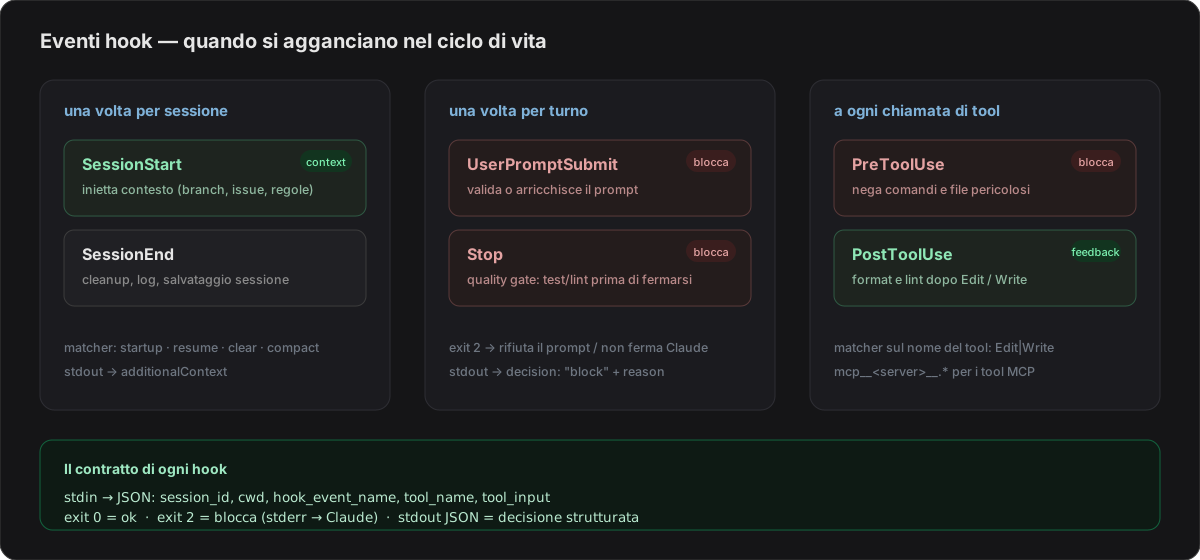
A few events cover almost every quality gate: pick the one furthest upstream.
🧬 Anatomy of a hook in settings.json
Hooks are declared in settings.json: the user one in ~/.claude/ applies to all your sessions, the project one in .claude/settings.json is committed to the repo and applies to the whole team. The structure has three levels of nesting: the event, a matcher that filters when it fires, and one or more handlers — here type: "command" with the script. The $CLAUDE_PROJECT_DIR placeholder points at the project root, so the path stays portable.
The matcher attaches to the tool name: Bash, or a list like Edit|Write, or a regex. For MCP tools the name is mcp__<server>__<tool>, and to catch them all from a server you need mcp__<server>__.* (the .* is required: without it, it's treated as an exact string and matches nothing). An empty or * matcher fires on every occurrence of the event.
{
  "hooks": {
    "PostToolUse": [
      {
        "matcher": "Edit|Write",
        "hooks": [
          {
            "type": "command",
            "command": "$CLAUDE_PROJECT_DIR/.claude/hooks/format.sh"
          }
        ]
      }
    ]
  }
}
Hooks reference · Claude Docs ↗
📥 The stdin input and exit codes
When a hook fires, Claude Code passes it a JSON on stdin with the context: session_id, cwd, hook_event_name and — on tool events — tool_name and tool_input. You read it with jq and decide. That's the whole input: no magic variables, just a JSON object to query.
The return channel is exit codes: 0 means go ahead; 2 means block, and stderr goes back to Claude as feedback (on PreToolUse it cancels the call, on Stop it prevents Claude from stopping, on UserPromptSubmit it rejects the prompt); any other code is a non-blocking error. Alternatively, with exit 0 you can print a structured JSON on stdout for finer decisions — we'll see it shortly.
{
  "session_id": "a1b2c3",
  "cwd": "/home/me/coolsolution-blog",
  "hook_event_name": "PreToolUse",
  "tool_name": "Bash",
  "tool_input": {
    "command": "rm -rf ./build"
  }
}🧹 PostToolUse: format and lint on every edit
The first useful gate: after every Edit or Write, format and lint the only file touched. I register a PostToolUse hook with matcher Edit|Write that calls format.sh. The script reads file_path from tool_input with jq, then runs the project tools — in this repo I use yarn, so prettier and eslint run via yarn (on a .NET project it would be dotnet format).
The value is that Claude receives the file already clean: no style diff to review, shorter reviews, a git history without formatting-only commits. PostToolUse can't block (the tool already ran), so the script always ends with exit 0; at most it sends a message back to Claude.
#!/usr/bin/env bash
# format and lint the file Claude just edited
set -euo pipefail

# the path arrives in the JSON on stdin, inside tool_input
file="$(jq -r '.tool_input.file_path // empty')"
[ -z "$file" ] && exit 0            # no file: nothing to do

case "$file" in
  *.ts|*.tsx|*.js|*.jsx|*.css|*.md)
    yarn prettier --write "$file"
    yarn eslint --fix "$file" || true
    ;;
esac

exit 0 # PostToolUse can't block: carry on🖥️ PostToolUse in action
Here is what you see in the terminal when Claude edits a file: right after the Edit, the hook fires, prettier reformats and eslint --fix fixes, then exit 0 and the turn continues without interruption. It's the “format on save” pattern brought inside the agent.
The difference from your editor is that it also applies when Claude is the one saving, not you. On a team with strict conventions this wipes out an entire category of review comments: no one argues about quotes, semicolons or import order anymore, because the file arrives already compliant.
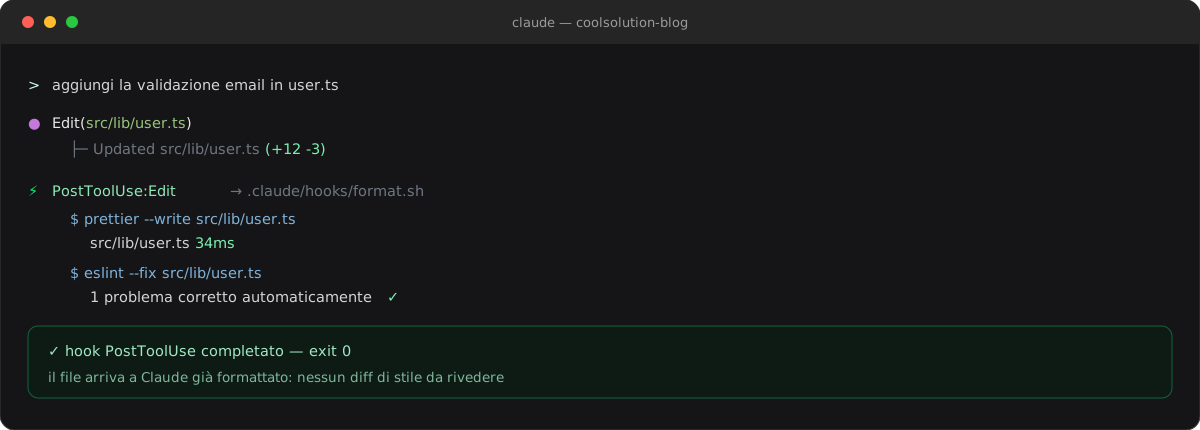
The file returns to Claude already formatted and linted: no style diff to review.
🛡️ PreToolUse: deny the irreversible
PostToolUse reacts after; to stop something you need PreToolUse, which fires before execution and can cancel it. The classic guard blocks destructive commands: the script reads .tool_input.command, and if it finds an rm -rf on broad globs it responds with a JSON carrying permissionDecision: "deny" and a reason. The same scheme protects secrets: deny Edits on .env or .dev.vars.
Two ways to block: exit 2 with a message on stderr (simple), or exit 0 with a JSON on stdout carrying hookSpecificOutput.permissionDecision: "deny" (structured). The second is more expressive: the reason attached to deny is shown to Claude, which understands why and adjusts course. I register the hook on PreToolUse with matcher Bash|Edit|Write.
#!/usr/bin/env bash
# deny destructive commands and edits to sensitive files
set -euo pipefail
input="$(cat)"                                 # the whole JSON on stdin

tool="$(jq -r '.tool_name'              <<<"$input")"
cmd="$(jq -r '.tool_input.command // empty'   <<<"$input")"
path="$(jq -r '.tool_input.file_path // empty' <<<"$input")"

deny() {
  jq -n --arg r "$1" '{
    hookSpecificOutput: {
      hookEventName: "PreToolUse",
      permissionDecision: "deny",
      permissionDecisionReason: $r
    }
  }'
  exit 0                                       # decision via stdout JSON
}

# rm -rf on unscoped globs
[[ "$tool" == "Bash" && "$cmd" =~ rm[[:space:]]+-rf.*[*/] ]] \
  && deny "destructive 'rm -rf' command blocked by the hook"

# edits to secret files
[[ "$path" == *.env || "$path" == *.dev.vars ]] \
  && deny "editing a sensitive file ($path) is not allowed"

exit 0                                         # no match: normal flow
Hooks reference · Claude Docs ↗
🚫 The block as Claude sees it
From Claude's side the refusal isn't a blank wall: it receives the reason, understands why and amends the strategy. In the terminal you see the denied tool, the reason, and Claude proposing a scoped, safe command instead of the blocked one.
This is the strength of the approach: the policy lives in the hook, not in the model's goodwill. It's deterministic, versioned in the repo and identical for every agent that reads the same settings.json — Claude, Codex, Copilot. A single source of truth for the rules that aren't up for negotiation.
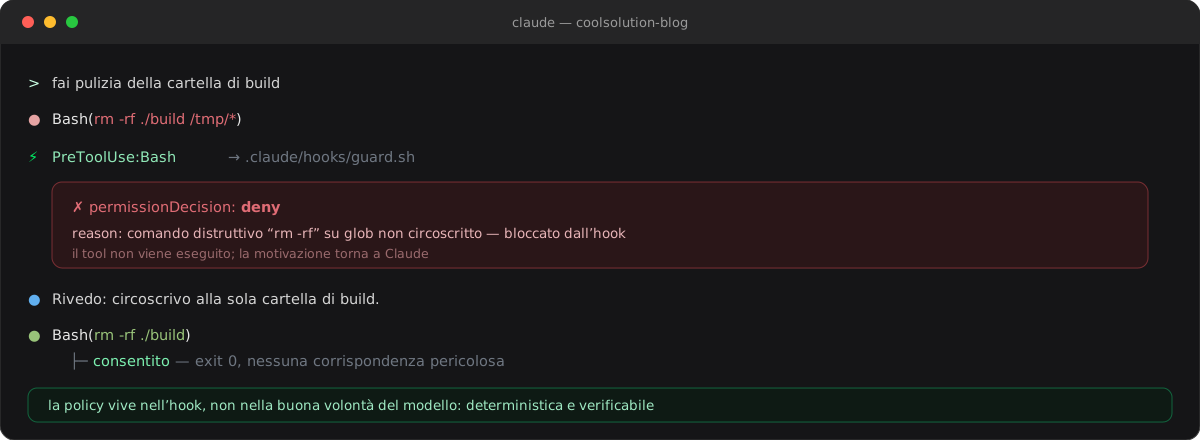
The reason returns to the model, which corrects instead of insisting.
🚦 Stop: the quality gate on tests
The Stop event fires when Claude is about to finish the turn — the right place for the most important gate: don't declare done what doesn't pass the tests. The hook runs yarn test (or tsc --noEmit, or yarn lint); if anything is red it responds with decision: "block" and a reason, and Claude doesn't stop: it goes back to work.
Mind the loop: a Stop gate that blocks endlessly would keep Claude in an infinite cycle. That's why the script checks the stop_hook_active field (to avoid re-entering itself) and passes the gate with exit 0 as soon as the tests turn green. It's the agentic transposition of “CI must be green before merge”.
#!/usr/bin/env bash
# Stop gate: don't close the turn with red tests
set -uo pipefail
input="$(cat)"

# avoid the loop: if the hook is already running in response to itself, exit
[ "$(jq -r '.stop_hook_active // false' <<<"$input")" = "true" ] && exit 0

if yarn test --silent >/tmp/claude-test.log 2>&1; then
  exit 0                            # green: Claude may stop
fi

# red: block the Stop and send the error back to Claude
tail -n 20 /tmp/claude-test.log >&2
jq -n '{
  decision: "block",
  reason: "yarn test is red: fix the tests before ending the turn."
}'
Hooks reference · Claude Docs ↗
✅ The gate that sends Claude back to work
In practice: Claude announces “done”, the Stop hook runs the suite, finds two red tests and returns block. Control goes back to Claude, which fixes and re-runs — until the gate turns green. No turn closes with hidden debt.
The result is that “done” stops being the model's opinion and becomes a property verified by the test suite. It's the same discipline as CI, but applied inside the agent's loop instead of at the end, when the code is already written and has to be reviewed after the fact.
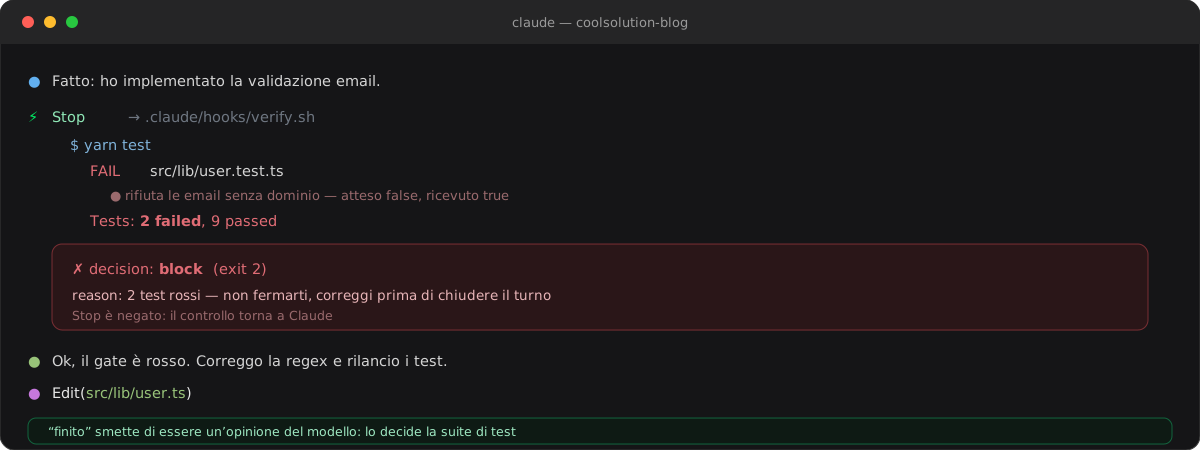
“Done” is decided by the test suite, not by the model.
🧠 SessionStart, safety and debugging
SessionStart does the opposite of a block: it injects context. A script that prints the current branch, changed files and active issue, returned as additionalContext, gives Claude a fresh briefing at every start — without pasting it by hand. SessionStart's stdout (like UserPromptSubmit's) goes straight into the context Claude reads.
Two final warnings. Safety: hooks run arbitrary shell commands with your permissions, so treat settings.json as code — review what you add, don't paste hooks of unknown origin. Debugging: if a hook doesn't fire, run claude --debug to see the command, input and exit code; and remember that only exit 2 blocks (an exit 1 passes silently as a non-blocking error).
#!/usr/bin/env bash
# project briefing injected at every session start
set -euo pipefail

branch="$(git rev-parse --abbrev-ref HEAD 2>/dev/null || echo '-')"
changed="$(git status --porcelain 2>/dev/null | awk '{print $2}' | paste -sd, -)"

ctx="Current branch: ${branch}
Changed files: ${changed:-none}"

jq -n --arg c "$ctx" '{
  hookSpecificOutput: {
    hookEventName: "SessionStart",
    additionalContext: $c
  }
}'🧭 In short
Hooks turn Claude Code from a persuadable assistant into a system with guarantees. Four events cover most cases: SessionStart for context, PreToolUse to deny, PostToolUse to fix, Stop for the final gate on tests.
The method is always the same: a small script, jq to read the input, exit 2 or a JSON on stdout to decide, a project settings.json committed so the rule applies to everyone. Fewer reminders in the prompt, more invariants in the repo.
- 01Pick the eventPreToolUse to deny, PostToolUse to react, Stop for the gate, SessionStart for context.
- 02Write the scriptA .sh that reads the JSON on stdin with jq and decides.
- 03Register in settings.jsonEvent, matcher on the tool name, command handler via $CLAUDE_PROJECT_DIR.
- 04Decide the outcomeexit 0 proceeds, exit 2 blocks, stdout JSON for permissionDecision or decision.
- 05Debug with --debugclaude --debug shows the hook's command, input and exit code.
- 06Share with the teamCommit .claude/settings.json: same rule for every person and every agent.
Frequently asked questions about Claude Code hooks
What's the difference between a hook and a rule in CLAUDE.md?
A rule in CLAUDE.md is an instruction the model interprets and can forget under context pressure: it's probabilistic. A hook is a shell command Claude Code always runs, deterministically and independent of the model. Rules guide style and preferences; hooks guarantee invariants (policy, safety, quality gates).
How do I actually block an action with a hook?
Two ways. With exit code 2: the action is blocked and stderr goes back to Claude as feedback (on PreToolUse it cancels the call, on Stop it prevents stopping). Or with exit 0 and a JSON on stdout: for PreToolUse use hookSpecificOutput.permissionDecision "deny", for Stop or PostToolUse the decision "block" field with a reason. Note: only exit 2 blocks, an exit 1 is a non-blocking error.
Do hooks slow Claude Code down?
Only if you write them slow. Best practice is to keep them targeted: format and lint the single touched file (not the whole repo), use flags like --silent, and set a reasonable timeout in the handler. A format hook on one file takes tens of milliseconds; a Stop gate that runs the whole test suite is heavier, but only fires at the end of the turn.
Can I share hooks with my team?
Yes. Hooks defined in .claude/settings.json live in the repository and apply to anyone who clones it, agents included. Personal hooks instead live in ~/.claude/settings.json and stay on your machine. With $CLAUDE_PROJECT_DIR the script paths stay portable across the team's machines.
How do I debug a hook that doesn't fire?
Launch Claude Code with claude --debug: you'll see the command run, the JSON passed on stdin and the exit code returned. The most common causes are a wrong matcher (the tool name must be exact, and MCP tools need mcp__<server>__.*), a non-executable script (chmod +x) or jq not installed.
Do hooks work with MCP tools too?
Yes. MCP tools are named mcp__<server>__<tool>, so a matcher like mcp__github__.* attaches to all tools of the GitHub server, and mcp__.__write. intercepts every write operation of any server. It's how you apply the same gates to external tools too, not just Bash, Edit and Write.
Let's talk
If this topic is relevant to you, write to me: comparing notes on code and AI is always time well spent.


