 COOL
COOL 


In this article
🔍 Non-interactive mode: claude -p
Everything Claude Code does in an interactive session — reading files, running commands and reasoning about code — it can also do without an interface. The -p flag (or --print) executes one prompt, prints the result and exits. This is non-interactive mode, formerly called headless mode, and it is the foundation for scripts and automation. Context comes from the working directory and output goes to stdout like any Unix tool.
CI needs several distinct guardrails. --output-format selects text, json or stream-json; JSON includes the result, session ID and an estimated cost. --allowedTools pre-approves tools, but it is not a deny-list by itself. For a restricted run I also use --permission-mode dontAsk and explicitly deny write tools. --max-turns limits agent round trips, while --max-budget-usd is the actual estimated-cost ceiling.
# 1. Basic: prompt in, result on stdout, exit
claude -p "List the files touched most often in the last 20 commits"

# 2. JSON output: result + cost + session ID
claude -p "Summarize the project architecture" \
  --output-format json

# 3. With guardrails: permissions, turns and budget
claude -p "Find TODO and FIXME comments and group them by area" \
  --allowedTools "Read,Grep,Glob" \
  --disallowedTools "Edit,Write" \
  --permission-mode dontAsk \
  --max-turns 5 \
  --max-budget-usd 0.50
Headless mode · official docs ↗
🧪 Reviewing locally, before CI
Before moving a review prompt into a workflow, I test it in the terminal. The loop is short: run the script, read the review, improve the prompt and run it again. JSON output includes the total_cost_usd estimate, which helps me choose --max-turns and --max-budget-usd; I still use the Claude Console Usage page for authoritative spend.
The script fetches the base branch, calculates a deterministic diff and pipes it to Claude on stdin, so the agent does not need to run git diff. dontAsk denies tools that were not pre-approved and --disallowedTools blocks writes. The review produces only a report. In CI I apply the same principle by separating the commenting workflow from the one that may change code.
#!/usr/bin/env bash
# Headless review of the diff against the base branch.
set -euo pipefail

base="${1:-main}"

git fetch origin "${base}"
git diff "origin/${base}...HEAD" | claude --bare -p "Review the diff
received on stdin.
For each finding give: file, line, severity (high/medium/low),
problem and proposed fix. Focus on bugs, security,
performance. Ignore style." \
  --allowedTools "Read,Grep,Glob" \
  --disallowedTools "Edit,Write" \
  --permission-mode dontAsk \
  --max-turns 10 \
  --max-budget-usd 1.00 \
--output-format json⚙️ Setup: /install-github-app and secrets
The bridge between the repository and the Anthropic API starts with one command: I open claude in the repository and run /install-github-app. The wizard guides me through installing the official GitHub App, registering the ANTHROPIC_API_KEY secret and creating a starter workflow; repository-admin access is required. I can also install the app from github.com/apps/claude, add the secret in the Actions settings and create the YAML manually.
The one place worth slowing down is the workflow permissions block. The review template ships conservative, with pull-requests: read: Claude can read the PR but cannot post the review comment. To get findings directly on the pull request you need to raise it to write — and that's a choice I make deliberately, workflow by workflow, not a repo-wide default.
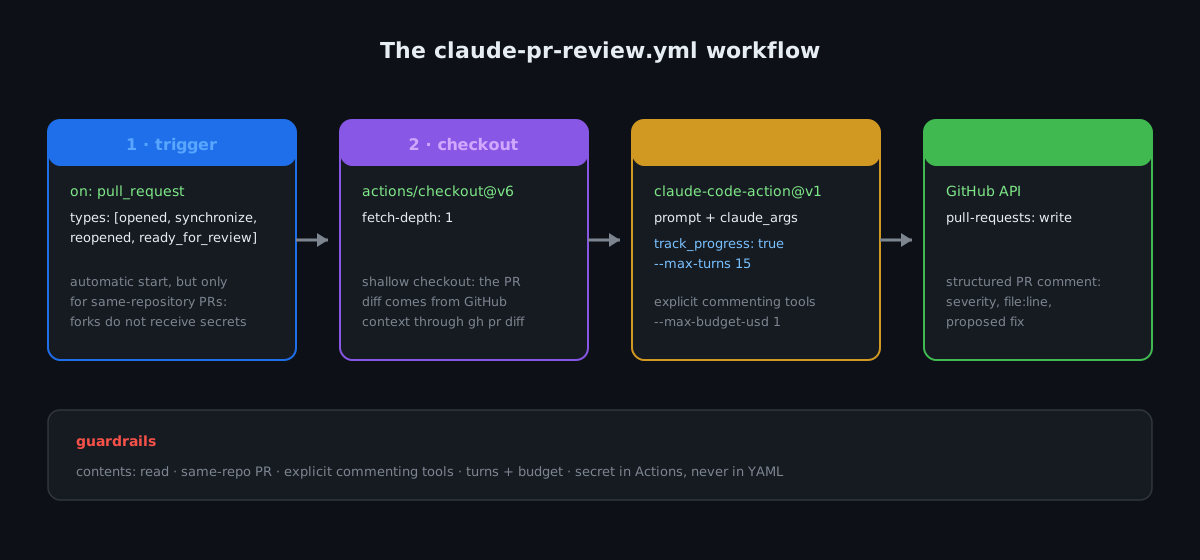
The runner executes the same agent loop I use locally: repository checkout, explicit guardrails and a final comment through the GitHub API.
🤖 The automatic review workflow
The first workflow runs automatically when a non-draft pull request is opened, updated, reopened or marked ready for review. With an explicit prompt, anthropics/claude-code-action@v1 enters automation mode. track_progress: true guarantees a progress comment that also carries the final summary, while the gh pr and inline-comment MCP tools let Claude publish findings on the PR.
contents: read keeps the code read-only, pull-requests: write allows comments and id-token: write is required by the official GitHub App. A shallow checkout is sufficient because the action receives PR context and can use gh pr diff; full history is unnecessary. The job deliberately excludes forks because fork-triggered pull_request workflows do not receive ANTHROPIC_API_KEY and their GITHUB_TOKEN remains read-only.
name: Claude PR Review

on:
  pull_request:
    types: [opened, synchronize, reopened, ready_for_review]

concurrency:
  group: claude-pr-review-${{ github.event.pull_request.number }}
  cancel-in-progress: true

jobs:
  review:
    if: >
      github.event.pull_request.draft == false &&
      github.event.pull_request.head.repo.full_name == github.repository
    runs-on: ubuntu-latest
    permissions:
      contents: read
      pull-requests: write
      id-token: write
    steps:
      - uses: actions/checkout@v6
        with:
          fetch-depth: 1

      - uses: anthropics/claude-code-action@v1
        with:
          anthropic_api_key: ${{ secrets.ANTHROPIC_API_KEY }}
          track_progress: true
          prompt: |
            REPO: ${{ github.repository }}
            PR NUMBER: ${{ github.event.pull_request.number }}

            Review this pull request.
            For each finding: file, line, severity (high/medium/low),
            problem, proposed fix. Focus on bugs,
            security and performance. Ignore style.
            Use gh pr comment for the summary and the MCP tool
            for inline comments, with confirmed: true.
          claude_args: |
            --max-turns 15
            --max-budget-usd 1.00
            --allowedTools "mcp__github_inline_comment__create_inline_comment,Bash(gh pr comment:*),Bash(gh pr diff:*),Bash(gh pr view:*)"
            --disallowedTools "Edit,Write"
anthropics/claude-code-action · GitHub ↗
💬 @claude in comments: interactive mode
The second workflow requires an explicit mention. I write @claude how would you handle pagination here? in a comment and the agent answers; with @claude fix the validation on this endpoint, it may implement the change and create a commit on the PR branch. Without a prompt, the action enters interactive mode and applies its access-control check: by default, only a user with repository write access can trigger it.
Here contents: write is necessary because the agent may create commits. I therefore keep the workflows separate: automatic review has read-only code access, while the interactive workflow has broader powers but starts only after an authorized mention. I also include pull_request_review so mentions in submitted review bodies work alongside general and inline comments.
name: Claude

on:
  issue_comment:
    types: [created]
  pull_request_review_comment:
    types: [created]
  pull_request_review:
    types: [submitted]

jobs:
  claude:
    if: |
      (github.event_name == 'issue_comment' && contains(github.event.comment.body, '@claude')) ||
      (github.event_name == 'pull_request_review_comment' && contains(github.event.comment.body, '@claude')) ||
      (github.event_name == 'pull_request_review' && contains(github.event.review.body, '@claude'))
    runs-on: ubuntu-latest
    permissions:
      contents: write
      pull-requests: write
      issues: write
      id-token: write
    steps:
      - uses: actions/checkout@v6
        with:
          fetch-depth: 1

      - uses: anthropics/claude-code-action@v1
        with:
          anthropic_api_key: ${{ secrets.ANTHROPIC_API_KEY }}
claude_args: --max-turns 25 --max-budget-usd 2.00🎛️ claude_args: model, permissions and turns
claude_args passes CLI flags to the action. I use --model to select a model, --max-turns to limit agent round trips and --max-budget-usd to stop when the client-side estimate reaches the threshold. --allowedTools pre-approves specific capabilities; the effective boundary comes from combining it with --disallowedTools, the permission mode and GitHub's permissions block.
One easy-to-miss detail is the permission syntax. Bash(git diff:) authorizes commands beginning with git diff; the equivalent modern form is Bash(git diff *). Without the boundary before the wildcard, Bash(git diff) also matches git diff-index. I therefore keep patterns specific and add only tools required for the expected result.
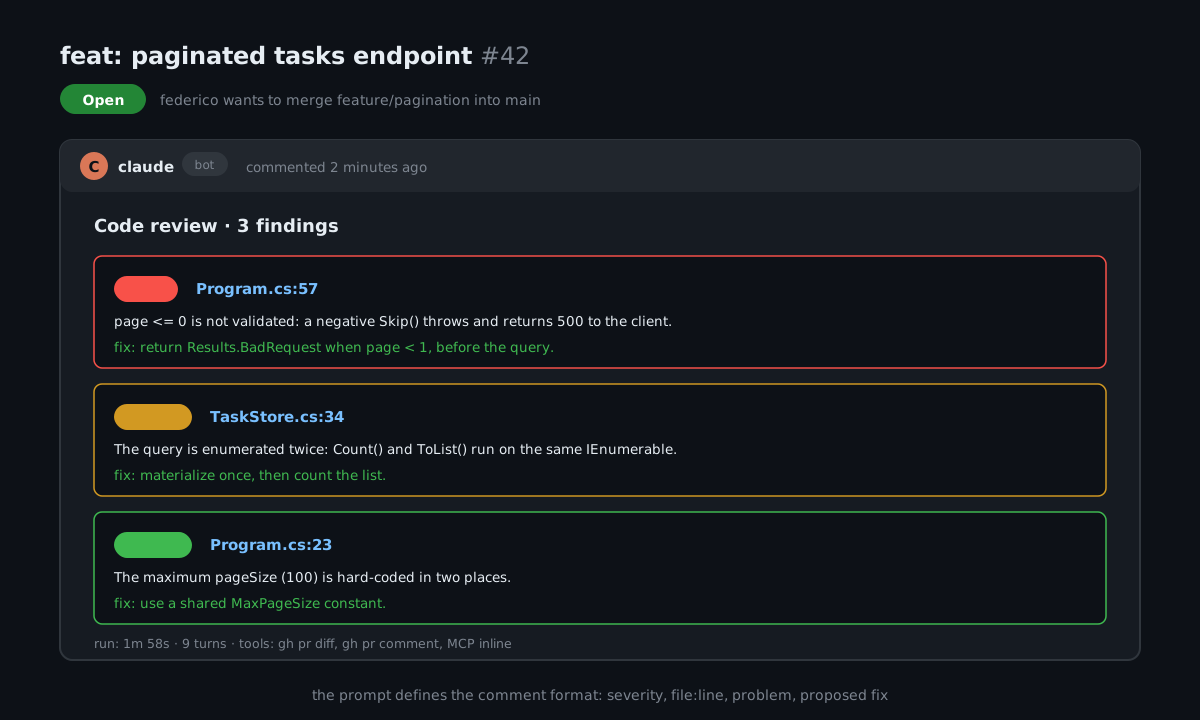
Every run produces a structured comment: severity, file:line, problem and proposal. The format is decided by the prompt, not the action.
⚠️ Mistakes to avoid
The first mistake is skipping local tuning. Iterating on a YAML prompt requires repeated pushes and runner waits; a prompt tested with claude -p reaches CI in much better shape. The second is treating the agent's review as a verdict: it is a first pass that clears mechanical problems — missing null checks, edge cases and suspicious queries — and frees human reviewers to focus on architecture and design choices. A human still approves the PR.
The third mistake is economic: --max-turns limits agent duration, while --max-budget-usd sets the estimated-cost threshold. I start low, observe total_cost_usd and verify authoritative spend in the Claude Console. The final mistake is about security: secrets are not passed to fork-triggered pull_request workflows. I do not bypass that protection with pull_request_target while checking out untrusted fork code into the main workspace.
- Tune the prompt locally with claude -p: iterating in CI costs minutes per attempt; in the terminal it takes seconds.
- Two workflows, two perimeters: automatic review is read-only; write access lives only in the @claude workflow invoked by a human.
- Limit turns and budget: --max-turns controls round trips; --max-budget-usd controls estimated spend per run.
- Minimal permissions that work: pull-requests: write is needed for the comment; contents: write only where the agent actually commits.
- AI review doesn't approve: it clears the mechanical problems, but merging stays a human decision.
🧪 Verify with a test PR
Before enabling the workflow across the repository, I open a same-repository test PR with a harmless deliberate defect. I verify that the run starts, the comment is published, inline findings point to the correct files and lines, and a superseded run is canceled after a new push. Only then do I merge the workflow into main.
git switch -c test/claude-pr-review
# Introduce a harmless defect and commit it
git add .
git commit -m "test: exercise Claude PR review"
git push -u origin test/claude-pr-review
gh pr create --fill --base main
gh pr checks --watch✅ Final checklist
Before declaring the automatic review "live" on a repo, I always walk through the same seven points. They are the difference between a workflow that produces useful reviews and one that generates expensive noise — and I learned each of these by getting it wrong at least once.
If any item isn't green, the workflow doesn't go to main. That holds for side projects and holds twice for work repos, where a runaway run across twenty open PRs is a bill, not an experiment.
[ ] Review prompt tuned locally with claude -p
[ ] ANTHROPIC_API_KEY registered as a repo secret
[ ] Review workflow: pull-requests: write, contents: read
[ ] Separate @claude workflow for code changes
[ ] Required gh/MCP tools can publish comments
[ ] --max-turns and --max-budget-usd calibrated
[ ] Same-repository/fork policy explicitly definedFrequently asked questions about Claude Code GitHub Actions
What is Claude Code headless mode?
It's the non-interactive execution of the CLI: with the -p (--print) flag Claude Code runs the same agent loop as a normal session — reading files, running commands, reasoning about code — but prints the result and exits, with no UI. It's the foundation of every automation: local scripts, cron jobs, CI/CD. The output can be plain text, structured JSON or a line-by-line stream of JSON events.
What does claude-code-action do compared to a regular review bot?
Anthropic's official action runs a Claude Agent SDK-powered agent inside the GitHub Actions runner: it can use a real shell, read checked-out files and — in workflows where you allow it — modify code and commit. It supports Claude Code CLI arguments while adding GitHub event context, authentication and comment tools.
How much does an automatic PR review cost?
It depends on the model, diff size and consumed turns. --max-turns limits round trips, --max-budget-usd stops the run at an estimated threshold and --model can select a cheaper model. The JSON total_cost_usd field is a client-side estimate; I use the Claude Console Usage page for authoritative spend.
Why separate the review workflow from the @claude one?
Least privilege. The automatic review runs without a human in the loop on eligible same-repository PRs: I give it contents: read plus only the tools needed to inspect and comment, so it cannot modify repository code. The @claude workflow can write code and commit (contents: write), but only starts when an authorized person explicitly mentions it. Broad automation with small powers, big powers only on human request.
Does Claude's review replace the human one?
No, it precedes it. The agent is good at mechanical problems — missing null checks, unhandled edge cases, N+1 queries and inconsistencies with the rest of the codebase — and flags them before a colleague begins the manual review. Human review remains necessary for architecture, product choices and context that doesn't live in the repo. A person always approves the merge.
Can I use the action without a direct Anthropic API key?
Yes. Anthropic Workload Identity Federation replaces the static key with federation identifiers and id-token: write. Bedrock, Vertex AI and Microsoft Foundry require provider-specific use_bedrock/use_vertex/use_foundry inputs, OIDC setup, environment values and model identifiers. The review prompt remains reusable, but the authentication workflow changes.
Let's talk
If this topic is relevant to you, write to me: comparing notes on code and AI is always time well spent.


