COOL


In this article
- 🧩 What Claude Code mods are (and what changes compared with the status line)
- 🗺️ Where a mod draws: render sites
- 🧱 The anatomy: one directory, three required files
- 📄 Manifest and hooks.json: what turns a plugin into a mod
- 📊 Where the data comes from: $.session.usage() and session.measure
- 🗂️ Reactive state: declaring the values in types/index.d.ts
- 📥 register.tsx, part 1: the atoms and reading the limits
- 🧮 register.tsx, part 2: from a percentage to cells
- 🔄 register.tsx, part 3: session.start, the timer and session.measure
- 🎨 register.tsx, part 4: drawing in the band
- ⌨️ register.tsx, part 5: the /usage-bar command and the pane
- 🔁 The development loop: --plugin-dir, hot reload and validate
- 🧪 Testing the mod without a session
- 📦 Installing it in every session: a local marketplace
- 🔒 Trusting a mod: what it can reach
- 🤖 The shortcut: asking Claude for the mod
- 📦 GitHub repo
- ✅ Final checklist: the usage bar in eight moves
🧩 What Claude Code mods are (and what changes compared with the status line)
A mod is a plugin that changes how Claude Code looks and behaves. It is made of JavaScript or TypeScript event handlers: Claude Code calls one when an event happens — a tool call, a submitted prompt, a piece of the interface to draw — and the handler can observe the event, rewrite it or answer in Claude Code's place.
The difference from what existed before is where the code runs. Settings hooks, skills, status lines and MCP servers work from outside: they run a script, or give Claude text or tools. A mod runs inside the Claude Code process, so it can draw a pane or a band above the prompt, register a command that answers without a model turn, and share variables between one hook and the next.
Requirements: Claude Code 2.1.287 or later in the terminal (claude --version); mods are on by default. In the Code tab of the Desktop app they work from the bundled 2.1.286. A note on vocabulary: the documentation calls a mod's handlers hooks and the ones configured in settings.json settings hooks. I follow the same convention.
Status line and settings hooks — from outside
- A script or an HTTP request run on an event
- Receives JSON, answers with text or an outcome
- Draws no panes, bands or controls
- Configured in settings.json
Mod — from inside
- Functions called in the Claude Code process
- Observes, rewrites or answers any event
- Draws panes, bands, toasts and status lines
- A plugin: manifest, hooks.json, hooks module
If an existing script is enough, it stays the right tool: a mod is for drawing or stepping into the event.
🗺️ Where a mod draws: render sites
Each place a mod can draw is called a render site. Two are empty until a mod fills them: the pane — a sidebar beside the transcript in a wide fullscreen terminal, otherwise a framed region above the prompt — and the band, the strip directly above the prompt input, always present and shared by every mod.
Then there are three outputs that take a single call: $.ui.status(text) writes a line under the prompt, $.ui.toast(text) shows a notice at the top right that goes away by itself, $.ui.log(text) adds a dim line to the transcript that Claude does not read. Finally the sites Claude Code already draws — the spinner, tool call rows, messages — which a mod can adjust or replace.
For the usage bar I pick the band: it is always visible, it sits right on the prompt and it takes a tree of elements with colors. The status line would cost a single call, but it is text only and always starts with ⚠ and the mod's name.
Where the result shows: hooks run in every session that loads the plugin, but the drawing appears in the terminal, in the Code tab of the Desktop app and in the VS Code extension's panel (from 2.1.299). With claude -p and the Agent SDK the hooks run and nothing is drawn.
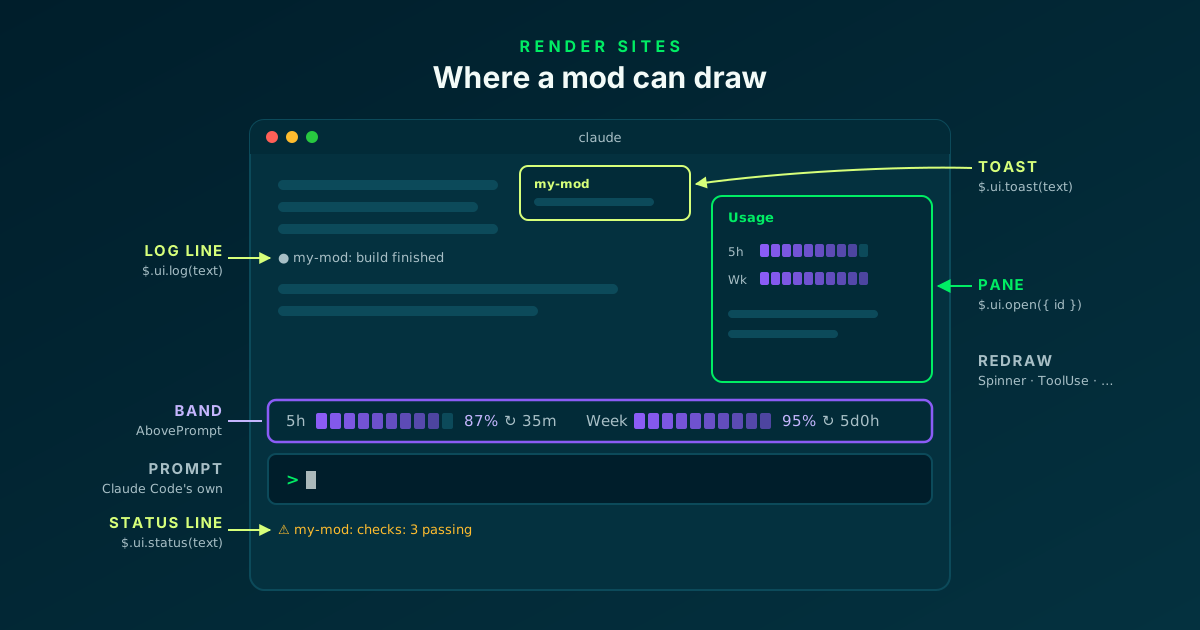
The usage bar lives in the band: the strip directly above the prompt.
🧱 The anatomy: one directory, three required files
A mod is a plugin directory with three required files: the manifest .claude-plugin/plugin.json, the hooks/hooks.json file that points to the code, and the code itself, the hooks module. No Node.js, bundler or build step is needed: Claude Code loads .js, .ts and .tsx files directly.
For the usage bar I add two optional files: types/index.d.ts, required when the mod uses the reactive $.state, and a test file. I use the .tsx extension for the hooks module because I want to write the interface tree as JSX.
$ mkdir -p usage-bar/.claude-plugin usage-bar/hooks usage-bar/types usage-bar/tests

# at the end of the tutorial the directory looks like this
usage-bar/
├── .claude-plugin/
│   └── plugin.json        # the plugin manifest
├── hooks/
│   ├── hooks.json         # points to the hooks module
│   └── register.tsx       # the mod's code
├── types/
│   └── index.d.ts         # the values kept in $.state
└── tests/
    └── register.test.ts   # tests for claude plugin test
Create a mod · Claude Code Docs ↗
📄 Manifest and hooks.json: what turns a plugin into a mod
The manifest has no special fields for mods: name, version, description, author. The one extra line is types, which tells Claude Code where I declared the state values. I use it two steps from now.
hooks.json is what makes the difference: the modules key lists one path, relative to the file itself, and having it is what turns the plugin into a mod. One thing to watch in the name: claude plugin validate fails names that look like Anthropic's own, such as ones that start with claude-.
// usage-bar/.claude-plugin/plugin.json
{
  "name": "usage-bar",
  "version": "0.1.0",
  "description": "Mini progress bars above the prompt with the remaining plan usage",
  "author": { "name": "Your Name" },
  "types": "./types/index.d.ts"
}

// usage-bar/hooks/hooks.json
{
  "description": "The usage-bar hooks module",
  "modules": ["./register.tsx"]
}📊 Where the data comes from: $.session.usage() and session.measure
The mod talks to no external API: Claude Code already has the numbers. $.session.usage() returns { startedAt, context, rateLimits, cost }: context is the context window use (tokens, window, percent), rateLimits is a list of plan windows, each with kind, percentUsed and resetsAt.
In my sessions the kind values are five_hour for the 5-hour window and seven_day for the weekly one. They are the figures of the last API response: before the session's first response the list is empty, and the bar has to handle that case.
To avoid polling for nothing there is the session.measure event, which fires after each turn and when a limit's percent used changes. The flow becomes: the event updates the state, the state redraws the band, a one-minute timer moves the countdowns.
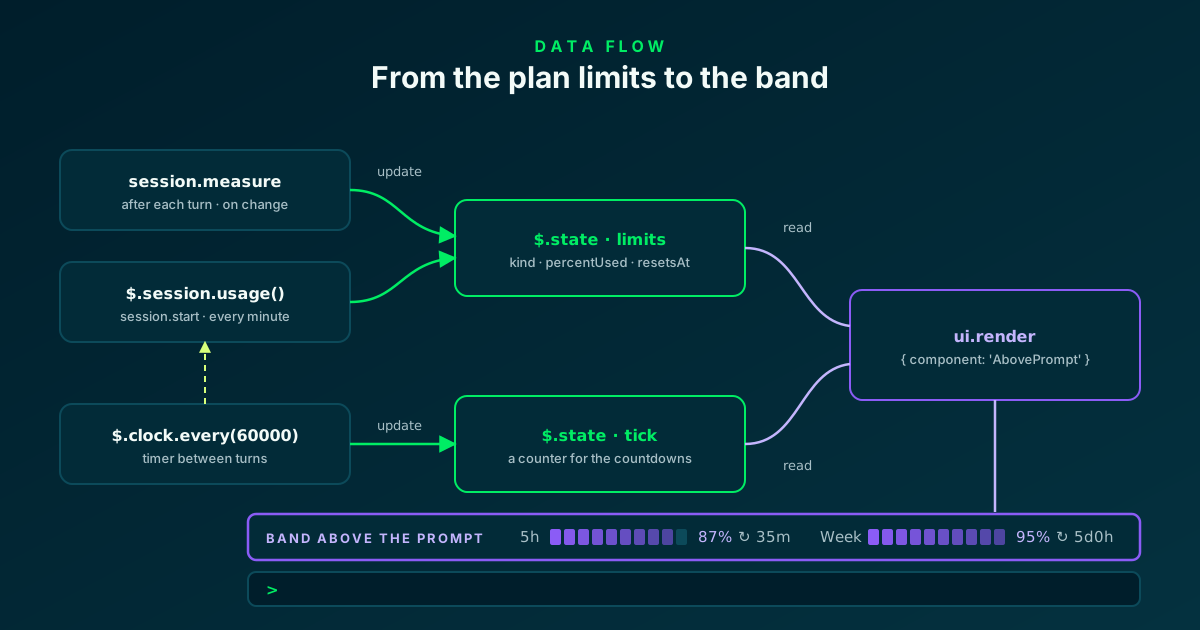
Two sources, one state, a single place that draws.
🗂️ Reactive state: declaring the values in types/index.d.ts
A mod has three places to keep a value. A module-level variable lasts until the module reloads, which is every save during development. $.state lasts for the session, survives a reload and is reactive. $.store is a key-value store on disk, shared between sessions.
For the bar I use $.state: a ui.render hook that reads a value subscribes to that value, and Claude Code redraws the site each time I write it. I never call $.ui.invalidate.
The values have to be declared. The outer key of PluginState is the plugin's name; inside it are the values and their types. I need two: limits, the plan windows, and tick, a counter the timer increments to move the countdowns.
export type UsageWindow = {
  kind: string
  percentUsed: number
  resetsAt?: string
}

declare module 'claude-code' {
  interface PluginState {
    'usage-bar': { limits: UsageWindow[]; tick: number }
  }
}
Keep state · Claude Code Docs ↗
📥 register.tsx, part 1: the atoms and reading the limits
The hooks module starts with the atoms: atom names a state value and gives its default, read returns it, update writes it. They are helpers imported from claude-code, the one bare import a hooks module is allowed. plugin and key are written as literal strings, because validation reads them from the source.
refreshLimits asks the engine for the windows and stores them only when there are any: an empty reading must not wipe the figures the band already shows. Note the $ parameter: static analysis accepts passing $ to a function declared at the top level of the same file, and the report lists the call as $.session.usage (via refreshLimits).
The EngineInterface and Register types do not come from npm: Claude Code writes them into .claude-plugin/types/ each time it loads the mod with --plugin-dir, and they describe the events and methods of the version I am running.
import { atom, read, update } from 'claude-code'
import type { EngineInterface, Register } from 'claude-code'

import type { UsageWindow } from '../types'

const limits = atom({ plugin: 'usage-bar', key: 'limits' } as const, [] as UsageWindow[])
const tick = atom({ plugin: 'usage-bar', key: 'tick' } as const, 0)

const PANE = 'usage-bar'
const BAR_CELLS = 10
const VIOLET = '#8b5cf6'
const LABELS: Record<string, string> = { five_hour: '5h', seven_day: 'Week', spend_limit: 'Spend' }

// Read the rate-limit windows from the engine; keep the old ones on an empty reading
const refreshLimits = async ($: EngineInterface): Promise<UsageWindow[]> => {
  const { rateLimits } = await $.session.usage()
  const rows = rateLimits.map(r => ({ kind: r.kind, percentUsed: r.percentUsed, resetsAt: r.resetsAt }))
  if (rows.length > 0) await update($, limits, () => rows)
  return rows
}
Mods API methods · Mods reference ↗
🧮 register.tsx, part 2: from a percentage to cells
This part is plain TypeScript, with no mods API: it turns a window into pieces of text to draw. I show what is left, not what I have used: 100 - percentUsed, clamped between 0 and 100, becomes a number of filled cells out of ten.
formatEta renders the time to the reset in a compact form: 35m, 2h14m, 5d0h. toParts returns the list of pieces — label, filled cells, empty cells, percent, countdown — and drops the empty ones.
textProps exists for a precise reason: each element takes only the props it declares, and a tree that does not validate is discarded — Claude Code draws its own version of the site. So I pass color and dimColor only when they are needed.
const formatEta = (ms: number): string => {
  if (ms <= 0) return 'now'
  const minutes = Math.floor(ms / 60000)
  const days = Math.floor(minutes / 1440)
  const hours = Math.floor((minutes % 1440) / 60)
  if (days > 0) return `${days}d${hours}h`
  if (hours > 0) return `${hours}h${minutes % 60}m`
  return `${minutes}m`
}

type Part = { text: string; color?: string; dim?: boolean }

// Pass only the props that are set
const textProps = (p: Part) => ({
  ...(p.color === undefined ? {} : { color: p.color }),
  ...(p.dim ? { dimColor: true } : {}),
})

// One window: label, bar of what is LEFT, percent and reset countdown
const toParts = (w: UsageWindow, now: number): Part[] => {
  const remaining = Math.max(0, Math.min(100, 100 - w.percentUsed))
  const filled = Math.round((remaining / 100) * BAR_CELLS)
  const eta = w.resetsAt ? ` ↻ ${formatEta(Date.parse(w.resetsAt) - now)}` : ''
  const parts: Part[] = [
    { text: `${LABELS[w.kind] ?? w.kind} `, dim: true },
    { text: '█'.repeat(filled), color: VIOLET },
    { text: '░'.repeat(BAR_CELLS - filled), dim: true },
    { text: ` ${Math.round(remaining)}%`, color: VIOLET },
    { text: eta, dim: true },
    { text: '   ' },
  ]
  return parts.filter(p => p.text !== '')
}
Build a tree from elements · Claude Code Docs ↗
🔄 register.tsx, part 3: session.start, the timer and session.measure
register is the function Claude Code calls when the mod loads: it receives on, and each call to on registers a hook. Every hook receives three arguments: the $ API, the event e, and next, which passes the event on to the other mods and then to Claude Code.
In session.start I do three things: a first reading, the timer and the command. A hooks module has no setInterval or setTimeout: timers go through $.clock.every and $.clock.after. Every minute I increment tick and read the figures again. The callback runs outside any event, between turns, and does not start one.
session.start fires again on every reload of the mod, and timers stop together with the module: no duplicate timers. The event is registered exactly once: two on('session.start') calls without a matcher make the module fail to load, so all the startup work sits in one hook.
In session.measure I update the state only when e.changed includes rateLimits, then return next(e): I observe the event without changing it.
export const register: Register = on => {
  on('session.start', async ($, e, next) => {
    await refreshLimits($)
    // Every minute: move the countdowns and re-read the figures
    $.clock.every(60000, () => {
      void update($, tick, n => n + 1)
      void refreshLimits($).catch((error: unknown) =>
        $.ui.log(`usage not re-read (${String(error)})`, { to: 'debug' }),
      )
    })
    await $.command.register({ name: 'usage-bar', description: 'Show remaining plan usage in a pane' })
    return next(e)
  })

  // After each turn, and when a plan limit's percent changes
  on('session.measure', async ($, e, next) => {
    if (e.changed.includes('rateLimits')) {
      await update($, limits, () =>
        e.rateLimits.map(r => ({ kind: r.kind, percentUsed: r.percentUsed, resetsAt: r.resetsAt })),
      )
    }
    return next(e)
  })
Run work in the background · Claude Code Docs ↗
🎨 register.tsx, part 4: drawing in the band
The drawing is a hook on ui.render filtered with the matcher { component: 'AbovePrompt' }: Claude Code calls it each time it is about to draw the band, and the hook returns a tree of elements. I get the elements from $.ui.resolve(e). In a .tsx file I can then write them as JSX, but they must be destructured first, because a hooks module has no element globals.
The two read calls at the top do the reactive work: by reading limits and tick the hook subscribes to both, so it runs again when new figures arrive and on every timer tick. I do not need the value of tick: I need the subscription.
The band is shared. A returned tree replaces what the mods after mine draw there; to keep theirs I put the result of await next(e) among the children of my Box. When I have nothing to show — no reading yet, or e.props.hasSurvey is true because a survey holds the band — I return next(e) and step aside.
The result in the terminal is a line such as 5h █████████░ 87% ↻ 35m Week ██████████ 95% ↻ 5d0h.
  on('ui.render', { component: 'AbovePrompt' }, async ($, e, next) => {
    const rows = await read($, limits)
    await read($, tick)
    // Nothing to show yet, or a survey holds the band: leave it alone
    if (e.props.hasSurvey || rows.length === 0) return next(e)

    const { Box, Text } = $.ui.resolve(e)
    const now = await $.clock.now()
    // Keep what the mods after mine draw in the band
    const below = await next(e)
    return (
      <Box flexDirection="column">
        {below}
        <Box>
          {rows.flatMap(w => toParts(w, now)).map(p => (
            <Text {...textProps(p)}>{p.text}</Text>
          ))}
        </Box>
      </Box>
    )
  })
Pick where to draw · Claude Code Docs ↗
⌨️ register.tsx, part 5: the /usage-bar command and the pane
I registered the command in session.start; here I handle it with command.run and the matcher { command: 'usage-bar' }. The hook never calls next: the command has no behavior other than mine. The returned text prints in the transcript, after the plugin's name.
$.ui.open tells Claude Code the pane exists, with an id I choose. Opening a pane draws nothing by itself: Claude Code raises ui.render for the Pane site, and the second hook — filtered on that id with requestId — returns the same bars, one per row.
Why a pane, when the band is already there? It is the right place for surfaces that have no band, and a pane opened by a command the user ran appears at any width. One the mod opens by itself appears only from 144 columns up.
  on('command.run', { command: 'usage-bar' }, async $ => {
    await $.ui.open({ id: PANE, title: 'Usage' })
    return { text: 'Usage pane opened.' }
  })

  on('ui.render', { component: 'Pane', requestId: PANE }, async ($, e) => {
    const rows = await read($, limits)
    await read($, tick)
    const { Box, Text } = $.ui.resolve(e)
    if (rows.length === 0) return <Text dimColor>No usage data yet.</Text>
    const now = await $.clock.now()
    return (
      <Box flexDirection="column">
        {rows.map(w => (
          <Box>
            {toParts(w, now).map(p => (
              <Text {...textProps(p)}>{p.text}</Text>
            ))}
          </Box>
        ))}
      </Box>
    )
  })
}
Add a command · Claude Code Docs ↗
🔁 The development loop: --plugin-dir, hot reload and validate
During development I install nothing: claude --plugin-dir ./usage-bar loads the directory for one session and reloads the hooks module on every save. A line in the transcript confirms the reload and lists the hooks. After Claude's first response the bar appears above the prompt; /usage-bar opens the pane.
On every load Claude Code writes the TypeScript declarations for the running version into .claude-plugin/types/: events, API methods, elements. They are the most complete reference, and when a documentation page and those files disagree, the files win.
claude plugin validate runs the static analysis without executing the code. The hooks: line lists the events with their matchers, calls: every API method the module calls. If an event I meant to handle is missing from the first line, Claude Code will not call that hook: it is usually a misspelled name, reported with an error such as "tool.calls" is not an event.
The analysis imposes a few writing rules: every API call in full ($.ui.open, never const ui = $.ui), event names as string literals, only static import declarations of files inside the plugin. After the result, the command also prints the checks of Anthropic's plugin directory (README, license, icon): they do not change the outcome and matter only for publishing there.
# load the directory for one session, without installing anything
$ claude --plugin-dir ./usage-bar

# what Claude Code reads from the mod, without running it
$ claude plugin validate ./usage-bar
  ❯ ./register.tsx hooks: session.start, session.measure, ui.render{component=AbovePrompt}, command.run{command=usage-bar}, ui.render{component=Pane, requestId=usage-bar}
  ❯ ./register.tsx answers its own command: command.run{command=usage-bar}
  ❯ ./register.tsx calls: $.clock.every, $.clock.now, $.command.register, $.session.usage (via refreshLimits), $.state.get, $.state.set, $.ui.log, $.ui.open, $.ui.resolve
  ❯ ./register.tsx state writes: usage-bar.limits, usage-bar.tick
  ❯ ./register.tsx state reads: usage-bar.limits, usage-bar.tick

✔ Validation passed
Validate a mod · Claude Code Docs ↗
🧪 Testing the mod without a session
Tests run from the shell with claude plugin test: no session, no sign-in, no network. A test fires the events the hooks handle and checks what the hooks did.
The file imports test, expect and mock from claude-code/testing. With on I answer in the engine's place: session.usage returns fake figures — every API method is also an event, with the same name minus the $. — and mock.clock gives me a clock I control.
$.ui.mount mounts the plugin's AbovePrompt site on a surface, and findAll looks for the Text elements that were drawn. With 40% used I expect 60% and the countdown ↻ 42m; I advance the clock by two minutes and the timer has to bring it to ↻ 40m.
From the mod's directory, claude plugin test prints (pass) draws the remaining bar with a live reset countdown and the summary 1 pass, 0 fail. The command exits with status 1 when a test fails, so it also works in CI.
import { expect, mock, test } from 'claude-code/testing'

const PROPS = {
  hasSurvey: false,
  isWorking: false,
  maxRows: 10,
  bodyColumns: 120,
  scroll: { offset: 0, bodyRows: 10 },
  view: {},
}
const MINUTE = 60000

test('draws the remaining bar with a live reset countdown', async ($, on) => {
  const clock = mock.clock(on)
  const now = clock.now()
  // 40% used, so 60% left; the window resets in 42 minutes
  const rateLimits = [
    { kind: 'five_hour', percentUsed: 40, resetsAt: new Date(now + 42 * MINUTE + 30000).toISOString() },
  ]
  // Answer in the engine's place: no session, no network
  on('session.start', (_$, e) => ({ cwd: e.cwd }))
  on('session.usage', () => ({ value: { startedAt: 0, context: { window: 200000 }, rateLimits } }))
  on('session.measure', (_$, e) => ({ changed: e.changed }))

  await $.session.start({ cwd: '/tmp', surface: 'terminal', isInteractive: true })
  await $.session.measure({ context: { window: 200000 }, rateLimits, changed: ['rateLimits' as const] })

  const ui = await $.ui.mount({ plugin: 'usage-bar', surface: 'terminal', component: 'AbovePrompt', props: PROPS })
  const found = async (text: string): Promise<number> => (await ui.findAll({ type: 'Text', text })).length

  expect(await found('5h')).toBeGreaterThan(0)
  expect(await found('60%')).toBe(1)
  expect(await found('↻ 42m')).toBe(1)

  // Two minutes later the timer has moved the countdown
  await clock.advance(2 * MINUTE)
  expect(await found('↻ 40m')).toBe(1)
  expect(await found('↻ 42m')).toBe(0)
})
Test a mod · Claude Code Docs ↗
📦 Installing it in every session: a local marketplace
--plugin-dir covers one session. To have the bar everywhere the mod has to be installed as a plugin, from a marketplace. The marketplace can be a local directory: all it takes is a .claude-plugin/marketplace.json file in the directory that contains usage-bar/.
I add the marketplace and install by giving the plugin's name, an at sign and the marketplace's name. Inside a session the same commands are /plugin marketplace add and /plugin install. If I install from the shell while a session is open, /reload-plugins loads it right away.
To check: /plugin shows a line such as 1 mod active · usage-bar under its tabs. Two things to know. The local marketplace points at the directory: if I move it, the mod stops loading. And the installed copy is cached by version: an edit arrives only after I raise version in the manifest and install again. That is why I keep developing with --plugin-dir.
# in the directory that contains usage-bar/
$ mkdir -p .claude-plugin
$ cat > .claude-plugin/marketplace.json <<'EOF'
{
  "name": "my-mods",
  "owner": { "name": "Your Name" },
  "plugins": [
    {
      "name": "usage-bar",
      "source": "./usage-bar",
      "description": "Mini progress bars above the prompt with the remaining plan usage"
    }
  ]
}
EOF

$ claude plugin marketplace add "$PWD"
✔ Successfully added marketplace: my-mods (declared in user settings)
$ claude plugin install usage-bar@my-mods
✔ Successfully installed plugin: usage-bar@my-mods (scope: user)

# in a session that is already open
/reload-plugins
Install plugins · Claude Code Docs ↗
🔒 Trusting a mod: what it can reach
A mod is code that runs with my permissions, and it is not sandboxed: it can read and write files anywhere my user account can, start processes, make network requests, read environment variables and settings, see every prompt and every tool call, and call a model on my plan.
The countermeasure is in the architecture: a hook has no way to reach outside its own code other than the $ API. That is why claude plugin validate can list what a mod does before I install it. The usage bar on this page calls neither $.fs, $.process nor $.http: it reads the usage, keeps a state and draws.
To turn mods off: a single mod is disabled from the Installed tab of /plugin; claude --safe-mode starts a session without installed mods and without my other customizations; "disableAllHooks": true in ~/.claude/settings.json stops them in every session, together with settings hooks and a custom status line.
What a mod can do
- Read and write files as my user account
- Start processes and make network requests
- See and rewrite prompts and tool calls
- Call a model on my plan
How I keep it in check
- claude plugin validate before installing
- The hooks: and calls: lines, read one by one
- Only authors and marketplaces I trust
- --safe-mode or disableAllHooks to turn mods off
The permission prompt is not a render site: a mod cannot change what it shows.
🤖 The shortcut: asking Claude for the mod
None of this has to be written by hand. In an interactive session I describe the mod and Claude writes it, working from the built-in plugin-authoring skill, which knows where to save the files and which events and methods my version has. I can load it myself with /plugin-authoring.
When the first file is saved Claude Code asks whether to enable hot reloading for the session: if I accept, the mod loads when the turn ends and reloads after each turn that changes it. In the default and acceptEdits modes I approve each file, because ~/.claude is a protected path.
A mod written this way loads only in the session that made it, and its directory is deleted once it is older than cleanupPeriodDays. To keep it I copy it out and load it with --plugin-dir, or install it from the marketplace as above.
Knowing what a matcher, an atom and next are still pays off: it is what allows me to read and correct what Claude generates. For more complete examples, Anthropic shares a few mods in the claude-code-playground repository, under claude-code/mods: token-weather draws a forecast of the context window above the prompt.
# in an interactive Claude Code session
> make a mod that shows my remaining 5-hour and weekly plan usage
  as small progress bars above the prompt, with a countdown to each reset

# Claude writes the mod in the session's mods folder
~/.claude/dev-mods/<session-id>/usage-bar/

# to keep it: copy it out and load it
$ cp -r ~/.claude/dev-mods/<session-id>/usage-bar ~/mods/usage-bar
$ claude --plugin-dir ~/mods/usage-bar
Ask Claude for a mod · Claude Code Docs ↗
📦 GitHub repo
All the code of this article is in a public repository: claude-code-mods-usage-bar. It holds the usage-bar mod with the same files as this page — manifest, hooks.json, register.tsx, the types and the test — plus a README and the MIT license. The manifest in the repo also has the author, the license and the links.
The repository is also a marketplace: it has its own .claude-plugin/marketplace.json, named coolsolution-mods, so the mod installs directly from GitHub without cloning anything. To read and change it, I clone it and load it with --plugin-dir.
Trying it takes only Claude Code 2.1.287 or later: no Node.js, no build, no external service.
# try it without installing
$ git clone https://github.com/fscamuzzi/claude-code-mods-usage-bar.git
$ cd claude-code-mods-usage-bar
$ claude --plugin-dir ./usage-bar

# validate and test
$ claude plugin validate ./usage-bar
$ cd usage-bar && claude plugin test

# install it from GitHub, in a Claude Code session
/plugin marketplace add fscamuzzi/claude-code-mods-usage-bar
/plugin install usage-bar@coolsolution-mods
/reload-plugins
claude-code-mods-usage-bar · GitHub ↗
✅ Final checklist: the usage bar in eight moves
A recap of the path. The finished mod is five files, only one with logic: no build, no dependencies, and an immediate save-and-look cycle thanks to hot reload.
The version I run every day adds a few refinements I left out here: it fits the bars to the width with e.props.bodyColumns, respects the band's maxRows row budget, fades the color of the cells and registers a tool for the model with $.tool.register, so I can ask Claude how much is left. They are variations on the same five hooks.
- 01Versionclaude --version: 2.1.287 or later
- 02Three filesplugin.json, hooks.json with modules, register.tsx
- 03Declared statetypes/index.d.ts and types in the manifest
- 04Data$.session.usage() and the session.measure event
- 05Bandui.render on AbovePrompt, next(e) among the children
- 06Timer$.clock.every to move the countdowns
- 07Validate and testclaude plugin validate and claude plugin test
- 08Installlocal marketplace and plugin install
Data Claude Code already has, drawn where I look.
Frequently asked questions about Claude Code mods
What is the difference between a mod and a custom status line?
The status line is an external script that Claude Code runs, showing its output as text. A mod is code that runs inside Claude Code: it reacts to events, keeps state and draws element trees in panes, the band and other render sites, with colors and controls. If one line of text is enough, a script stays the simpler choice; for an interface, or to step into tool calls and prompts, it takes a mod.
Which Claude Code version do mods need?
2.1.287 or later in the terminal, on by default; the Desktop app supports them from its bundled 2.1.286. Hooks run in every session that loads the plugin, but the drawing appears only in the terminal, in the Code tab of the Desktop app and in the VS Code extension's panel from 2.1.299. With claude -p and the Agent SDK the hooks run without drawing.
Where does the usage bar get its numbers?
From Claude Code itself: $.session.usage() returns rateLimits, a list of windows with kind, percentUsed and resetsAt, and the session.measure event reports when they change. They are the figures of the last API response, so before the session's first response there is nothing to show. The mod makes no network requests.
Why use $.state and not a module variable?
For two reasons. A variable resets on every reload of the module, which is every save during development, while $.state lasts for the session. And $.state is reactive: a ui.render hook that reads a value runs again each time that value is written, with no call to $.ui.invalidate. For data that must stay from one session to the next there is $.store.
How do I find out what a mod does before installing it?
With claude plugin validate on the plugin's directory: without running the code, it lists the handled events on the hooks: line and every API method called on the calls: line, plus reads and writes of environment variables and state. A mod runs with my permissions and is not sandboxed, so those lines deserve reading: $.fs, $.process, $.http and $.model are the calls I look at first.
Let's talk
If this topic is relevant to you, write to me: comparing notes on code and AI is always time well spent.