 COOL
COOL 


In this article
- 🔍 What a git worktree is (and why vibe coding needs it)
- 🚀 The --worktree flag: the session is born isolated
- 📁 .worktreeinclude: gitignored files that follow the session
- 🔒 Isolation is not a suggestion: the four checks
- 🤖 Isolated subagents: worktree isolation in the frontmatter
- ⚙️ baseRef: where the worktree's branch starts from
- 🧹 Cleanup and resume: what happens when I close
- 🧭 What about Codex? Manual worktrees and isolated threads
- 📦 GitHub repo
- ✅ Final checklist: the worktree flow in eight moves
🔍 What a git worktree is (and why vibe coding needs it)
A git worktree is an additional working directory attached to the same repository: it has its own files and its own branch, but shares the .git directory — history, remotes and objects — with the main checkout. No second clone, no remotes to reconfigure: a commit made in a worktree is immediately visible from any other checkout of the same repo.
For agent work it is the perfect primitive: every Claude Code session gets its own copy of the files, so one session builds a feature while another fixes a bug, without either one's edits showing up in the other's diff. It is a different layer of isolation from subagents and agent teams, which coordinate the work: worktrees isolate the files, and the two compose.
Before the native support the routine was manual: git worktree add, cd, claude. It still works — and it is still needed in one specific case I cover later — but for the everyday parallel session a flag is now enough.
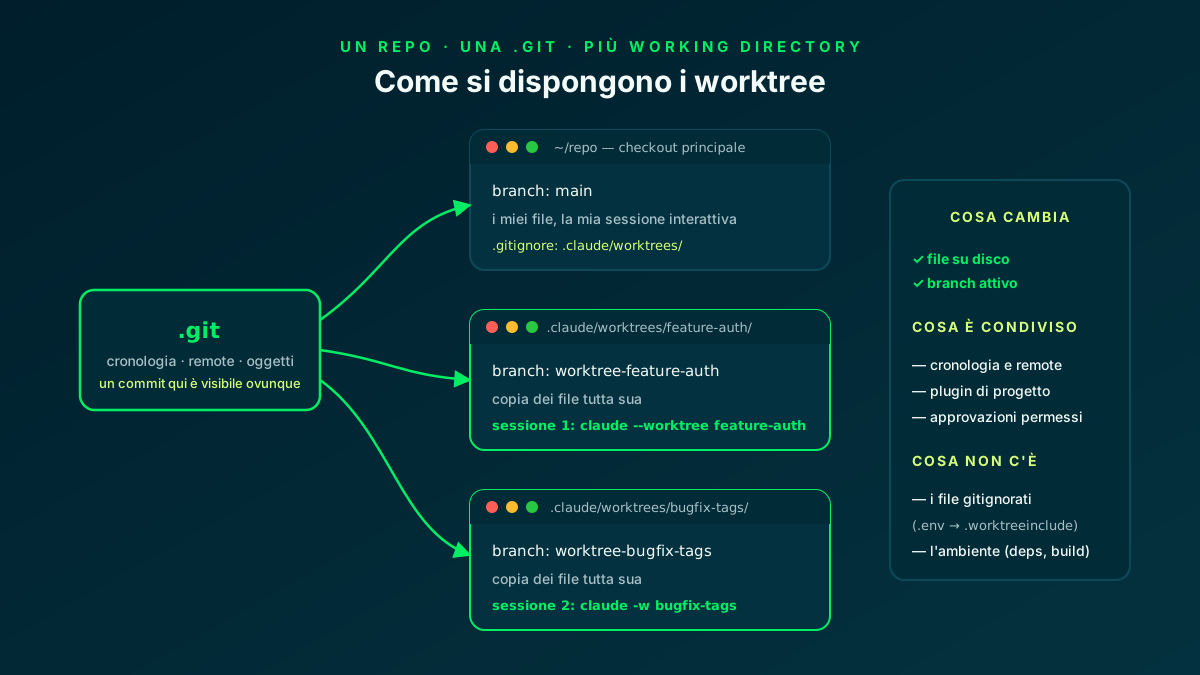
Worktrees share history and remotes with the main checkout: only the files on disk and the branch differ.
🚀 The --worktree flag: the session is born isolated
With claude --worktree <name> (short form -w) Claude Code runs git worktree add for me: it creates the directory under .claude/worktrees/<name>/ at the repo root, on a new branch called worktree-<name>, and opens the session inside it. A second terminal with a different name is the second parallel session; if I omit the name, Claude generates one like bright-running-fox.
Two operational details I have learned to respect: the first interactive session requires workspace trust — if I have never run claude in that directory, claude --worktree exits with an error until I accept the dialog; claude -p --worktree skips the trust check instead and proceeds without it. It also pays to add .claude/worktrees/ to .gitignore, or the main checkout fills up with ghost untracked files.
There is also the no-terminal variant: asking Claude to "work in a worktree" during a session. It creates one itself with the EnterWorktree tool and moves in; leaving .claude/worktrees/ for arbitrary paths requires my explicit approval instead, because the session's working directory — and with it CLAUDE.md and settings — would migrate elsewhere.
# terminal 1: the feature
$ claude --worktree feature-auth
#   -> .claude/worktrees/feature-auth/  branch worktree-feature-auth

# terminal 2: the bugfix, in parallel
$ claude -w bugfix-tags
#   -> .claude/worktrees/bugfix-tags/   branch worktree-bugfix-tags

# from a pull request: fetches pull/1234/head from origin
$ claude --worktree "#1234"   # quotes protect the #

# in the project's .gitignore
.claude/worktrees/
Worktrees · Claude Code Docs ↗
📁 .worktreeinclude: gitignored files that follow the session
A worktree is a fresh checkout: tracked files are all there, but .env, .env.local and any other gitignored file stay behind in the main checkout. The first parallel session I ever launched died instantly because of this — the app would not start without its local configuration.
The native fix is the .worktreeinclude file at the project root: it uses .gitignore syntax and every time Claude Code creates a worktree it copies the matching files in. The safety rule is elegant: only files that are both in .worktreeinclude and gitignored get copied, so a tracked file is never duplicated by accident.
It applies to every worktree Claude Code creates with git — the --worktree ones, the isolated subagents' ones and the desktop app's parallel sessions. The rest of the environment (dependencies, build) still needs initializing: the first thing I ask a session born in a fresh worktree is to install the dependencies.
.env
.env.local
config/secrets.json

# .gitignore syntax; ONLY files that are also gitignored
# are copied: tracked files are never duplicated
.worktreeinclude · Claude Code Docs ↗
🔒 Isolation is not a suggestion: the four checks
What separates the native support from a hand-rolled worktree is the enforcement: while a session is isolated, Claude Code actively blocks every tool call that would touch the main checkout. It is not a prompt politely asking the model: it is a check on tool use, and it covers every subagent the session spawns too.
There are four checks. File edits: an Edit, Write or NotebookEdit targeting a path in the main checkout is refused. Working directory: a Bash, PowerShell or Monitor command whose working directory resolves to the main checkout — or cannot be verified — does not run. Git redirects: in Bash and Monitor commands, git -C, --git-dir, the GIT_DIR and GIT_WORK_TREE variables or a cd before the command cannot smuggle git across the boundary. Command shape: Bash and Monitor refuse shell constructs Claude Code cannot trace without executing them, like brace expansion or heredocs with unquoted delimiters — and this check cannot be turned off. PowerShell applies only the working-directory check; Bash and Monitor apply all three command checks.
A refusal is not a dead end: Claude sees it as a tool error that names the worktree and explains how to rewrite the command — typically by splitting it into plain, separate commands. In practice the agent corrects itself on the first bounce.
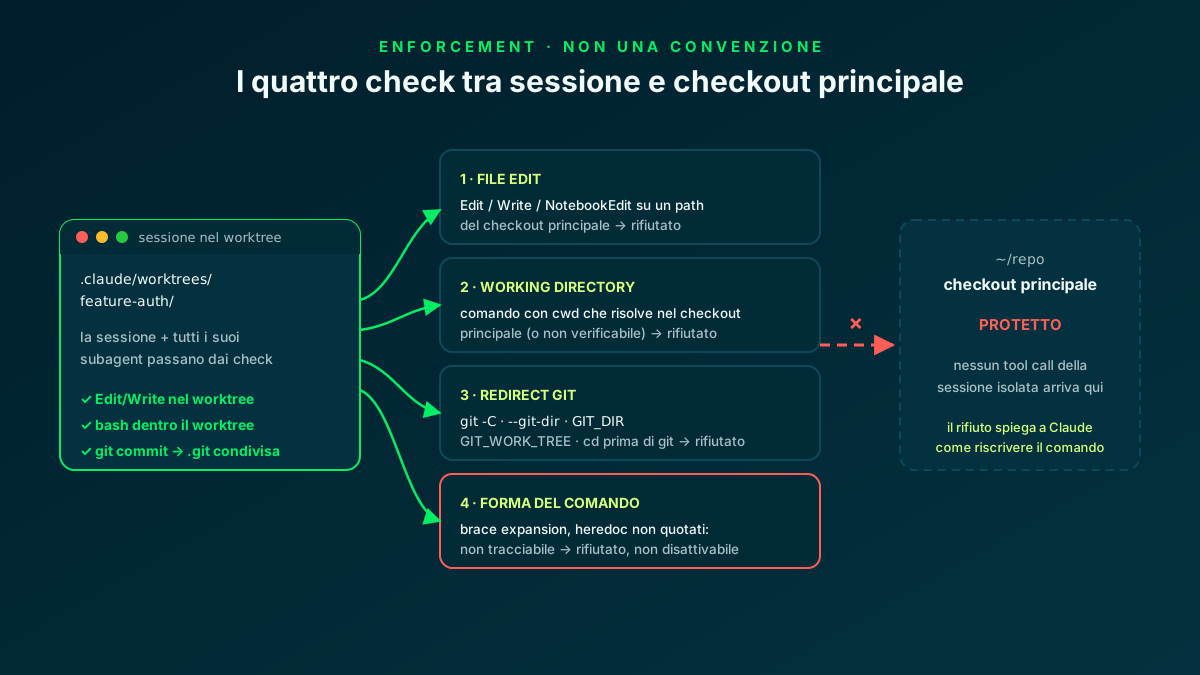
Edit, Write and NotebookEdit cover files; PowerShell uses only the working-directory check, while Bash and Monitor use all three command checks.
🤖 Isolated subagents: worktree isolation in the frontmatter
Worktrees and subagents compose: a subagent can run in its own temporary worktree, so multiple agents editing files in parallel never collide. I can ask on the fly ("use worktrees for your agents") or make it permanent in the subagent definition's frontmatter with isolation: worktree.
The lifecycle is managed: the subagent's worktree is removed automatically when the agent finishes without changes; if it holds work, it stays on disk until the periodic sweep can remove it without losing anything — and while the agent runs, a git worktree lock stops any concurrent cleanup from yanking it away.
It is the pattern I use for mechanical refactors across many files: the refactorer works in its own worktree, the tests run there, and the diff arrives clean without ever touching my copy. Combined with the one module → one agent map from the agent teams article, the two tools snap together: the team coordinates, the worktrees separate.
---
name: refactorer
description: Applies mechanical refactors across many files,
  then runs the test suite and reports the results.
isolation: worktree
---

Apply the requested refactor across every affected file.
Run the full test suite (yarn test) inside YOUR worktree
and report the diff summary and the test output.
Subagent isolation · Claude Code Docs ↗
⚙️ baseRef: where the worktree's branch starts from
By default every worktree uses "fresh" to branch from the repository's default branch on the remote when it is available. Claude Code keeps origin/HEAD current on its own: if the repo has not been fetched in the last 24 hours, it fetches the default branch with a five-second cap; if the fetch fails but the cached remote ref is usable, it uses that. If no remote is configured, or origin/HEAD is neither available nor fetchable, it falls back to my local HEAD. I normally get a clean tree aligned with the remote, with my current local commit as the fallback.
The alternative is "head": the worktree starts from my local HEAD, unpushed commits included. It is the right value when isolating subagents that must operate on my work-in-progress — a refactorer starting from main would not see the half-built feature it is supposed to touch.
What baseRef does not do is point at an arbitrary branch: to open a worktree on a specific existing branch the route is still a manual git worktree add, then claude inside the directory. It is the one case where the old routine is still needed.
{
  "worktree": {
    "baseRef": "head"
  }
}
Base branch · Claude Code Docs ↗
🧹 Cleanup and resume: what happens when I close
When an interactive session exits, Claude Code checks what removal would lose: changed files, untracked files, new commits. Clean worktree and unnamed session: automatic removal, branch included. Named session or worktree with work in it: it asks me whether to keep or remove — keeping preserves directory and branch so I can come back later.
Non-interactive runs with -p are the exception to know: no exit prompt, so no cleanup — and the lock taken at creation stays in place until a later session's sweep releases it. To remove them by hand: git worktree remove, preceded by git worktree unlock if git refuses.
Resume closes the loop: resuming a session that lived in a worktree returns it to that worktree — it holds for interactive resumes, for --continue and --resume with -p, and for the Agent SDK. Before re-entering, Claude Code verifies the directory is still a separate, healthy checkout; if the worktree no longer exists, the session restarts in the launch directory and the binding is cleared.
# what is out there
$ git worktree list
/repo                                  abc123 [main]
/repo/.claude/worktrees/feature-auth   def456 [worktree-feature-auth]

# removal (--force if it has uncommitted changes)
$ git worktree remove .claude/worktrees/feature-auth

# if git refuses because of a lock left by a -p run
$ git worktree unlock .claude/worktrees/feature-auth
$ git worktree remove .claude/worktrees/feature-auth🧭 What about Codex? Manual worktrees and isolated threads
The pattern is not exclusive to Claude Code. In a new thread's composer in the Codex app, I choose Worktree and the starting branch. Codex creates the worktree from the selected branch, but starts it in detached HEAD by default: it does not immediately create an isolated branch. A branch exists only after I choose Create branch here in the chat header. Default retention keeps the 15 most recent Codex-managed worktrees; I can change the limit or turn off automatic deletion.
With the Codex CLI the support is manual but the flow is identical to Claude Code's pre-flag routine: git worktree add with a new branch, cd into the directory, codex. One git constraint to remember: the same branch cannot be checked out in two worktrees at once, so every instance wants its own.
What is missing compared to Claude Code is the enforcement: in a manual worktree the isolation is a convention, not a constraint — no path checks, no git-redirect blocking. Shared rules in AGENTS.md and a strict CI remain the only guardrails, which is why I prefer the native support for heavy parallel work.
# one worktree per instance, one branch per worktree
$ git worktree add ../demo-feature-auth -b feature-auth
$ cd ../demo-feature-auth && codex

# in parallel, in another terminal
$ git worktree add ../demo-bugfix-tags -b bugfix-tags
$ cd ../demo-bugfix-tags && codex

# when the work is done
$ git worktree remove ../demo-feature-auth
Worktrees · OpenAI Codex Docs ↗
📦 GitHub repo
All the article's material is in a public repository: WorktreeNotes, a small two-module Node API (Notes and Tags) with a node --test suite — real enough to give two parallel sessions something concrete to work on without conflicts. Around the app sit the pieces of the flow: the .worktreeinclude with the .env example, the .claude/settings.json with worktree.baseRef, the refactorer subagent definition with isolation: worktree, ready-made prompts in prompts/ and two service scripts for worktree status and cleanup.
To try it I need Node 20+, Git and Yarn; Bash is required on macOS/Linux. Claude Code is required only for the worktree flows and optional if I only want to run the zero-dependency API. No external services are needed: no database, no Docker. I copy .env.example to .env to demonstrate the worktree flow, but the app does not load .env automatically at runtime; the tests have zero dependencies.
# prerequisites: Node.js 20+, Git, Yarn; Bash on macOS/Linux
# Claude Code: worktree flows only; optional for running the zero-dependency API
$ git clone https://github.com/fscamuzzi/claude-code-worktrees-demo.git
$ cd claude-code-worktrees-demo
$ cp .env.example .env   # .env is not loaded automatically
$ yarn test    # node --test: 9 passing
$ yarn start   # the API on http://localhost:3000

# then the two parallel sessions:
$ claude --worktree feature-auth   # terminal 1
$ claude -w bugfix-tags            # terminal 2

# worktree status and cleanup
$ bash scripts/wt-status.sh
$ bash scripts/wt-clean.sh
claude-code-worktrees-demo · GitHub ↗
✅ Final checklist: the worktree flow in eight moves
Recapping the journey. My takeaway after weeks with the flag: worktrees do not replace subagents or agent teams — they are the layer underneath, the one that separates files while the others coordinate the work. The everyday parallel session starts with -w and ends with the cleanup prompt; the manual worktree survives only for existing branches and for Codex.
And the cross-cutting lesson is the same as my hooks: the isolation that works is the one the tool enforces, not the one I politely ask the model for.
- 01.gitignore.claude/worktrees/ out of the main checkout
- 02One-time trustrequired interactively; claude -p --worktree skips it
- 03claude -w <name>one session per worktree, automatic branch
- 04.worktreeinclude.env and local config follow every worktree
- 05Environment setupdependencies installed in the newborn worktree
- 06Right baseRef"fresh" from remote or local-HEAD fallback; "head" from my WIP
- 07Isolated subagentsisolation: worktree in the frontmatter
- 08Deliberate cleanup-p never cleans: git worktree remove/unlock
Files separated by construction, coordination free to run on top.
Frequently asked questions about git worktrees with Claude Code
What is the difference between a git worktree and a plain branch?
A branch is a pointer into history: to switch I must check it out, and the files on disk change under whoever is working. A worktree is an extra working directory, with its own branch, sharing the same .git: two sessions work on two branches at the same time, each with its own copy of the files. That separate copy is what makes agent parallelism safe.
Where does the --worktree flag create worktrees and how do I clean them up?
Under .claude/worktrees/<name>/ at the repo root, on a worktree-<name> branch. When an interactive session exits, Claude Code removes a clean unnamed worktree by itself and asks what to do in the other cases. Non-interactive runs with -p never clean up: for those you need git worktree remove, possibly preceded by git worktree unlock.
How do I carry .env files into a new worktree?
With a .worktreeinclude file at the project root, in .gitignore syntax. On every worktree creation Claude Code copies the matching files, but only if they are also gitignored: a tracked file is never duplicated. It applies to --worktree worktrees, isolated subagents' worktrees and the desktop app's parallel sessions.
Can I start the worktree from an existing branch?
Not with the flag: worktree.baseRef only accepts "fresh" (the remote's default branch when available, with a fallback to my local HEAD) or "head" (always my local HEAD, unpushed commits included), not a branch name. For an existing branch the route is manual: git worktree add with the branch, cd into the directory and claude from there. Alternatively, --worktree "#1234" creates a worktree from a pull request's head.
When do I use worktrees and when an agent team?
They are different layers that combine. Worktrees isolate files: they matter when two or more sessions edit the same repo in parallel, or when work must survive the session with its own branch and commits. Agent teams coordinate the work: shared task list, messages between teammates. For heavy parallelism I use both: team on top, worktrees underneath — subagents too can each run in their own with isolation: worktree.
Let's talk
If this topic is relevant to you, write to me: comparing notes on code and AI is always time well spent.


