 COOL
COOL 

In this article
- 🎬 Show, don't prompt: what Record a Skill is
- 🖱️ Where the button is (and who has it)
- 🎥 The recording: screen plus your voice
- 🧠 What happens the moment you stop
- 📄 What you actually get: a plain Skill
- ▶️ Running it again
- 🎯 What's worth recording — and what isn't
- 🔒 Before you hit record: privacy and safety
- ✅ Where it fits, and why it matters
🎬 Show, don't prompt: what Record a Skill is
Claude Cowork isn't a chat window: it's the mode where Claude runs multi-step work on your desktop — opening local files, moving between folders and applications, and handing back a finished deliverable. Record a Skill, which Anthropic started rolling out in late July 2026, is how you teach it one of those workflows by demonstration instead of by prompt. You record yourself doing the task once, and Claude saves it as something it can repeat on demand.
The mental model that matters: the recording is the source of truth. Claude isn't guessing what you might want from a paragraph of instructions — it's watching the exact buttons you click, the order you click them in, and the values you type, while your narration explains the why behind each choice. That combination of what (the screen) and why (your voice) is what separates a brittle click-replay from a real, reusable skill.
The old way — prompt it
- You describe every step in words
- Edge cases only exist if you remember them
- Ambiguity in the text becomes wrong output
- Re-explained from scratch each time
Record a Skill — show it
- You do the task once, on screen
- Claude captures the exact clicks and values
- Your narration supplies the rules and the why
- Saved once, re-run with a slash command
A prompt is what you can put into words; a recording is everything you actually do, including the parts you'd forget to write down.
🖱️ Where the button is (and who has it)
The entry point is the composer in a Cowork task. Click the + button — the same menu you use to attach a file — and Record a skill sits right at the top, directly under Add files or photos and above the Skills, Connectors and Plugins entries (see the real menu below). Pick it and Claude asks for screen-recording permission, with an explicit warning not to type passwords or show private conversations while it's rolling; then you press Start Recording.
As of the July 2026 rollout it's a desktop-app feature only — not the web or mobile clients — and it's landing on the paid plans (Pro, Max and Team) in phases, so if you don't see it yet, update the app and check again in a day or two. It's the Cowork counterpart to a capability OpenAI already ships in Codex, so expect this "demonstrate a workflow" pattern to become table stakes across agents.
- Path: Cowork task → composer + menu → Record a skill.
- Platform: the Claude desktop app only (macOS/Windows), not web or mobile.
- Plans: rolling out on paid tiers — Pro, Max and Team.
- First prompt: grant screen-recording permission, then Start Recording.
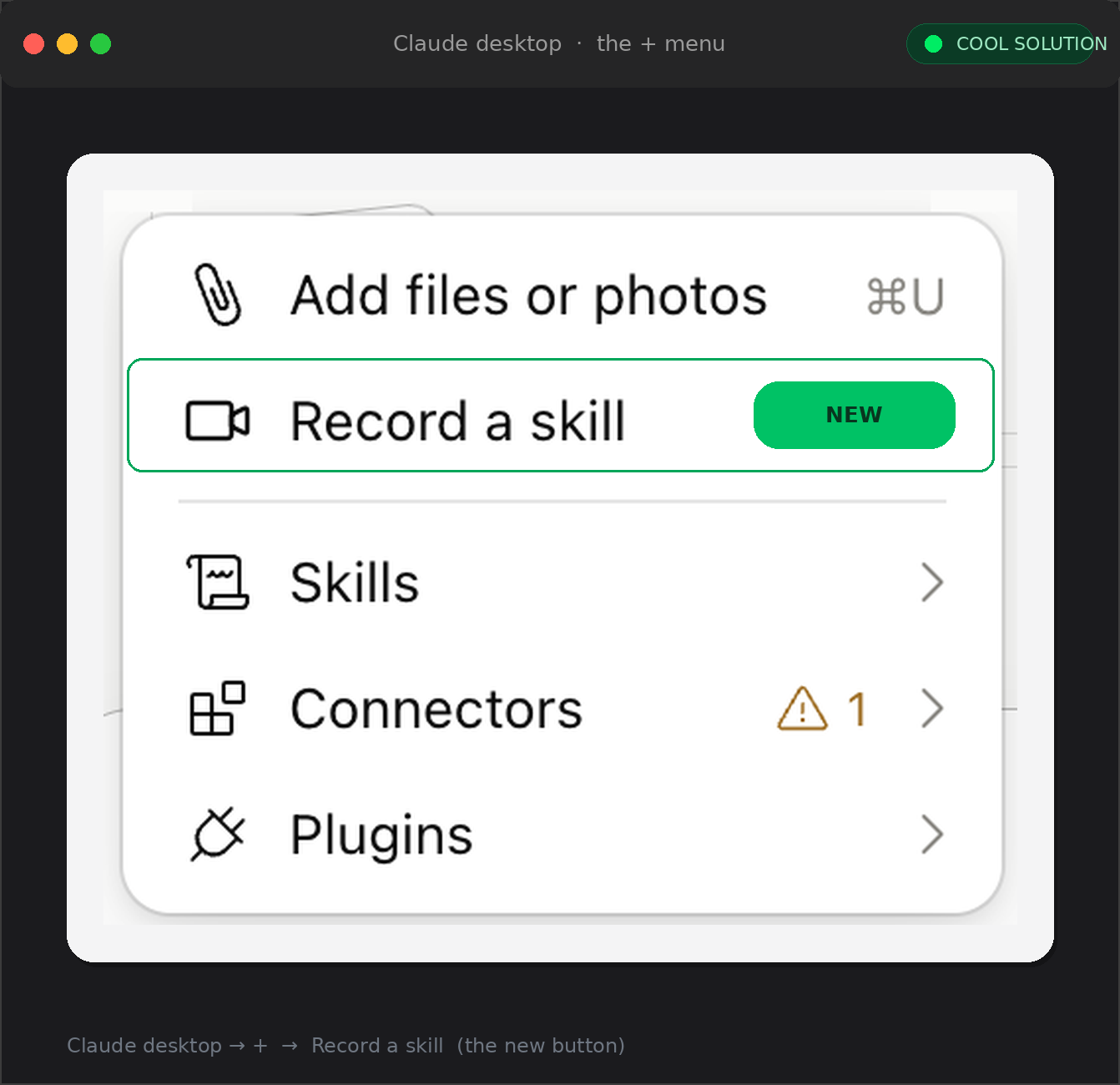
The actual menu (my desktop app): Record a skill sits directly under Add files or photos, above Skills, Connectors and Plugins.
🎥 The recording: screen plus your voice
Once it's rolling, Record a Skill captures two channels at the same time: your screen and your microphone. You do the task at a normal pace and — this is the part people skip — you say what you're doing and why out loud. Claude reads the screen to learn the mechanics; it listens to your narration to learn the rules. "I filter to last week, keep only closed deals, then export to CSV" tells it the steps; "…because finance only wants closed deals" tells it the logic it will bake into the skill.
One discipline pays off here: stay in the tabs and windows that belong to the task. Anything visible on screen is treated as part of the workflow, so wandering into unrelated email or Slack teaches Claude noise. Keep the demonstration tight, narrate the decision points rather than the obvious clicks, and you'll get a cleaner skill out the other side.
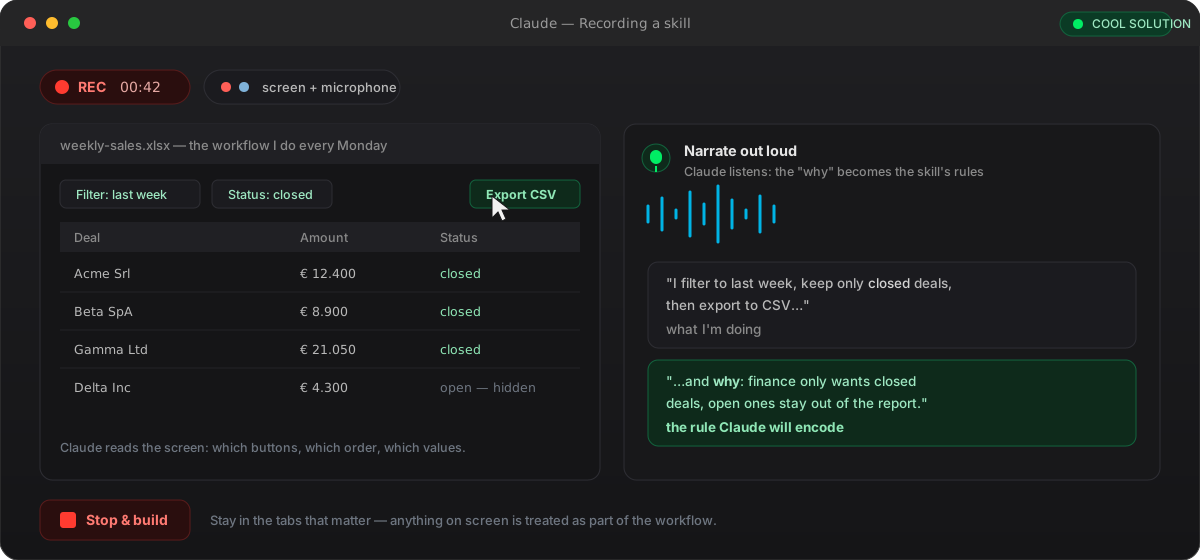
Two channels at once — the screen gives Claude the steps, your narration gives it the rules. The 'why' is the part that turns a replay into a skill.
🧠 What happens the moment you stop
When you hit stop, Claude doesn't blindly serialise your clicks. First it plays the demonstration back to you — a short summary of the steps it understood and the rule it extracted — so you can catch a misread before anything is written. This read-back is the single most useful step: it's where you confirm that "keep only closed deals" was heard as a rule and not as a one-off.
Then it builds the skill. In the walkthroughs I've seen, Claude fans the work out to a few sub-agents running in parallel — one drafts the SKILL.md, one writes the reference rules (which app, which selectors, which file names), one packages everything into a folder — and finally proposes a name (something like weekly-sales-report) with a Save Skill button. Edit the name, skim the steps, and only then save: the read-back plus a quick review is your quality gate.
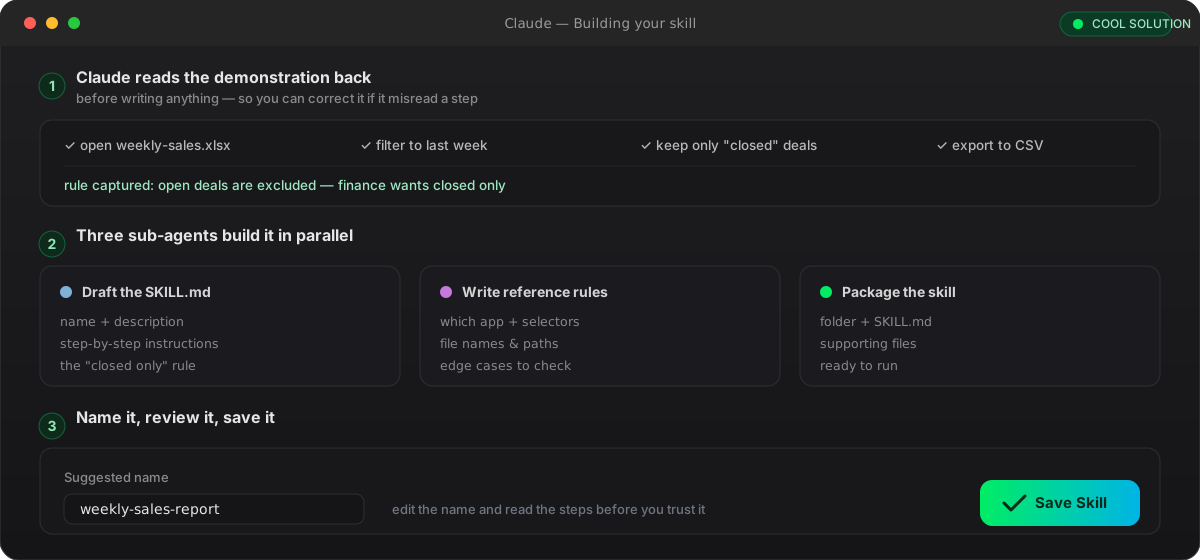
Claude reads the demo back before building anything, then parallel sub-agents draft, document and package it — you name it and save.
📄 What you actually get: a plain Skill
The output isn't a magic black box — it's an ordinary Agent Skill: a folder with a SKILL.md at its root, exactly the same open format you'd hand-write for Claude Code. Frontmatter with a name and a description, then the steps and rules in plain markdown. That matters because it means a recorded skill is readable, editable and reviewable: if Claude captured a step wrong, you open the file and fix a line, you don't re-record from zero.
It also means recording is just another way to author the same artifact. Everything you already know about hand-written skills applies — the description is still the line Claude matches to decide when to fire the skill, supporting files still load on demand, and you can still commit it, share it, or package it into a plugin later. Record a Skill lowers the cost of the first draft; it doesn't lock you into a proprietary format.
---
name: weekly-sales-report
description: Build the weekly sales report from weekly-sales.xlsx.
  Use every Monday to export last week's closed deals to CSV.
---

## Steps
1. Open weekly-sales.xlsx
2. Filter the deals to the last week
3. Keep only rows where Status = "closed"
4. Export the result to report-<YYYY-MM-DD>.csv

## Rules
- Exclude open deals: finance only wants closed ones.
- Save the file in the reports/ folder.
Agent Skills · Anthropic Engineering ↗
▶️ Running it again
Once saved, the skill lives alongside your others and you invoke it the usual way: open a fresh chat and type /weekly-sales-report. Claude loads the recorded procedure and carries out the steps itself — filter, keep closed, export — applying the rule it heard in your narration, without you re-explaining a thing. For steps that touch the browser it drives Claude in Chrome, so if the skill needs to click around a web app you'll want the Control Chrome setting enabled.
This is where the payoff shows up. The task that used to be ten minutes of clicking every Monday becomes one command and a review of the output. You're not automating away judgement — you still read the CSV before you send it — you're automating away the mechanical repetition so your attention goes to the part that needs a human.
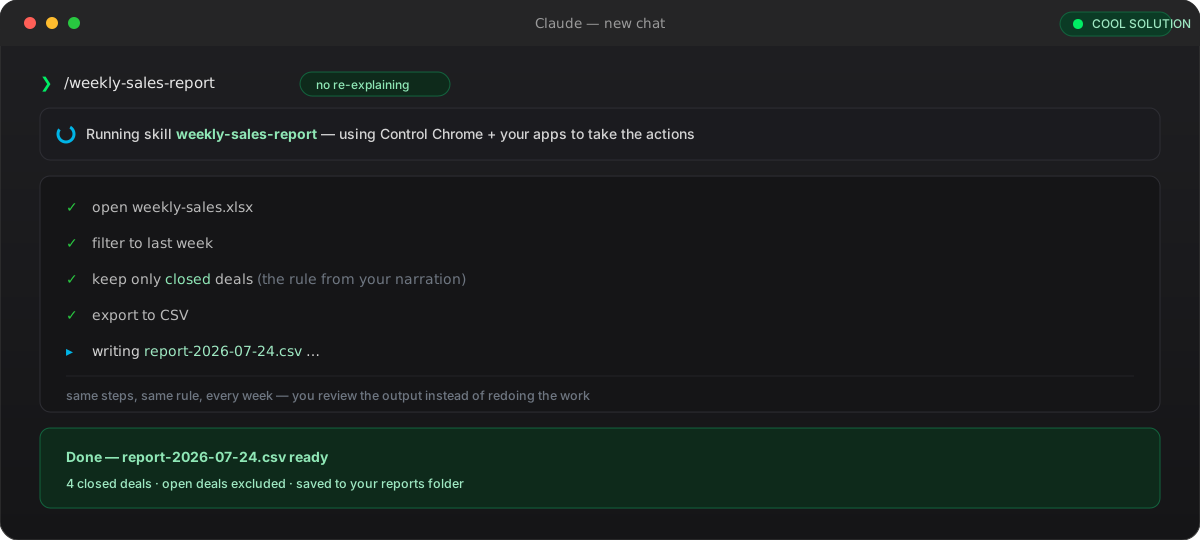
Same steps, same rule, every week: you trigger it with a slash command and review the output instead of redoing the work.
🎯 What's worth recording — and what isn't
Record a Skill shines on workflows that are repeatable and rule-based: the same shape every time, decisions you can say out loud, an output you can check. Weekly reports, spreadsheet clean-ups, brand-formatting a deck, a research brief with a fixed structure, triaging inbound support tickets — anything where the value is in doing it consistently rather than creatively.
It's a poor fit for the opposite: one-off tasks you'll never repeat (the recording costs more than it saves), anything driven by unspoken intuition you can't narrate, and — most importantly — irreversible or sensitive actions. Don't record yourself approving a payment, resetting a password or moving money: a skill that can do those on command is a liability, not a convenience.
Record it
- Weekly reports and recurring exports
- Spreadsheet normalisation and clean-ups
- Deck / document brand formatting
- Research briefs with a fixed structure
- Support triage and ticket classification
Don't record it
- One-off tasks you won't repeat
- Password resets, banking, payments
- Irreversible approvals
- Tasks driven by intuition you can't narrate
- Anything showing secrets or personal data
Rule of thumb: if you can narrate the rules and check the output, record it. If it's irreversible or unspeakable, don't.
🔒 Before you hit record: privacy and safety
A screen recording captures whatever is on screen, and — as of this rollout — Anthropic hasn't yet published a dedicated page on exactly how these recordings are stored and retained. That's reason enough to treat the capture like something that might be reviewed: prepare the screen before you press record rather than trusting that a sensitive detail won't matter.
Practically, that means recording with sample data instead of real customer records, closing anything with credentials or private messages, and disabling notification previews so a Slack DM doesn't pop into frame. After Claude builds the skill, skim the generated SKILL.md for anything that shouldn't be there — a copied identifier, a real file path, an accidental secret — before you save or share it.
[ ] Use fake / sample data, not real customer records
[ ] Close email, chat, password managers, finance apps
[ ] Turn off notification previews (no DMs popping in-frame)
[ ] Record the smallest screen area and shortest path that works
[ ] After building: read the SKILL.md for leaked paths / secrets
[ ] Rename or redact anything sensitive before you save or share✅ Where it fits, and why it matters
Record a Skill doesn't replace hand-written skills — it lowers the barrier to the first one. Writing a SKILL.md from scratch assumes you can already spell out every step; recording assumes only that you can do the task. For the many people whose expertise lives in their hands rather than in documentation, that's the whole unlock: the knowledge that used to leave with the person now leaves with a demonstration.
The deeper point is that the output is portable and boring in the best way — a plain SKILL.md on the open Agent Skills standard. So a workflow you captured by talking through it once becomes a reviewable, editable, shareable artifact, no different from one an engineer wrote by hand. Show it once, keep it forever, and improve it like any other file.
- 01Open the + menuIn a Cowork task, composer → + → Record a skill, then grant screen permission.
- 02Do the task onceScreen + voice: perform it at normal pace and narrate what you do and why.
- 03StopClaude plays the demonstration back so you can catch a misread before it builds.
- 04It builds the skillSub-agents draft the SKILL.md, write the rules and package it; Claude proposes a name.
- 05Review and saveEdit the name, skim the steps, press Save Skill — the read-back is your quality gate.
- 06Re-run itIn a new chat type /skill-name; Claude repeats the steps, using Control Chrome where needed.
Frequently asked questions about Record a Skill Claude Cowork
What is Record a Skill in Claude Cowork?
It's a feature of the Claude desktop app that lets you teach Cowork a workflow by demonstration instead of by prompt. You record your screen while doing a task once and narrating what you do and why; Claude turns that recording into a reusable Skill (a SKILL.md) it can run again on demand. Anthropic started rolling it out in late July 2026.
Where do I find the Record a Skill button, and which plans have it?
In a Cowork task, open the composer's + menu — the same one for adding files or a screenshot — and choose 'Record a skill'. It's a desktop-app feature only (not web or mobile) and it's rolling out on the paid plans: Pro, Max and Team. If you don't see it, update the app and check again, since the rollout is phased.
Does Record a Skill capture my microphone as well as my screen?
Yes. It records both your screen and your microphone at the same time. The screen teaches Claude the mechanical steps — which buttons, which order, which values — while your spoken narration teaches it the rules and the reasoning. Saying why you do each step, not just what you click, is what produces a robust skill instead of a brittle click-replay.
What does Claude actually create — is it a normal Skill?
Yes. The output is an ordinary Agent Skill: a folder with a SKILL.md at its root, the same open format you'd hand-write for Claude Code, with a name and description in frontmatter plus steps and rules in markdown. Because it's a plain file, you can read it, edit a misheard step, commit it, share it, or package it into a plugin — recording is just another way to author the same artifact.
How do I run a recorded skill later?
Open a new chat and invoke it with a slash command, e.g. /weekly-sales-report. Claude loads the recorded procedure and performs the steps itself, applying the rule it heard in your narration. For steps that act on a web app it uses Claude in Chrome, so enable the Control Chrome setting if the skill needs to take browser actions.
Is it safe to record a workflow that touches sensitive data?
Treat the recording as something that could be reviewed: as of the rollout Anthropic hasn't published detailed retention terms. Record with sample data, close apps with credentials or private messages, and disable notification previews so nothing pops into frame. Afterwards, read the generated SKILL.md for leaked paths or secrets. And don't record irreversible actions — payments, password resets — as a skill that can do them on command.
Let's talk
If this topic is relevant to you, write to me: comparing notes on code and AI is always time well spent.