 COOL
COOL 


In this article
- 🧊 Why an LLM cannot be tested with an assert
- 🧱 The Microsoft.Extensions.AI.Evaluation library
- 🏗️ The architecture of the suite
- ⬇️ Step 1 · Ollama with Docker Compose
- 🧩 Step 2 · Project and NuGet packages
- 🤖 Step 3 · The assistant under test
- ⚙️ Step 4 · The wiring: judge, evaluators and reporting
- 📏 Step 5 · A custom evaluator with no LLM
- 🧪 Step 6 · The xunit test with the scenarios
- 📊 Step 7 · dotnet test, caching and the HTML report
- 🛡️ Limits, the local judge and what I learned
- 📦 GitHub repo
- ✅ Final checklist and next steps
🧊 Why an LLM cannot be tested with an assert
A unit test verifies a deterministic contract: same input, same output. An LLM breaks that assumption at the root: the same question produces different phrasings on every call, all potentially correct. Assert.Equal on a generated answer is a test that lies: red on good answers, green only by coincidence.
LLM evaluation replaces comparison with judgement: metrics that measure properties of the answer — is it relevant? is it coherent? does it stick to the provided context? — assigning a score from 1 to 5. Quality metrics are computed by another model acting as a judge (LLM-as-judge); deterministic ones, like length, remain plain code.
String asserts
- Same input ⇒ different output on every run
- Red even on correct answers
- No quality measure, only equality
- No way to track trends over time
Evaluation with metrics
- 1-5 scores for relevance, coherence, groundedness
- Judgement tolerates rephrasing
- Deterministic custom metrics where needed
- Per-scenario reports and trends, run after run
Comparison measures equality; evaluation measures quality.
🧱 The Microsoft.Extensions.AI.Evaluation library
Microsoft.Extensions.AI.Evaluation is the NuGet package family that brings evaluation into .NET tests: it builds on the Microsoft.Extensions.AI abstractions (IChatClient), so it works with any provider — Ollama locally, Azure OpenAI, any backend with a compatible client.
It integrates with the test framework you already use — I use xunit — and with plain dotnet test: no special runners, no external platforms. There are four pieces:
- Evaluation — the abstractions: IEvaluator, EvaluationResult, the metrics (NumericMetric, BooleanMetric) and their interpretations.
- Evaluation.Quality — the ready-made LLM-as-judge evaluators: RelevanceEvaluator, CoherenceEvaluator, GroundednessEvaluator, CompletenessEvaluator and the agent-focused ones like ToolCallAccuracyEvaluator.
- Evaluation.Reporting — ScenarioRun, response caching and the result store on disk (or Azure Storage).
- Evaluation.Console — the aieval tool that turns the results into the HTML report.
🏗️ The architecture of the suite
The system under test is a minimal support assistant: it receives a question and a context (the relevant FAQ entry) and must answer only with what the context contains, in under 80 words, in the language of the question. Deliberately small: the star here is the test bench, not the assistant.
Each evaluation case becomes a scenario: the xunit test creates a ScenarioRun, gets the assistant's answer, has the evaluators judge it and lets the framework persist scores and cache to disk. The model under test and the judge are two separate configurations: today both are local llama3.1, tomorrow the judge can become a bigger model without touching code.
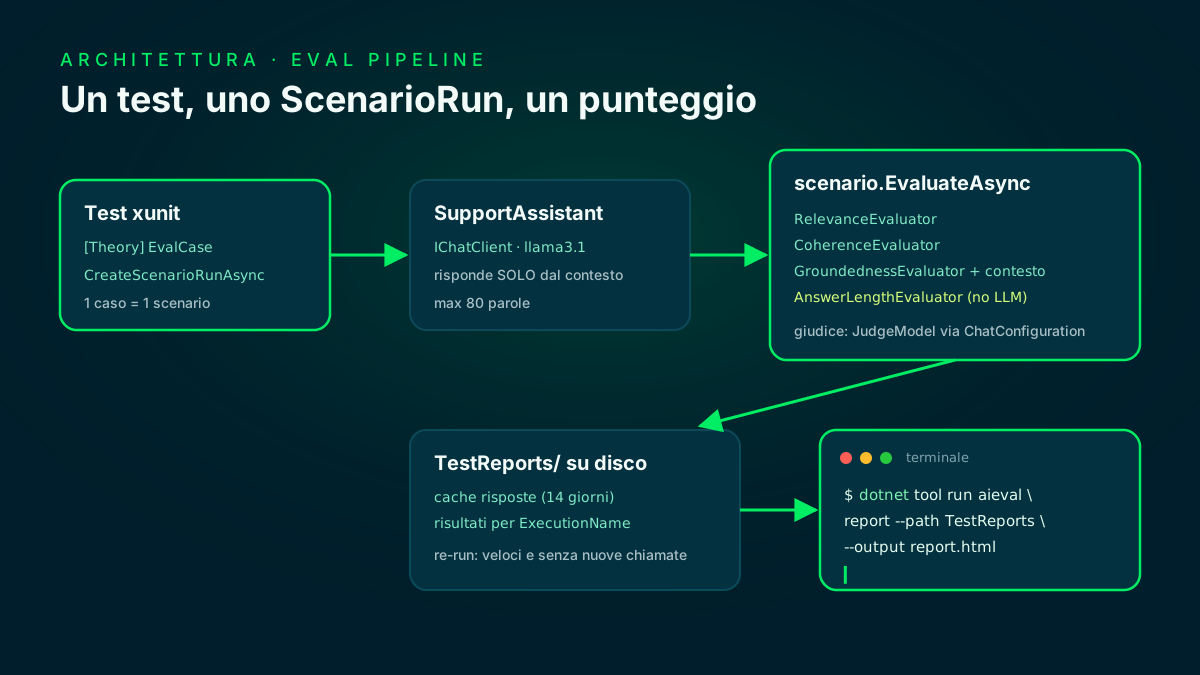
SUT and judge are two distinct IChatClients; cache and results live in TestReports/.
⬇️ Step 1 · Ollama with Docker Compose
The only external dependency is Ollama. In the repo I start it with Docker Compose: one service for the server on the http://localhost:11434 endpoint and a one-shot service that pulls llama3.1 into the shared volume and exits. Nothing to install locally besides Docker.
If you already run Ollama natively, skip Docker entirely: the default endpoint is the same.
services:
  ollama:
    image: ollama/ollama:latest
    ports:
      - "11434:11434"
    volumes:
      - ollama-models:/root/.ollama
    healthcheck:
      test: ["CMD", "ollama", "list"]
      interval: 10s
      timeout: 5s
      retries: 10

  # pulls llama3.1 into the shared volume, then exits
  ollama-init:
    image: ollama/ollama:latest
    depends_on:
      ollama:
        condition: service_healthy
    environment:
      OLLAMA_HOST: http://ollama:11434
    entrypoint: ["/bin/sh", "-c", "ollama pull llama3.1"]
    restart: "no"

volumes:
ollama-models:🧩 Step 2 · Project and NuGet packages
The solution has two projects: a class library with the assistant and an xunit project with the evaluation suite. The evaluation packages go into the test project only: production code doesn't even know a judge exists.
I also add the tool manifest with Microsoft.Extensions.AI.Evaluation.Console: that's the aieval tool that turns the results into the HTML report at the end.
$ dotnet new sln -n LlmEvalDemo
$ dotnet new classlib -n SupportAssistant -o src/SupportAssistant -f net8.0
$ dotnet new xunit -n SupportAssistant.Evaluation.Tests \
    -o tests/SupportAssistant.Evaluation.Tests -f net8.0
$ dotnet sln add src/SupportAssistant tests/SupportAssistant.Evaluation.Tests

# the class library only sees the abstractions
$ dotnet add src/SupportAssistant package Microsoft.Extensions.AI.Abstractions

# all the evaluation lives in the test project
$ cd tests/SupportAssistant.Evaluation.Tests
$ dotnet add reference ../../src/SupportAssistant
$ dotnet add package Microsoft.Extensions.AI
$ dotnet add package Microsoft.Extensions.AI.Evaluation
$ dotnet add package Microsoft.Extensions.AI.Evaluation.Quality
$ dotnet add package Microsoft.Extensions.AI.Evaluation.Reporting
$ dotnet add package OllamaSharp

# the aieval tool for the report
$ cd ../.. && dotnet new tool-manifest
$ dotnet tool install Microsoft.Extensions.AI.Evaluation.Console
The evaluation libraries · Microsoft Learn ↗
🤖 Step 3 · The assistant under test
The service is deliberately simple: an IChatClient, a system prompt with the three rules — context only, 80 words max, the question's language — and temperature 0 to reduce variance across runs.
One detail that matters: the method returns both the messages and the response. Evaluators judge the answer relative to the conversation: without the system prompt and the original question, the judge cannot assess relevance.
using Microsoft.Extensions.AI;

namespace SupportAssistant;

// The system under test: an assistant that answers ONLY from the
// provided context — exactly the behaviour the GroundednessEvaluator
// will score in the suite.
public class SupportAssistantService(IChatClient chat)
{
    private const string SystemPrompt =
        "You are the support assistant of a software product. " +
        "Answer using ONLY the information in the provided context. " +
        "If the context does not contain the answer, say you don't know " +
        "and suggest contacting support. " +
        "Keep the answer under 80 words and reply in the same language " +
        "as the question.";

    // Returns messages + response: evaluators judge the answer against
    // the whole conversation, not in isolation.
    public async Task<(IList<ChatMessage> Messages, ChatResponse Response)> AskAsync(
        string question,
        string context,
        CancellationToken ct = default)
    {
        IList<ChatMessage> messages =
        [
            new(ChatRole.System, SystemPrompt),
            new(ChatRole.User, $"Context:\n{context}\n\nQuestion: {question}")
        ];

        ChatOptions options = new() { Temperature = 0f };
        ChatResponse response = await chat.GetResponseAsync(messages, options, ct);
        return (messages, response);
    }
}⚙️ Step 4 · The wiring: judge, evaluators and reporting
All the setup lives in one static class: configuration reads endpoint and models from appsettings.tests.json, with SUT and judge as separate entries. The ReportingConfiguration is the heart: it declares which evaluators run on each scenario, which IChatClient the judge uses and where cache and results go.
enableResponseCaching: true is the life-changing line: the judge's responses are reused by subsequent runs until the request changes (14-day default). The first run pays the full cost; the following ones are nearly instant.
using Microsoft.Extensions.AI;
using Microsoft.Extensions.AI.Evaluation;
using Microsoft.Extensions.AI.Evaluation.Quality;
using Microsoft.Extensions.AI.Evaluation.Reporting;
using Microsoft.Extensions.AI.Evaluation.Reporting.Storage;
using Microsoft.Extensions.Configuration;
using OllamaSharp;

namespace SupportAssistant.Evaluation.Tests;

public static class EvalSetup
{
    private static readonly IConfigurationRoot Config =
        new ConfigurationBuilder()
            .AddJsonFile("appsettings.tests.json", optional: false)
            .AddEnvironmentVariables()
            .Build();

    // The assistant under test uses the SUT model...
    public static IChatClient CreateSutClient() =>
        new OllamaApiClient(new Uri(Config["Ollama:Endpoint"]!), Config["Ollama:SutModel"]!);

    // ...the LLM-as-judge evaluators use the judge model: two config
    // entries, so the judge can grow bigger without touching code.
    private static ChatConfiguration CreateJudgeConfiguration() =>
        new(new OllamaApiClient(new Uri(Config["Ollama:Endpoint"]!), Config["Ollama:JudgeModel"]!));

    // One ExecutionName per run: the report groups results by run.
    private static string ExecutionName { get; } = $"{DateTime.Now:yyyyMMddTHHmmss}";

    public static ReportingConfiguration Reporting { get; } =
        DiskBasedReportingConfiguration.Create(
            storageRootPath: FindReportsPath(),   // <repo>/TestReports
            evaluators:
            [
                new RelevanceEvaluator(),
                new CoherenceEvaluator(),
                new GroundednessEvaluator(),
                new AnswerLengthEvaluator()
            ],
            chatConfiguration: CreateJudgeConfiguration(),
            enableResponseCaching: true,
            executionName: ExecutionName);
}
Evaluate with reporting · Microsoft Learn ↗
📏 Step 5 · A custom evaluator with no LLM
Not every metric needs a judge. The 80-word budget in the system prompt is perfectly checkable with a regex: I implement IEvaluator with a word count and an interpretation that fails out-of-budget answers.
This is the pattern to remember: deterministic metrics are the ideal hard gate for CI — fast, free, zero flakiness — while the judge's scores act as quality telemetry. EvaluateAsync returns a NumericMetric with value, reason and interpretation: the same shape as the LLM-based metrics, so it lands in the same report.
using System.Text.RegularExpressions;
using Microsoft.Extensions.AI;
using Microsoft.Extensions.AI.Evaluation;

namespace SupportAssistant.Evaluation.Tests;

// Deterministic metric, zero LLM: counts words and fails answers over
// budget. The ideal hard gate for CI.
public class AnswerLengthEvaluator : IEvaluator
{
    public const string MetricName = "Answer Length";

    private const int MinWords = 3;
    private const int MaxWords = 100;

    public IReadOnlyCollection<string> EvaluationMetricNames => [MetricName];

    public ValueTask<EvaluationResult> EvaluateAsync(
        IEnumerable<ChatMessage> messages,
        ChatResponse modelResponse,
        ChatConfiguration? chatConfiguration = null,
        IEnumerable<EvaluationContext>? additionalContext = null,
        CancellationToken cancellationToken = default)
    {
        int words = Regex.Matches(modelResponse.Text ?? "", @"\b\w+\b").Count;

        NumericMetric metric = new(
            MetricName,
            value: words,
            reason: $"The response contains {words} words (budget: {MinWords}-{MaxWords}).");

        metric.Interpretation = words >= MinWords && words <= MaxWords
            ? new EvaluationMetricInterpretation(
                EvaluationRating.Good,
                reason: "The response respects the word budget.")
            : new EvaluationMetricInterpretation(
                EvaluationRating.Unacceptable,
                failed: true,
                reason: "The response is empty, too short or over the word budget.");

        return new ValueTask<EvaluationResult>(new EvaluationResult(metric));
    }
}
IEvaluator · Microsoft Learn ↗
🧪 Step 6 · The xunit test with the scenarios
Each case is a record — name, question, context — and becomes a row of the [Theory]. Three scenarios: a question covered by the context, one in Italian (the context is in English: the judge also sees the language switch) and an out-of-scope one, where the right answer is admitting you don't know — which is exactly what the GroundednessEvaluator rewards.
Note the dual assert regime: the deterministic gate is always on, the judge's scores only block the build with EVAL_STRICT=1. That's the documentation's own recommendation: scores drift as models evolve, so watch the trends in the report rather than failing CI on every wobble.
public record EvalCase(string Name, string Question, string Context)
{
    public override string ToString() => Name;
}

public class SupportAssistantEvalTests(ITestOutputHelper output)
{
    private static bool Strict =>
        Environment.GetEnvironmentVariable("EVAL_STRICT") == "1";

    public static TheoryData<EvalCase> Cases => new()
    {
        new EvalCase("PasswordReset", "How do I reset my password?", AccountFaq),
        new EvalCase("InvoiceDownload", "Dove scarico le fatture in PDF?", BillingFaq),
        new EvalCase("OutOfScope", "Can I pay my invoices with Bitcoin?", BillingFaq)
    };

    [Theory]
    [MemberData(nameof(Cases))]
    public async Task Answer_quality_is_evaluated_and_reported(EvalCase evalCase)
    {
        // await using: results are persisted to disk on dispose.
        await using ScenarioRun scenario =
            await EvalSetup.Reporting.CreateScenarioRunAsync(
                $"SupportAssistant.{evalCase.Name}");

        SupportAssistantService assistant = new(EvalSetup.CreateSutClient());
        (IList<ChatMessage> messages, ChatResponse response) =
            await assistant.AskAsync(evalCase.Question, evalCase.Context);

        // The assistant's context is also the judge's grounding context.
        EvaluationResult result = await scenario.EvaluateAsync(
            messages,
            response,
            additionalContext: [new GroundednessEvaluatorContext(evalCase.Context)]);

        // Deterministic gate: always enforced.
        NumericMetric length = result.Get<NumericMetric>(AnswerLengthEvaluator.MetricName);
        Assert.False(length.Interpretation!.Failed, length.Interpretation.Reason);

        // Judge metrics: always logged, blocking only in strict mode.
        foreach (string name in new[]
        {
            RelevanceEvaluator.RelevanceMetricName,
            CoherenceEvaluator.CoherenceMetricName,
            GroundednessEvaluator.GroundednessMetricName
        })
        {
            // A small judge may fail to produce a parseable score:
            // TryGetValue, so a missing metric is data in the report,
            // not an exception in the suite.
            if (!result.Metrics.TryGetValue(name, out EvaluationMetric? raw)
                || raw is not NumericMetric metric)
            {
                output.WriteLine($"  {name}: no score produced by the judge");
                continue;
            }

            output.WriteLine($"  {name}: {metric.Value} — {metric.Reason}");

            if (Strict)
                Assert.True(
                    metric.Interpretation?.Failed != true,
                    $"{name} failed: {metric.Interpretation?.Reason}");
        }
    }
}📊 Step 7 · dotnet test, caching and the HTML report
The suite runs with the command you already know: dotnet test. The first run really queries Ollama — assistant plus judge, a few minutes on consumer hardware — and fills the cache; subsequent runs reuse the responses and finish in seconds.
Then the payoff: aieval report reads TestReports/ and generates an HTML report with scores, the judge's reasoning and full conversations, scenario by scenario, run after run. In CI you just publish it as a pipeline artifact.
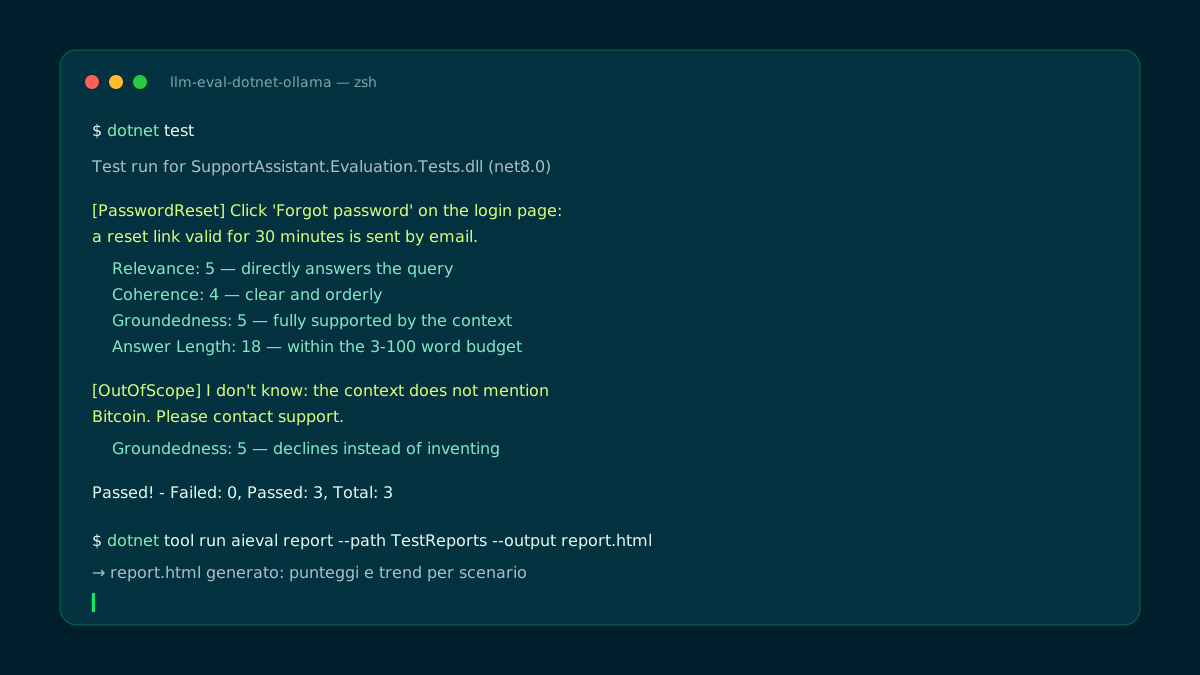
On the out-of-scope case the judge rewards admitting you don't know.
🛡️ Limits, the local judge and what I learned
The local judge is the trade-off to understand: free and private, but an 8B llama3.1 is as strict a judge as it is inconsistent. It really happened in my runs: on the out-of-scope case the judge failed to produce a parseable Coherence score — hence the TryGetValue in the test — and the assistant once answered in Portuguese to an English question. The suite made both visible: that's exactly its job.
Practical rules I'm taking home:
- Judge ≥ system under test: a judge smaller than the SUT produces noisy scores; as soon as you can, point JudgeModel at a bigger model — it's one config line.
- Hard gates on deterministic metrics only: length, format, forbidden patterns. LLM scores block the build only in strict mode; trends belong in the report.
- A missing metric is data: TryGetValue instead of Get — a judge that doesn't answer is information to report, not a crash of the suite.
- Caching as a multiplier: with enableResponseCaching the suite costs once and re-runs for free; invalidation is automatic when prompt or model change.
- Always include an out-of-scope scenario: it's the most informative test — it measures whether the system prefers silence over invention.
📦 GitHub repo
All the article's code is in a public repository: the complete solution — assistant, evaluation suite with the three scenarios, custom evaluator — plus the docker-compose.yml for Ollama, the tool manifest for aieval and the README with step-by-step instructions.
Once cloned, you only need Docker (or a native Ollama install) and the .NET SDK: docker compose up -d, dotnet test, and the first scores are in TestReports/.
$ git clone https://github.com/fscamuzzi/llm-eval-dotnet-ollama.git
$ cd llm-eval-dotnet-ollama

# dependencies in Docker (Ollama + llama3.1 pull)
$ docker compose up -d
$ docker compose logs -f ollama-init   # wait for the pull

# the evaluation suite
$ dotnet test

# the HTML report
$ dotnet tool restore
$ dotnet tool run aieval report --path TestReports --output report.html
llm-eval-dotnet-ollama · GitHub ↗
✅ Final checklist and next steps
Recap: if you followed the steps you now have an xunit suite that measures the quality of the answers of an LLM system with standard and custom metrics, a zero-cost local judge, caching that makes re-runs instant and an HTML report ready for CI.
From here you level up: the agent-focused evaluators (ToolCallAccuracyEvaluator, TaskAdherenceEvaluator) bring the same approach to tool-using agents, and the same test bench evaluates a full RAG system — retrieval provides the context, groundedness measures how well the answer stays inside it.
- 01Ollama via Composeserver + llama3.1 pull
- 02Project + NuGetevaluation in tests only
- 03Assistant under testcontext, 80 words, T=0
- 04EvalSetupseparate SUT and judge + reporting
- 05Custom evaluatordeterministic IEvaluator
- 06xunit testscenarios + dual-regime gates
- 07Cache + reportdotnet test, then aieval report
Next: agent-focused evaluators and evaluating RAG pipelines.
Frequently asked questions about LLM evaluation .NET
What is LLM evaluation?
It's the practice of measuring the quality of a model's answers with metrics — relevance, coherence, adherence to context — instead of exact comparisons. Quality metrics are assigned by a judge model (LLM-as-judge), while deterministic ones remain plain code.
What does Microsoft.Extensions.AI.Evaluation contain?
The abstractions (IEvaluator, EvaluationResult, the metrics), ready-made quality evaluators like RelevanceEvaluator, CoherenceEvaluator and GroundednessEvaluator, reporting with response caching and a disk-based store, and the aieval command-line tool that generates the HTML report.
Can I use Ollama as the judge for LLM evaluation?
Yes: the evaluators use IChatClient, so any model exposed by OllamaSharp works. A small model like llama3.1 8B is an inconsistent judge though: configure a model bigger than the system under test as the judge as soon as you can.
What is the GroundednessEvaluator?
It's the evaluator that measures how much the answer relies on the provided context, passed as a GroundednessEvaluatorContext. It rewards answers supported by the context and admitting you don't know when the context lacks the answer: the key metric for RAG systems.
Should judge scores fail the CI build?
Preferably not: scores drift as models evolve. The documentation recommends hard gates only on deterministic metrics and trend monitoring in the report for LLM-based ones; in the tutorial the score asserts only activate with EVAL_STRICT=1.
How does response caching work in evaluation?
With enableResponseCaching the ReportingConfiguration saves model and judge responses to disk: subsequent runs reuse them until prompt, model or parameters change (14-day default expiry). The first run pays the full cost, the following ones are nearly instant.
Let's talk
If this topic is relevant to you, write to me: comparing notes on code and AI is always time well spent.


