 COOL
COOL 


In this article
- 🐢 Why streaming: the monolithic response problem
- 🔬 Token after token: GetStreamingResponseAsync
- 🛰️ SSE: the right channel (now native in .NET 10)
- 🏗️ The architecture of the solution
- ⬇️ Step 1 · Ollama and a local model
- 🧱 Step 2 · Project and NuGet packages
- ⚙️ Step 3 · appsettings.json
- 🧩 Step 4 · Registering the chat client
- 📡 Step 5 · The SSE endpoint with TypedResults.ServerSentEvents
- 🚀 Step 6 · Program.cs: two lines of wiring
- 🖥️ Step 7 · The minimal HTML page
- 🧪 Step 8 · Run it and try it with curl
- 🔎 On the wire: what the stream looks like
- 🌐 Step 9 · Consuming the stream in the browser
- 🛡️ Cancellation, errors and guardrails
- ✅ Final checklist and next steps
- 📦 The full project on GitHub
🐢 Why streaming: the monolithic response problem
An LLM generates text one token at a time: the full answer to a complex question can take tens of seconds. If the endpoint waits for generation to finish before responding, the user stares at a spinner the whole time — and proxy and load balancer timeouts start firing.
Streaming flips the experience: the first fragment can arrive well before the complete answer and the user reads while the model writes. The total latency doesn't change, but the perceived latency collapses. Actual timing depends on the model, hardware and load.
Without streaming
- Tens of seconds staring at an empty screen
- Proxy and gateway timeouts always lurking
- The whole answer buffered in memory
- Cancellation lands after generation is already paid for
With streaming
- First token visible in under a second
- Periodic fragments reduce idle-timeout risk
- Each fragment forwarded as soon as it's generated
- Close the page → generation stops
Same total latency, opposite experience: perception is made by the first token.
🔬 Token after token: GetStreamingResponseAsync
In Microsoft.Extensions.AI streaming is a method on the IChatClient interface: GetStreamingResponseAsync returns an IAsyncEnumerable<ChatResponseUpdate>. Each update is a fragment of the response — usually one or a few tokens of text in the Text property.
The beauty is that it's the same abstraction as always: the code consuming the stream doesn't know whether Ollama, OpenAI or Azure sits behind it. And an await foreach is all it takes to read it, without ever buffering the full response in memory.
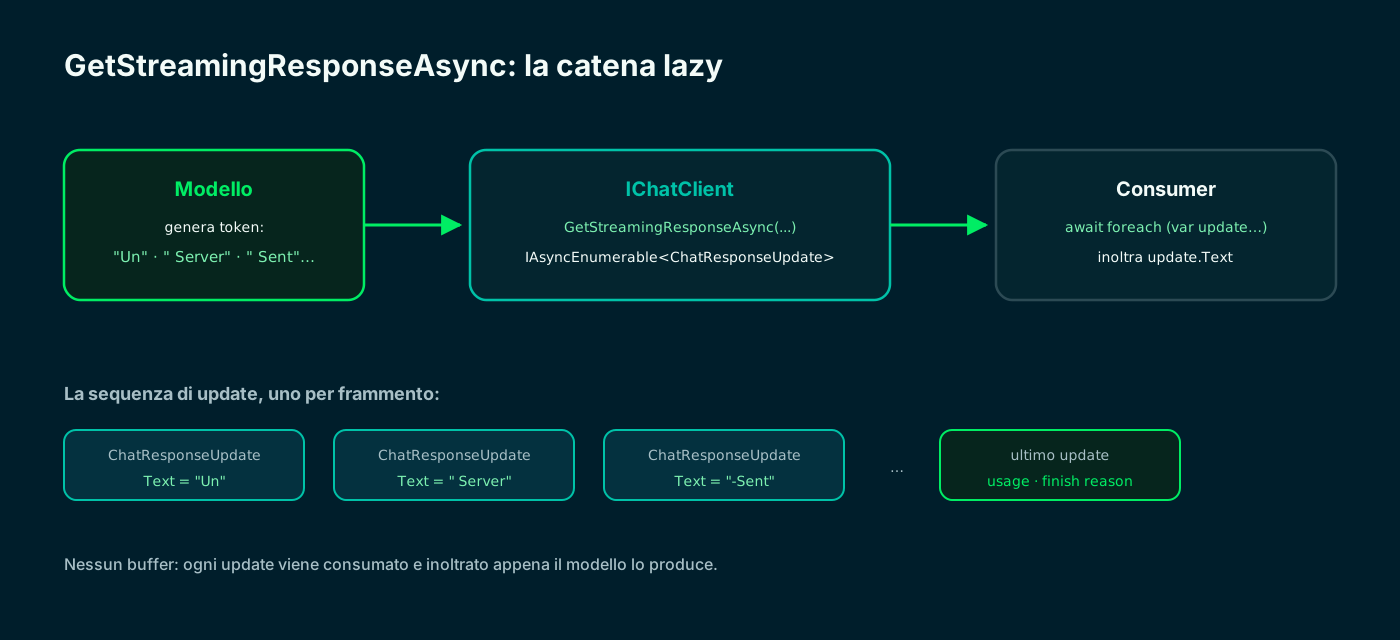
The model generates, IChatClient exposes updates, await foreach forwards them: no intermediate buffer.
🛰️ SSE: the right channel (now native in .NET 10)
To carry fragments from server to browser you need a unidirectional server → client channel. That's exactly what Server-Sent Events exist for: plain HTTP with a text/event-stream content type, where each event is text prefixed by data:. It's the transport used by the streaming APIs of OpenAI and Anthropic.
A WebSocket would be oversized: it's bidirectional, needs a dedicated handshake and complicates proxies and authentication. With .NET 10 SSE became first-class in ASP.NET Core: TypedResults.ServerSentEvents accepts an IAsyncEnumerable<SseItem<T>> and handles content type, serialization and wire format. Heartbeats, timeouts and proxy policies remain application and infrastructure concerns.
- SSE: plain HTTP and generally straightforward to proxy through CDNs, which must still be configured not to buffer the response. Perfect for model output.
- WebSocket: bidirectional and stateful; makes sense for collaboration or multi-user chat, not for a one-way token flow.
- Polling: simple but laggy and noisy; with an LLM it means losing precisely the "writes while you read" effect.
- SseItem<T> (namespace System.Net.ServerSentEvents): wraps each event's Data, EventType and EventId.
🏗️ The architecture of the solution
I build a .NET 10 Minimal API with a single POST /chat/stream endpoint. The model runs locally on Ollama, exposed as an IChatClient by OllamaSharp; the endpoint turns the ChatResponseUpdates into SseItem<string>s and returns them with TypedResults.ServerSentEvents.
The whole chain is lazy: the model generates a token, Ollama pushes it onto the local HTTP stream, IChatClient exposes it as an update, the endpoint forwards it as an SSE event. No link in the chain waits for the next one.
- Model: Ollama running locally (llama3.1), zero paid tokens and data that never leaves the machine.
- Streaming from the model: GetStreamingResponseAsync → IAsyncEnumerable<ChatResponseUpdate>.
- Transport to the client: TypedResults.ServerSentEvents + SseItem<string>, native to ASP.NET Core 10.
- NuGet packages: Microsoft.Extensions.AI and OllamaSharp. The transport needs nothing.
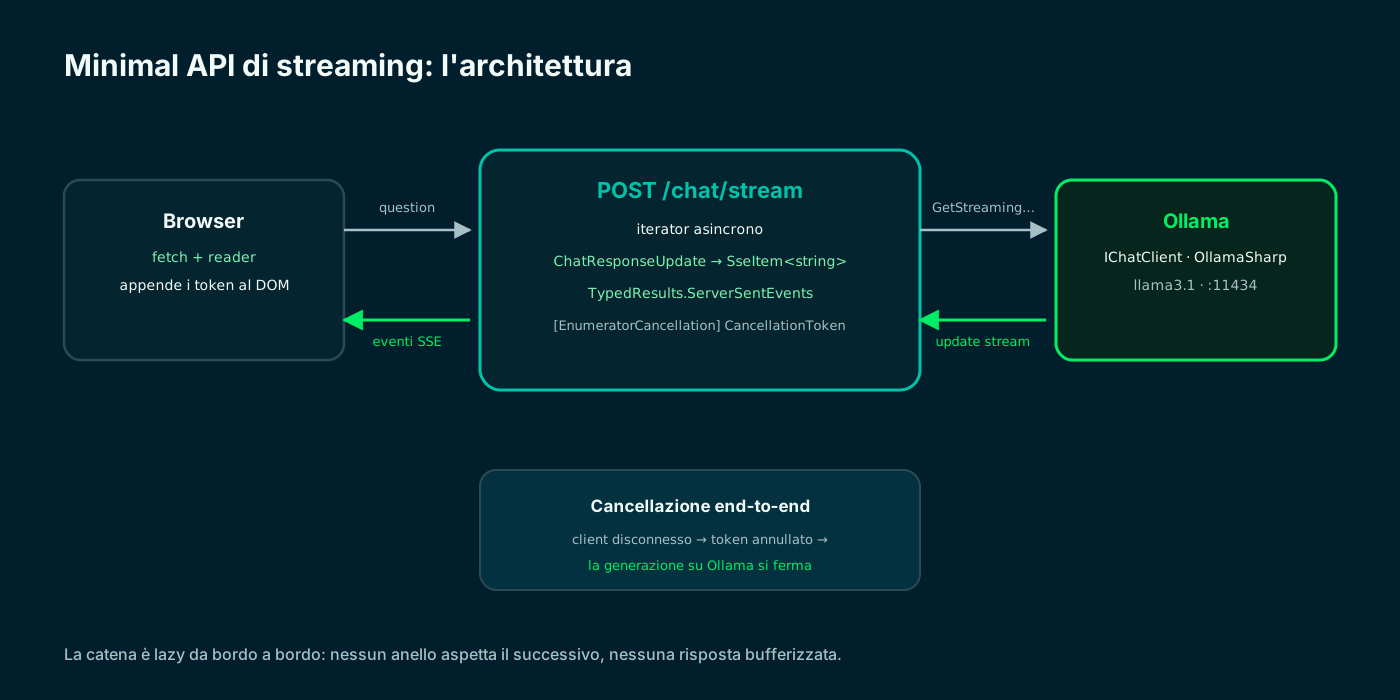
A lazy chain from edge to edge: the token generated now is in the browser an instant later.
⬇️ Step 1 · Ollama and a local model
Ollama runs the model on your computer, on the http://localhost:11434 endpoint, and streams by default. Any chat model works for this tutorial: llama3.1 is a good balance of quality and hardware requirements.
If you followed my RAG or function calling tutorials you already have everything ready: the stack is the same, only how I consume the response changes.
# pull the model (once)
$ ollama pull llama3.1

# the server usually starts on its own; otherwise:
$ ollama serve                 # http://localhost:11434

# try streaming from the terminal: tokens arrive one at a time
$ ollama run llama3.1 "Explain Server-Sent Events in two sentences"🧱 Step 2 · Project and NuGet packages
I create a Minimal API on .NET 10 and add just two packages: the Microsoft.Extensions.AI abstractions and OllamaSharp, whose OllamaApiClient implements IChatClient directly.
The remarkable part is what's not needed: no packages for Server-Sent Events. TypedResults.ServerSentEvents and SseItem<T> are part of the framework in .NET 10.
# new Minimal API on .NET 10
$ dotnet --version             # must start with 10.
$ dotnet new web -n StreamingChatDemo --framework net10.0 && cd StreamingChatDemo

# AI abstractions + Ollama provider; SSE needs nothing
$ dotnet add package Microsoft.Extensions.AI
$ dotnet add package OllamaSharp
Microsoft.Extensions.AI · Microsoft Learn ↗
⚙️ Step 3 · appsettings.json
Ollama's endpoint and model live in appsettings.json: switching model — or moving to a cloud provider tomorrow — must not touch the code.
{
  "Ollama": {
    "Endpoint": "http://localhost:11434",
    "ChatModel": "llama3.1"
  }
}🧩 Step 4 · Registering the chat client
The wiring sits in an extension method AddStreamingChat: it registers OllamaApiClient as IChatClient with the Microsoft.Extensions.AI pipeline. UseLogging is invaluable in development to watch the updates flow by.
As always with these abstractions, the endpoint will depend only on the interface: switching to OpenAI or Azure would change just this one registration line.
using Microsoft.Extensions.AI;
using OllamaSharp;

namespace StreamingChatDemo.Extensions;

// A single extension method registers the chat client: OllamaApiClient
// implements IChatClient, so streaming comes for free.
public static class ChatServiceExtensions
{
    public static IServiceCollection AddStreamingChat(this IServiceCollection services, IConfiguration config)
    {
        var ollama = config.GetSection("Ollama");
        var chatClient = new OllamaApiClient(new Uri(ollama["Endpoint"]!), ollama["ChatModel"]!);

        services.AddChatClient(chatClient)
            .UseLogging();

        return services;
    }
}📡 Step 5 · The SSE endpoint with TypedResults.ServerSentEvents
The heart of the tutorial. The POST /chat/stream endpoint returns TypedResults.ServerSentEvents fed by an async iterator: an await foreach reads the updates from the model and re-emits them as SseItem<string>. Each event carries a progressive EventId; when generation ends I emit an explicit done event.
Note the CancellationToken: ASP.NET Core binds it to the HTTP request, and [EnumeratorCancellation] propagates it inside the iterator all the way to Ollama. If the user closes the page, generation actually stops — no model left warming the GPU for nobody.
using System.Net.ServerSentEvents;
using System.Runtime.CompilerServices;
using Microsoft.Extensions.AI;

namespace StreamingChatDemo.Endpoints;

public record ChatStreamRequest(string Question);

public static class ChatEndpoints
{
    // POST /chat/stream — the model's answer flows as Server-Sent Events.
    public static void MapChatEndpoints(this IEndpointRouteBuilder app) =>
        app.MapPost("/chat/stream", (ChatStreamRequest req, IChatClient chat, CancellationToken ct) =>
            TypedResults.ServerSentEvents(StreamAnswerAsync(req, chat, ct)));

    // Async iterator: each ChatResponseUpdate becomes an SseItem<string>.
    // [EnumeratorCancellation] propagates the HTTP request token down to Ollama:
    // client disconnected => generation stopped.
    private static async IAsyncEnumerable<SseItem<string>> StreamAnswerAsync(
        ChatStreamRequest req,
        IChatClient chat,
        [EnumeratorCancellation] CancellationToken ct)
    {
        List<ChatMessage> messages =
        [
            new(ChatRole.System, "Answer concisely."),
            new(ChatRole.User, req.Question)
        ];

        var eventId = 0;
        await foreach (var update in chat.GetStreamingResponseAsync(messages, cancellationToken: ct))
        {
            // some updates carry no text (metadata, usage): skip them
            if (string.IsNullOrEmpty(update.Text)) continue;

            yield return new SseItem<string>(update.Text) { EventId = eventId++.ToString() };
        }

        // explicit terminal event: the client knows the stream is complete
        yield return new SseItem<string>("[DONE]", eventType: "done");
    }
}
Minimal API responses · Microsoft Learn ↗
🚀 Step 6 · Program.cs: two lines of wiring
As always in a well-factored Minimal API, Program.cs stays tiny: the chat client registration and the endpoint mapping.
using StreamingChatDemo.Endpoints;
using StreamingChatDemo.Extensions;

var builder = WebApplication.CreateBuilder(args);

builder.Services.AddStreamingChat(builder.Configuration);

var app = builder.Build();

app.UseDefaultFiles();          // serves wwwroot/index.html at /
app.UseStaticFiles();

app.MapChatEndpoints();   // POST /chat/stream

app.Run();🖥️ Step 7 · The minimal HTML page
Create wwwroot/index.html: it contains every element used by the JavaScript and loads stream-client.js. Because the page and endpoint are served by the same Minimal API, no CORS configuration is required.
<!doctype html>
<html lang="en">
<head>
  <meta charset="utf-8">
  <meta name="viewport" content="width=device-width, initial-scale=1">
  <title>Streaming Chat Demo</title>
</head>
<body>
  <form id="chat-form">
    <label for="question">Question</label>
    <input id="question" required value="What is a Server-Sent Event?">
    <button>Send</button>
    <button id="cancel" type="button" disabled>Cancel</button>
  </form>
  <p id="status" role="status"></p>
  <pre id="output"></pre>
  <script src="/stream-client.js"></script>
</body>
</html>🧪 Step 8 · Run it and try it with curl
With curl -N (no buffering) you see the stream in its real wire format: each event is a data:/id: block, and the flow closes with the done event. If tokens arrive one at a time, end-to-end streaming works.
$ dotnet run --urls http://localhost:5000

# in a second terminal:
$ curl -N http://localhost:5000/chat/stream \
    -H "Content-Type: application/json" \
    -d '{"question":"What is a Server-Sent Event?"}'

# data: A
# id: 0
#
# data:  Server-Sent
# id: 1
#
# ...
#
# event: done
# data: [DONE]🔎 On the wire: what the stream looks like
It's worth looking at the traffic once to appreciate how simple the protocol is: text, data: lines, an empty line as separator. No binary frames, no handshake: that's why SSE crosses proxies, gateways and CDNs without drama.
It's also the format used by the streaming APIs of OpenAI and Anthropic: learning to produce and consume it pays off well beyond this tutorial. In production, always verify buffering and timeouts for every proxy or CDN in the path.
![Terminal showing the Server-Sent Events stream: the curl request to /chat/stream, then a sequence of events with progressive id and data lines containing the text fragments generated by the model, and finally the done event with data [DONE].](/blog/llm-streaming-sse-minimal-api-dotnet/sse-wire.svg)
Events separated by an empty line, progressive ids, a done event at the end: that's the whole protocol.
🌐 Step 9 · Consuming the stream in the browser
On the client I use fetch with a reader on the body stream: the browser's native EventSource only supports GET, while here the question travels in a POST body. I normalize CRLF/LF, validate the status and body, and only accept a response that ends with the done event.
Each fragment is appended to the DOM as soon as it arrives. An AbortController explicitly cancels the request; closing or reloading the page also closes the connection.
// Consumes POST /chat/stream: EventSource only supports GET,
// so I read the SSE stream straight from the fetch body.
async function streamAnswer(question, onToken, signal) {
  const response = await fetch("/chat/stream", {
    method: "POST",
    headers: { "Content-Type": "application/json" },
    body: JSON.stringify({ question }),
    signal,
  });

  if (!response.ok) throw new Error(`HTTP ${response.status}`);
  if (!response.body) throw new Error("Streaming is not supported");

  const reader = response.body.getReader();
  const decoder = new TextDecoder();
  let buffer = "";

  while (true) {
    const { value, done } = await reader.read();
    if (done) break;

    buffer += decoder.decode(value, { stream: true }).replaceAll("\r\n", "\n");

    // SSE events are separated by an empty line
    const events = buffer.split("\n\n");
    buffer = events.pop() ?? "";

    for (const rawEvent of events) {
      const isDone = rawEvent.split("\n").includes("event: done");
      const data = rawEvent
        .split("\n")
        .filter((line) => line.startsWith("data: "))
        .map((line) => line.slice(6))
        .join("\n");

      if (isDone) return;
      if (data) onToken(data);
    }
  }

  throw new Error("Stream closed without a done event");
}

const form = document.querySelector("#chat-form");
const question = document.querySelector("#question");
const output = document.querySelector("#output");
const status = document.querySelector("#status");
const cancel = document.querySelector("#cancel");
let controller;

form.addEventListener("submit", async (event) => {
  event.preventDefault();
  controller?.abort();
  controller = new AbortController();
  output.textContent = ""; status.textContent = "Generating…"; cancel.disabled = false;
  try {
    await streamAnswer(question.value, token => output.textContent += token, controller.signal);
    status.textContent = "Complete";
  } catch (error) {
    status.textContent = error.name === "AbortError" ? "Cancelled" : `Error: ${error.message}`;
  } finally { cancel.disabled = true; }
});
cancel.addEventListener("click", () => controller?.abort());🛡️ Cancellation, errors and guardrails
Streaming introduces failure modes of its own: the connection can drop mid-answer, the client can vanish, the model can slow down. The good news is that the CancellationToken + SSE chain already covers the main cases; a few points deserve attention.
- End-to-end cancellation: the HTTP request token, propagated with [EnumeratorCancellation], stops generation on Ollama when the client disconnects. Verify it in the logs: it's the difference between a free GPU and a wasted one.
- Explicit terminal event: the event: done line distinguishes "stream completed" from "connection dropped midway". The client should only trust answers that end with done.
- Errors after the stream started: after the first event the status is already 200 and can't change. If the model fails midway, emit a dedicated error event instead of truncating silently.
- Reconnection: only EventSource reconnects automatically and manages Last-Event-ID. This tutorial's POST fetch client does not: resuming requires application logic, event persistence and explicitly sending the last ID.
- Proxies and buffering: in production disable response buffering on the reverse proxy (e.g. proxy_buffering off on nginx), or tokens will arrive in bursts.
// After the first SseItem the HTTP status is already sent: a model
// failure mid-stream must be reported as an EVENT, not a status code.
var completed = false;
var failed = false;

await using var updates = chat.GetStreamingResponseAsync(messages, cancellationToken: ct)
    .GetAsyncEnumerator(ct);

while (!completed && !failed)
{
    try { completed = !await updates.MoveNextAsync(); }
    catch (OperationCanceledException) when (ct.IsCancellationRequested) { yield break; }
    catch (Exception) { failed = true; }   // no stack traces on the wire

    if (!completed && !failed && !string.IsNullOrEmpty(updates.Current.Text))
        yield return new SseItem<string>(updates.Current.Text);
}

yield return failed
    ? new SseItem<string>("generation_failed", eventType: "error")
: new SseItem<string>("[DONE]", eventType: "done");✅ Final checklist and next steps
Recapping the journey: a .NET 10 Minimal API that reads a local LLM's stream with GetStreamingResponseAsync and forwards it to the browser with native Server-Sent Events — the first fragment appears as soon as it is available, end-to-end cancellation, zero transport dependencies.
From here the pieces compose: add function calling so the model can act while streaming shows its reasoning, or RAG to answer from your documents. The abstractions are the same: that's the value of building on IChatClient.
- 01Ollama + modelllama3.1; endpoint 11434
- 02Project + NuGetExtensions.AI + OllamaSharp
- 03appsettings.jsonendpoint and model
- 04AddStreamingChatIChatClient + UseLogging
- 05SSE endpointTypedResults.ServerSentEvents
- 06HTML pagewwwroot + static files
- 07curl -Ndata/id events on the wire
- 08Fetch clientreader + split on empty line
- 09Guardrailsdone, error, cancellation
From here: streaming + function calling, or streaming + RAG, on the same IChatClient base.
📦 The full project on GitHub
The complete project from this tutorial — SSE endpoint, chat client registration, HTML page and fetch-based streaming client — is published as a public repository: clone it, dotnet run, and watch the tokens flow. The README carries the same commands you saw here.
git clone https://github.com/fscamuzzi/llm-streaming-sse-minimal-api-dotnet.git
cd llm-streaming-sse-minimal-api-dotnet/StreamingChatDemo
dotnet run --urls http://localhost:5000
fscamuzzi/llm-streaming-sse-minimal-api-dotnet · GitHub ↗
Frequently asked questions about LLM streaming ASP.NET Core
What are Server-Sent Events (SSE)?
A standard mechanism to push events from server to client over a plain HTTP connection: a text/event-stream content type and text events prefixed by data:. It's the transport used by the streaming APIs of OpenAI and Anthropic, and since .NET 10 it's supported natively in ASP.NET Core.
SSE or WebSocket for streaming an LLM?
For model output alone, SSE: it's unidirectional like the token flow and uses standard HTTP. Proxies and CDNs must be configured not to buffer. Automatic reconnection is available with EventSource; with this tutorial's POST fetch client it must be implemented. WebSocket makes sense when you truly need bidirectionality.
How do you stream from an LLM in .NET?
With Microsoft.Extensions.AI: GetStreamingResponseAsync on IChatClient returns an IAsyncEnumerable of ChatResponseUpdate. Each update carries a text fragment in Text; an await foreach consumes them without buffering the full response.
What do you need to use TypedResults.ServerSentEvents?
Just ASP.NET Core on .NET 10: no additional packages. The endpoint returns TypedResults.ServerSentEvents with an IAsyncEnumerable of SseItem; the framework handles content type, wire format and serialization. Heartbeats and timeouts must be configured separately when needed.
What happens if the user closes the page during generation?
If the request's CancellationToken is propagated down to the provider — via [EnumeratorCancellation] on the iterator — the client disconnection cancels the Ollama call and generation stops, immediately freeing CPU or GPU.
Why isn't EventSource enough as a client?
The browser's native EventSource only supports GET requests without a body. If the question travels in a JSON POST, you read the SSE stream from a fetch body with a reader: the parsing is a few lines, as shown in the tutorial.
Let's talk
If this topic is relevant to you, write to me: comparing notes on code and AI is always time well spent.


