 COOL
COOL 


In this article
- 🔍 What agent teams are (and why they are not subagents)
- ⚙️ Enabling agent teams: the experimental variable
- 🏗️ The demo project: TeamBoard, three modules for three teammates
- 🚀 The first team: a parallel review on three fronts
- 🗂️ The shared task list: assignments, dependencies, self-claim
- 🧩 Reusable roles: a subagent definition as a teammate
- 📝 Plan approval: the lead approves before any code is written
- 🪝 The team quality gate: TaskCompleted with exit 2
- 🖥️ In-process or split panes: how I watch the team
- ⚠️ Costs, limits and when NOT to use a team
- 📦 GitHub repo
- ✅ Final checklist: the team in eight moves
🔍 What agent teams are (and why they are not subagents)
An agent team is a set of Claude Code sessions working together: one acts as the team lead — it spawns teammates, breaks work into tasks, synthesizes results — and the others are independent teammates. The key difference from subagents is not parallelism, which was already there: it is horizontal communication. Teammates message each other, share a task list with dependencies, and I can open any teammate's transcript and talk to it directly.
The subagent remains the right tool when I need a focused worker that reports a result and disappears: it costs fewer tokens, because only the summary returns to the main context. The team is worth the premium when the workers need to discuss: reviews with different perspectives that challenge each other, debugging with competing hypotheses, features spanning multiple layers with one owner per layer.
The price is explicit in the documentation: every teammate is a full Claude instance with its own context window, so tokens scale linearly with the number of teammates. For sequential work or work with many dependencies, a single session remains the most efficient choice.
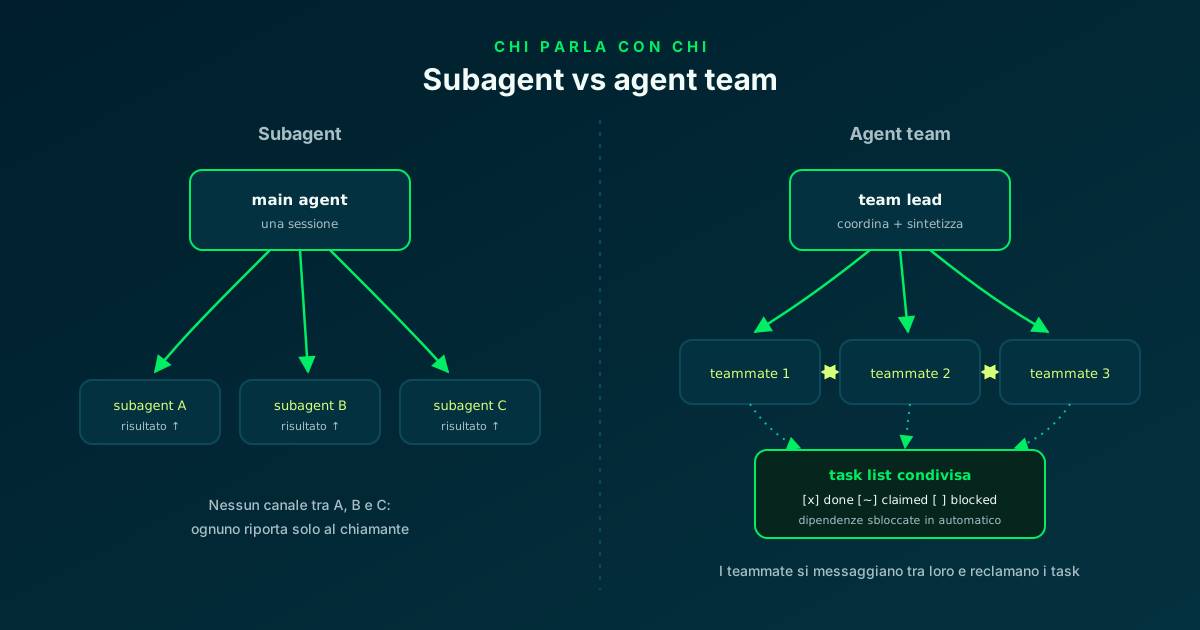
Subagents report only to their caller; teammates message each other and share the task list.
⚙️ Enabling agent teams: the experimental variable
Agent teams are disabled by default: they switch on with the CLAUDE_CODE_EXPERIMENTAL_AGENT_TEAMS environment variable, which I put in the project's .claude/settings.json so it applies to every session. Without the variable, Claude neither proposes nor spawns teammates; with it, even a regular subagent that Claude names launches as a teammate — a documented side effect worth knowing before it surprises you.
An important constraint for automation: spawning teammates requires an interactive session. In headless mode with the -p flag (and in Agent SDK sessions) Claude does not create teammates: a named subagent runs as an ordinary subagent even with the variable on.
If in doubt, the reverse gear is the same lever: setting the variable to 0 in the user settings.json restores classic subagents, without restarting the session.
{
  "env": {
    "CLAUDE_CODE_EXPERIMENTAL_AGENT_TEAMS": "1"
  },
  "teammateMode": "in-process"
}
Agent teams · Claude Code Docs ↗
🏗️ The demo project: TeamBoard, three modules for three teammates
To watch a team at work you need a project that lends itself to conflict-free partitioning: the golden rule of agent teams is that two teammates must never touch the same file. TeamBoard is a .NET 8 Minimal API for a retro board, split into three vertical modules — Notes (the board notes), Tags (the labels) and Stats (the counts) — each with its own endpoints, its own service and its own xunit tests.
The stack is my usual one: Minimal API without Controllers, typed records for the DTOs, LINQ for the logic, an in-memory store to avoid dragging a database into a tutorial that is about something else. Each module lives in its own folder: it is the natural map of one module → one teammate.
src/TeamBoard.Api/
├── Modules/
│   ├── Notes/    NoteEndpoints.cs · NoteService.cs · NoteModels.cs
│   ├── Tags/     TagEndpoints.cs  · TagService.cs  · TagModels.cs
│   └── Stats/    StatsEndpoints.cs · StatsService.cs
└── Program.cs    (MapNotes + MapTags + MapStats)

tests/TeamBoard.Tests/
├── NotesTests.cs · TagsTests.cs · StatsTests.cs

.claude/
├── settings.json    (agent teams ON + TaskCompleted hook)
├── agents/          security-reviewer.md · test-runner.md
└── hooks/ task-completed-gate.sh🚀 The first team: a parallel review on three fronts
The best way to start with agent teams — the documentation itself suggests it — is a task that writes no code: review. A single reviewer tends to fixate on one class of problems at a time; three teammates with three different lenses cover security, performance and tests together, and the lead synthesizes at the end.
Spawning is natural language: I describe the task and the teammates I want, Claude populates the task list and launches them. I give every teammate an explicit name in the prompt: predictable names are what I need later to send direct messages ("ask security to...") without ambiguity.
One detail worth knowing: Claude sometimes decides the task does not warrant a team and uses ordinary subagents. The two cases are hard to tell apart in the panel — the fix is to explicitly request an agent team if the first attempt spawned subagents.
Spawn three teammates to review the TeamBoard modules:
- "security": vulnerabilities and input validation on the endpoints
- "perf": allocations, inefficient LINQ, lock contention in the store
- "coverage": gaps in the xunit suite, missing edge cases

Each one reviews ALL three modules through its own lens,
files findings as tasks in the shared list and debates them
with the other two before the final report. You synthesize at the end.
Use cases · Claude Code Docs ↗
🗂️ The shared task list: assignments, dependencies, self-claim
Team coordination runs through a shared task list: the lead creates tasks, teammates claim and complete them. A task can depend on another: until the dependency is closed nobody can claim it — and when the upstream task completes, Claude Code unblocks the dependents on its own. Claiming uses file locking, so two teammates cannot race for the same task.
Tasks get assigned in two ways: I tell the lead who does what, or I leave self-claim on — a teammate that finishes picks up the first free, unblocked task by itself. For the implementation phase I use the module rule: in the spawn prompt I state explicitly that Notes belongs to one teammate, Tags to another, Stats to the third, so the file partitioning is in the contract from the start.
All this state lives locally: team config in ~/.claude/teams/, task list in ~/.claude/tasks/, under a session-derived name. The config is runtime, not something to hand-write: to define reusable roles, the right path is the subagent definitions of the next step.
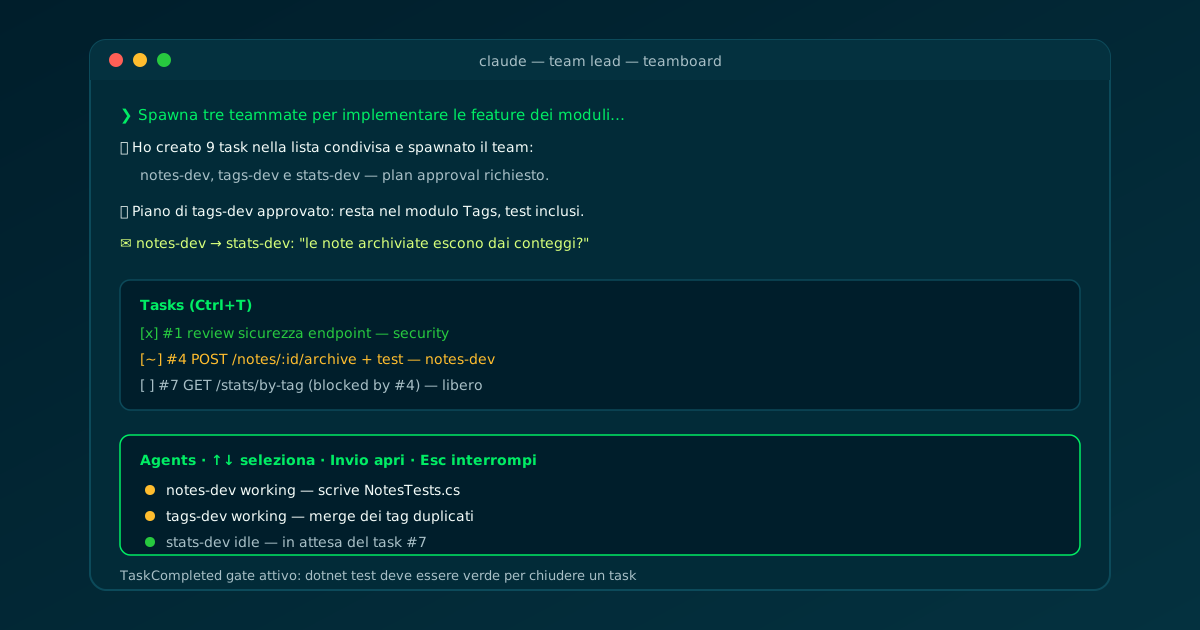
Arrow keys to select a teammate, Enter to open its transcript, Ctrl+T for the task list.
🧩 Reusable roles: a subagent definition as a teammate
The roles I use often are not re-described at every spawn: I pin them in a subagent definition — a markdown file in .claude/agents/ — and mention it by name when asking for the teammate. The same definition works both ways: as a classic subagent when I delegate, as a teammate when there is a team. The teammate honors its tools allowlist and model; the body of the file is appended to the system prompt, it does not replace it.
Two asterisks worth knowing: the skills and mcpServers frontmatter fields do not apply when the definition runs as a teammate (skills and MCP servers come from project and user settings, as in a regular session); and to an in-process teammate Claude Code adds SendMessage and the task list tools on its own, because it could not coordinate without them.
My security-reviewer is read-only by construction: Read, Grep, Glob and Bash. A reviewer that cannot write code is a reviewer I trust more — the same logic as the test-guardian I use in my TDD flow.
---
name: security-reviewer
description: Read-only security reviewer for TeamBoard. Checks input
  validation, injection risks and error handling on every endpoint.
tools: Read, Grep, Glob, Bash
---

You are the security reviewer of this codebase. You never write code.

1. Review every endpoint for missing input validation and
   unbounded payloads (note text length, tag names, ids).
2. Check the in-memory stores for race conditions.
3. File one finding per issue in the shared task list and
   discuss disagreements with the other reviewers by message.
Subagents · Claude Code Docs ↗
📝 Plan approval: the lead approves before any code is written
For risky tasks there is an extra gear: requiring the teammate to work in plan mode until the lead approves. The teammate explores read-only, writes its plan and sends the lead an approval request; the lead judges it autonomously — it approves, or rejects with feedback that sends the teammate back to revise the plan.
The interesting part is that the lead's judgment criteria are programmed in the prompt: "only approve plans that include tests", "reject plans touching more than one module". It is automated plan review, with me in the role of policy author instead of plan reader.
For TeamBoard's build phase I use it like this: the three teammates each implement a feature in their own module, but nobody touches a file before their plan passes the lead with the policy "one module only, tests included".
Spawn three teammates to implement, in parallel:
- "notes-dev":  note archiving (POST /notes/{id}/archive) — Notes module
- "tags-dev":   tag rename with merge (PUT /tags/{id}) — Tags module
- "stats-dev":  counts per tag (GET /stats/by-tag) — Stats module

Require plan approval before any changes.
Only approve plans that: stay inside their own module,
add xunit tests for the feature, and only touch Program.cs
to map the new endpoint.
Plan approval · Claude Code Docs ↗
🪝 The team quality gate: TaskCompleted with exit 2
With several agents closing tasks in parallel, the risk of an optimistic "completed" multiplies by the number of teammates. The answer is the same as in single-session flows: a deterministic hook. Agent teams bring three dedicated events — TaskCreated, TaskCompleted and TeammateIdle — and all of them follow the familiar semantics: exit code 2 blocks the operation and returns the stderr to the agent as an instruction.
My gate sits on TaskCompleted: when a teammate tries to mark a task as completed, the script runs dotnet test; if the suite is red, the task does not close and the teammate receives the failure output. No task "completed" with broken tests, whatever the model that closed it believes.
TeammateIdle is the twin for end-of-turn: it fires when a teammate is about to go idle, and an exit 2 sends it back to work. The pair covers the two moments when an agent can declare victory too early.
#!/usr/bin/env bash
# TaskCompleted hook: a task cannot be completed while tests are red.
cd "${CLAUDE_PROJECT_DIR:-.}" || exit 0

output=$(dotnet test --nologo 2>&1)
if [ $? -ne 0 ]; then
  {
    echo "Team gate: the suite is RED - this task is NOT complete."
    echo "$output" | tail -20
  } >&2
  exit 2   # blocks completion, stderr goes back to the teammate
fi
exit 0

# .claude/settings.json
# { "hooks": { "TaskCompleted": [ { "hooks": [ { "type": "command",
# "command": "$CLAUDE_PROJECT_DIR/.claude/hooks/task-completed-gate.sh" } ] } ] } }🖥️ In-process or split panes: how I watch the team
By default the team runs in-process: all teammates inside the lead's terminal, with the agent panel below the prompt — arrow keys to select, Enter to open a teammate's transcript and talk to it, Esc to interrupt its turn, Ctrl+T for the task list. Works in any terminal, zero setup.
The alternative is split panes: each teammate in its own pane, everyone's output visible at once. It requires tmux, or iTerm2 with the it2 CLI, and turns on with teammateMode ("auto" or "tmux") in settings.json or the --teammate-mode flag for a single session. On iTerm2 the suggested entry point is tmux -CC.
One practical warning about "vanished" teammates: an idle row hides after thirty seconds of a fully idle panel, but the teammate stays alive and addressable — a message with its name brings the row back. Before assuming a crash, call it by name.
⚠️ Costs, limits and when NOT to use a team
Agent teams are experimental and the documentation is honest about the limits. The main ones, today: /resume and /rewind do not restore in-process teammates (the lead may try to message teammates that no longer exist); a task can stay marked in-progress even when the work is done and needs a manual nudge; there is one team per session, the lead is fixed and teammates cannot spawn their own teammates.
On the wallet: every teammate is a full instance, so tokens scale linearly. The recommended size is 3-5 teammates with 5-6 tasks each: three focused teammates outperform five scattered ones.
The compass I use to pick the tool is this:
- Single session: sequential work, edits on the same files, small refactors.
- Subagent: only the result matters — research, verification, one-shot clean-context review.
- Agent team: the workers need to discuss — multi-perspective review, competing hypotheses, independent modules in parallel.
- Separate worktrees: parallelism that must outlive the session, with independent branches and commits.
📦 GitHub repo
All the material from this article is in a public repository: the complete TeamBoard solution (a three-module .NET 8 Minimal API + 12 xunit tests), the .claude/settings.json with agent teams enabled and the TaskCompleted hook registered, the security-reviewer and test-runner subagent definitions, and ready-made spawn prompts in prompts/. Clone it, dotnet test is green, open Claude Code and the team spawns with the first prompt.
No external services needed: no database, no Docker — the solution runs in-process with the .NET 8 SDK alone.
$ git clone https://github.com/fscamuzzi/claude-code-agent-teams-demo.git
$ cd claude-code-agent-teams-demo
$ dotnet test    # Passed! - Failed: 0, Passed: 12

# the API, live
$ dotnet run --project src/TeamBoard.Api
$ curl -s http://localhost:5000/notes \
    -H "Content-Type: application/json" \
    -d '{"text":"Retro: fewer standups, more pairing","tags":["process"]}'

# then, inside Claude Code:
$ claude   # and paste prompts/01-parallel-review.md
claude-code-agent-teams-demo · GitHub ↗
✅ Final checklist: the team in eight moves
A recap of the route. The takeaway after weeks of use: the team does not replace the single session or subagents — it is a third tool, one that pays off when the discussion between agents produces something a single agent would not find. Multi-perspective reviews and competing hypotheses are where the difference shows immediately.
And the same guardrails I have been using for months on single sessions — rules in CLAUDE.md, deterministic hooks, read-only roles — scale to the team without changing philosophy: only the event they hook into changes.
- 01Variable ONCLAUDE_CODE_EXPERIMENTAL_AGENT_TEAMS=1 in settings.json
- 02Partitionable projectvertical modules, zero shared files
- 03First team on reviewthree lenses, no code written
- 04Explicit namesfor direct messages to teammates
- 05Task listdependencies + self-claim, one module each
- 06Reusable rolessubagent definitions as teammates
- 07Plan approvalapproval policy in the lead's prompt
- 08TaskCompleted hookexit 2 while the suite is red
One lead, three teammates, one task list: parallelism with the usual guardrails.
Frequently asked questions about Claude Code agent teams
What is the difference between a subagent and an agent team teammate?
A subagent reports its result only to the agent that spawned it and does not communicate with others; a teammate is a full Claude Code session that messages other teammates directly, shares a task list with dependencies and can be addressed by me without going through the lead. Subagents cost fewer tokens; the team is worth it when workers need to discuss with each other.
How do I enable Claude Code agent teams?
With the CLAUDE_CODE_EXPERIMENTAL_AGENT_TEAMS=1 environment variable, in the env block of settings.json or in the shell. They are experimental and disabled by default. Watch out for two effects: with the variable on, even a subagent that Claude names launches as a teammate, and in headless mode (-p) teammates do not spawn at all.
Do teammates inherit the lead session's context?
Partly: they load the same project context as a regular session — CLAUDE.md, MCP servers, skills — plus the spawn prompt, but they do NOT inherit the lead's conversation history. That is why the spawn prompt should carry all task-specific details: files to touch, constraints, acceptance criteria.
Can I prevent a task from being closed with broken tests?
Yes, with the TaskCompleted hook: when a teammate tries to mark a task as completed, the attached script runs and, if it exits with code 2, completion is blocked and the stderr goes back to the teammate as an instruction. In my gate the script runs dotnet test and blocks closure on a red suite; TeammateIdle does the same for end-of-turn.
Do agent teams also work with Codex or other agents?
No, they are a native Claude Code feature. With Codex you get parallelism by hand: multiple instances in separate git worktrees, coordinated by me. The pattern is partly replicable though: shared rules in AGENTS.md, module-based partitioning and a strict CI as the gate — what is missing is the shared task list and inter-instance messaging.
Let's talk
If this topic is relevant to you, write to me: comparing notes on code and AI is always time well spent.


