 COOL


In this article
- 🧭 Third chapter: why Hermes
- 🔌 Many providers, one app
- 📋 The Kanban: tasks in sequence, like on a board
- 🤖 How I structured the work: first Bot and six steps
- 🧩 How a Hermes plugin is made: one package, two halves
- 📄 The two manifests
- 📊 Where the data comes from
- 🛡️ Normalizing: no raw text across the boundary
- 🔄 Cache, intervals and backoff
- 🖥️ The desktop half: one file, no build
- 🎚️ Ten blocks, a percentage, a countdown
- 🔍 The popover: every window and the Refresh button
- 🧪 Tests and validation
- 📦 Installation
- ✅ Final checklist: quota in Hermes in eight moves
🧭 Third chapter: why Hermes
This series has one rule: to understand an AI client, I customize it. The Claude Code mod runs inside the app process. The Codex plugin is an MCP server with a page in an iframe. Hermes sits in between: the desktop half runs in the app, the backend runs in the Hermes gateway.
Three things convinced me to try it. It is open source under the MIT license, so I can read the code I run. It is customizable: panes, status bar, commands and themes are added with a plugin. And it supports many AI providers with little configuration, which is why a quota meter makes sense here.
Chapters 1 and 2
- Claude Code: a mod, code inside the process
- Codex: an MCP server and an MCP App in an iframe
- One provider per client
- Data read from the client itself
Chapter 3 — Hermes
- Desktop half: one ESM file, no build
- Backend: Python routes in the gateway
- Three providers in the same bar
- Data read from Hermes APIs and from Ollama
The same goal in all three chapters: see how much quota is left without leaving the app.
🔌 Many providers, one app
In Hermes a provider is a source of models. Some are in the core, others come as plugins from the catalog. I configured six, and I choose among them from the model selector without changing application.
The provider plugins I installed come from three places: the official Nous Research catalog, the community catalog and the JetBrains repository for Junie. Each catalog plugin is pinned to a commit, so I know which version I am running.
- ChatGPT / Codex — the OpenAI subscription, with the
openai-codexprovider. - Claude — the Pro or Max subscription, with the official
claude-subscription-directsdkplugin (experimental). - Junie — the JetBrains agent, with the
junie-acpplugin that speaks ACP. - GitHub Copilot — with the
github-copilotplugin from the community catalog. - Ollama Cloud — the models hosted by Ollama.
- Local Ollama — the models that run on my machine.
📋 The Kanban: tasks in sequence, like on a board
The section I liked most is the Kanban. It is a persistent task board, shared by the Hermes profiles. Each task has a title, a body, a status and an assignee, which is the name of a profile.
The gateway hosts a dispatcher: it takes the ready tasks and starts the assigned profile as a separate process. The result is that the agent structures the work into tasks and runs them one after the other, like the cards of a Jira-style dashboard. I see what is queued, what is running and what is done.
For me the advantage is readability. A long request does not stay a single conversation: it becomes a row of cards, each with a small job and an owner. If a step fails, I know which one.
# list the tasks of the current board
$ hermes kanban list

# continuous stream of task events
$ hermes kanban watch
Kanban · Hermes documentation ↗
🤖 How I structured the work: first Bot and six steps
I created a Hermes profile that I named first Bot. Its job is to make several providers work together with a fixed flow on the Kanban board. Each step is a card, and each card uses the model that fits that step.
The flow has two phases. In the first, the prompt is written and improved by three different models. In the second, one model implements and two models review. Each reviewer does at most two rounds of review and fix: this limit prevents endless loops between the writer and the reviewer.
The plugin of this article was born this way. I wrote the request; the rest went through the cards.
- 01ClaudeTakes the request and turns it into a prompt
- 02CodexOptimizes the prompt
- 03Ollama CloudKimi 3.1 Pro optimizes it again
- 04ClaudeImplements from the final prompt
- 05CodexReview and fix, twice at most
- 06Ollama CloudReview and fix, twice at most
Three models on the prompt, one on the implementation, two on the review.
🧩 How a Hermes plugin is made: one package, two halves
In Hermes the word plugin means different things. Here I use a unified package: a folder under plugins/ in the Hermes home, which contains the agent part, the backend and the desktop part. It installs and uninstalls as one thing.
plugin.yaml is the manifest. __init__.py is the agent half: in this plugin it registers nothing, no tools and no hooks. It exists because enabling the plugin is what turns the backend on. dashboard/plugin_api.py contains the routes. desktop/plugin.js is the file that the desktop app loads.
subscription-quota-bars/
├── plugin.yaml              # package manifest
├── __init__.py              # agent half: register() registers nothing
├── dashboard/
│   ├── manifest.json        # declares the backend, with no tab
│   └── plugin_api.py        # GET /quota, POST /quota/refresh
└── desktop/
    └── plugin.js            # the meters in the status bar
hermes-subscription-quota-bars · GitHub ↗
📄 The two manifests
plugin.yaml declares the name, the kind, the version and the optional environment variables. The standalone kind says that the plugin is not a model provider. OLLAMA_API_KEY is in optional_env: without the key the plugin still works, with two providers out of three.
dashboard/manifest.json connects the backend. The api field names the file with the routes, which Hermes mounts under /api/plugins/subscription-quota-bars. With tab.hidden the plugin adds no tab to the web dashboard: the backend serves the desktop half only.
name: subscription-quota-bars
kind: standalone
version: 1.0.0
description: Always-visible status-bar meters of remaining Codex, Claude and Ollama Cloud subscription quota (Hermes Desktop).
license: MIT
optional_env:
- OLLAMA_API_KEY📊 Where the data comes from
For Codex and Claude I call no external API. Hermes already has a function that reads the account usage of a provider: fetch_account_usage. I call it with read_only=True and with the provider slug. For Claude I use the slug of the claude-subscription-directsdk-experimental plugin, not the generic Anthropic one.
For Ollama Cloud I make one request: GET https://ollama.com/api/balance. The key comes from get_secret("OLLAMA_API_KEY"), that is, from the secrets of the active Hermes profile. The plugin makes no inference calls and contacts no other endpoint.
The Hermes and httpx imports are inside the functions. So importing the file has no effects, and the tests can load it without Hermes.
CODEX_SLUG = "openai-codex"
CLAUDE_SLUG = "claude-subscription-directsdk-experimental"

def fetch_codex() -> Outcome:
    from agent.account_usage import fetch_account_usage
    return normalize_hermes_snapshot("codex", fetch_account_usage(CODEX_SLUG, read_only=True))

def fetch_claude() -> Outcome:
    from agent.account_usage import fetch_account_usage
return normalize_hermes_snapshot("claude", fetch_account_usage(CLAUDE_SLUG, read_only=True))🛡️ Normalizing: no raw text across the boundary
The backend rule is the same as in the Codex plugin: every field of the response is rebuilt from validated values. Percentages must be finite numbers and are clamped between 0 and 100. Reset dates must have an explicit offset, otherwise they become unknown.
Window names go through a fixed table: Session, Weekly, Current week, Fable week and a few others. A label I do not know is never shown: it becomes Model quota or Other quota, with an opaque identifier. The plan (Pro, Max, …) and the source also come from a closed list.
Errors have a fixed message chosen from a dictionary. The text of the original error never reaches the desktop half. I have a test that checks it: an exception with a fake token in its message must not appear in the response.
def parse_percent(value: Any) -> Optional[float]:
    """Validated percentage clamped to [0, 100]; no fraction heuristic (1 means 1 %)."""
    number = _finite_number(value)
    if number is None:
        return None
return min(100.0, max(0.0, number))🔄 Cache, intervals and backoff
The desktop half asks for /quota every 60 seconds, but the backend does not call the providers on every request. Each provider has a slot with a minimum interval: 180 seconds for Codex, 300 for Claude, 120 for Ollama Cloud. Inside the interval the response comes from the cache.
If a read fails, the wait doubles at each error, up to 30 minutes. If the provider answers 429 with Retry-After, I honour that value. There is one read in progress at a time: whoever arrives in the meantime waits for the same result. The HTTP request waits 12 seconds at most, then it returns the state it has and lets the read finish in the background.
There is one cache per Hermes profile. If I change account or key, the old data is dropped. Claude has one more rule: the data is valid for five minutes after the read, then it disappears from the bar, because for that provider I have no independent way to verify which account is active.
router = APIRouter()

@router.get("/quota")
async def get_quota() -> JSONResponse:
    return await _serve(manual=False)

@router.post("/quota/refresh")
async def refresh_quota() -> JSONResponse:
return await _serve(manual=True)🖥️ The desktop half: one file, no build
desktop/plugin.js is plain ESM. The app loads it as it is: no JSX, no bundler. Elements are created with jsx() and jsxs(), and the only import surface is @hermes/plugin-sdk, plus React.
The plugin exports an object with an id and a register(ctx) function. With ctx.register I add an item to the right area of the status bar. The context gives me the rest too: ctx.rest calls my backend, ctx.storage saves the view preference, ctx.setInterval creates timers that the app clears when the plugin is disabled.
React Query, already in the SDK, reads the data: polling every 60 seconds, one retry for transient errors. The query key contains the connection, the profile and the gateway epoch. If I change profile while a request is in flight, the response is discarded.
export default {
  id: PLUGIN_ID,
  name: 'Subscription Quota Bars',
  description: 'Remaining Codex, Claude and Ollama Cloud subscription quota in the status bar.',
  register(ctx) {
    const ui = createUi(ctx)
    ctx.register({
      id: 'meters',
      area: STATUSBAR_AREAS.right,
      order: 70,
      render: () => jsx(QuotaStatusbar, { ctx, ui })
    })
  }
}
Desktop Plugin SDK · Hermes documentation ↗
🎚️ Ten blocks, a percentage, a countdown
Each quota window is a meter: the label, ten blocks, the remaining percentage and the time to the reset. Each provider has its own colour, taken from the theme variables of the app. There are no hardcoded colours in the code.
Two details prevent wrong readings. The blocks round down, but a quota above zero always lights at least one block and only 100 % lights them all. The percentage follows the same idea: <1% instead of a false 0 %, 99% instead of a false 100 %.
The screenshot shows the result on my account: Codex at 19 % of the week, Claude at 92 %, and the start of the monthly Ollama meter.

Label, ten blocks, remaining percentage and countdown to the reset for each window.
🔍 The popover: every window and the Refresh button
A click on the bar opens a popover with the details. For each provider I see the plan, the age of the data, the last attempt and when the next one will be possible. The model-specific windows also appear here, such as Claude's Fable week, which do not go in the bar.
At the bottom there are two controls. The All windows / Tightest only selector chooses whether the bar shows every window or only the one with the least quota. The Refresh button calls POST /quota/refresh and then disables itself for 30 seconds; the backend limits still apply.
The status does not rely on colour alone. Each meter has a full accessible text, and old data is marked with the words LAST KNOWN.
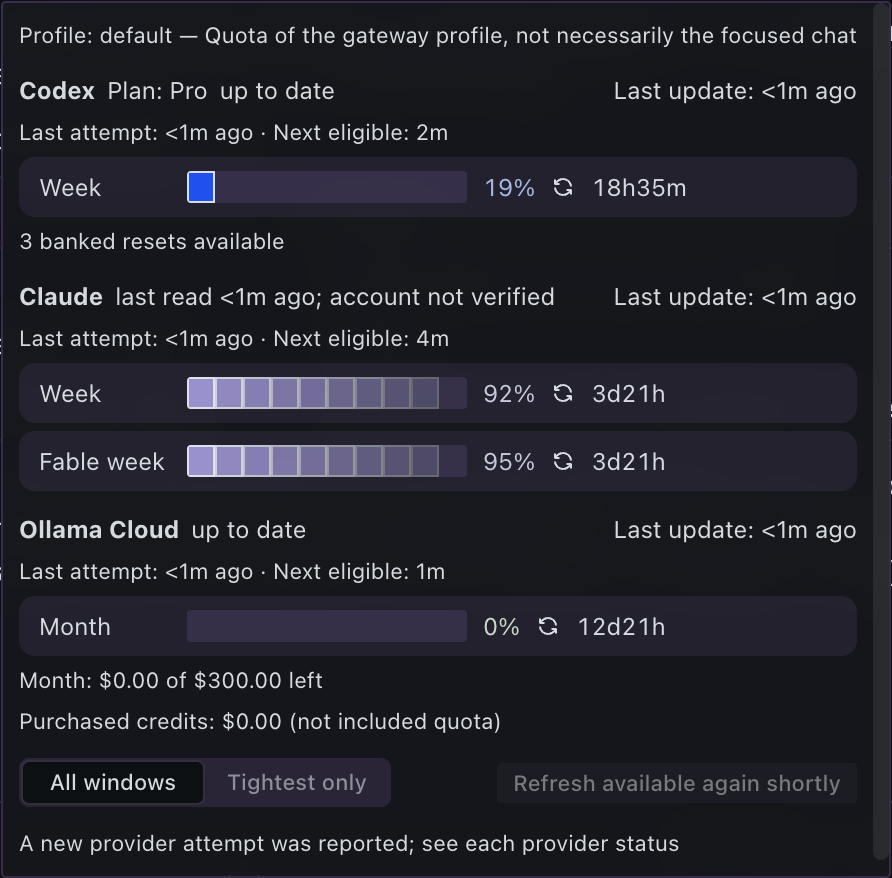
Every window of each provider, with the plan, the age of the data and the next possible refresh.
🧪 Tests and validation
Hermes has a command that checks a package before you install it: hermes plugins validate .. It verifies the manifest, tries register() in isolation, runs a security scan and checks that the desktop half uses the SDK surface only. The plugin passes.
Then there are 27 tests, and none of them starts Hermes or calls a provider. The 12 tests of the desktop half run with node:test: a small loader replaces @hermes/plugin-sdk and React with stand-ins, so I can import plugin.js and test formatting, response validation and the view model. The 15 backend tests use unittest with fake readers: parsing, normalization, cache and backoff.
The last check is scripts/audit.sh: it fails if a tracked file contains a token, a personal path or a private key. It is the same kind of check I added to the Codex plugin before the push.
$ hermes plugins validate .
$ node --import ./tests/register.mjs --test tests/plugin.test.mjs
$ python3 -m unittest discover -s tests -v
$ bash scripts/audit.sh📦 Installation
I clone the repo into the plugins/ folder of the Hermes home, with the plugin name, and I enable it. Then I turn on the desktop half in the app, from Capabilities → Plugins: the two halves have separate switches.
If a provider is not configured, its meter says not configured or unavailable and the others keep working. For Ollama Cloud the OLLAMA_API_KEY key goes in the secrets of the Hermes profile: the plugin reads it from nowhere else.
$ git clone https://github.com/fscamuzzi/hermes-subscription-quota-bars.git \
    "${HERMES_HOME:-$HOME/.hermes}/plugins/subscription-quota-bars"
$ hermes plugins enable subscription-quota-bars

# then, in Hermes Desktop: Capabilities → Plugins → turn on the desktop half

# removal
$ hermes plugins disable subscription-quota-bars✅ Final checklist: quota in Hermes in eight moves
A recap. Compared with the first two chapters, the new piece here is the backend: Hermes gives me a place to run Python code next to the interface, with the same credentials and the same profiles as the agent. The desktop half stays small because it does not need to know anything about the providers.
The limits I know: I tested on macOS with Apple silicon only, and the Claude source is an experimental Hermes provider.
- 01ProvidersConfigure in Hermes the providers to measure
- 02Packageplugin.yaml and __init__.py in plugins/<id>/
- 03Backenddashboard/manifest.json with api and a hidden tab
- 04Readersfetch_account_usage for Codex and Claude, /api/balance for Ollama
- 05Normalizationallowlists, clamped percentages, fixed messages
- 06Cacheper-provider intervals, backoff, one cache per profile
- 07Desktopplugin.js: ctx.register in the status bar, ctx.rest
- 08Verificationhermes plugins validate, 27 tests, audit
Data that Hermes already has, drawn where I look at it.
Frequently asked questions about Hermes Desktop plugin
What is Hermes Agent?
Hermes Agent is an open source AI agent by Nous Research, under the MIT license. You use it from the terminal or with Hermes Desktop, the native app for macOS, Windows and Linux. You extend it with plugins: model providers, tools, panes and interface items.
What is the difference between this plugin, the Claude Code mod and the Codex plugin?
The Claude Code mod is code that runs inside the app process. The Codex plugin is a separate MCP server with a page in an iframe. The Hermes plugin has two halves: a JavaScript file that the desktop app loads without a build and a Python backend with its own routes under /api/plugins/<id>, served by the Hermes gateway.
Where does the plugin get the quota from?
For Codex and Claude it uses the Hermes fetch_account_usage function, read-only, with the provider slug. For Ollama Cloud it makes a GET request to https://ollama.com/api/balance with the OLLAMA_API_KEY key taken from the profile secrets. It makes no inference calls and contacts no other endpoint.
Is the Ollama Cloud key safe?
The key is read from the secret scope of the active Hermes profile, used in the header of one request, and it does not appear in any response, message or log of the plugin. Every field returned to the desktop half is rebuilt from validated values, and errors have fixed messages.
What happens if I do not use one of the three providers?
The meter of that provider shows not configured or unavailable, and the others keep working. Each provider has its own cache, intervals and backoff, so an error on one does not block the others.
Let's talk
If this topic is relevant to you, write to me: comparing notes on code and AI is always time well spent.


