 COOL
COOL 


In this article
- 🔍 What hybrid search is
- 🧮 Dense vs sparse: the difference in plain terms
- 🎯 When you actually need it
- ⚖️ RRF: how two rankings become one
- 🏗️ The solution architecture
- 🐳 Step 1 · Qdrant and Ollama with Docker Compose
- 🧱 Step 2 · The project and the NuGet packages
- ⚙️ Step 3 · Configuration in appsettings.json
- 🗂️ Step 4 · The typed options
- 🧩 Step 5 · The collection: two named vectors
- 📥 Step 6 · Ingestion: one point, two representations
- 🔎 Step 7 · Three searches over the same collection
- 🧬 Step 8 · The hybrid query: prefetch + RRF
- 🔌 Step 9 · Wiring it all with AddHybridSearch
- 🚀 Step 10 · Program.cs: collection and seed at startup
- 📡 Step 11 · The /search endpoint
- 🧪 Step 12 · Try it from the terminal
- 📈 Dense, keyword and hybrid side by side
- 🤖 Step 13 · From retrieval to RAG: POST /ask
- 🧠 Step 14 · The semantic cache of the answers, on Qdrant
- ⚡ Step 15 · Redis: exact-match and output cache
- 🗄️ Step 16 · MongoDB: generic IRepository, Bogus and pagination
- 🎚️ Tuning: the knobs that matter
- ✅ Final checklist
- 📦 The full project on GitHub
- 📞 The example calls, from the .http file
- 🎁 Bonus · Swagger UI and ReDoc: the API that documents itself
- 🔀 Bonus · Switching the AI provider from appsettings: Ollama or OpenAI-compatible
- 🦾 Bonus · Microsoft Agent Framework: on top of Microsoft.Extensions.AI, not instead of it
🔍 What hybrid search is
Hybrid search runs the same query over two representations of the same document — a dense vector (the embedding, capturing meaning) and a sparse vector (weighted keywords, capturing exact terms) — and then fuses the two rankings into one. It is not an average of scores: it is a fusion by position, which needs no normalization across different scales.
The idea in pseudocode is all here: two searches, one fusion. The interesting part is that with Qdrant both searches and the fusion happen in a single database call, not in three hand-orchestrated round-trips.
# on every search
dense_hits  = vector_search(embed(q), top=20)   # semantics
sparse_hits = bm25_search(q, top=20)            # exact keywords

# fusion by POSITION, not by score
for hit in dense_hits + sparse_hits:
    score[hit.id] += 1 / (k + rank(hit))        # RRF

return top(score, limit)                        # a single ranking
Full code · fscamuzzi/hybrid-search-dotnet-qdrant-ollama ↗
🧮 Dense vs sparse: the difference in plain terms
Before touching code I stop on the two searches that hybrid search fuses together, because this is the key to every choice that follows. Dense (semantic): it understands meaning. The text passes through an AI model — here Ollama — that turns it into a "full" vector of numbers (768 dimensions, all populated). Two sentences with different words but similar meaning end up close together: "the dog barks" ≈ "my labrador is making noise". Perfect when the searcher doesn't use the document's exact words.
Sparse (BM25): it looks for the exact words. It's the evolution of classic keyword search: the vector is huge but almost entirely zero, with values only where the text's words appear, weighted by rarity and frequency. It matches only if the words coincide — search for ERR_CONN_5012 and you find only the documents that contain exactly that code. Perfect for error codes, proper nouns, acronyms, technical terms: things a semantic model often waters down
Dense
- How it's built: embedding from Ollama
- Finds: similar meaning
- Strong on: natural-language questions
- Weak on: rare/precise technical terms
Sparse (BM25)
- How it's built: computed by Qdrant server-side
- Finds: identical words
- Strong on: codes, acronyms, exact names
- Weak on: synonyms and paraphrases
That's what the two named vectors in the same collection are for: I run both searches and fuse the results, typically with RRF — the right pattern for a retrieval that has to understand both natural language and exact codes.
🎯 When you actually need it
If your users only search in conversational sentences, dense search is almost always enough. Hybrid search becomes the extra gear when the domain contains exact terms that matter: error codes, SKUs, API names, regulatory acronyms, identifiers. Those are exactly the tokens a general-purpose embedding represents worst — and the ones BM25 rewards most, thanks to IDF, because they are rare in the corpus.
The other typical case is RAG: hybrid retrieval brings the model more relevant chunks when the question mixes natural language and technical terms ("why does NB-429 keep failing?"). Same building blocks, same index, better final answer.
- Dense wins: paraphrases, synonyms, conversational questions with no words in common with the document.
- BM25 wins: codes, acronyms, proper nouns, very specific one-or-two-word queries.
- Hybrid wins: mixed queries ("NB-1042 signature check fails") and corpora full of domain jargon.
Dense (embeddings)
- Understands paraphrases and synonyms
- No shared words required
- Weak on rare codes and acronyms
- Cost: one embedding per query
Keyword (BM25)
- Exact on rare terms (IDF)
- Explainable: visible matches
- Blind to synonyms
- Cost: no embedding at all
Complementary strengths: that is why fusing the two rankings beats either one alone.
⚖️ RRF: how two rankings become one
The fusion problem is that the two searches score on different scales: cosine similarity is bounded, BM25 is unbounded. Summing or averaging them without normalization is a lottery. Reciprocal Rank Fusion (RRF) cuts the knot: it ignores scores and only looks at positions. Every document receives the sum of 1/(k + rank) for each ranking it appears in; in Qdrant k is 2 and ranks are zero-based.
The result is intuitive: a document near the top of both rankings overtakes one that excels in only one. Qdrant also offers an alternative fusion, DBSF (Distribution-Based Score Fusion), which normalizes scores by mean and standard deviation and then sums them: more on that in the tuning section.
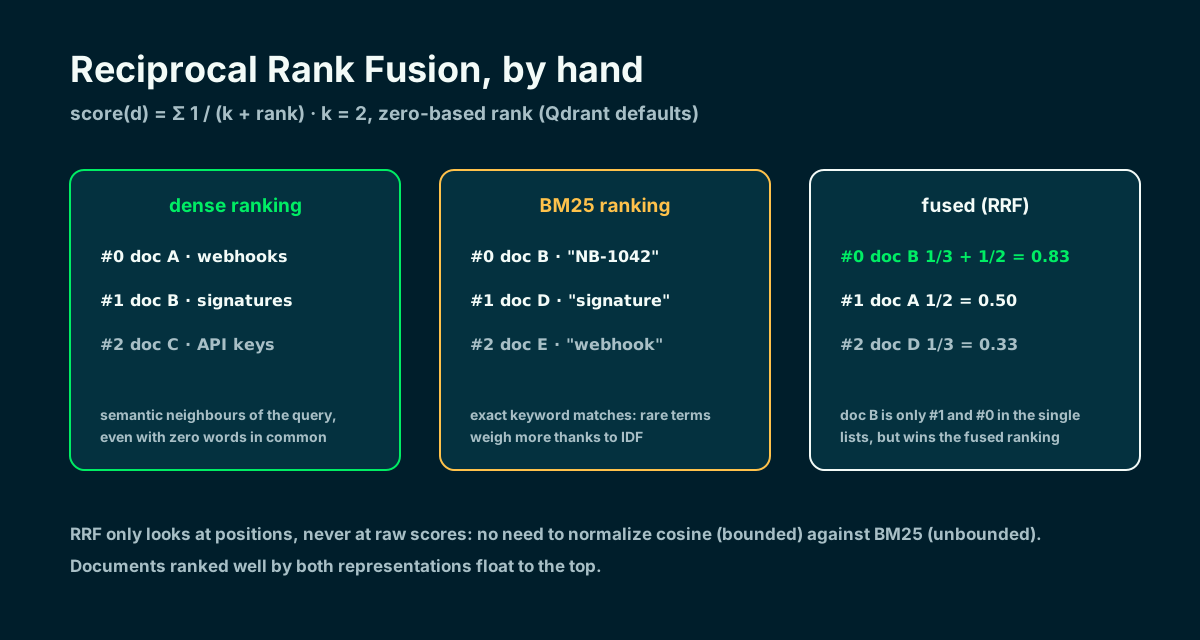
Positions only, never raw scores: no normalization needed between cosine and BM25.
🏗️ The solution architecture
I build a Minimal API in .NET 10 whose heart is IHybridSearchStore, the seam behind which Qdrant lives. The GET /search endpoint accepts three modes — dense, keyword, hybrid — so the differences show up on the same knowledge base: 14 articles of a fictional KB, complete with error codes like NB-1042. Around the retrieval sit three more pieces: POST /ask (the actual RAG, with a semantic cache on Qdrant), GET /users (MongoDB with pagination, output-cached on Redis) and DELETE /cache/output.
The Qdrant collection has two named vectors per point: dense (Ollama embeddings, 768 dimensions, cosine) and bm25 (a sparse vector). The part that simplifies everything: since Qdrant 1.15.2 the BM25 vector is computed by the database server-side — I pass raw text with the qdrant/bm25 model and Qdrant does tokenization, stemming and weighting. No BM25 math in my C#. Full code on GitHub: github.com/fscamuzzi/hybrid-search-dotnet-qdrant-ollama.
- Models: Ollama with nomic-embed-text (768 dimensions) via IEmbeddingGenerator — hybrid search by itself needs no chat model; llama3.1 comes in for /ask's RAG answers.
- Databases: Qdrant v1.18 (Docker) for search and semantic cache, MongoDB 8 for the users, Redis 8 for exact-match and output caching.
- Packages: Microsoft.Extensions.AI, OllamaSharp, Qdrant.Client, MongoDB.Driver, Bogus, StackExchangeRedis (output cache), FluentValidation.
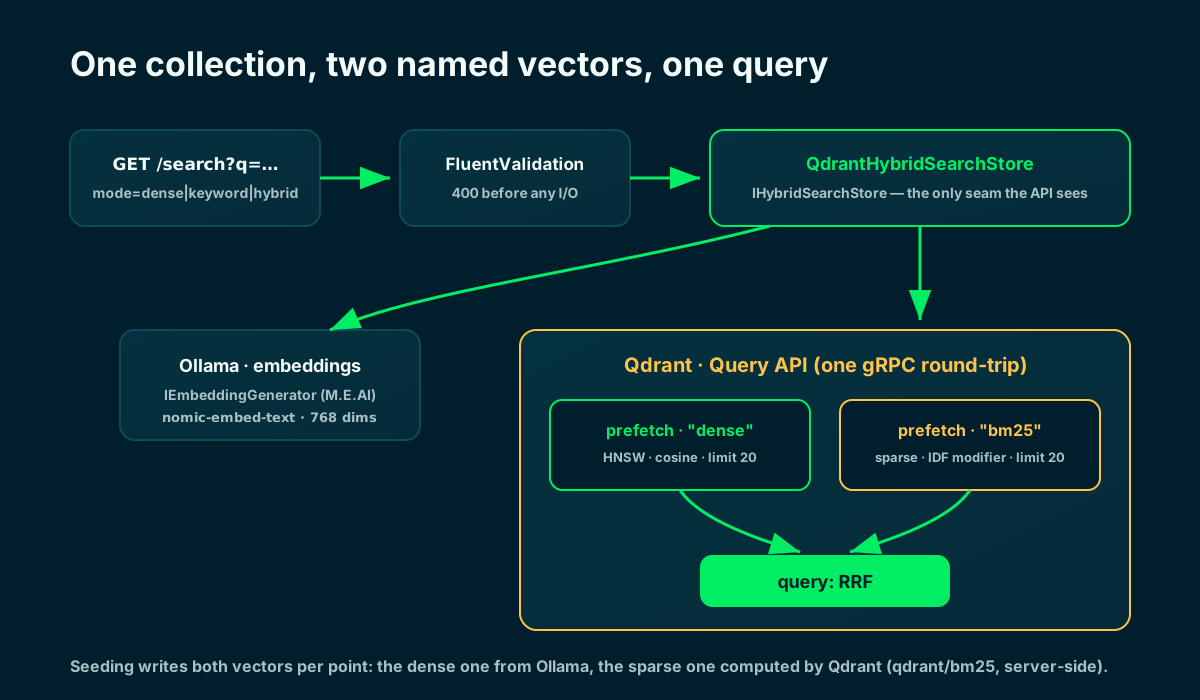
Both searches and the fusion run inside Qdrant, in a single gRPC round-trip.
🐳 Step 1 · Qdrant and Ollama with Docker Compose
There are four external dependencies: Qdrant, Ollama, Redis and MongoDB. I put them in Docker Compose with healthchecks and volumes; a one-shot service pulls both models — nomic-embed-text for the vectors and llama3.1 for the RAG answers — as soon as Ollama is healthy. The app runs on the host with dotnet run and talks to the containers on localhost.
One detail you don't want to get wrong: Qdrant exposes two ports. 6333 is REST (and the dashboard at /dashboard), 6334 is gRPC — and that is the one the .NET client uses. Before starting the API I run docker compose logs -f ollama-init and wait for the model download to exit with code 0.
name: hybrid-search-dotnet-qdrant-ollama

# External dependencies only: the ASP.NET Core app runs on the host with
# dotnet run and talks to these services on localhost. docker compose up -d
# starts Qdrant, Ollama, Redis 8 and MongoDB, and pulls the two models into
# the Ollama volume. MongoDB uses host port 27018 to avoid the 27017 conflict.
services:
  qdrant:
    image: qdrant/qdrant:v1.18.1
    container_name: hybrid-search-qdrant
    ports:
      - "6333:6333"   # REST + web dashboard (http://localhost:6333/dashboard)
      - "6334:6334"   # gRPC — the .NET client (Qdrant.Client) uses this one
    volumes:
      - qdrant-data:/qdrant/storage
    healthcheck:
      test: ["CMD-SHELL", "bash -c ':> /dev/tcp/127.0.0.1/6333' || exit 1"]
      interval: 10s
      timeout: 5s
      retries: 15
    restart: unless-stopped

  ollama:
    image: ollama/ollama:latest
    container_name: hybrid-search-ollama
    ports:
      - "11434:11434"
    volumes:
      - ollama-data:/root/.ollama
    healthcheck:
      test: ["CMD-SHELL", "ollama list >/dev/null 2>&1 || exit 1"]
      interval: 10s
      timeout: 5s
      retries: 15
    restart: unless-stopped

  # One-shot init: waits for Ollama to be healthy, pulls both models, exits.
  # nomic-embed-text feeds the vectors; llama3.1 answers the RAG questions.
  ollama-init:
    image: ollama/ollama:latest
    depends_on:
      ollama:
        condition: service_healthy
    environment:
      - OLLAMA_HOST=ollama:11434
    entrypoint: ["/bin/sh", "-c", "ollama pull nomic-embed-text && ollama pull llama3.1"]
    restart: "no"

  # Redis backs the OUTPUT cache (/users responses) and the exact-match
  # cache of the chat pipeline. The SEMANTIC cache lives in Qdrant.
  redis:
    image: redis:8
    container_name: hybrid-search-redis
    ports:
      - "6379:6379"
    volumes:
      - redis-data:/data
    command: ["redis-server", "--save", "60", "1"]
    healthcheck:
      test: ["CMD", "redis-cli", "ping"]
      interval: 10s
      timeout: 5s
      retries: 15
    restart: unless-stopped

  # Backs the /users API: database created on first write; indexes + Bogus
  # seeding happen in the awaited startup initializer.
  mongodb:
    image: mongo:8
    container_name: hybrid-search-mongodb
    ports:
      - "27018:27017"
    volumes:
      - mongo-data:/data/db
    healthcheck:
      test: ["CMD-SHELL", "mongosh --quiet --eval 'db.runCommand({ ping: 1 }).ok' | grep -q 1"]
      interval: 10s
      timeout: 5s
      retries: 15
    restart: unless-stopped

volumes:
  qdrant-data:
  ollama-data:
  redis-data:
  mongo-data:
Local Quickstart · Qdrant Docs ↗
🧱 Step 2 · The project and the NuGet packages
I create a Minimal API and add the packages: the Microsoft.Extensions.AI abstractions (for IEmbeddingGenerator and IChatClient), OllamaSharp — whose OllamaApiClient implements those abstractions, just like any cloud provider —, the official Qdrant.Client (gRPC), MongoDB.Driver and Bogus for the fake users, the two StackExchangeRedis packages for distributed and output caching, and FluentValidation for the endpoints' input.
It is the same stack as my previous articles on semantic caching and function calling: only the database underneath changes. If tomorrow I wanted to switch from Ollama to OpenAI or Azure, I would swap the embedding generator registration and recreate the collection with the new dimensions.
$ dotnet new web -n HybridSearchDemo && cd HybridSearchDemo

$ dotnet add package Microsoft.Extensions.AI
$ dotnet add package OllamaSharp
$ dotnet add package Qdrant.Client
$ dotnet add package MongoDB.Driver
$ dotnet add package Bogus
$ dotnet add package Microsoft.Extensions.Caching.StackExchangeRedis
$ dotnet add package Microsoft.AspNetCore.OutputCaching.StackExchangeRedis
$ dotnet add package FluentValidation.DependencyInjectionExtensions
Microsoft.Extensions.AI · Microsoft Learn ↗
⚙️ Step 3 · Configuration in appsettings.json
All the configuration lives in appsettings.json: the Ollama endpoint, embedding model and dimensions, Qdrant's gRPC host and port, the collection name, the names of the two vectors and the PrefetchLimit — how many candidates each branch hands to the fusion.
Keeping these values here means changing model, threshold or host without touching the code.
{
  "Logging": {
    "LogLevel": {
      "Default": "Information",
      "Microsoft.AspNetCore": "Warning"
    }
  },
  "AllowedHosts": "*",
  "HybridSearch": {
    "OllamaEndpoint": "http://localhost:11434",
    "EmbeddingModel": "nomic-embed-text",
    "ChatModel": "llama3.1",
    "EmbeddingDimensions": 768,
    "QdrantHost": "localhost",
    "QdrantPort": 6334,
    "CollectionName": "kb_hybrid",
    "DenseVectorName": "dense",
    "SparseVectorName": "bm25",
    "PrefetchLimit": 20,
    "RagTopK": 3,
    "CacheCollectionName": "semantic_cache",
    "CacheMinScore": 0.85,
    "CacheTtl": "1.00:00:00",
    "RedisConnection": "localhost:6379"
  },
  "Mongo": {
    "ConnectionString": "mongodb://localhost:27018",
    "DatabaseName": "pochybrid-search",
    "EnableLogQueries": false
  }
}
Full code · fscamuzzi/hybrid-search-dotnet-qdrant-ollama ↗
🗂️ Step 4 · The typed options
I bind that section to a strongly-typed class, HybridSearchOptions, so the rest of the code never uses magic strings. EmbeddingDimensions must match the model (768 for nomic-embed-text); if I change the embedder I recreate the collection with the new dimensions.
namespace HybridSearchDemo.Configuration;

// Strongly-typed configuration bound from the "HybridSearch" section of
// appsettings.json: Ollama (embeddings + chat), Qdrant (gRPC), the two named
// vectors, the semantic-cache collection and Redis. Changing model, host or
// collection never touches the code.
public sealed class HybridSearchOptions
{
    public const string SectionName = "HybridSearch";

    // Ollama serves both models locally: nomic-embed-text for the vectors,
    // llama3.1 to generate the RAG answers of POST /ask.
    public string OllamaEndpoint { get; init; } = "http://localhost:11434";
    public string EmbeddingModel { get; init; } = "nomic-embed-text";
    public string ChatModel { get; init; } = "llama3.1";

    // Must match the embedding model: nomic-embed-text returns 768 dimensions.
    public int EmbeddingDimensions { get; init; } = 768;

    // Qdrant gRPC endpoint: the .NET client speaks gRPC on 6334, not REST on 6333.
    public string QdrantHost { get; init; } = "localhost";
    public int QdrantPort { get; init; } = 6334;

    public string CollectionName { get; init; } = "kb_hybrid";

    // The two named vectors of the search collection: dense (semantic, from
    // Ollama) and sparse (BM25, computed server-side by Qdrant).
    public string DenseVectorName { get; init; } = "dense";
    public string SparseVectorName { get; init; } = "bm25";

    // How many candidates each prefetch branch feeds into the RRF fusion stage.
    public ulong PrefetchLimit { get; init; } = 20;

    // How many fused hits POST /ask packs into the LLM context.
    public int RagTopK { get; init; } = 3;

    // Semantic cache of the RAG answers — a SECOND Qdrant collection, dense-only.
    public string CacheCollectionName { get; init; } = "semantic_cache";

    // Min cosine SIMILARITY (1 = identical) accepted as a semantic hit.
    public float CacheMinScore { get; init; } = 0.85f;

    // Qdrant has no native TTL: entries carry createdAt and lookups filter it.
    public TimeSpan CacheTtl { get; init; } = TimeSpan.FromDays(1);

    // Redis backs the OUTPUT cache (/users) and the exact-match chat cache.
    public string RedisConnection { get; init; } = "localhost:6379";
}
Full code · fscamuzzi/hybrid-search-dotnet-qdrant-ollama ↗
🧩 Step 5 · The collection: two named vectors
Here comes the first structural decision: a single collection where every point carries two named vectors. The dense vector is a classic 768-dimension HNSW with cosine metric; the bm25 vector is sparse and declares the IDF modifier.
That modifier is mandatory with BM25: the sparse representations generated by the qdrant/bm25 model deliberately exclude the IDF component, because Qdrant maintains it at collection level and applies it at query time. Without the modifier, rare terms would weigh no more than common ones.
// Idempotent: one collection, TWO named vectors per point. The sparse side
// enables the IDF modifier — mandatory with BM25: Qdrant maintains the
// corpus statistics and applies IDF at query time.
public async Task EnsureCollectionAsync(CancellationToken ct = default)
{
    if (await client.CollectionExistsAsync(_opt.CollectionName, ct))
        return;

    await client.CreateCollectionAsync(
        collectionName: _opt.CollectionName,
        vectorsConfig: new VectorParamsMap
        {
            Map =
            {
                [_opt.DenseVectorName] = new VectorParams
                {
                    Size = (ulong)_opt.EmbeddingDimensions,
                    Distance = Distance.Cosine,
                },
            },
        },
        sparseVectorsConfig: (_opt.SparseVectorName, new SparseVectorParams { Modifier = Modifier.Idf }),
        cancellationToken: ct);
}
Indexing and the IDF modifier · Qdrant Docs ↗
📥 Step 6 · Ingestion: one point, two representations
Seeding reads 14 KB articles from a JSON file and writes one point with both vectors for each. The dense side I compute myself with Ollama's GenerateVectorAsync; the sparse side I delegate to Qdrant by passing a Document: raw text plus the qdrant/bm25 model. Tokenization, stemming and BM25 weighting happen in the database, not in my C#.
The method is idempotent: if the collection already holds points, it returns immediately. The title and text payloads travel next to the vectors, so the API response never needs a second trip to fetch content.
// Seeds the corpus once: skips when the collection already holds points.
public async Task SeedFromFileAsync(string path, CancellationToken ct = default)
{
    if (await client.CountAsync(_opt.CollectionName, cancellationToken: ct) > 0)
        return;

    await using var file = File.OpenRead(path);
    var docs = await JsonSerializer.DeserializeAsync<List<KbDocument>>(file, JsonSerializerOptions.Web, ct) ?? [];

    // One Ollama call per document: fine for a seed of ~15 KB articles.
    var points = new List<PointStruct>();
    foreach (var (doc, index) in docs.Select((d, i) => (d, i)))
    {
        var dense = await embedder.GenerateVectorAsync($"{doc.Title}. {doc.Text}", cancellationToken: ct);

        points.Add(new PointStruct
        {
            Id = (ulong)(index + 1),
            Vectors = new Dictionary<string, Vector>
            {
                // Dense side: the embedding computed locally by Ollama.
                [_opt.DenseVectorName] = dense.ToArray(),

                // Sparse side: raw text. Qdrant tokenizes, stems and turns it
                // into a BM25 sparse vector on the server — no client-side math.
                [_opt.SparseVectorName] = new Document { Model = Bm25Model, Text = $"{doc.Title}. {doc.Text}" },
            },
            Payload = { ["title"] = doc.Title, ["text"] = doc.Text },
        });
    }

    await client.UpsertAsync(_opt.CollectionName, points, cancellationToken: ct);
}
Server-side BM25 · Qdrant Docs ↗
🔎 Step 7 · Three searches over the same collection
The public SearchAsync method dispatches on the requested strategy and maps Qdrant points into typed DTOs. The dense search embeds the query and asks for cosine neighbours over the dense vector; the keyword search again passes a BM25 Document — Qdrant turns the query into a sparse vector and applies the collection-level IDF.
Note the asymmetric cost: keyword search pays for no embedding at all, dense does. That is why in the terminal you will see BM25 answer in a few milliseconds and the dense/hybrid modes in a few dozen.
// One entry point, three strategies over the same collection.
public async Task<IReadOnlyList<SearchHit>> SearchAsync(
    string query, SearchMode mode, int limit, CancellationToken ct = default)
{
    var results = mode switch
    {
        SearchMode.Dense => await DenseAsync(query, limit, ct),
        SearchMode.Keyword => await KeywordAsync(query, limit, ct),
        _ => await HybridAsync(query, limit, ct),
    };

    return [.. results.Select(point => new SearchHit(
        point.Id.Num,
        point.Score,
        point.Payload["title"].StringValue,
        point.Payload["text"].StringValue))];
}

// Dense only: embed the query with Ollama, nearest neighbours by cosine.
private async Task<IReadOnlyList<ScoredPoint>> DenseAsync(string query, int limit, CancellationToken ct)
{
    var vector = await embedder.GenerateVectorAsync(query, cancellationToken: ct);

    return await client.QueryAsync(
        _opt.CollectionName,
        query: vector.ToArray(),
        usingVector: _opt.DenseVectorName,
        limit: (ulong)limit,
        payloadSelector: true,
        cancellationToken: ct);
}

// Keyword only: BM25. The query string becomes a sparse vector inside
// Qdrant, and IDF is applied against the collection-level statistics.
private async Task<IReadOnlyList<ScoredPoint>> KeywordAsync(string query, int limit, CancellationToken ct) =>
    await client.QueryAsync(
        _opt.CollectionName,
        query: new Document { Model = Bm25Model, Text = query },
        usingVector: _opt.SparseVectorName,
        limit: (ulong)limit,
        payloadSelector: true,
cancellationToken: ct);🧬 Step 8 · The hybrid query: prefetch + RRF
The heart of the article is twenty lines. Qdrant's Query API accepts a list of prefetches — sub-searches executed first — and a main query applied to their results. I declare two prefetches, one per named vector, and RRF fusion as the main query.
Everything happens in a single gRPC round-trip: no client-side orchestration, no doubled network latency, no merge code to maintain. Each branch contributes PrefetchLimit candidates (20): enough for the fusion to have material to work with, few enough to stay fast.
// Hybrid: both branches run inside Qdrant as prefetches, then Reciprocal
// Rank Fusion merges the two rankings into a single one. One round-trip.
private async Task<IReadOnlyList<ScoredPoint>> HybridAsync(string query, int limit, CancellationToken ct)
{
    var vector = await embedder.GenerateVectorAsync(query, cancellationToken: ct);

    return await client.QueryAsync(
        _opt.CollectionName,
        prefetch:
        [
            new PrefetchQuery
            {
                Query = vector.ToArray(),
                Using = _opt.DenseVectorName,
                Limit = _opt.PrefetchLimit,
            },
            new PrefetchQuery
            {
                Query = new Document { Model = Bm25Model, Text = query },
                Using = _opt.SparseVectorName,
                Limit = _opt.PrefetchLimit,
            },
        ],
        query: Fusion.Rrf,
        limit: (ulong)limit,
        payloadSelector: true,
        cancellationToken: ct);
}
Hybrid Queries · Qdrant Docs ↗
🔌 Step 9 · Wiring it all with AddHybridSearch
I collect the wiring in an extension method: typed options, the Qdrant gRPC client as a singleton, the two Ollama clients (embedding and chat) registered through the Microsoft.Extensions.AI abstractions — with Redis as the exact-match cache in the chat client pipeline — and the three services behind their interfaces: store, semantic cache and RagService.
Endpoints and tests depend only on the interfaces: if I ever wanted to swap the database, I would rewrite one class and the rest of the app would never notice.
using HybridSearchDemo.Caching;
using HybridSearchDemo.Configuration;
using HybridSearchDemo.Rag;
using HybridSearchDemo.Search;
using Microsoft.Extensions.AI;
using OllamaSharp;
using Qdrant.Client;

namespace HybridSearchDemo.Extensions;

public static class ServiceCollectionExtensions
{
    // One call wires the whole hybrid stack: typed options, the Qdrant gRPC
    // client, the Ollama embedding + chat clients, the hybrid store, the
    // Qdrant semantic cache and the RAG service.
    public static IServiceCollection AddHybridSearch(this IServiceCollection services, IConfiguration configuration)
    {
        var section = configuration.GetSection(HybridSearchOptions.SectionName);
        services.Configure<HybridSearchOptions>(section);
        var options = section.Get<HybridSearchOptions>() ?? new HybridSearchOptions();

        // gRPC client, port 6334. The REST port (6333) only serves the dashboard here.
        services.AddSingleton(_ => new QdrantClient(options.QdrantHost, options.QdrantPort));

        var endpoint = new Uri(options.OllamaEndpoint);

        // Embeddings: a dedicated Ollama client bound to the embedding model.
        services.AddEmbeddingGenerator(new OllamaApiClient(endpoint) { SelectedModel = options.EmbeddingModel });

        // Chat pipeline for /ask, outermost first: Redis exact-match cache -> Ollama.
        // Paraphrases are caught EARLIER, by the Qdrant semantic cache in RagService.
        services.AddStackExchangeRedisCache(redis => redis.Configuration = options.RedisConnection);
        services.AddChatClient(new OllamaApiClient(endpoint) { SelectedModel = options.ChatModel })
            .UseDistributedCache()
            .UseLogging();

        services.AddSingleton<IHybridSearchStore, QdrantHybridSearchStore>();
        services.AddSingleton<ISemanticCacheStore, QdrantSemanticCacheStore>();
        services.AddSingleton<IRagService, RagService>();
        return services;
    }
}
Full code · fscamuzzi/hybrid-search-dotnet-qdrant-ollama ↗
🚀 Step 10 · Program.cs: collection and seed at startup
Program.cs stays compact: I register the services, create the two Qdrant collections (search and semantic cache), seed the KB and the Mongo users before Kestrel accepts requests. Every operation is idempotent: on a second start, nothing happens.
Waiting for the seeds before serving traffic avoids the classic race: a search arriving while the corpus is still half empty, or an empty /users response landing in the output cache.
using FluentValidation;
using HybridSearchDemo.Caching;
using HybridSearchDemo.Configuration;
using HybridSearchDemo.Endpoints;
using HybridSearchDemo.Extensions;
using HybridSearchDemo.HostedServices;
using HybridSearchDemo.Search;

var builder = WebApplication.CreateBuilder(args);

// Search + RAG side: Qdrant (hybrid search + semantic cache), Ollama
// (embeddings + chat) and the Redis exact-match cache for the chat pipeline.
builder.Services.AddHybridSearch(builder.Configuration);

// Data side: MongoDB (single database, generic IRepository<>), user service,
// FluentValidation and the awaited startup initializer for indexes + fake users.
builder.Services.AddMongoInfrastructure(builder.Configuration);
builder.Services.AddValidatorsFromAssemblyContaining<Program>();

// OUTPUT caching on the same Redis: whole HTTP responses, tagged for eviction.
var redisConnection = builder.Configuration
    .GetSection(HybridSearchOptions.SectionName)[nameof(HybridSearchOptions.RedisConnection)]!;
builder.Services.AddStackExchangeRedisOutputCache(options => options.Configuration = redisConnection);
builder.Services.AddOutputCache();

var app = builder.Build();

// Create the two Qdrant collections (search + semantic cache) and seed the KB
// corpus BEFORE Kestrel accepts requests. Every operation is idempotent.
var store = app.Services.GetRequiredService<IHybridSearchStore>();
await store.EnsureCollectionAsync(app.Lifetime.ApplicationStopping);
await store.SeedFromFileAsync(
    Path.Combine(AppContext.BaseDirectory, "Data", "seed-documents.json"),
    app.Lifetime.ApplicationStopping);
await app.Services.GetRequiredService<ISemanticCacheStore>()
    .EnsureCollectionAsync(app.Lifetime.ApplicationStopping);

// Finish MongoDB indexes and seed before the server can answer and cache /users.
await app.Services.GetRequiredService<UserCollectionInitializer>()
    .InitializeAsync(app.Lifetime.ApplicationStopping);

app.UseOutputCache();

app.MapSearchEndpoints(); // GET /search           -> dense | keyword | hybrid
app.MapAskEndpoints();    // POST /ask             -> RAG + Qdrant semantic cache
app.MapUserEndpoints();   // GET /users            -> Mongo + Redis output cache
app.MapCacheEndpoints();  // DELETE /cache/output  -> flush the output cache

app.Run();
Full code · fscamuzzi/hybrid-search-dotnet-qdrant-ollama ↗
📡 Step 11 · The /search endpoint
One endpoint, GET /search, with typed binding via [AsParameters]. FluentValidation rejects empty queries, unknown modes and out-of-range limits with HTTP 400 before touching Ollama or Qdrant; valid requests go to the store and come back as a DTO with query, mode, milliseconds and results.
The mode stays a string in the contract — so any casing binds — and becomes an enum only after validation. The elapsed time in the response makes the cost of each strategy visible.
using System.Diagnostics;
using FluentValidation;
using HybridSearchDemo.Models;
using HybridSearchDemo.Search;

namespace HybridSearchDemo.Endpoints;

public static class SearchEndpoints
{
    // GET /search?q=...&mode=dense|keyword|hybrid&limit=5 — one endpoint, three
    // strategies, same JSON shape, so the differences are easy to eyeball.
    public static void MapSearchEndpoints(this IEndpointRouteBuilder app) =>
        app.MapGet("/search", async (
            [AsParameters] SearchRequest request,
            IValidator<SearchRequest> validator,
            IHybridSearchStore store,
            CancellationToken ct) =>
        {
            var validation = await validator.ValidateAsync(request, ct);
            if (!validation.IsValid)
                return Results.ValidationProblem(validation.ToDictionary());

            var mode = request.ParseMode();

            // Time the whole call so the reply shows what each strategy costs.
            var stopwatch = Stopwatch.StartNew();
            var hits = await store.SearchAsync(request.Q, mode, request.Limit, ct);
            stopwatch.Stop();

            return Results.Ok(new SearchResponse(
                request.Q, mode.ToString().ToLowerInvariant(), stopwatch.ElapsedMilliseconds, hits));
        });
}
Full code · fscamuzzi/hybrid-search-dotnet-qdrant-ollama ↗
🧪 Step 12 · Try it from the terminal
Once the model pull is done, from the HybridSearchDemo folder I start the app with dotnet run --urls http://localhost:5080. Three curl calls tell the story. With the current nomic-embed-text build and this small corpus, dense also ranks NB-1042 first: embedding rankings depend on model and corpus, so a miss is not guaranteed. BM25 reaches the same exact hit deterministically without computing an embedding, while hybrid keeps that lexical safeguard and the semantic neighbours in one ranking.
# 1) exact code, dense mode: current model ranks NB-1042 first too
$ curl -s "localhost:5080/search?q=NB-1042&mode=dense"

# 2) same code, BM25: first result, with no embedding at all
$ curl -s "localhost:5080/search?q=NB-1042&mode=keyword"

# 3) mixed query, hybrid: exact match first + semantic neighbours
$ curl -s "localhost:5080/search?q=NB-1042+signature+check+fails&mode=hybrid"

# bonus: paraphrase with no shared words — here dense wins
$ curl -s "localhost:5080/search?q=second+factor+login&mode=keyword"
$ curl -s "localhost:5080/search?q=second+factor+login&mode=hybrid"
Full code · fscamuzzi/hybrid-search-dotnet-qdrant-ollama ↗
📈 Dense, keyword and hybrid side by side
Here are the three answers side by side. In this run dense also finds the code, which is a useful reminder that embedding rankings are model- and corpus-dependent; BM25 finds the literal term deterministically and without an embedding but ignores synonyms; hybrid keeps both signals in the same ranking. The cost shows too: pure BM25 pays for no embedding.
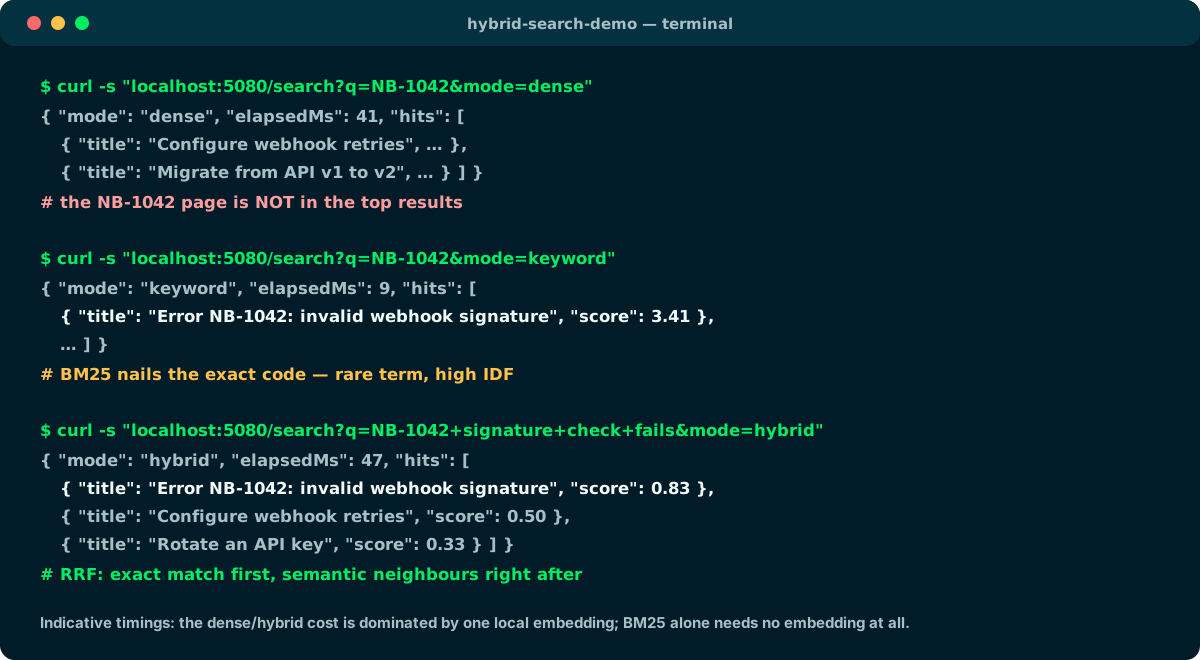
Dense happens to find this code; keyword guarantees the literal signal; hybrid keeps lexical and semantic evidence together.
🤖 Step 13 · From retrieval to RAG: POST /ask
Retrieval alone is not RAG: the G is missing. The POST /ask endpoint closes the loop: the documents retrieved from Qdrant do not go back to the client — they go into llama3.1's prompt (via Microsoft.Extensions.AI's IChatClient), and what returns to the client is the model's answer, grounded on that context, together with the sources used to generate it.
RagService runs in five moves, with one efficiency detail: the question is embedded exactly once and that vector serves both as the semantic-cache key and as the dense branch of the hybrid retrieval — which is why IHybridSearchStore exposes an overload accepting a pre-computed embedding.
public async Task<AskReply> AskAsync(string question, CancellationToken ct = default)
{
    var stopwatch = Stopwatch.StartNew();

    // 1) One embedding, two uses: semantic-cache key AND dense retrieval branch.
    var embedding = await embedder.GenerateVectorAsync(question, cancellationToken: ct);

    // 2) Cache probe: a semantically-close question already answered within the
    //    TTL short-circuits everything — no retrieval, no LLM call.
    var cached = await cacheStore.FindAsync(embedding, ct);
    if (cached is not null)
        return new AskReply(cached, "semantic-cache", stopwatch.ElapsedMilliseconds, []);

    // 3) Retrieval: hybrid (dense + BM25 + RRF) over the KB collection.
    var hits = await searchStore.HybridSearchAsync(embedding, question, _opt.RagTopK, ct);

    // 4) Generation: the retrieved chunks become the grounding context of a
    //    single prompt; the model must answer from them or say it cannot.
    var response = await chat.GetResponseAsync(BuildPrompt(question, hits), cancellationToken: ct);

    // 5) Persist for the next paraphrase — only non-blank answers.
    if (!string.IsNullOrWhiteSpace(response.Text))
        await cacheStore.SaveAsync(embedding, question, response.Text, ct);

    stopwatch.Stop();
    return new AskReply(response.Text, "model", stopwatch.ElapsedMilliseconds,
        [.. hits.Select(hit => new RagSource(hit.Id, hit.Score, hit.Title))]);
}
Full code · fscamuzzi/hybrid-search-dotnet-qdrant-ollama ↗
🧠 Step 14 · The semantic cache of the answers, on Qdrant
In the semantic caching article the cache lived on Redis; here I move it to Qdrant, which I already have around: a second collection (semantic_cache) with a single dense vector. Every model answer becomes a point: vector = question embedding, payload = question, answer and createdAt. A new question is a hit when its nearest neighbour exceeds cosine similarity 0.85.
Qdrant has no native TTL: I enforce expiry at query time, filtering createdAt with a range condition over a dedicated payload index — an entry older than the TTL is invisible even when its vector matches perfectly. Result: the paraphrase of an already-asked question never touches the model.
// One nearest neighbour, gated by similarity AND freshness: an entry older
// than CacheTtl is invisible even when its vector is a perfect match.
public async Task<string?> FindAsync(ReadOnlyMemory<float> embedding, CancellationToken ct = default)
{
    var oldestValid = DateTimeOffset.UtcNow.Subtract(_opt.CacheTtl).ToUnixTimeSeconds();

    var hits = await client.QueryAsync(
        _opt.CacheCollectionName,
        query: embedding.ToArray(),
        filter: Conditions.Range("createdAt", new Qdrant.Client.Grpc.Range { Gte = oldestValid }),
        limit: 1,
        scoreThreshold: _opt.CacheMinScore,   // cosine similarity >= 0.85
        payloadSelector: true,
        cancellationToken: ct);

    return hits.Count > 0 ? hits[0].Payload["answer"].StringValue : null;
}

// Stores a fresh question/answer pair keyed by the question embedding.
public async Task SaveAsync(
    ReadOnlyMemory<float> embedding, string question, string answer, CancellationToken ct = default)
{
    var point = new PointStruct
    {
        Id = Guid.NewGuid(),
        Vectors = embedding.ToArray(),
        Payload =
        {
            ["question"] = question,
            ["answer"] = answer,
            ["createdAt"] = DateTimeOffset.UtcNow.ToUnixTimeSeconds(),
        },
    };

    await client.UpsertAsync(_opt.CacheCollectionName, [point], cancellationToken: ct);
}
Full code · fscamuzzi/hybrid-search-dotnet-qdrant-ollama ↗
⚡ Step 15 · Redis: exact-match and output cache
Redis does two jobs in this project, neither of which is the semantic cache (that lives on Qdrant). First: it is the distributed cache behind UseDistributedCache() in the chat client pipeline — a byte-identical RAG prompt (same question, same retrieved context) never reaches the model twice. Second: it is ASP.NET Core's output cache for GET /users — the whole HTTP response lives on Redis for 60 seconds, varied by query string and tagged users so DELETE /cache/output can evict it in one shot.
The three caching levels have different roles and compose without stepping on each other: output cache (identical HTTP response), exact-match (identical prompt), semantic (similar question).
// Chat pipeline for /ask, outermost first: Redis exact-match cache -> Ollama.
// Paraphrases are caught EARLIER, by the Qdrant semantic cache in RagService.
services.AddStackExchangeRedisCache(redis => redis.Configuration = options.RedisConnection);
services.AddChatClient(new OllamaApiClient(endpoint) { SelectedModel = options.ChatModel })
    .UseDistributedCache()
    .UseLogging();

// GET /users — the WHOLE HTTP response is cached on Redis for 60 seconds,
// varied by the paging params and tagged for one-shot eviction.
app.MapGet("/users", async ([AsParameters] GetUsersRequest request, ...) => { ... })
    .CacheOutput(policy => policy
    .Expire(TimeSpan.FromSeconds(60))
    .SetVaryByQuery("page", "pageSize", "search")
    .Tag("users"));

// DELETE /cache/output — evict every cached /users response at once.
app.MapDelete("/cache/output", async (IOutputCacheStore store, CancellationToken ct) =>
{
    await store.EvictByTagAsync("users", ct);
    return Results.NoContent();
});
Full code · fscamuzzi/hybrid-search-dotnet-qdrant-ollama ↗
🗄️ Step 16 · MongoDB: generic IRepository, Bogus and pagination
The data side reuses the pattern from my semantic caching article: one MongoDB database, one generic IRepository<T> — no per-collection repository classes — and an awaited startup initializer that creates the indexes and seeds 500 fake users with Bogus. GET /users pages server-side: the filter is a typed LINQ expression, CountDocumentsAsync and the sorted page run in parallel, and the response is a typed envelope with items, page and totals.
A note on LINQ: the MongoDB driver ships a real LINQ provider and the repository leans on it (IQueryable, typed predicates, Regex.IsMatch translated into $regex). Qdrant.Client does not — there is no LINQ provider for Qdrant, and its gRPC Query API (prefetch, Rrf, filters) is the idiomatic .NET surface: using it directly is not a fallback, it is the right call.
public async Task<PagedResult<UserResponse>> GetPagedAsync(GetUsersRequest request, CancellationToken ct = default)
{
    // 1) Typed LINQ expression: blank search matches everything, otherwise the
    //    Regex.Escaped term is matched (case-insensitive $regex) on three fields.
    var search = request.Search;
    Expression<Func<User, bool>> predicate;
    if (string.IsNullOrWhiteSpace(search))
    {
        predicate = _ => true;
    }
    else
    {
        var pattern = Regex.Escape(search);
        predicate = u => Regex.IsMatch(u.LastName, pattern, RegexOptions.IgnoreCase) ||
                         Regex.IsMatch(u.FirstName, pattern, RegexOptions.IgnoreCase) ||
                         Regex.IsMatch(u.Email, pattern, RegexOptions.IgnoreCase);
    }

    // 2) Server-side paging — the repository issues count + sorted page in
    //    parallel and returns the filtered total alongside the slice.
    var (users, totalCount) = await repository.FindAsync(
        predicate,
        u => u.LastName,
        ascending: true,
        skip: (request.Page - 1) * request.PageSize,
        take: request.PageSize,
        ct: ct);

    // 3) Project entities -> DTOs and wrap them in the paged envelope.
    return users.ToPagedResult(request, totalCount);
}
Full code · fscamuzzi/hybrid-search-dotnet-qdrant-ollama ↗
🎚️ Tuning: the knobs that matter
Basic hybrid search works without tuning, but three knobs deserve attention. The PrefetchLimit decides how many candidates per branch reach the fusion: too low and RRF has no material, too high and you pay useless latency — 20-50 is a good range. RRF's k (default 2 in Qdrant) flattens or sharpens the weight of top positions. And since version 1.17 Qdrant also supports per-branch weights in RRF, if you want to push the semantic or the lexical side.
The DBSF alternative normalizes scores (mean ± 3 standard deviations) and sums them: it can reward wide score gaps that RRF ignores, but it is more sensitive to your corpus's score distribution. My practical advice: start with plain RRF, measure on a set of real queries, and change only if the numbers justify it.
RRF (default)
- Fuses by position, ignores scores
- Zero normalization required
- Robust across different metrics
- Tunable k and per-branch weights
DBSF
- Normalizes and sums scores
- Sensitive to the distribution
- Rewards wide score gaps
- Validate on your own corpus
Start with RRF; switch to DBSF only if an eval set on your domain shows a real gain.
✅ Final checklist
Let's recap. If you followed the steps, you now have a Minimal API that queries the same knowledge base three ways, fuses dense vectors and BM25 keywords inside the database, and above all closes the RAG loop: the retrieved documents feed llama3.1 and the model's answer returns to the client with its sources, passing through a semantic cache on Qdrant, the exact-match cache on Redis, with the Mongo users paginated and output-cached.
From here you can level up: add Qdrant's payload filters (category, language, tenant), try RRF weights or a re-ranker on the top fused results, or replace the fake corpus with your real documents.
- 01Docker ComposeQdrant, Ollama (2 models), Redis, MongoDB
- 02Project + NuGetExtensions.AI, Qdrant.Client, Mongo, Redis
- 03appsettings + Optionstwo typed named vectors
- 04Collectiondense cosine + sparse IDF
- 05Ingestionembedding + qdrant/bm25 Document
- 06Three searchesdense, keyword, hybrid
- 07Prefetch + RRFfusion inside Qdrant
- 08/search endpointvalidation + DTO with timings
- 09RAG: POST /askretrieval → llama3.1 → answer + sources
- 10Semantic cachesecond Qdrant collection, filtered TTL
- 11Redisexact-match + /users output cache
- 12MongoDBIRepository, Bogus, pagination
From here: payload filters, RRF weights, re-ranking, your real corpus.
📦 The full project on GitHub
The complete companion project for this tutorial — the Qdrant store, the three search modes, the RAG endpoint with its semantic cache, Redis for exact-match and output caching, MongoDB with the generic repository and Bogus users, the seed corpus with the NB-* codes, FluentValidation, an .http file with every call ready, Swagger UI and ReDoc at /swagger and /redoc, and an xUnit test suite that runs without any infrastructure (no Qdrant, no Ollama, no Redis, no MongoDB) — is public on GitHub under the MIT license. The README walks the same Docker Compose, dotnet test and dotnet run flow shown here, plus an architecture diagram.
git clone https://github.com/fscamuzzi/hybrid-search-dotnet-qdrant-ollama.git
cd hybrid-search-dotnet-qdrant-ollama
docker compose up -d                 # Qdrant + Ollama
docker compose logs -f ollama-init   # wait for exit code 0
cd HybridSearchDemo && dotnet run --urls http://localhost:5080
fscamuzzi/hybrid-search-dotnet-qdrant-ollama · GitHub ↗
📞 The example calls, from the .http file
I close with the calls that tell the whole system's story — the same ones in the repo's HybridSearchDemo.http file, ready for VS Code's REST Client or Rider's HTTP client. The sequence to try in order: the three searches on the NB-1042 code, then the RAG — first question with "source": "model" and the sources, a paraphrase with "source": "semantic-cache" and elapsedMs collapsing without touching the model — and finally the paginated users, where the second identical call comes out of the Redis output cache.
Every response is a typed DTO carrying its milliseconds: comparing the timings across model, semantic-cache and the output cache is the most concrete demonstration of why these three levels exist.
### Search: dense vs keyword vs hybrid on the same code
GET {{host}}/search?q=NB-1042&mode=dense
GET {{host}}/search?q=NB-1042&mode=keyword
GET {{host}}/search?q=NB-1042 signature check fails&mode=hybrid

### RAG: first question -> "source": "model" + sources
POST {{host}}/ask
Content-Type: application/json

{ "question": "Why does NB-1042 keep failing on my webhook endpoint?" }

### Paraphrase -> "source": "semantic-cache", no LLM call at all
POST {{host}}/ask
Content-Type: application/json

{ "question": "My webhook endpoint keeps getting the NB-1042 failure, what is wrong?" }

### Users: Mongo pagination + Redis output cache (60s, tag "users")
GET {{host}}/users?page=1&pageSize=10
GET {{host}}/users?page=1&pageSize=5&search=an

### Flush the output cache: the next /users comes fresh from Mongo
DELETE {{host}}/cache/output
Full code · fscamuzzi/hybrid-search-dotnet-qdrant-ollama ↗
🎁 Bonus · Swagger UI and ReDoc: the API that documents itself
As a bonus, the API ships its own documentation with one OpenAPI document (Swashbuckle) and two UIs: /swagger (Swagger UI, the interactive console with Try it out) and /redoc (ReDoc, the three-panel reference). The document is fed by the XML doc comments (///) on endpoints, request and response records — what you read in ReDoc is the same text you read in the code — plus the endpoint metadata (WithSummary, WithTags, Produces<T>), which groups the operations into Search, RAG, Users and Cache.
Two details that matter in ReDoc. First, the generated contract must be read exactly as emitted: body property question is required, while for GET /search Swashbuckle reflects the [AsParameters] record names as Q, Mode and Limit, and Q is currently shown as optional because the record gives it an empty-string default. FluentValidation still rejects a missing or blank q at runtime with HTTP 400. The nullability options and [Required], [Range] and [MaxLength] attributes remain useful for request-body schemas, defaults and bounds, but they do not turn that query parameter into OpenAPI-required metadata. Second: an operation filter injects the x-codeSamples extension with ready-to-copy snippets in curl, C#, JavaScript and Python — ReDoc renders them as language tabs next to each operation.
// SwaggerGen: XML comments + required-from-nullability + code samples.
services.AddSwaggerGen(options =>
{
    options.SwaggerDoc("v1", new OpenApiInfo { Title = "Hybrid Search + RAG API", Version = "v1" });

    // Non-nullable (string) => required in the schema; string? stays optional.
    options.SupportNonNullableReferenceTypes();
    options.NonNullableReferenceTypesAsRequired();

    // The /// comments of this assembly become the schema and field descriptions.
    options.IncludeXmlComments(Path.Combine(AppContext.BaseDirectory, "HybridSearchDemo.xml"));

    options.OperationFilter<CodeSamplesOperationFilter>();
});

// Two UIs over the same document: /swagger (try-it-out) and /redoc (reference).
app.UseSwagger();
app.UseSwaggerUI(ui => ui.SwaggerEndpoint("/swagger/v1/swagger.json", "Hybrid Search + RAG API v1"));
app.UseReDoc(redoc => { redoc.RoutePrefix = "redoc"; redoc.SpecUrl = "/swagger/v1/swagger.json"; });

// The operation filter: code tabs for ReDoc, one set per endpoint.
operation.Extensions["x-codeSamples"] = new OpenApiArray
{
    new OpenApiObject
    {
        ["lang"] = new OpenApiString("Shell"),
        ["label"] = new OpenApiString("curl"),
        ["source"] = new OpenApiString("curl -s -X POST http://localhost:5080/ask ..."),
    },
    // ... C#, JavaScript, Python
};

// On the requests, nullability and attributes decide required/optional:
public sealed record AskRequest(
    [property: Required, MaxLength(500), Description("The question. REQUIRED.")]
    string Question);
Swashbuckle.AspNetCore · GitHub ↗
🔀 Bonus · Switching the AI provider from appsettings: Ollama or OpenAI-compatible
Second bonus, born from a question I hear often: how much does it cost to move this demo off Ollama? Answer: one configuration key. The whole tutorial depends on two Microsoft.Extensions.AI abstractions — IChatClient and IEmbeddingGenerator — never on the concrete SDKs. In the repo I added an AiClientFactory with a switch over the new AiProvider value in appsettings.json: with "ollama" (the default) everything stays local exactly as in the sixteen steps; with "openai" both clients are built by the official OpenAI SDK and the stable Microsoft.Extensions.AI.OpenAI adapters (AsIChatClient(), AsIEmbeddingGenerator()), pointed at OpenAiEndpoint. And "openai" means OpenAI-compatible, not just OpenAI: OpenRouter, Groq, Mistral, LM Studio, vLLM, llama.cpp server — even Ollama's own /v1 route. Compared to Step 9, two lines change: the two new OllamaApiClient(...) become the factory calls.
Three practical details. The key never enters the repo: OpenAiApiKey travels via user-secrets or the HybridSearch__OpenAiApiKey environment variable, and the factory fails fast at startup when the provider is openai and the key is blank — keyless local servers are happy with any placeholder. EmbeddingDimensions follows the model: 768 for nomic-embed-text, 1536 for text-embedding-3-small, 3072 for text-embedding-3-large; the Qdrant collections are created with that size at startup, so changing embedding model means recreating kb_hybrid and semantic_cache. And above all: the Redis cache, the semantic cache and the endpoints do not change by a single line — they are middleware and consumers of the same abstractions, blind to the provider underneath.
// Services/AiClientFactory.cs — one switch, two clients, zero ifs in the rest of the app.
public static IChatClient CreateChatClient(HybridSearchOptions options) =>
    options.AiProvider switch
    {
        AiProvider.Ollama => new OllamaApiClient(new Uri(options.OllamaEndpoint)) { SelectedModel = options.ChatModel },
        AiProvider.OpenAi => CreateOpenAiClient(options).GetChatClient(options.ChatModel).AsIChatClient(),
        _ => throw new ArgumentOutOfRangeException(nameof(options), options.AiProvider, "Unsupported AI provider"),
    };

// CreateEmbeddingGenerator: same switch, over EmbeddingModel + AsIEmbeddingGenerator().

// The OpenAI-compatible branch: official SDK pointed at the configured endpoint.
private static OpenAIClient CreateOpenAiClient(HybridSearchOptions options)
{
    if (string.IsNullOrWhiteSpace(options.OpenAiApiKey))
        throw new InvalidOperationException(
            "HybridSearch:OpenAiApiKey is required when AiProvider is 'openai'.");

    return new OpenAIClient(
        new ApiKeyCredential(options.OpenAiApiKey),
        new OpenAIClientOptions { Endpoint = new Uri(options.OpenAiEndpoint) });
}

// appsettings.json — "AiProvider": "openai", endpoint, models of the ACTIVE
// provider, EmbeddingDimensions aligned; the key via env var or user-secrets.

// Step 9, final version: the two new OllamaApiClient(...) become
services.AddEmbeddingGenerator(AiClientFactory.CreateEmbeddingGenerator(options));
services.AddChatClient(AiClientFactory.CreateChatClient(options)); // Redis cache and logging untouched
Full code · fscamuzzi/hybrid-search-dotnet-qdrant-ollama ↗
🦾 Bonus · Microsoft Agent Framework: on top of Microsoft.Extensions.AI, not instead of it
Looking at the stack, the question is fair: now that the Microsoft Agent Framework is GA — 1.0 since April 3, 2026, the declared heir of Semantic Kernel and AutoGen — shouldn't this tutorial use it instead of Microsoft.Extensions.AI? I did the check, and the answer is that they are not alternatives: Agent Framework is built on top of the same abstractions. Its ChatClientAgent consumes an IChatClient — OllamaSharp, the OpenAI adapter, or whatever comes out of the previous bonus' factory, indifferently — and for embeddings, which here feed ingestion, the three searches and the semantic cache, an Agent Framework equivalent simply does not exist: IEmbeddingGenerator IS Microsoft.Extensions.AI. The exact-match cache of Step 15 is M.E.AI middleware on the chat pipeline too.
For this tutorial's RAG call — stateless, one prompt, no tools — an agent would only add a layer. The framework becomes the right choice when you need what it was born for: tools and function calling with approvals, stateful multi-turn threads, multi-agent workflows, MCP integration. The nice part is that the upgrade starts exactly here: hand ChatClientAgent the IChatClient the factory already produces, and instructions, tools and threads arrive on top — with Ollama or an OpenAI-compatible endpoint underneath, nothing else touched.
// The same IChatClient the factory builds (Ollama OR OpenAI-compatible)…
var chatClient = AiClientFactory.CreateChatClient(options);

// …becomes an agent: instructions, tools and threads arrive ON TOP of the abstractions.
// NuGet: Microsoft.Agents.AI (GA, April 2026) — the heir of SK + AutoGen.
AIAgent agent = new ChatClientAgent(
    chatClient,
    instructions: "You are a support assistant. Answer ONLY from the provided context.",
    name: "hybrid-rag-agent");

var reply = await agent.RunAsync("Why does NB-1042 keep failing?");

// Embeddings stay on Microsoft.Extensions.AI: IEmbeddingGenerator has no
// Agent Framework equivalent — this tutorial's ingestion, search and
// semantic cache would not change either way.
microsoft/agent-framework · GitHub ↗
Frequently asked questions about hybrid search in .NET
What is hybrid search?
A search that runs the same query over two representations — dense vectors (embeddings, semantics) and sparse vectors (BM25 keywords, exact terms) — and fuses the two rankings into one, typically with Reciprocal Rank Fusion. It takes the best of both: paraphrases and exact codes.
Why isn't dense vector search enough?
Because embeddings do not guarantee reliable handling of rare, opaque tokens such as error codes, SKUs and acronyms. The current model finds NB-1042 in this small corpus, but that ranking can change with the model or data. BM25 gives the literal token an explicit, deterministic signal through IDF.
What is Reciprocal Rank Fusion (RRF)?
A fusion method that ignores raw scores and uses positions only: every document receives the sum of 1/(k + rank) for each ranking it appears in. It needs no normalization across metrics with different scales, like cosine and BM25. In Qdrant, k is 2 and ranks are zero-based.
Do I have to compute BM25 vectors in C# myself?
No. Since Qdrant 1.15.2 the conversion into BM25 sparse vectors happens server-side: I pass a Document with the text and the qdrant/bm25 model, both at ingestion and at query time. The only requirement is declaring the IDF modifier on the collection's sparse vector configuration.
Does hybrid search need a chat model?
For search alone, no: an embedding model is enough (here nomic-embed-text via Ollama, 768 dimensions). The chat model (llama3.1) comes in for the /ask endpoint, where the retrieved documents become the prompt's context and the generated answer returns to the client: that is the tutorial's RAG part.
RRF or DBSF?
RRF is the robust default: it fuses by position and does not depend on score scales. DBSF normalizes scores and sums them: it can reward wide gaps but is more sensitive to the corpus distribution. My advice is to start with RRF and switch only after measuring on real queries.
Can I use this approach for RAG?
Yes, and in this tutorial I actually do: POST /ask runs the hybrid retrieval, hands the retrieved chunks to llama3.1 as the prompt's context and returns the model-generated answer to the client along with the sources. Retrieval alone is not RAG: generation is required too.
How does the semantic cache on Qdrant work?
Model answers land in a second Qdrant collection: vector = question embedding, payload = question, answer and createdAt. A new question is a hit when the nearest neighbour exceeds cosine similarity 0.85 and is newer than the TTL, enforced at query time with a range filter over a payload index. Paraphrases never touch the model.
What is Redis for, if the semantic cache lives on Qdrant?
Two different things: it is the exact-match distributed cache in front of the chat client (an identical prompt never reaches the model twice) and ASP.NET Core's output cache for GET /users, holding the whole HTTP response for 60 seconds, varied by query string and tagged for eviction via DELETE /cache/output.
Is there a LINQ provider for Qdrant in .NET?
No. The MongoDB driver has a real LINQ provider and the generic repository uses it (IQueryable, typed predicates, $regex). Qdrant.Client instead exposes the native gRPC Query API — prefetch, Rrf, filters — which is the idiomatic .NET surface: there is no LINQ alternative to prefer.
Can I use OpenAI or another OpenAI-compatible endpoint instead of Ollama?
Yes. In the companion repo the provider is picked in appsettings.json via the AiProvider key (default ollama): with openai a factory builds IChatClient and IEmbeddingGenerator with the official OpenAI SDK and the Microsoft.Extensions.AI.OpenAI adapters, pointed at any compatible endpoint — OpenAI, OpenRouter, Groq, LM Studio, vLLM, even Ollama's own /v1 route. Just align EmbeddingDimensions with the model and recreate the Qdrant collections.
Does the Microsoft Agent Framework replace Microsoft.Extensions.AI?
No: it is built on top of it. ChatClientAgent consumes an IChatClient, and for embeddings there is no equivalent — IEmbeddingGenerator is Microsoft.Extensions.AI. For a stateless RAG call with no tools the abstractions are enough; the framework (1.0 GA since April 2026, heir of Semantic Kernel and AutoGen) becomes the right choice with tools, multi-turn threads, multi-agent workflows and MCP.
Let's talk
If this topic is relevant to you, write to me: comparing notes on code and AI is always time well spent.


