 COOL
COOL 


In this article
- 🧠 What function calling (tool calling) is
- 🎯 When to use it (and how it differs from RAG)
- 🔬 Anatomy of a tool: from C# method to schema
- 🏗️ The solution architecture
- ⬇️ Step 1 · Ollama and a tool-capable model
- 🧱 Step 2 · Project and NuGet packages
- ⚙️ Step 3 · appsettings.json
- 🧩 Step 4 · Register the chat client (UseFunctionInvocation)
- 🚀 Step 5 · Program.cs: two lines of wiring
- 📦 Step 6 · The first tool: order status from MongoDB
- 🌐 Step 7 · A tool that calls an external API with Refit
- 💬 Step 8 · The /assistant endpoint with ChatOptions.Tools
- 🧪 Step 9 · Try it from the terminal
- 🔎 Behind the scenes: the invocation loop
- 🔒 Step 10 · Limits, errors and tool safety
- ✅ Final checklist and next steps
- 📦 The full project on GitHub
🧠 What function calling (tool calling) is
On its own, an LLM knows how to produce text, not act. Function calling (or tool calling) flips that: you describe some of your own functions to the model and, when needed, it asks to run them itself to fetch real data or perform actions.
Note: the model executes nothing. It decides which function to invoke and with which arguments; your runtime runs the method and hands back the result, which the model uses to compose the final answer. It's the building block that turns a chatbot into an assistant wired to your systems.
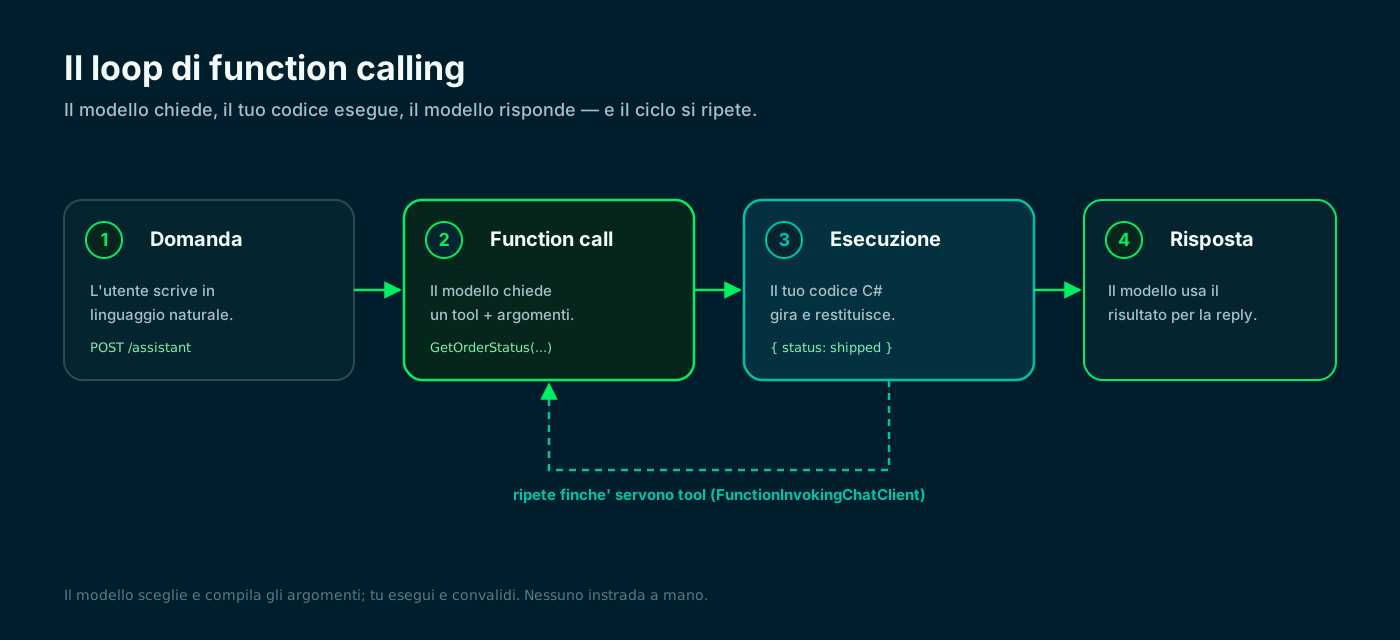
The model asks, your code runs, the model answers. The loop repeats as long as tools are needed.
🎯 When to use it (and how it differs from RAG)
RAG retrieves text and puts it in the prompt: perfect when the answer lives inside documents. Function calling makes something happen: query a transactional database, call an API, compute, kick off a process.
The two don't compete, they add up: an assistant often uses RAG for knowledge and tools for live data and actions. Rule of thumb: if the question needs a dynamic value or an operation, it's a job for a tool.
RAG — retrieve
- Answers from documents and knowledge bases
- Textual, semi-static data
- No side effects
- Great against hallucinations
Function calling — act
- Queries systems and APIs in real time
- Dynamic data: orders, prices, status
- Can perform actions (with care)
- The model picks the right tool
They don't exclude each other: RAG for knowledge, tools for live data and operations.
🔬 Anatomy of a tool: from C# method to schema
With Microsoft.Extensions.AI a tool is a C# method plus an attribute. AIFunctionFactory.Create reads the method signature and the [Description] attributes and generates the JSON schema the model sees: name, what it does, which parameters it needs and their types.
The clearer the descriptions, the better the model picks and fills in the arguments. Speaking names, one [Description] on the method and one per parameter: that's 90% of tool-calling quality.
![Anatomy of a tool: on the left a C# method GetOrderStatusAsync with a [Description] attribute on the method and on the orderCode parameter; an arrow shows how AIFunctionFactory.Create turns it into the JSON schema on the right, with name, description and properties (orderCode of type string) that the model reads.](/blog/function-calling-microsoft-extensions-ai-dotnet/tool-anatomy.svg)
The name, parameter types and [Description] attributes become the schema the model reads.
🏗️ The solution architecture
We build a Minimal API in .NET: an assistant for a small shop that answers questions about orders and prices. The model runs locally on Ollama via OllamaSharp; function invocation is handled by Microsoft.Extensions.AI.
Two families of tools: one reads order status from MongoDB, the other converts a price by calling an external API with Refit. A single POST /assistant endpoint: the model decides the rest.
- Model: Ollama locally (llama3.1), exposed as IChatClient by OllamaSharp.
- Function calling: .UseFunctionInvocation() adds the automatic loop from Microsoft.Extensions.AI.
- Tools: OrderTools (MongoDB) and PricingTools (external API via Refit).
- NuGet packages: Microsoft.Extensions.AI, OllamaSharp, Refit.HttpClientFactory, MongoDB.Driver.
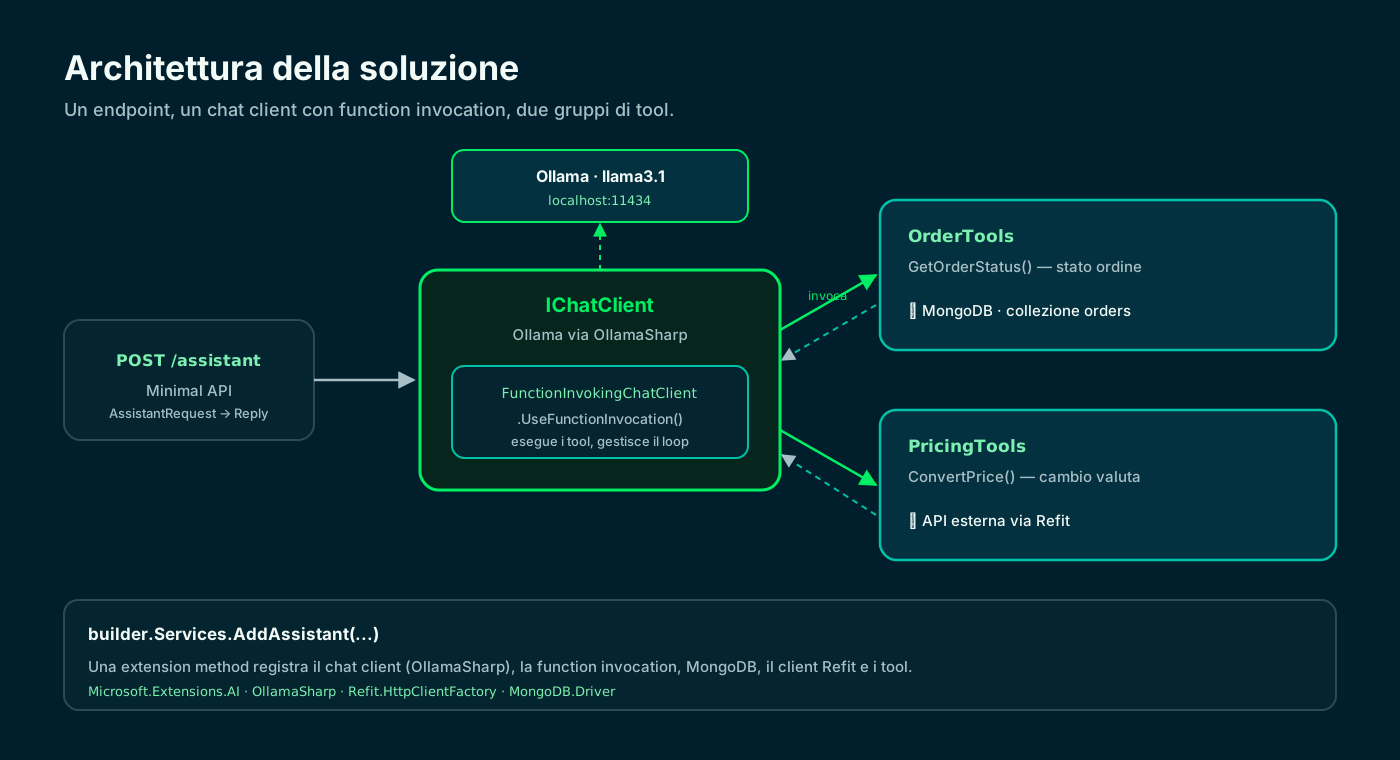
One endpoint, a chat client with function invocation, two tool groups: MongoDB and an external API.
⬇️ Step 1 · Ollama and a tool-capable model
Ollama runs the model on your machine, on the http://localhost:11434 endpoint. Not every model supports tool calling: pick one that declares it, such as llama3.1, qwen3 or mistral.
Zero tokens spent and data that never leaves the machine. With 16 GB of RAM you comfortably run 7-8 billion parameter models.
# pull a model that supports tool calling (llama3.1, qwen3, mistral...)
$ ollama pull llama3.1

# start the server (it usually starts on its own)
$ ollama serve                 # http://localhost:11434

# quick check from the terminal
$ ollama run llama3.1 "Hi, who are you?"🧱 Step 2 · Project and NuGet packages
We create a Minimal API and add four packages: the Microsoft.Extensions.AI abstractions, the OllamaSharp provider, Refit for the external API and the MongoDB driver.
Important note: the old Microsoft.Extensions.AI.Ollama is deprecated. Today you use OllamaSharp, whose OllamaApiClient implements IChatClient directly.
# new Minimal API
$ dotnet new web -n ToolCallingDemo && cd ToolCallingDemo

# AI abstractions + Ollama provider (OllamaSharp) + Refit + Mongo driver
$ dotnet add package Microsoft.Extensions.AI
$ dotnet add package OllamaSharp
$ dotnet add package Refit.HttpClientFactory
$ dotnet add package MongoDB.Driver
Microsoft.Extensions.AI · Microsoft Learn ↗
⚙️ Step 3 · appsettings.json
All configuration lives in appsettings.json: the Ollama endpoint and model, the exchange API base URL and the MongoDB connection. The Ollama endpoint is http://localhost:11434.
Keeping these values here means changing model, host or provider without touching the code.
{
  "Ollama": {
    "Endpoint": "http://localhost:11434",
    "ChatModel": "llama3.1"
  },
  "ExchangeRates": {
    "BaseUrl": "https://api.exchangerate.host"
  },
  "Mongo": {
    "ConnectionString": "mongodb://localhost:27017",
    "Database": "shopdemo"
  }
}🧩 Step 4 · Register the chat client (UseFunctionInvocation)
We collect all the wiring into an extension method AddAssistant. It registers the Ollama chat client as IChatClient, enables function invocation, and adds MongoDB, the Refit client and the two tool groups.
The key is .UseFunctionInvocation(): it adds the FunctionInvokingChatClient, which runs the tools the model requests on its own and feeds the results back into the conversation.
using Microsoft.Extensions.AI;
using MongoDB.Driver;
using OllamaSharp;
using Refit;
using ToolCallingDemo.Tools;

namespace ToolCallingDemo.Extensions;

// One extension method wires the whole stack: the Ollama chat client (via
// OllamaSharp), the function-invocation pipeline, MongoDB, the Refit client
// and the "tools" as typed services.
public static class AssistantServiceExtensions
{
    public static IServiceCollection AddAssistant(this IServiceCollection services, IConfiguration config)
    {
        var ollama = config.GetSection("Ollama");
        var chatClient = new OllamaApiClient(new Uri(ollama["Endpoint"]!), ollama["ChatModel"]!);

        // OllamaApiClient implements IChatClient. UseFunctionInvocation adds the
        // FunctionInvokingChatClient, which runs the tools the model requests on its own.
        services.AddChatClient(chatClient)
            .UseFunctionInvocation()
            .UseLogging();

        var mongo = config.GetSection("Mongo");
        var mongoClient = new MongoClient(mongo["ConnectionString"]);
        services.AddSingleton<IMongoDatabase>(_ => mongoClient.GetDatabase(mongo["Database"]));

        // Typed HTTP client with Refit: no hand-written HttpClient.
        services.AddRefitClient<IExchangeRateApi>()
            .ConfigureHttpClient(c => c.BaseAddress = new Uri(config["ExchangeRates:BaseUrl"]!));

        services.AddScoped<OrderTools>();
        services.AddScoped<PricingTools>();
        return services;
    }
}🚀 Step 5 · Program.cs: two lines of wiring
The Program.cs of a Minimal API stays tiny: one call to AddAssistant and the endpoint mapping. Everything else lives in the services.
The app depends only on the interfaces: tomorrow you switch from Ollama to OpenAI or Azure by changing the single chat-client line, leaving endpoints and tools untouched.
using ToolCallingDemo.Endpoints;
using ToolCallingDemo.Extensions;

var builder = WebApplication.CreateBuilder(args);

// One line registers Ollama (chat + function invocation), MongoDB, Refit and the tools.
builder.Services.AddAssistant(builder.Configuration);

var app = builder.Build();

app.MapAssistantEndpoints();   // POST /assistant

app.Run();📦 Step 6 · The first tool: order status from MongoDB
The first tool group reads order status from MongoDB. It's a plain C# method: the [Description] attribute — on the method and on the parameter — is what the model reads to decide whether and how to call it.
The return type is a typed record: never object, dynamic or anonymous types at a tool boundary. If the order doesn't exist, we return an explicit not_found status, so the model can say so instead of inventing.
using System.ComponentModel;
using MongoDB.Bson;
using MongoDB.Bson.Serialization.Attributes;
using MongoDB.Driver;

namespace ToolCallingDemo.Tools;

// Tools are plain C# methods. The [Description] attribute is what the model
// reads to understand WHEN and HOW to call them; parameters and return type
// become the tool's JSON schema.
public class OrderTools(IMongoDatabase database)
{
    private readonly IMongoCollection<Order> _orders = database.GetCollection<Order>("orders");

    [Description("Gets the status, total and delivery date of an order given its code.")]
    public async Task<OrderStatus> GetOrderStatusAsync(
        [Description("The order code, e.g. ORD-1024")] string orderCode,
        CancellationToken ct = default)
    {
        var order = await _orders.Find(o => o.Code == orderCode).FirstOrDefaultAsync(ct);
        if (order is null)
            return new OrderStatus(orderCode, "not_found", 0m, null);

        return new OrderStatus(order.Code, order.Status, order.Total, order.EstimatedDelivery);
    }
}

// Typed DTOs: never object/dynamic/anonymous at a tool boundary.
public record OrderStatus(string OrderCode, string Status, decimal Total, DateOnly? EstimatedDelivery);

// MongoDB document read by the tool. [BsonId] maps the _id key and
// [BsonIgnoreExtraElements] keeps extra fields on the document from breaking
// deserialization (handy as the schema evolves).
[BsonIgnoreExtraElements]
public class Order
{
    [BsonId]
    public ObjectId Id { get; set; }

    public string Code { get; set; } = "";
    public string Status { get; set; } = "";

    // decimal -> Decimal128 is already the default; the attribute makes it
    // explicit and avoids surprises if an old document stored the amount as a double.
    [BsonRepresentation(BsonType.Decimal128)]
    public decimal Total { get; set; }

    public DateOnly? EstimatedDelivery { get; set; }
}🌐 Step 7 · A tool that calls an external API with Refit
The second group converts a price between two currencies by calling an external API. The HTTP contract is a Refit interface: no hand-written HttpClient, the client is generated by Refit.
Parameters not present in the path become the query string: ConvertAsync("EUR", "USD", 100) calls /convert?from=EUR&to=USD&amount=100. Adapt the path to your exchange API.
using System.ComponentModel;
using Refit;

namespace ToolCallingDemo.Tools;

// The external API contract is the interface itself: Refit generates the client.
// Params not in the path become the query string: /convert?from=EUR&to=USD&amount=100
public interface IExchangeRateApi
{
    [Get("/convert")]
    Task<ConvertResponse> ConvertAsync(string from, string to, decimal amount, CancellationToken ct = default);
}

public record ConvertResponse(decimal Result);

// Second tool group: converts an amount between two currencies at the current rate.
public class PricingTools(IExchangeRateApi api)
{
    [Description("Converts an amount from one currency to another at the current exchange rate.")]
    public async Task<decimal> ConvertPriceAsync(
        [Description("Amount to convert")] decimal amount,
        [Description("Source currency ISO 4217, e.g. EUR")] string from,
        [Description("Target currency ISO 4217, e.g. USD")] string to,
        CancellationToken ct = default)
    {
        var conversion = await api.ConvertAsync(from, to, amount, ct);
        return Math.Round(conversion.Result, 2);
    }
}💬 Step 8 · The /assistant endpoint with ChatOptions.Tools
The endpoint brings it all together: it builds the AIFunctions with AIFunctionFactory.Create from the tool methods, passes them in ChatOptions.Tools and calls GetResponseAsync. The FunctionInvokingChatClient does the rest.
The system prompt mandates using the tools for real data and never inventing. From here on, if the question needs an order status or a conversion, the model calls the right method.
using Microsoft.Extensions.AI;
using ToolCallingDemo.Tools;

namespace ToolCallingDemo.Endpoints;

public record AssistantRequest(string Question);
public record AssistantReply(string Answer);

public static class AssistantEndpoints
{
    // POST /assistant — the model answers and, when needed, calls the tools on its own.
    public static void MapAssistantEndpoints(this IEndpointRouteBuilder app) =>
        app.MapPost("/assistant", async (
            AssistantRequest req,
            IChatClient chat,
            OrderTools orderTools,
            PricingTools pricingTools,
            CancellationToken ct) =>
        {
            // The two method groups become the tools available for this request.
            var options = new ChatOptions
            {
                Tools =
                [
                    AIFunctionFactory.Create(orderTools.GetOrderStatusAsync),
                    AIFunctionFactory.Create(pricingTools.ConvertPriceAsync)
                ]
            };

            var messages = new List<ChatMessage>
            {
                new(ChatRole.System,
                    "You are a shop assistant. Use the tools for real data on orders and prices. " +
                    "Do not invent statuses or amounts: if a tool finds nothing, say so."),
                new(ChatRole.User, req.Question)
            };

            var response = await chat.GetResponseAsync(messages, options, ct);
            return Results.Ok(new AssistantReply(response.Text));
        });
}🧪 Step 9 · Try it from the terminal
Two curl calls and the assistant is alive. On the first question the model realizes it must call GetOrderStatus; on the second, ConvertPrice. You route nothing: it decides.
Notice that in the body we only pass the natural-language question: choosing the tool and its arguments is entirely up to the model.
# an order status: the model will call GetOrderStatus on its own
$ curl http://localhost:5000/assistant \
    -H "Content-Type: application/json" \
    -d '{"question":"Where is order ORD-1024?"}'

# a conversion: the model will call ConvertPrice
$ curl http://localhost:5000/assistant \
    -H "Content-Type: application/json" \
-d '{"question":"How much is 149.90 EUR in USD?"}'🔎 Behind the scenes: the invocation loop
What really happens on each request? The model replies with a function call, the FunctionInvokingChatClient runs the method, puts its result back into the conversation and calls the model again: the loop repeats until there's nothing left to call.
With .UseLogging() you see it all in the logs: the call request, the chosen arguments, your method's result and the final answer. It's the best way to understand why the model picked a tool.
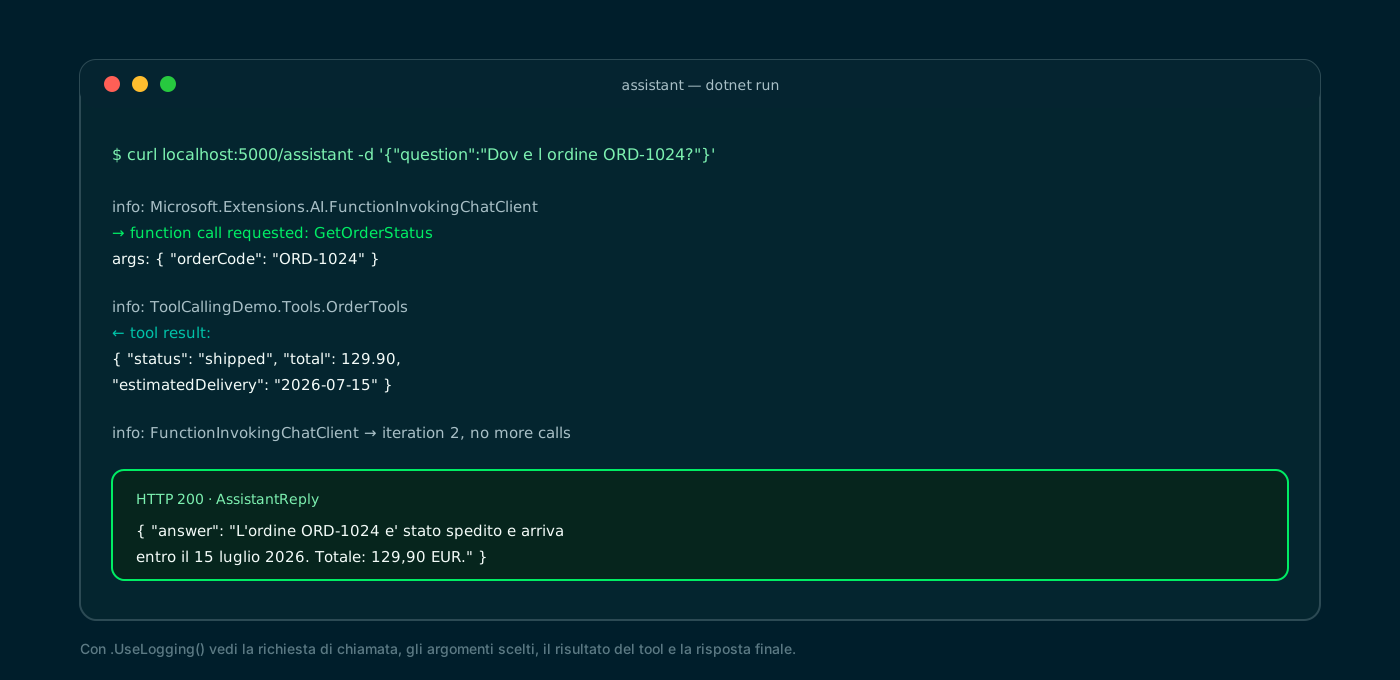
Call request, arguments, tool result and final answer: all traced with UseLogging.
🔒 Step 10 · Limits, errors and tool safety
Letting an LLM call functions is powerful, but it must be fenced in. The model chooses the arguments: treat them as untrusted input. And put guardrails on the loop, so a chain of calls can't run forever.
Microsoft.Extensions.AI exposes the right levers on the FunctionInvokingChatClient: maximum number of round-trips, error tolerance and the level of detail of the errors returned to the model.
- Validate the arguments: check formats and permissions before touching the database or the API.
- Mind the side effects: a tool that writes (orders, refunds) must be protected; for critical operations consider a human-approval step.
- Errors as data: if a tool throws, the client can send the exception back to the model to retry; MaximumConsecutiveErrorsPerRequest prevents failure loops.
- Parallel calls: AllowConcurrentInvocation runs multiple tools in the same response in parallel (default: serial).
- Models and streaming: not every Ollama model supports tools; with streaming the tools work, but the final text arrives after they run.
using Microsoft.Extensions.AI;

// Same tools, but with explicit limits on the function-calling loop.
services.AddChatClient(chatClient)
    .UseFunctionInvocation(configure: c =>
    {
        c.MaximumIterationsPerRequest = 5;          // at most 5 round-trips with the model
        c.MaximumConsecutiveErrorsPerRequest = 2;   // stop after 2 errors in a row
        c.IncludeDetailedErrors = false;            // don't pass stack traces to the model
    })
    .UseLogging();
FunctionInvokingChatClient · Microsoft Learn ↗
✅ Final checklist and next steps
Let's recap the path. If you followed the steps, you now have a .NET Minimal API where a local LLM calls your own C# methods as tools, reading real data from MongoDB and from an external API.
From here you can level up: add more tools, combine tools with RAG to unite knowledge and actions, or coordinate multiple agents — keeping the same architecture, because you depend on the interfaces, not the providers.
- 01Ollama + modelllama3.1; endpoint 11434
- 02Project + NuGetExtensions.AI + OllamaSharp + Refit + Driver
- 03appsettings.jsonOllama, external API, Mongo
- 04AddAssistantIChatClient + UseFunctionInvocation
- 05Program.csone line of wiring + endpoint
- 06Order toolMongoDB + [Description]
- 07Pricing toolexternal API via Refit
- 08/assistant endpointChatOptions.Tools + GetResponseAsync
From here: more tools, RAG + tools together, or multiple agents with the same structure.
📦 The full project on GitHub
The complete project from this tutorial — chat client registration, MongoDB and Refit tools, /assistant endpoint — is published as a public repository: clone it, start Ollama and MongoDB, and the assistant answers with real data. The README carries the same commands you saw here.
git clone https://github.com/fscamuzzi/function-calling-microsoft-extensions-ai-dotnet.git
cd function-calling-microsoft-extensions-ai-dotnet/ToolCallingDemo
dotnet run --urls http://localhost:5000
fscamuzzi/function-calling-microsoft-extensions-ai-dotnet · GitHub ↗
Frequently asked questions about function calling .NET
What is function calling in an LLM?
It's the model's ability to ask for your code's functions to run: it doesn't run them itself, but decides which to call and with which arguments. Your runtime runs them and returns the result, which the model uses for the final answer.
What's the difference between function calling and RAG?
RAG retrieves text from your documents and puts it in the prompt; function calling runs code to fetch dynamic data or perform actions. They're often used together: RAG for knowledge, tools for live data and operations.
Does Ollama support function calling?
Yes, but only some models (e.g. llama3.1, qwen3, mistral). With Microsoft.Extensions.AI and OllamaSharp the local model exposes tools like any cloud provider; make sure the chosen model declares tool support.
Should I use the Microsoft.Extensions.AI.Ollama package?
No: that package is deprecated. Today you use OllamaSharp, whose OllamaApiClient implements IChatClient. The rest of the code depends only on the abstractions, so switching to OpenAI or Azure changes one line.
How does the model know when to call a tool?
It reads the method name and the [Description] attributes (on the method and parameters), which become the tool's JSON schema. Clear descriptions and typed parameters are what drive the choice and the argument filling.
Is it safe to let an LLM call functions?
With care. The model chooses the arguments: treat them as untrusted input and validate them. For tools that write (orders, refunds) use permissions and, when needed, a human approval; cap the round-trips with MaximumIterationsPerRequest.
Let's talk
If this topic is relevant to you, write to me: comparing notes on code and AI is always time well spent.


