


AI Agent Orchestration: patterns, frameworks and an ASP.NET Core example
A single AI agent is fine for an isolated job: “write a function that validates emails”. But real work — understanding a codebase, writing across files, testing, handling edge cases — breaks a lone agent: it saturates the context, loses track of dependencies, ships brittle solutions. The 2026 answer is AI agent orchestration: a coordination layer that makes several specialised agents work together. The numbers show adoption is already mainstream, and under the marketing there is a concrete architecture you can build today, in .NET too. Let's look at the patterns, the frameworks and an ASP.NET Core example.
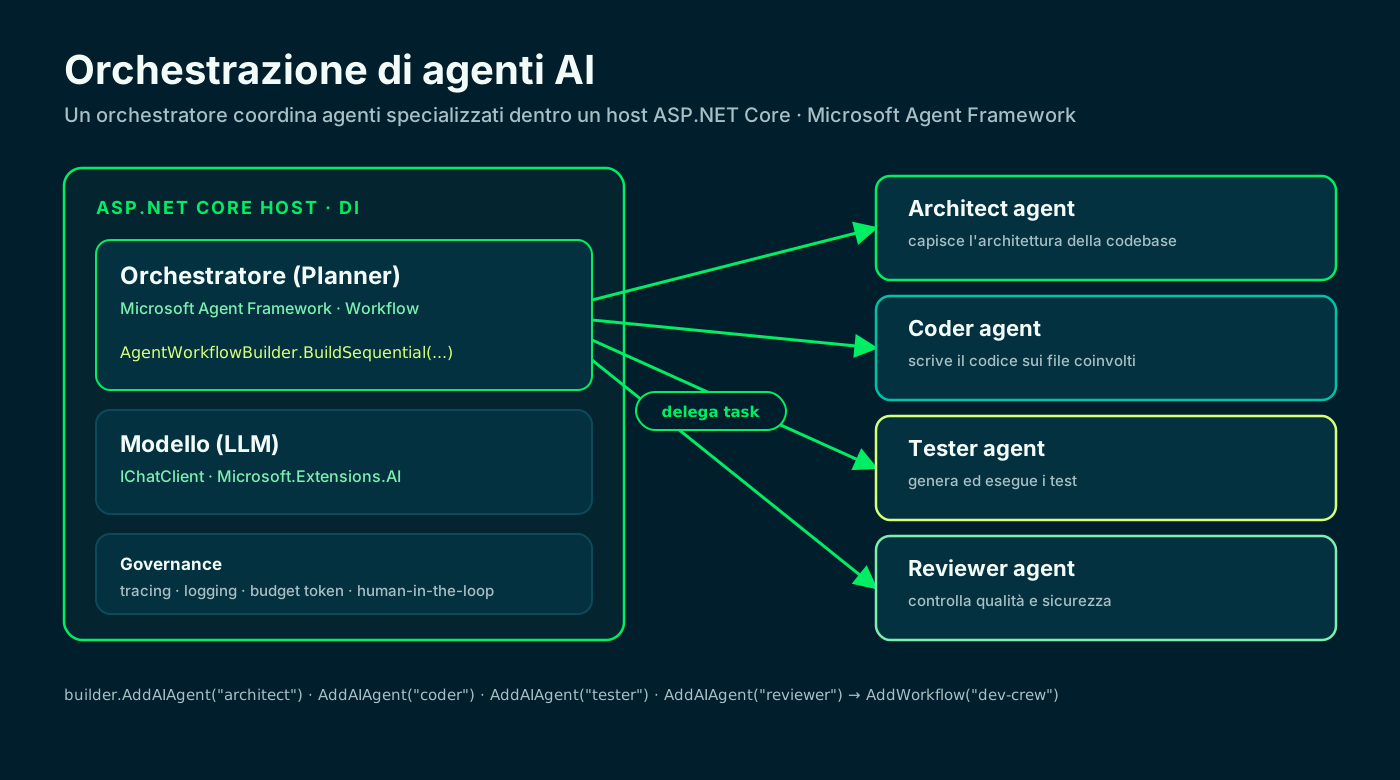
🎼 From the single agent to the orchestra
AI agent orchestration is the layer that coordinates multiple specialised agents to complete tasks no single agent can handle alone. Think of it as the conductor: each agent plays its instrument, orchestration keeps them in harmony. This isn't theory — multi-agent inquiries grew 1,445% in 2025 and 57% of organisations already run multi-step workflows in production.
The reason is practical. Coding agent sessions grew from 4 to 23 minutes on average, with 78% touching multiple files. A single agent on that complexity loses the thread; dividing responsibilities across agents with clear boundaries is what makes the result robust. No surprise that a reported 90% of engineers are shifting their centre of gravity from writing code to directing, reviewing and optimising agents.
Indicative figures from industry reports on adoption and coding-agent productivity.
🧩 The 4 orchestration patterns
Not all multi-agent systems are alike: the architecture depends on the use case. In 2026 four patterns dominate, and recognising them is the first step to avoid building a castle where a pipeline would do.
My rule of thumb: start with the hierarchical pattern (orderly delegation) and add complexity only when needed. Collaborative shines on creative problems, competitive when you want the best of several attempts, hybrid is what ends up in production because it mixes the three per sub-task.
- Hierarchical: a planner decomposes the task and delegates to specialised workers (code, test, review). The most common pattern in software work.
- Collaborative: peer agents that share state and improve on each other, like a design review across backend, frontend and DevOps.
- Competitive: several agents attempt the same task and an evaluator picks the best result for performance, readability or security.
- Hybrid: real systems combine patterns — a hierarchical planner delegating to collaborative teams with competitive evaluation on critical outputs.
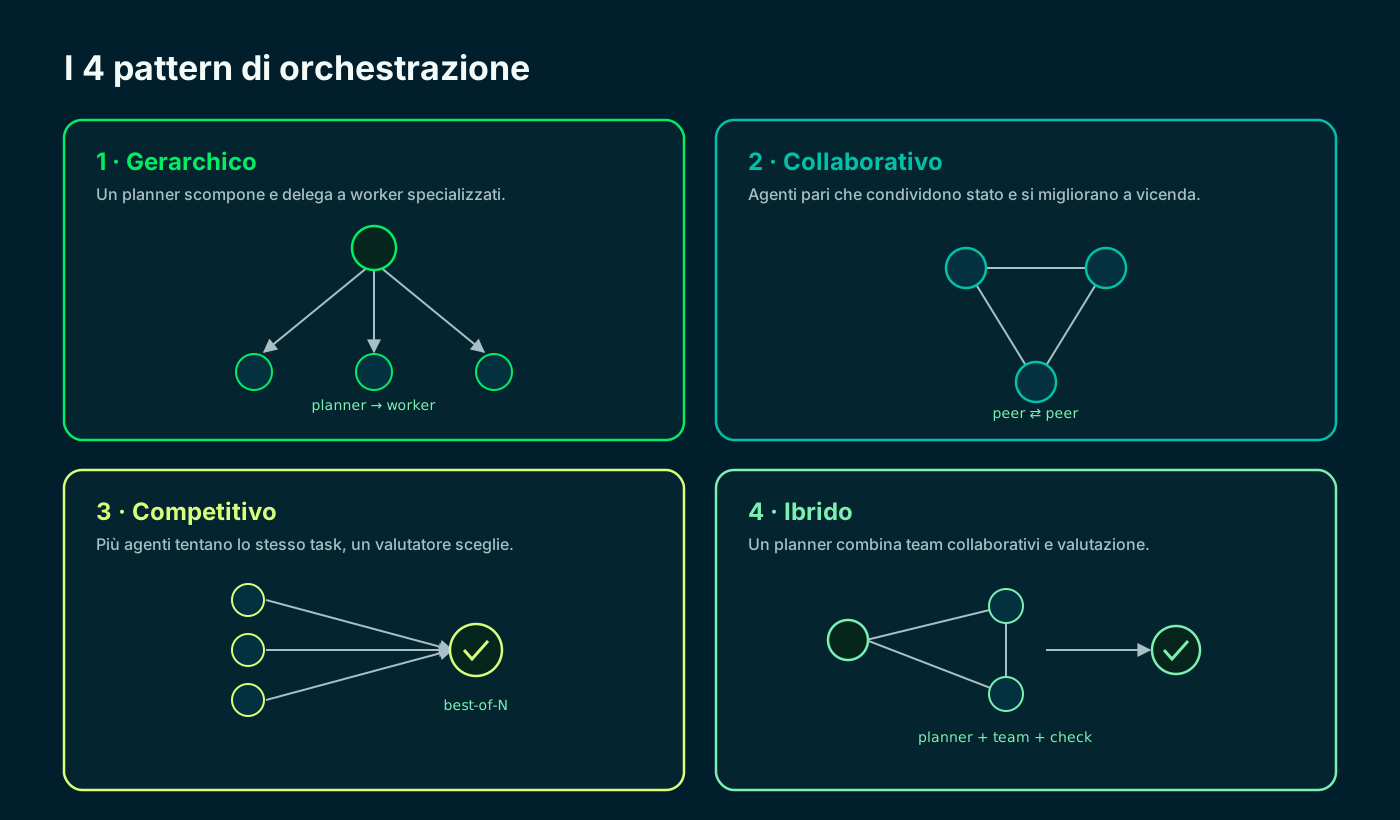
Hierarchical for delegation, collaborative for creativity, competitive for optimisation, hybrid for production.
🛠️ The frameworks that matter in 2026
The landscape has consolidated. In the Python world the leaders are LangGraph (state graphs, the de-facto standard for complex workflows, in production from Klarna to Cisco), CrewAI (role-based agents, a gentle learning curve) and AutoGen (the conversational approach born in Microsoft Research). For teams on the .NET platform, the reference is the Microsoft Agent Framework.
The Microsoft Agent Framework is the official synthesis of AutoGen and Semantic Kernel: it inherits their simple abstractions and enterprise features (session state, type safety, telemetry) and adds graph-based workflows for explicit orchestration. It reached 1.0 (GA) on April 3, 2026, so it's the natural choice when your stack is C# and ASP.NET Core.
Python (LangGraph, CrewAI, AutoGen)
- Broader, more mature ecosystem for research
- LangGraph: state graphs, many enterprise deployments
- CrewAI: role-based agents, rapid prototyping
- Ideal if the team already lives in Python/ML
.NET (Microsoft Agent Framework)
- One stack with your ASP.NET Core Web API
- Native Sequential, Concurrent and Handoff
- Type safety, DI, telemetry and sessions built in
- GA 1.0 since April 2026, successor to Semantic Kernel
There is no absolute winner: the framework that lives in the stack you already maintain wins.
🗺️ A 6-step method
Before the code, the method. Teams that actually ship orchestration follow six repeatable moves, framework-independent. Skipping one is the most common way to get stuck in a proof of concept that never scales.
The core is steps 5 and 6: without error recovery and observability you have a prototype, not a system. That's the difference between a demo that dazzles and something that survives real traffic.
- 011 · Define scopeBreak the work into atomic sub-tasks with clear inputs, outputs and success criteria.
- 022 · Design rolesOne agent per responsibility: architecture, implementation, tests, review.
- 033 · Choose the patternHierarchical or hybrid for most development workflows.
- 044 · Define communicationMessage passing and shared state: one agent's output is the next one's input.
- 055 · Add error recoveryFallback agents, retry with backoff, evaluators that filter outputs.
- 066 · Deploy with observabilityTracing, structured logging, latency, success and token-cost metrics.
🧰 Setting up the ASP.NET Core project
Now the hands-on part with the Microsoft Agent Framework. I create a minimal Web API and add three packages: the agent framework, its ASP.NET Core hosting extensions and a model provider. The hosting libraries register agents in the dependency injection container, so I resolve them like any other service.
The Microsoft.Extensions.AI abstractions (`IChatClient`) keep the code provider-independent: OpenAI today, Azure OpenAI or a local model via Ollama tomorrow, by changing one line. The Agent Framework packages are in preview, so I add them with `--prerelease`.
# new minimal Web API
dotnet new web -n DevCrew.Orchestration && cd DevCrew.Orchestration

# Agent Framework + ASP.NET Core hosting + model provider
dotnet add package Microsoft.Agents.AI --prerelease
dotnet add package Microsoft.Agents.AI.Hosting --prerelease
dotnet add package Microsoft.Extensions.AI.OpenAI --prerelease
Hosting in ASP.NET Core · Microsoft Learn ↗
🧑🚀 Registering the agents and the workflow
Here's the heart of orchestration. I register a shared `IChatClient` as a keyed singleton, then four specialised agents with `AddAIAgent`: architect, coder, tester, reviewer. Each has focused instructions and reuses the same model via `chatClientServiceKey`.
With `AddWorkflow` I compose them into a sequential pipeline — the hierarchical pattern in its most direct form: each agent's output becomes the next one's input. The `AddAsAIAgent()` call exposes the whole workflow as if it were a single agent, ready to resolve via DI.
using Microsoft.Agents.AI;
using Microsoft.Agents.AI.Workflows;
using Microsoft.Extensions.AI;
using OpenAI;

var builder = WebApplication.CreateBuilder(args);

// 1) Model shared by every agent: a keyed IChatClient.
var apiKey = builder.Configuration["OpenAI:ApiKey"]!;
IChatClient chat = new OpenAIClient(apiKey)
    .GetChatClient("gpt-4o-mini")
    .AsIChatClient();
builder.Services.AddKeyedSingleton<IChatClient>("chat-model", chat);

// 2) Four specialised agents, one per responsibility.
builder.AddAIAgent("architect",
    instructions: "Analyse the codebase and propose the plan.", chatClientServiceKey: "chat-model");
builder.AddAIAgent("coder",
    instructions: "Implement the plan by writing the code.", chatClientServiceKey: "chat-model");
builder.AddAIAgent("tester",
    instructions: "Write and run the tests on the code.", chatClientServiceKey: "chat-model");
builder.AddAIAgent("reviewer",
    instructions: "Review quality and security, return the final version.", chatClientServiceKey: "chat-model");

// 3) Hierarchical workflow: sequential pipeline of the four agents.
builder.AddWorkflow("dev-crew", (sp, key) =>
{
    var architect = sp.GetRequiredKeyedService<AIAgent>("architect");
    var coder = sp.GetRequiredKeyedService<AIAgent>("coder");
    var tester = sp.GetRequiredKeyedService<AIAgent>("tester");
    var reviewer = sp.GetRequiredKeyedService<AIAgent>("reviewer");
    return AgentWorkflowBuilder.BuildSequential(key, [architect, coder, tester, reviewer]);
}).AddAsAIAgent();
Workflow orchestrations · Microsoft Learn ↗
🔌 Exposing the orchestration with an endpoint
The workflow is an `AIAgent` registered under the key `dev-crew`: I expose it with a Minimal API endpoint, resolving it from the container with `FromKeyedServices`. No controller, no ceremony — one POST, one task, the orchestrated response.
In practice the client sends the goal (“add the login endpoint with tests”) and under the hood architect, coder, tester and reviewer hand the work down the pipeline. The caller sees one final result.
using Microsoft.Agents.AI;
using Microsoft.Extensions.DependencyInjection;

var app = builder.Build();

// The orchestration is a keyed AIAgent: resolve it and run it.
app.MapPost("/orchestrate", async (
    OrchestrationRequest body,
    [FromKeyedServices("dev-crew")] AIAgent crew) =>
{
    var run = await crew.RunAsync(body.Task);
    return Results.Ok(new { output = run.Text });
});

app.Run();

record OrchestrationRequest(string Task);🔀 Concurrent and handoff: the other two patterns
Switching pattern costs one line. With `BuildConcurrent` the same inputs go to several agents in parallel and results are aggregated: that's the competitive/collaborative pattern, handy for brainstorming or comparing implementations.
With `CreateHandoffBuilderWith` you build the handoff pattern instead: a triage agent routes the request to the right specialist, who can hand control back. It's the typical model for customer support or expert systems, where delegation is dynamic and content-driven.
// Concurrent: same inputs to several agents in parallel, results aggregated.
var concurrent = AgentWorkflowBuilder.BuildConcurrent(
    [architect, coder, tester]);

// Handoff: a triage routes, specialists can return to the triage.
var handoff = AgentWorkflowBuilder.CreateHandoffBuilderWith(triage)
    .WithHandoffs(triage, [backendAgent, frontendAgent])
    .WithHandoffs([backendAgent, frontendAgent], triage)
    .Build();
Handoff orchestration · Microsoft Learn ↗
🏭 From demo to production
This is where the toy splits from the system. First theme is cost: agentic tools can run $200-2,000 per engineer per month in tokens, and multi-agent multiplies the spend because five agents on a task burn five times. You need per-workflow budgets, tracking and optimised contexts; the ROI is there (2.5-3.5x on average, up to 4-6x for the best) but only with the right controls.
Second is security: AI-generated code has 2.74x more vulnerabilities than human code, and in multi-agent systems flaws compound as agents build on each other's output. Scanning in the pipeline, human review on critical changes, sandboxed environments. Finally, the MCP servers: they are the capability layer (databases, APIs, search) agents use without knowing how each tool works — with 5,000+ servers available, they've become foundational.
Prototype
- No cost control on tokens
- Agent outputs used without validation
- Zero tracing: impossible to see what happened
- One failure blocks the whole workflow
Production
- Per-workflow budgets and context optimisation
- Evaluators and human review on critical outputs
- End-to-end tracing, logging and metrics
- Fallback, retry with backoff, monitored error rates
Real agent failure rates sit between 5% and 15%: production plans for them, the prototype ignores them.
✅ In short
AI agent orchestration isn't a future concept: it's how complex software gets built in 2026. Pick the pattern by the task, give each agent a clear boundary, and invest in observability from day one. In .NET the Microsoft Agent Framework turns all of this into a few lines inside your Web API.
The rest is ordinary engineering: measure, limit each agent's blast radius, keep the human in the loop on critical decisions. Less magic, more method.
- 01Choose the patternhierarchical, collaborative, competitive or hybrid
- 02Project + NuGetAgent Framework + Hosting + provider
- 03Register the agentsAddAIAgent per role, keyed IChatClient
- 04Compose the workflowBuildSequential / Concurrent / Handoff
- 05Expose the endpointAddAsAIAgent + Minimal API MapPost
- 06Observe and limittracing, token budget, human review
Frequently asked questions about AI agent orchestration
When is a multi-agent system worth it over a single agent?
When the task needs distinct capabilities (writing code + testing + reviewing), parallel processing, error recovery with fallbacks, or coordination across domains. For isolated, well-defined jobs a single agent stays the simplest and cheapest choice.
What is the difference between the four orchestration patterns?
Hierarchical: a planner delegates to specialised workers. Collaborative: peer agents sharing state. Competitive: several agents attempt the same task and an evaluator picks the best. Hybrid: combines the three per sub-task and is usually what ends up in production.
Which framework should I pick if I work in .NET?
The Microsoft Agent Framework: it's the official synthesis of AutoGen and Semantic Kernel, with native Sequential, Concurrent and Handoff orchestrations, dependency injection and telemetry. It's GA since 1.0 (April 2026) and lives in the same stack as your ASP.NET Core Web API, without leaving C#.
Can I orchestrate agents inside an existing ASP.NET Core app?
Yes. The hosting libraries register agents and workflows in the dependency injection container: register agents with AddAIAgent, compose the workflow with AddWorkflow and expose it as an AIAgent with AddAsAIAgent. From there you resolve it in a Minimal API endpoint like any service.
How do I handle agent failures in production?
With circuit breakers, fallback agents and retry with exponential backoff, plus evaluators that check outputs before passing them downstream. Real failure rates typically sit between 5% and 15%: plan for them and log them for analysis.
How much does a multi-agent system cost?
Cost scales with the number of agents, because each consumes tokens: agentic tools can run $200-2,000 per engineer per month. Reported ROI is 2.5-3.5x on average and up to 4-6x for the best teams, but only with per-workflow budgets and context optimisation.
Let's talk
If this topic is relevant to you, write to me: comparing notes on code and AI is always time well spent.