 COOL
COOL 


In this article
- ⚖️ The criteria that matter (and why)
- 📊 The comparison in one table
- 🥊 Claude Code vs GitHub Copilot: the two poles
- 🎨 Cursor and Gemini (plus Ollama locally)
- 🦙 Ollama locally (and in the cloud): when AI runs on your own machine
- 🔌 Claude Code wired to Ollama: why it can make sense
- 🔒 Privacy: the real brake on AI in companies (and how to solve it)
- 🔀 An orchestrator to route prompts between local and cloud
- 🎯 Which to choose, by scenario
- 🧩 Our hybrid stack
⚖️ The criteria that matter (and why)
Comparing AI assistants on the underlying model alone is misleading: today they often draw on the same frontier models. The real difference is in the form: how they enter your workflow, how much project context they understand, how autonomous they are, and how much control they leave to the person writing the code.
That's why we judge them on five concrete axes, the same ones that weigh on real work:
- Form and integration: terminal, IDE plugin, or dedicated editor — it changes the whole way you work.
- Repository understanding: how much of the codebase the assistant actually keeps in mind.
- Agent mode: the ability to run multi-step tasks (read, edit, run commands), not just complete lines.
- MCP and external tools: access to your systems and data via the Model Context Protocol or plugins.
- Local work and privacy: the option to run on-premise models when data can't leave the building.
📊 The comparison in one table
A quick snapshot before the detail. It's a simplification — each tool moves fast — but it conveys where each one plays best.
Two figures that recur across the 2026 public comparisons, to take as orders of magnitude rather than absolute truth: on agentic benchmarks (such as SWE-bench) Claude Code tends to lead, with Cursor right behind; on pricing the typical picture is Copilot from ~$10/month, Cursor and Claude Code from ~$20 (up to Max plans at $100-200 for heavy users), while Gemini offers a generous free tier. The point, though, stays the same: the most productive teams don't pick a single tool, they combine them.
Criterion          Claude Code    Copilot       Cursor       Gemini
--------------------------------------------------------------------
Form               Agentic CLI    IDE plugin    AI editor    CLI + IDE
Repo context       High           Medium        High         Very high
Agent mode         Native         Yes (agent)   Yes          Growing
MCP / tools        Native         Yes           Partial      Yes
Local (Ollama)     Via config     No            Limited      Limited
Strong terrain     Agents+shell   GitHub        Editor UX    Huge context
🥊 Claude Code vs GitHub Copilot: the two poles
These are the two most-used extremes. Claude Code is an agentic assistant that lives in the terminal: it reads the repo, edits multiple files, runs commands, spins up subagents and connects to internal systems via MCP. It shines when the task is broad — a refactor touching ten files, a migration, a bug spanning several layers — because it reasons about the whole project rather than the current line.
GitHub Copilot starts from the opposite end: it was born inside the IDE as completion and now has a solid agent mode, but its real advantage is ubiquity and integration with the GitHub ecosystem (pull requests, code review, Actions). For a team already all-in on GitHub it's the lowest possible friction. For orchestrating agents in the terminal or exposing internal tools, Claude Code is still ahead.
I pick Claude Code
- Broad, agentic tasks (refactors, migrations)
- Terminal work across many files at once
- Internal tools via MCP, subagents, automations
- Fine-grained control over context and cost
I pick Copilot
- Team already entirely inside GitHub
- Low-friction in-IDE completion
- Assisted reviews and PRs in the GitHub ecosystem
- Immediate onboarding for those who dislike the CLI
Two opposite philosophies: an agent in the terminal vs an assistant in the IDE.
🎨 Cursor and Gemini (plus Ollama locally)
Cursor is an AI-first editor (a fork of VS Code) that puts the assistant at the center of the experience: codebase chat, multi-file edits, applying changes with an excellent visual interface. For those who want agentic power without leaving a graphical editor, it's the most comfortable choice; the flip side is editor lock-in and usage you need to keep an eye on.
Gemini plays the huge context card: Google's very large window helps when you feed it whole repositories or long documentation, and the Gemini CLI brings the agentic approach to the terminal. Finally, when data can't leave, we stay on Ollama or vLLM locally: none of the four is built for pure on-premise, but Claude Code and Gemini adapt better to hybrid stacks.
- Cursor: best UX for assisted multi-file editing in a graphical editor.
- Gemini: wins on long context and Google Cloud integration.
- Ollama / vLLM: the path when privacy demands in-house models.
🦙 Ollama locally (and in the cloud): when AI runs on your own machine
The fifth wheel in this comparison isn't an assistant but the engine that can sit under all of them: Ollama. Running a model locally has two advantages you never get in the cloud: your data never leaves your machine and you pay no tokens — inference runs on your hardware, so the marginal cost per request is zero. You pay the price in compute: performance depends heavily on the hardware you have.
A rule of thumb: with 16 GB of RAM you comfortably run ~7-8B models; a consumer GPU like an RTX 4060 (8 GB) or an Apple Silicon Mac (M3 Pro+) covers up to ~34B; for 70B at production speed you need multiple GPUs, an Apple Ultra, or professional cards.
And if you don't want to manage hardware, there's now Ollama Cloud too: the same open-weight models behind a managed endpoint, with the same OpenAI-compatible API as the local runtime.
- Models with tool calling: Qwen 2.5 (and Qwen2.5-Coder), Llama 3.1+, Mistral, DeepSeek, Gemma — they support function calls with the same schema as the OpenAI API.
- Zero token cost locally: the bill doesn't grow with every request — handy for agentic loops and experimentation.
- Depends on hardware: more VRAM and RAM mean bigger models and faster answers.
- Ollama Cloud: same interface, when you need to scale without buying GPUs.
Hardware                 Realistic models      Typical use
----------------------------------------------------------------
16 GB RAM (no GPU)       7-8B (Qwen, Llama)    daily dev
RTX 4060 8GB / M3 Pro    up to ~34B            serious coding
RTX 4090 24GB / M-Ultra  fast 34B+             team / RAG
Multi-GPU / A100         70B in production     heavy workloads
Ollama Cloud             whole catalog         zero hardware
🔌 Claude Code wired to Ollama: why it can make sense
Something many people don't know: you can keep Claude Code's interface — which stays excellent — and point it at a local Ollama model instead of Anthropic's servers. Claude Code speaks Anthropic's format, Ollama speaks the OpenAI-compatible one: you need a small translation layer.
The most common routes are claude-code-router (a community proxy that routes to Ollama, OpenRouter, DeepSeek, Gemini and more), LiteLLM as a proxy, or pointing the ANTHROPIC_BASE_URL variable at a compatible endpoint.
Why do it? Three concrete reasons: privacy (the code never leaves the machine), cost (no tokens for high-volume tasks), and the ability to work offline or try different models without switching tools. The trade-off is quality: a local 7-14B model can't match Opus or Sonnet on hard tasks — for those you go back to the cloud. And that's exactly the use case for the orchestrator we'll cover shortly.
# 1) a model running locally
$ ollama run qwen2.5-coder

# 2) a router translating Anthropic <-> OpenAI
$ npm i -g @musistudio/claude-code-router
$ ccr code # Claude Code, but on the local model🔒 Privacy: the real brake on AI in companies (and how to solve it)
When we propose AI inside a company, the first objection is almost never cost: it's where the data ends up. Proprietary code, documents, customer records — sending them to an external provider is often a legal, contractual or simply trust problem. It's a real adoption brake, but it isn't a dead end: there are at least three levels of solution, with increasing control.
Maximum control is Ollama locally: the data doesn't leave at all and there are no tokens to pay.
A practical middle ground, especially for those already on Microsoft, is Azure AI Foundry: according to Microsoft's documentation, prompts and responses are not used to train the models and stay isolated inside your Azure tenant, with data residency in the region you choose and no access by the model provider.
Finally, the frontier cloud APIs (Claude, OpenAI) remain convenient if you pair them with a serious contract: a Data Processing Agreement, zero-retention options and real legal due diligence.
- Ollama / vLLM locally: data in-house, zero tokens, depends on hardware.
- Azure AI Foundry: cloud but isolated tenant, no training on your data, regional residency.
- Cloud API + DPA: maximum convenience and quality, with contractual safeguards (zero-retention).
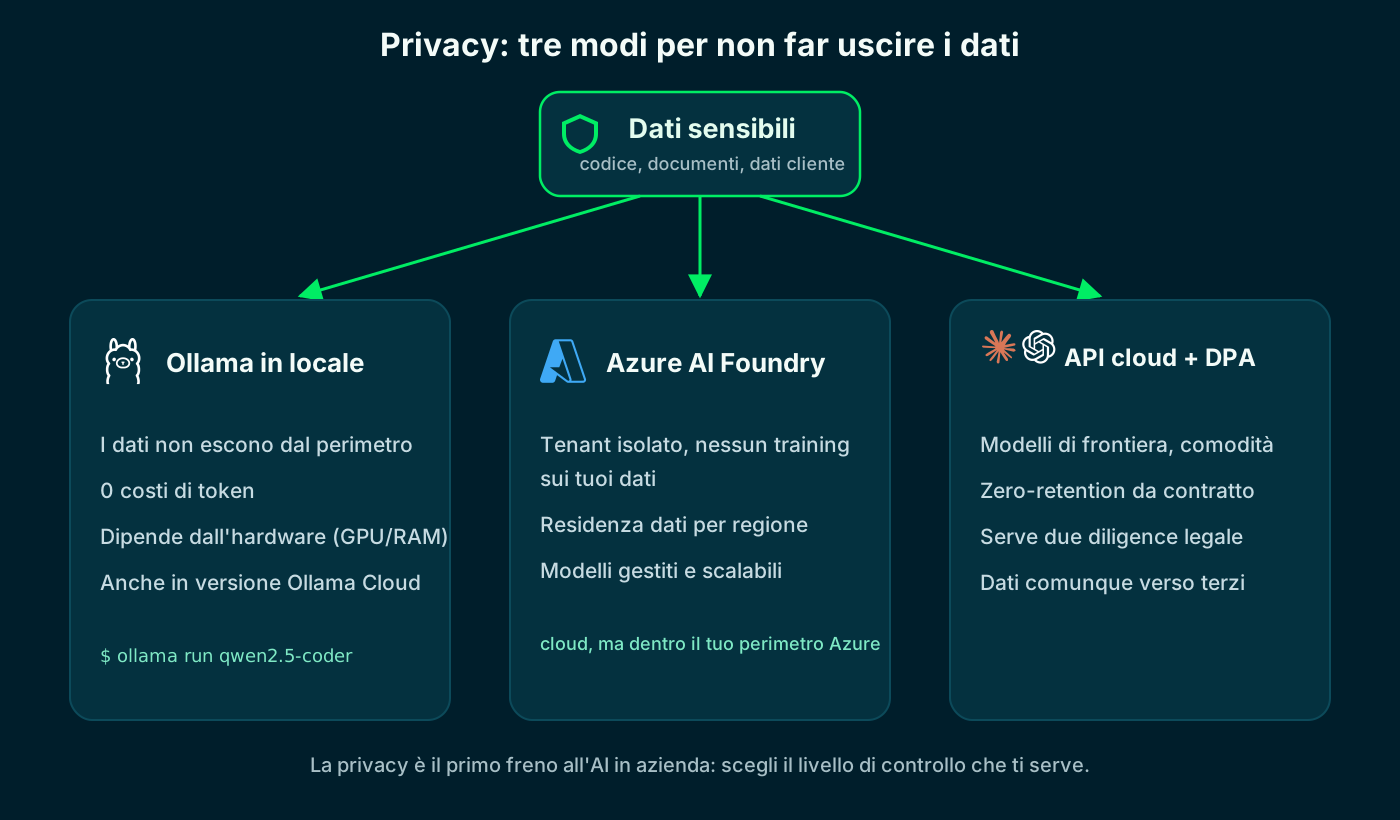
From maximum control (local) to maximum convenience (cloud with a contract).
🔀 An orchestrator to route prompts between local and cloud
The natural conclusion of all this: don't pick one provider, but put an orchestrator (a model router) in front that decides, prompt by prompt, where to send the request. A simple, repetitive task? Ollama locally handles it, at zero cost and without data leaving. A complex task that needs top quality? It forwards it to a cloud API like Claude or OpenAI/Codex. One interface, several backends behind it, with a policy that balances cost, privacy and quality.
The value isn't technology for its own sake: it's being able to switch models without rewriting code and to move the needle at will between spend, latency and confidentiality. Below are the most-used routers, with their sites.
Want to go from theory to practice? We wrote a step-by-step tutorial to install and configure an orchestrator with Claude Code Router, Ollama and Codex, starting from scratch — the link is right below, and on the image too.
- OpenRouter (openrouter.ai): managed gateway, hundreds of models behind one API.
- LiteLLM (litellm.ai): open-source gateway, OpenAI-compatible interface, self-hosted.
- claude-code-router (github.com/musistudio/claude-code-router): to stay inside Claude Code.
- RouteLLM and Portkey (portkey.ai): routing logic, fallback and observability.
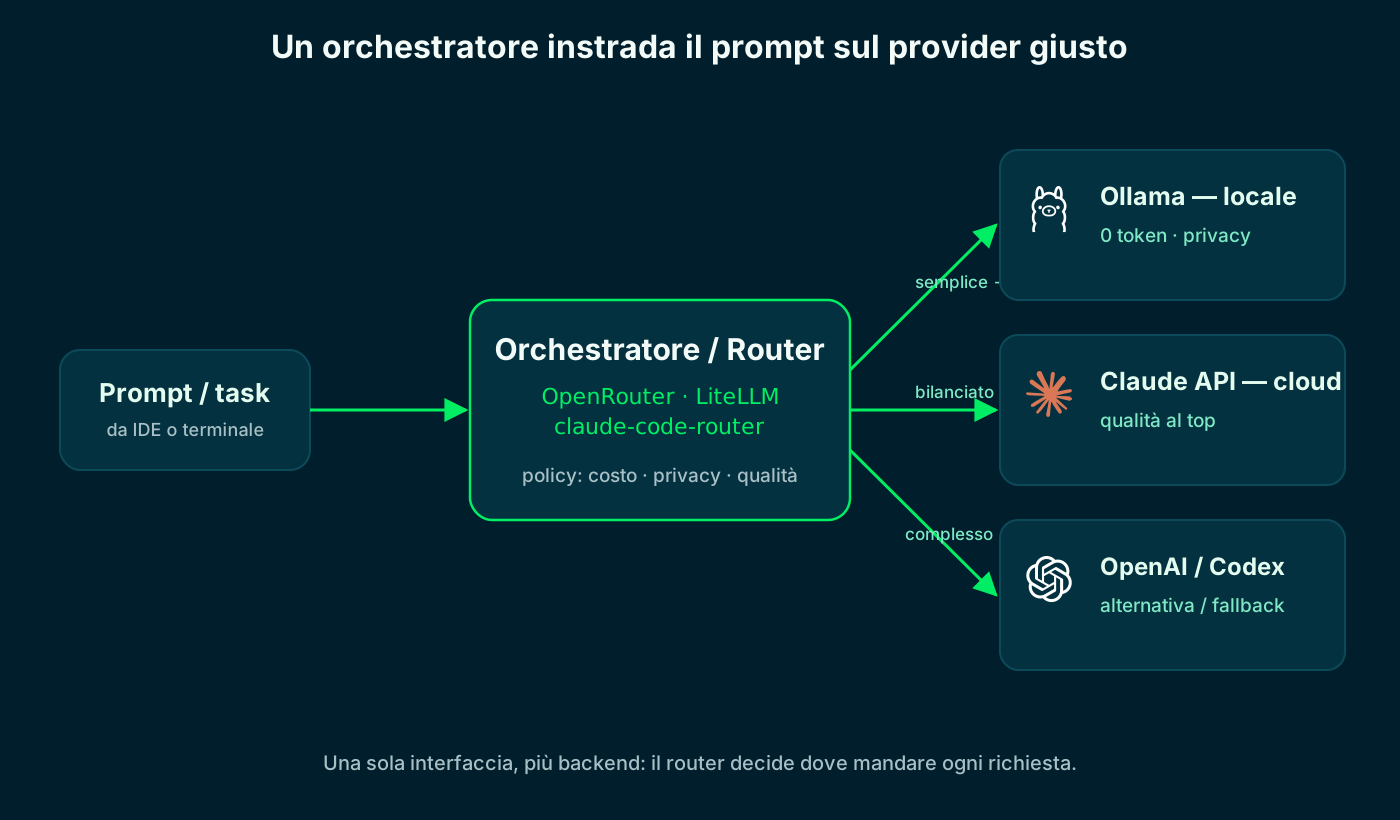
Step-by-step tutorial: set up the orchestrator (Claude Code Router + Ollama + Codex) →
The router picks the provider based on cost, privacy and task difficulty.
🎯 Which to choose, by scenario
Slogans aside, the choice depends on context. Here's how we decide, depending on what's on the table.
For agentic work and sensitive data
- Refactors and multi-file tasks → Claude Code
- Automations and internal tools (MCP) → Claude Code
- Privacy / hybrid on-premise → Claude Code or Ollama
- Very long context → Gemini
For teams, IDEs and daily speed
- Team on GitHub → Copilot
- In-IDE completion → Copilot or Cursor
- Assisted visual editing → Cursor
- Newcomers, no CLI → Copilot or Cursor
No single winner: the tool-to-scenario match wins.
🧩 Our hybrid stack
In practice we don't pick one: we combine them. The point isn't brand loyalty, it's using each tool where it pays off most while keeping human judgment on the decisions that matter. Here's a typical day's flow.
- 01Exploration and refactorClaude Code in the terminal: reads the repo, edits many files, runs the tests.
- 02Writing in the IDECopilot for line-by-line completion while we work in the editor.
- 03Targeted visual editingCursor when we need a multi-file edit with a convenient graphical preview.
- 04Long context and researchGemini when we feed in whole repositories or extensive documentation.
- 05Sensitive dataOllama locally when code or data can't leave the perimeter.
The hybrid stack: every tool in its place, the merge stays human.
Frequently asked questions about Claude Code vs Copilot vs Cursor
Which is best among Claude Code, Copilot, Cursor and Gemini in 2026?
There is no absolute winner. Claude Code excels at agentic terminal work and MCP, Copilot at GitHub integration, Cursor at assisted visual editing, Gemini at very long context. The choice depends on the scenario.
Which AI assistant is best for privacy or on-premise?
None of the four is built for pure on-premise. When data can't leave we use local models with Ollama or vLLM; among the four, Claude Code and Gemini adapt better to hybrid cloud/local stacks.
Claude Code or Copilot for a team?
If the team already lives inside GitHub, Copilot offers the lowest friction and great PR and review integration. If you need terminal agents, multi-file refactors and internal tools via MCP, Claude Code is more powerful.
Can you use them together?
Yes, and that's what we do: Claude Code for agentic tasks, Copilot or Cursor for IDE work, Gemini for long context, Ollama for sensitive data. They aren't mutually exclusive.
Does running Ollama locally have token costs?
No. Locally you pay no tokens: inference runs on your hardware and the marginal cost per request is zero. You only pay for hardware (and electricity). If you need to scale without GPUs, there's Ollama Cloud, which is paid.
Can I use Claude Code with a local Ollama model?
Yes: with a proxy like claude-code-router or LiteLLM, or by pointing ANTHROPIC_BASE_URL at a compatible endpoint, you keep Claude Code's interface but use a local model. Useful for privacy, cost and offline work; for hard tasks the cloud is still better.
How do I handle company data privacy with AI?
Three levels: Ollama or vLLM locally (data never leaves), Azure AI Foundry (cloud but isolated tenant, no training on your data, regional residency), or cloud APIs with a DPA and zero-retention. An orchestrator can send sensitive data locally and the rest to the cloud.
Let's talk
If this topic is relevant to you, write to me: comparing notes on code and AI is always time well spent.