


RAG from scratch in .NET: types, databases and a tutorial with Ollama and MongoDB
A language model is great at talking, but it doesn't know your documents. Retrieval-Augmented Generation closes that gap: it first retrieves the relevant pieces of text from your data, then passes them to the model that generates the answer. In this article we start from the basics — what RAG is and what it's for — walk through its types (hybrid, graph, re-ranking, agentic) and the database landscape, then build, step by step, a Minimal API in .NET that runs RAG locally with Ollama and MongoDB Community. No cloud, no tokens spent.
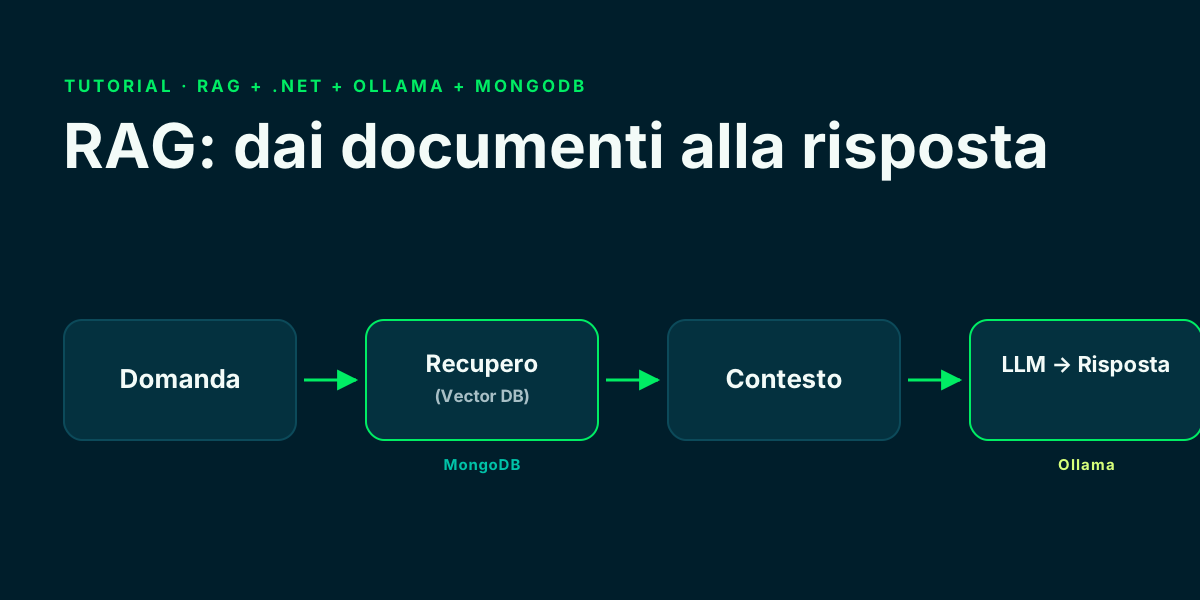
🔍 What RAG is (Retrieval-Augmented Generation)
Retrieval-Augmented Generation (RAG) is a technique that connects a language model to your data: instead of answering only with what it learned during training, the model first retrieves the relevant documents and then generates the answer using them as context.
It works in two phases. An indexing phase, one-off: documents are split into chunks, turned into vectors — the embeddings — and stored in a database. And a query phase, on every question: the most relevant chunks are fetched and passed to the model together with the question.
# Indexing (one-off)
chunks   = split(document)
vectors  = embed(chunks)          # embedding model
store(vectors, chunks)            # vector database

# Query (on every question)
q        = embed(question)
context  = vector_search(q, topK) # the most similar chunks
answer   = llm(question + context) # the model answers
Step-by-step RAG tutorial · LangChain ↗
🎯 What it's for: grounding, fewer hallucinations, private data
The number-one benefit is grounding: answers are anchored to real, verifiable sources, often with citations. This dramatically reduces hallucinations, because the model draws on concrete text rather than parametric memory alone.
The second is access to private, fresh data with no fine-tuning: internal docs, manuals, tickets, contracts. You update the database and the model accounts for it right away, without retraining anything.
- Grounding: answers based on sources, not on training memories.
- Fresh data: you update the index, not the model.
- Privacy: documents stay in your database (and with Ollama the model stays in-house too).
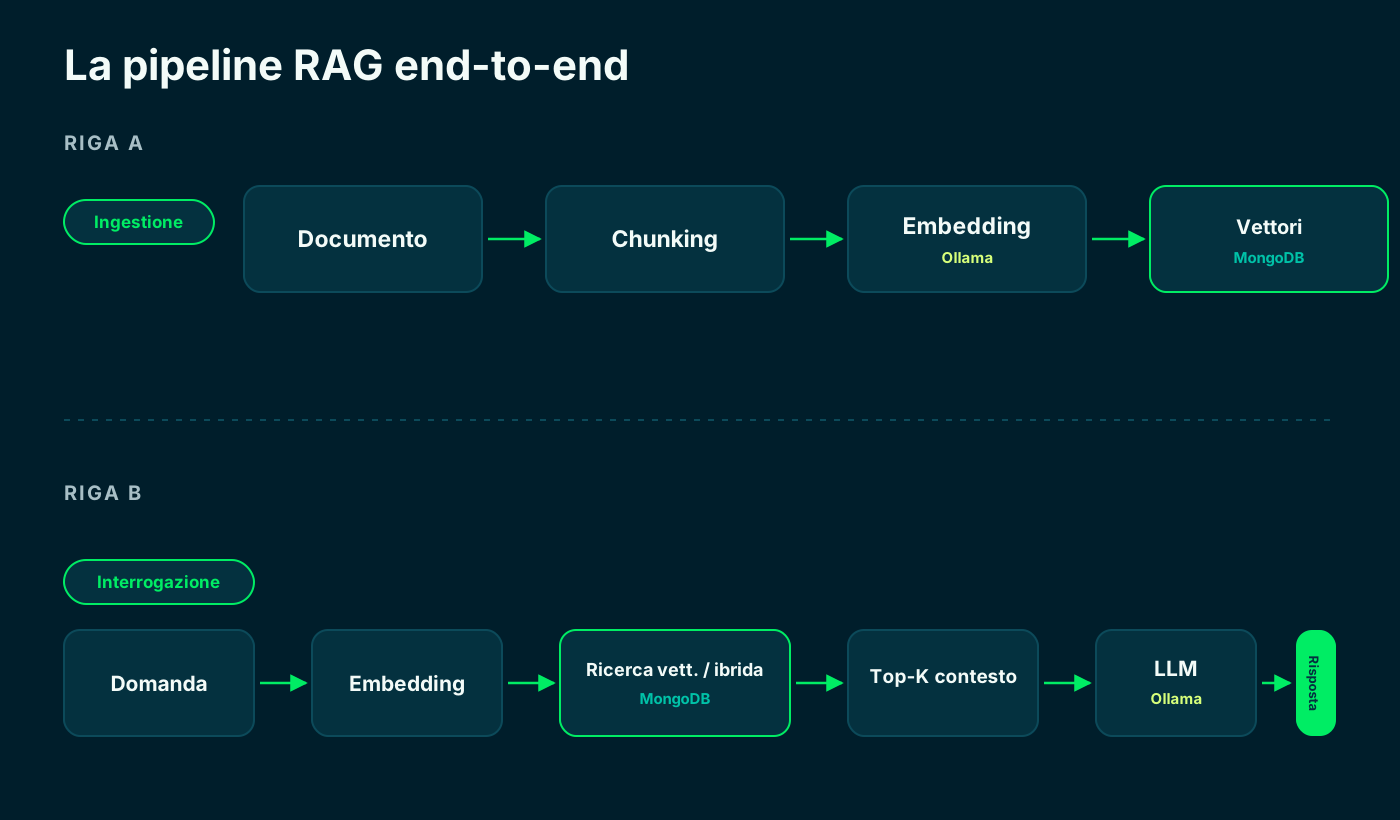
One-off ingestion on top, query on every question at the bottom.
🧩 The RAG types in one map
There is no single RAG: there is a family of approaches that differ by how they retrieve and how much they reason before answering. Below are the five most common ones; we look at each one further down.
Rule of thumb: start from the simplest and move up in complexity only when the numbers ask for it. Each level adds quality, but also latency and cost.
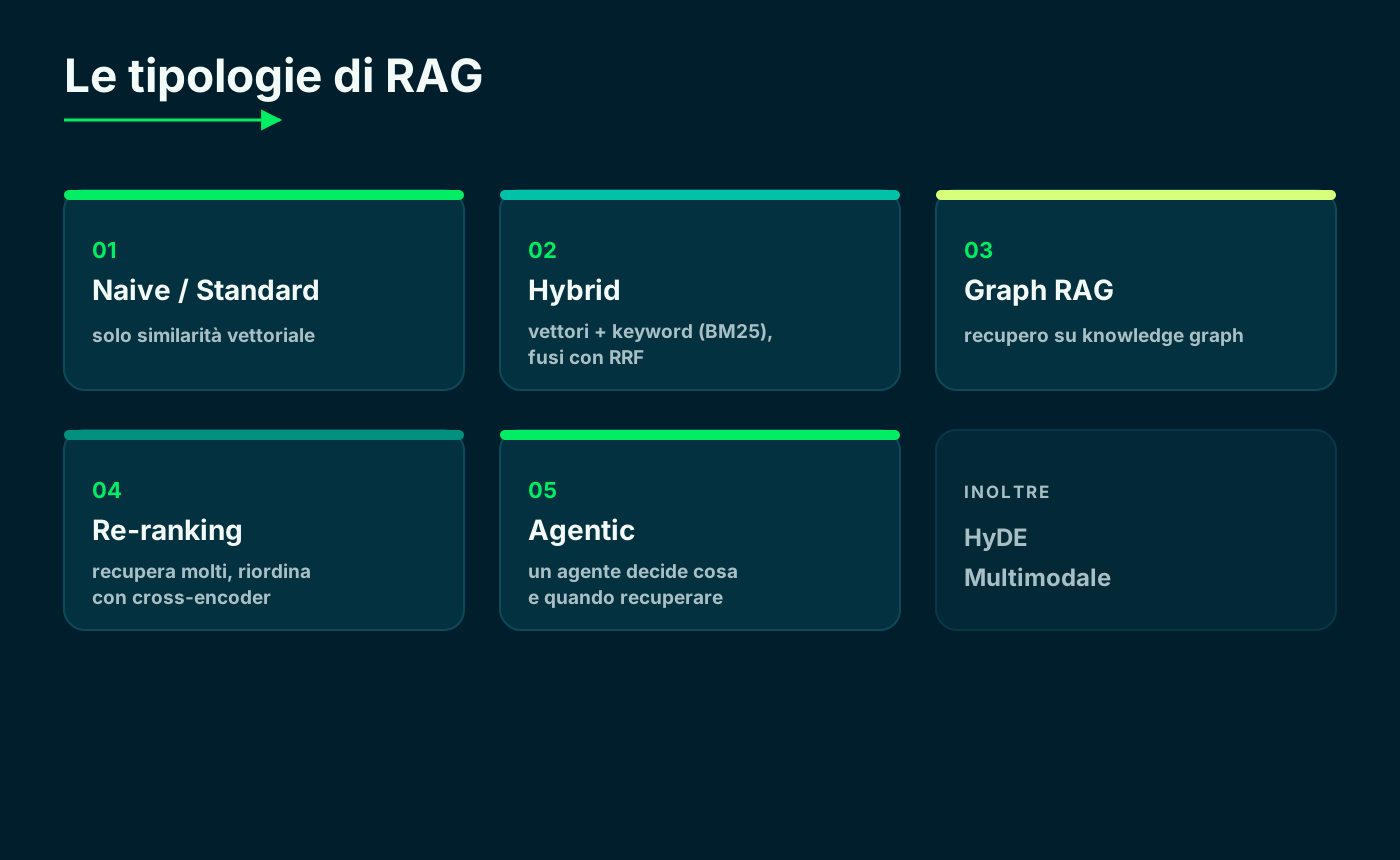
From pure similarity to an agent that decides what to retrieve.
1️⃣ Naive / Standard RAG
It's the baseline: you turn the question into a vector and retrieve the k most similar chunks by cosine distance. Simple, fast, cheap — and it's the right starting point for most cases.
The limit: it searches by meaning only. If the user types a product code or a rare term the embedder has never seen, semantic similarity can miss it. That's where the later variants come in.
2️⃣ Hybrid RAG: vectors + keywords (BM25 + RRF)
Hybrid search adds two worlds together: vector search (meaning) and full-text BM25 (exact words). It then fuses the two rankings with Reciprocal Rank Fusion, which combines positions instead of scores — so it avoids having to normalize different scales.
It's the right choice when the corpus is full of identifiers, acronyms, codes or technical jargon: BM25 catches the exact words, vectors catch the meaning. It almost always beats vector search alone.
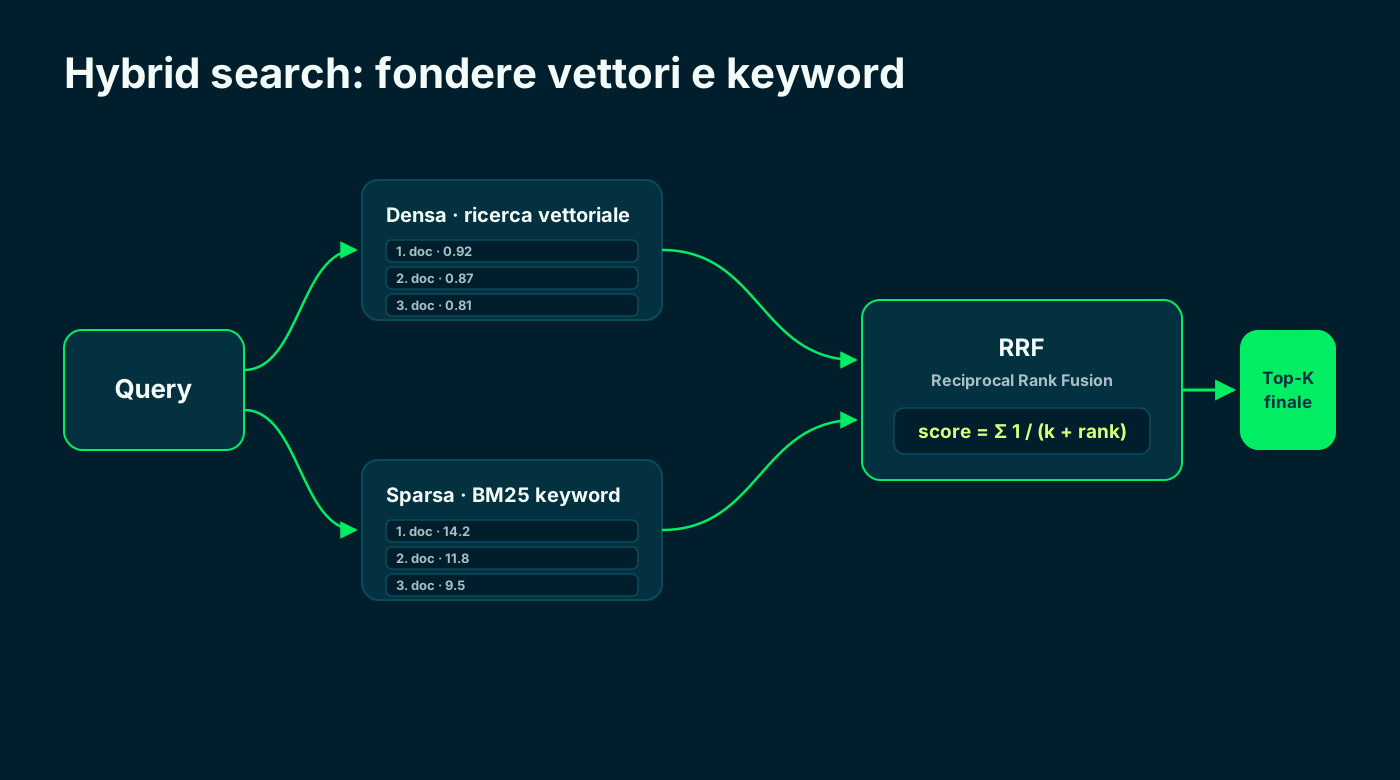
Two rankings, one fusion: the best of semantic and keyword.
3️⃣ Graph RAG
Graph RAG does not retrieve isolated chunks: it first builds a knowledge graph of entities and relationships from the corpus, then navigates the graph and summarizes its communities. It solves the two weak spots of vector RAG: multi-hop questions and global, whole-corpus ones.
The price to pay is expensive indexing (many LLM calls to extract the graph). The reference implementation is Microsoft GraphRAG.
# Classic vector retrieval
#   good for: "what does document X say about Y?"
#   weak on: questions that connect multiple sources

# Graph RAG
#   extracts entities + relationships  ->  knowledge graph
#   good for: multi-hop and global questions ("summarize the themes")
# cost: heavier indexing (many LLM calls)4️⃣ and 5️⃣ Re-ranking and Agentic RAG (with a note on HyDE and multimodal)
Re-ranking works in two stages: it retrieves many candidates (say 100) with the fast search, then reorders them with a cross-encoder that reads question and document together. It improves final precision at the cost of some latency on the short-list.
Agentic RAG puts an agent in charge of deciding whether, what and how many times to retrieve: it can query multiple sources, use tools and take several steps. It's the most powerful and the most expensive in model calls.
Two useful mentions: HyDE generates a hypothetical answer and searches for documents close to it (great in zero-shot); multimodal RAG extends everything to images and tables with embeddings in a shared space.
Re-ranking
- Retrieve many, then reorder
- Cross-encoder for precision
- One extra compute pass
- Great when order matters
Agentic
- The agent decides whether to retrieve
- More sources and more steps
- Can use external tools
- Top quality, top cost
Move up a level only when quality truly demands it.
🗄️ Databases for RAG: vector, hybrid, Docker or cloud
To retrieve you need two capabilities: vector search and, ideally, hybrid search (vectors + full-text). Almost every serious database today offers both, with official SDKs for .NET, Node and Python.
The practical difference is deployment: most run in Docker locally; only a few are cloud-only. Here is the overview.
- In Docker: MongoDB, Qdrant, Weaviate, Milvus, PostgreSQL + pgvector, Redis 8, Elasticsearch, OpenSearch, Chroma.
- Cloud-only: Pinecone (locally there's only an emulator for tests, not for production).
- Official .NET SDKs for almost all; in Chroma the .NET client is community-built, in Milvus it's Microsoft-contributed.
- One command to start, for example `docker run -p 6333:6333 qdrant/qdrant`.
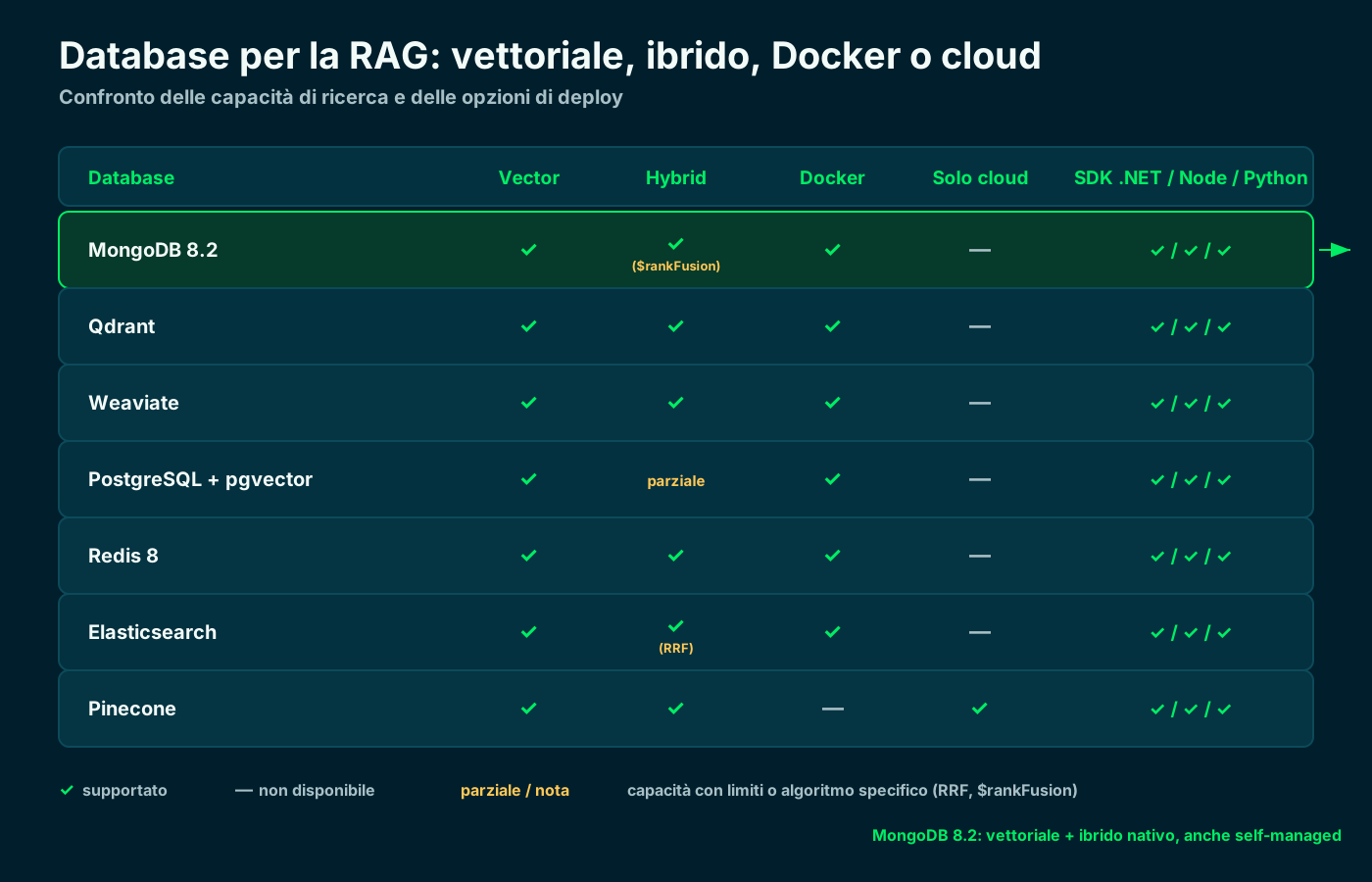
Vector, hybrid, Docker or cloud, and SDKs for .NET / Node / Python.
🍃 MongoDB in the spotlight: from Atlas-only to Community 8.2
For years MongoDB's vector search was exclusive to Atlas, the managed cloud service. As of version 8.2 (preview announced in September 2025) it also lands in self-managed Community: you can run $vectorSearch on your own server, without Atlas.
Under the hood there's a dedicated binary, mongot, alongside mongod. It also supports hybrid search with $rankFusion (RRF). Two honest caveats: in preview it is Linux-only and not yet GA.
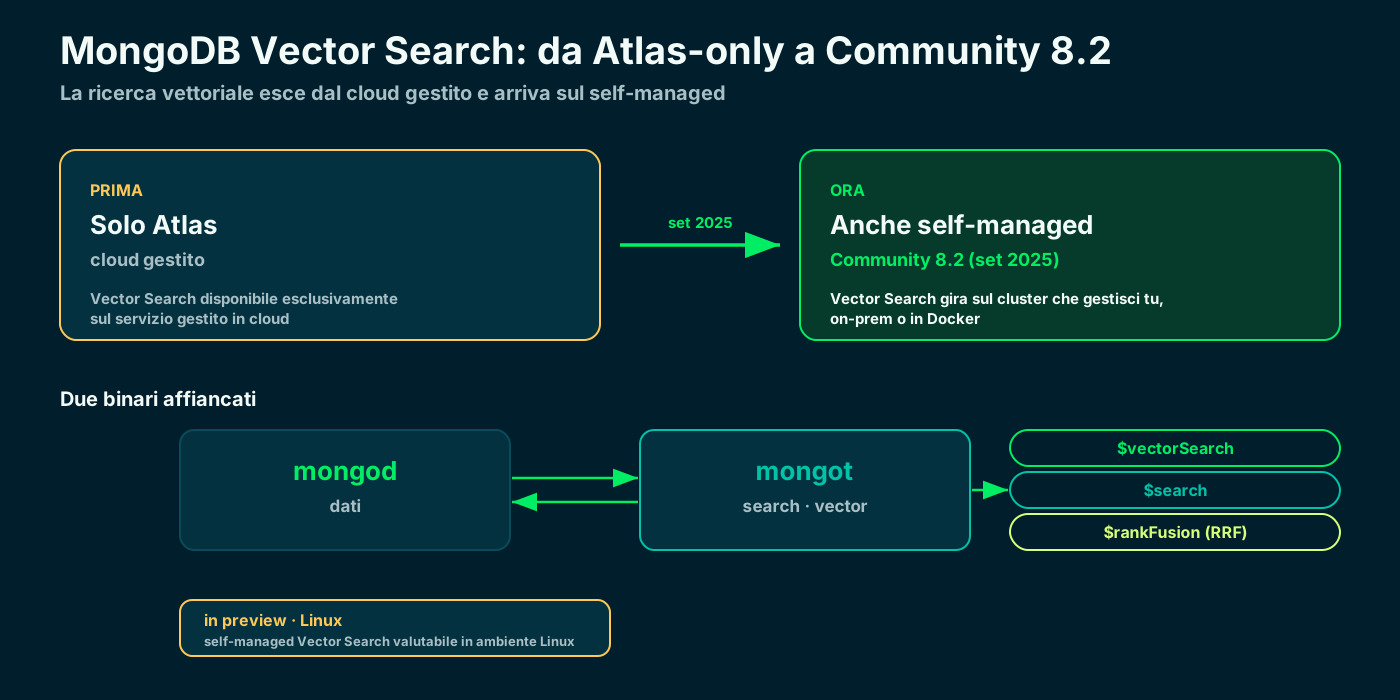
The same $vectorSearch as Atlas, now on your own server too (mongot, Linux, in preview).
🏗️ The tutorial: the solution architecture
We build a Minimal API in .NET that does end-to-end RAG with two external dependencies, both in-house: Ollama as the LLM and embedding engine, and MongoDB Community as the vector store with hybrid search.
The glue is Microsoft.Extensions.AI: the `IChatClient` and `IEmbeddingGenerator` abstractions make the code provider-independent. We expose two endpoints: one to upload a document, one to ask a question using RAG.
- LLM + embeddings: Ollama (`llama3.1` for chat, `nomic-embed-text` for vectors).
- Vector store + hybrid: MongoDB Community 8.2 in Docker (`$vectorSearch` + `$rankFusion`).
- NuGet packages: Microsoft.Extensions.AI, Microsoft.Extensions.AI.Ollama, MongoDB.Driver.
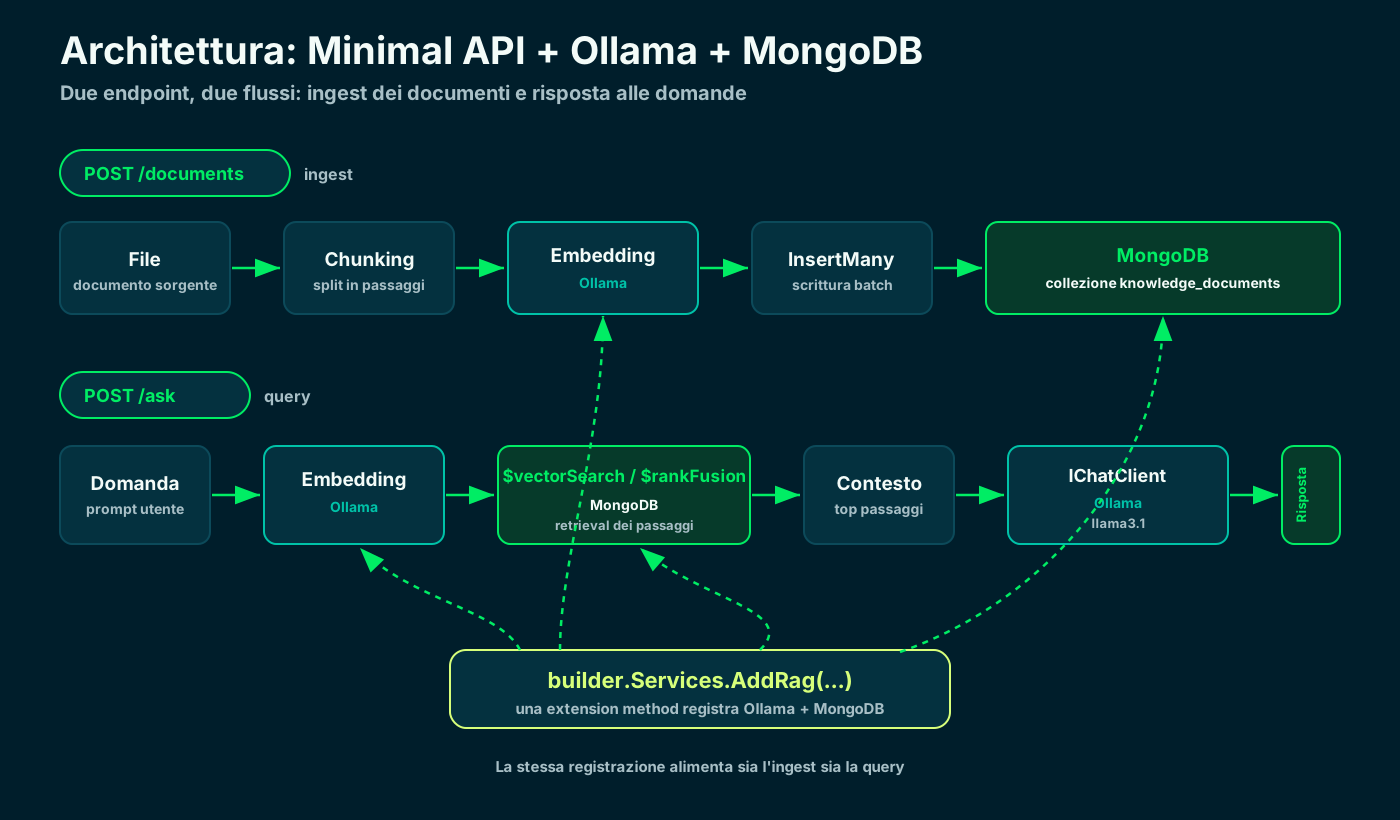
One extension method registers Ollama and MongoDB; two endpoints for ingest and question.
⬇️ Step 1 · Install Ollama locally
Ollama runs models on your computer. On macOS and Windows you download the app from the site; on Linux (or for a server) a single command line is enough. It exposes the API on http://localhost:11434.
Inference runs on your hardware: zero tokens to pay and data that never leaves the machine. With 16 GB of RAM you comfortably run the 7-8 billion parameter models.
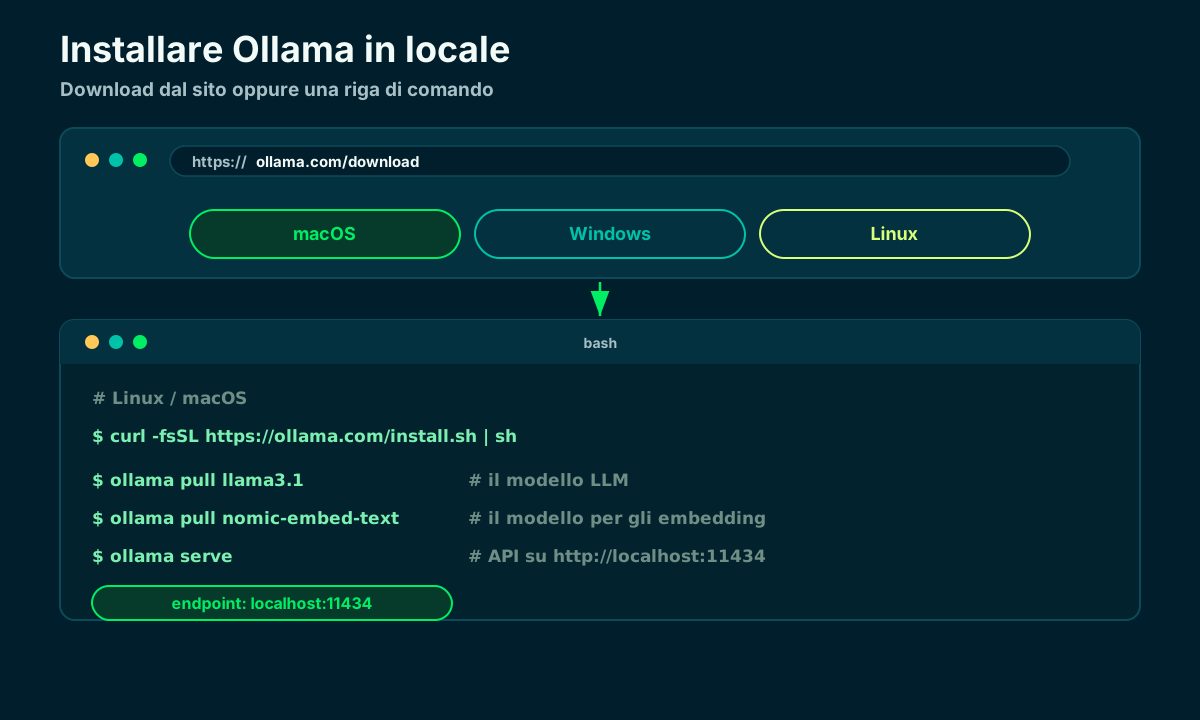
macOS and Windows from the app, Linux with the script; endpoint on localhost:11434.
⌨️ Install Ollama: the commands (copy & paste)
If you prefer the command line, here are the ready-to-copy commands. On macOS there's Homebrew; on Linux (or a headless server) the official script; on Windows the installer from the site. Then a single command starts the server.
# macOS (Homebrew)
$ brew install ollama

# Linux (or headless server)
$ curl -fsSL https://ollama.com/install.sh | sh

# Windows: download and run OllamaSetup.exe from ollama.com/download

# start the server (it usually starts on its own)
$ ollama serve # http://localhost:11434📦 Step 2 · Pull the models and test the endpoint
You need two models: a chat one (`llama3.1`) and an embedding one (`nomic-embed-text`, 768 dimensions). You pull them with `ollama pull` and test them on the spot.
Note the embedding's number of dimensions: it must match MongoDB's vector index. If you change the embedding model, rebuild the index with the new dimensions.
# 1) pull the two models
$ ollama pull llama3.1            # LLM for the answers
$ ollama pull nomic-embed-text   # embeddings (768 dim)

# 2) start the server (it usually starts on its own)
$ ollama serve                   # http://localhost:11434

# 3) try generating an embedding
$ curl http://localhost:11434/api/embeddings \
-d '{"model":"nomic-embed-text","prompt":"hello world"}'🐳 Step 3 · MongoDB Community 8.2 in Docker
We spin up MongoDB with a container. You need 8.2 (or later) for self-managed vector search; remember that in preview search is supported on Linux.
For hybrid search we'll use `$rankFusion`, available from 8.1 upward — so 8.2 covers everything. The mongot binary handles the search indexes.
# MongoDB Community 8.2 — vector + hybrid search (mongot, Linux)
$ docker run -d --name mongodb \
    -p 27017:27017 \
    mongodb/mongodb-community-server:8.2-ubi9

# check it's up
$ docker logs -f mongodb | grep -i "Waiting for connections"
MongoDB Vector Search · Docs ↗
🧱 Step 4 · Create the project and the NuGet packages
We create a Minimal API and add three packages: the Microsoft.Extensions.AI abstractions, the Ollama provider and the MongoDB driver.
The Microsoft.Extensions.AI abstractions are stable; the Ollama provider is in preview but it's the one used in the official samples. Alternatively you can use OllamaSharp: it implements the same interfaces.
# new Minimal API
$ dotnet new web -n RagDemo && cd RagDemo

# AI abstractions + Ollama provider + Mongo driver
$ dotnet add package Microsoft.Extensions.AI
$ dotnet add package Microsoft.Extensions.AI.Ollama --prerelease
$ dotnet add package MongoDB.Driver
Microsoft.Extensions.AI · Microsoft Learn ↗
⚙️ Step 5 · appsettings.json: where the Ollama URL goes
All configuration lives in appsettings.json: the Ollama URL, the two model names, the embedding dimensions and the MongoDB connection string. The Ollama endpoint is http://localhost:11434.
Keeping these values here means swapping a model or pointing at a different host without touching the code.
{
  "Ollama": {
    "Endpoint": "http://localhost:11434",
    "ChatModel": "llama3.1",
    "EmbeddingModel": "nomic-embed-text",
    "EmbeddingDimensions": 768
  },
  "Mongo": {
    "ConnectionString": "mongodb://localhost:27017",
    "Database": "ragdemo"
  }
}🧩 Step 6 · Register Ollama and MongoDB with an extension method
Following a real project's pattern, we collect all the wiring into an extension method `AddRag`. It registers Ollama's chat client and embedding generator as `IChatClient`/`IEmbeddingGenerator`, the MongoDB database and our own services.
The rest of the app depends only on the interfaces: Ollama never appears beyond this file. Tomorrow you switch to OpenAI or Azure by changing one line.
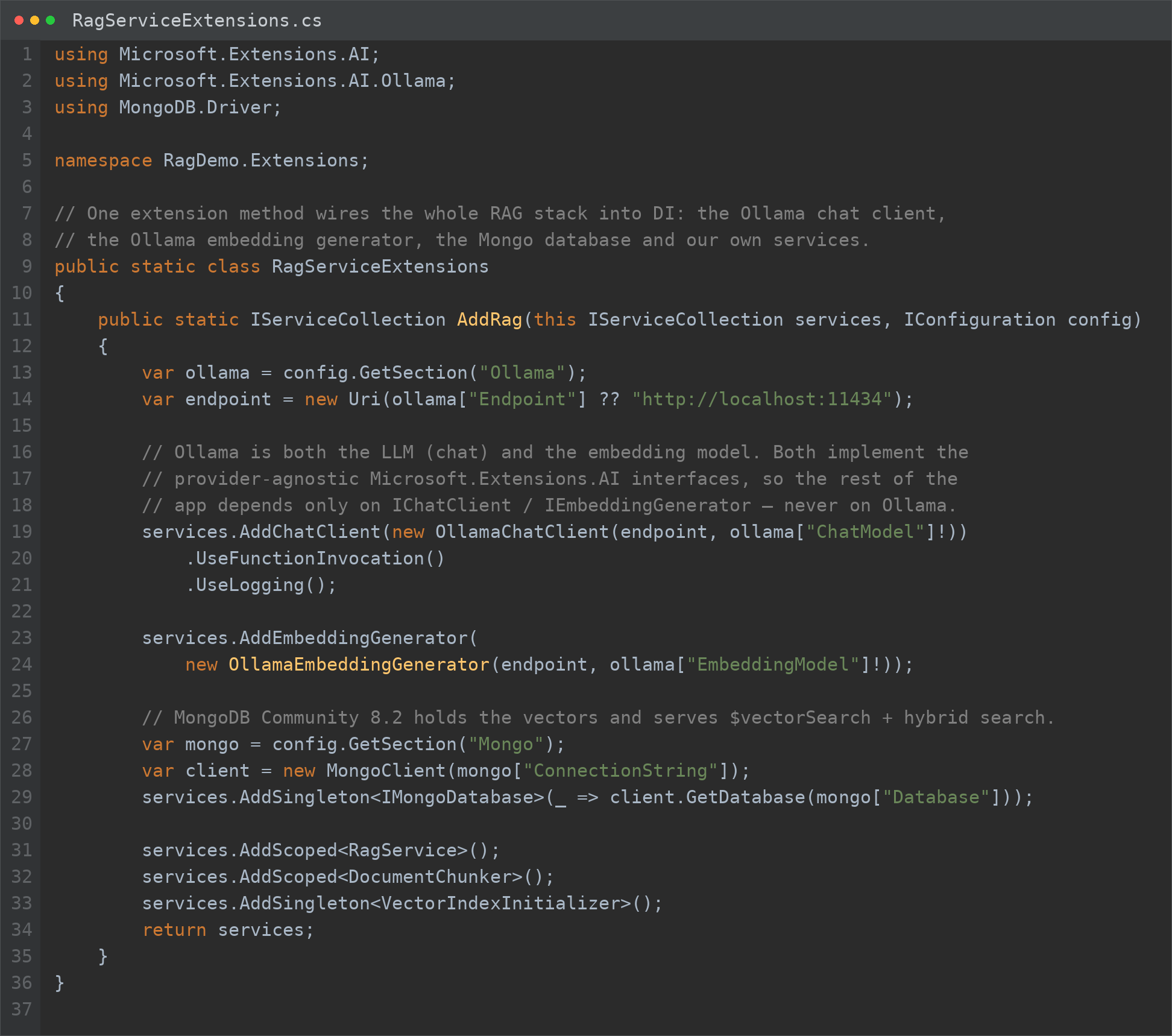
A single place registers Ollama (chat + embeddings) and MongoDB in the DI container.
🚀 Step 7 · Program.cs: one line of wiring, indexes at startup
The Program.cs of a Minimal API becomes tiny: one call to `AddRag`, the creation of the indexes at startup (idempotent) and the mapping of the two endpoints.
Creating the indexes at boot is handy: the first run builds them, the following ones find them ready and skip them.
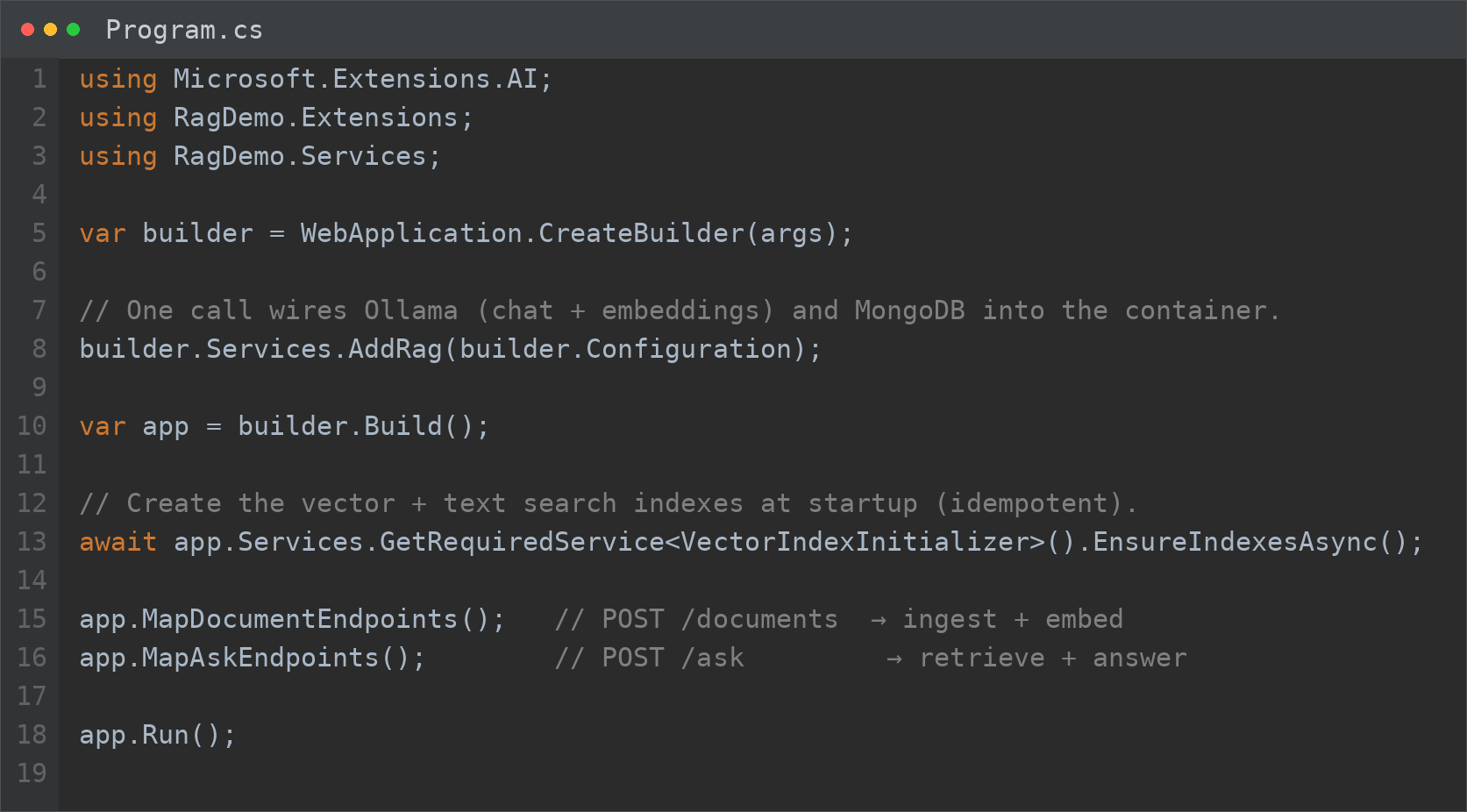
AddRag, EnsureIndexesAsync, two endpoints. That's it.
📄 Step 8 · The KnowledgeDocument entity and the vector
Each chunk becomes a MongoDB document with its embedding as `float[]` — exactly what the generator produces and what the vector index uses natively (f32). Using `double[]` would double the footprint with no gain.
We keep the collection name and the index name close to the entity, so a rename never leaves the code pointing at a dead collection.
![C# code of the KnowledgeDocument entity: SourceFile, ChunkIndex, Content fields, the embedding as float[] destined for the knowledge_vector_index, and CreatedAt.](/blog/code-knowledge-document.png)
One chunk per document; the embedding is a 768-dimensional float[].
🔑 Step 9 · Create the vector index (and the text one)
At startup we create two indexes: a vector one for `$vectorSearch` and a text one for the keyword side of hybrid search. The operation is idempotent: if the index exists, it does nothing.
The index `numDimensions` must match the embedding model (768 for `nomic-embed-text`), with cosine similarity. The same API works on Atlas and on Community 8.2.
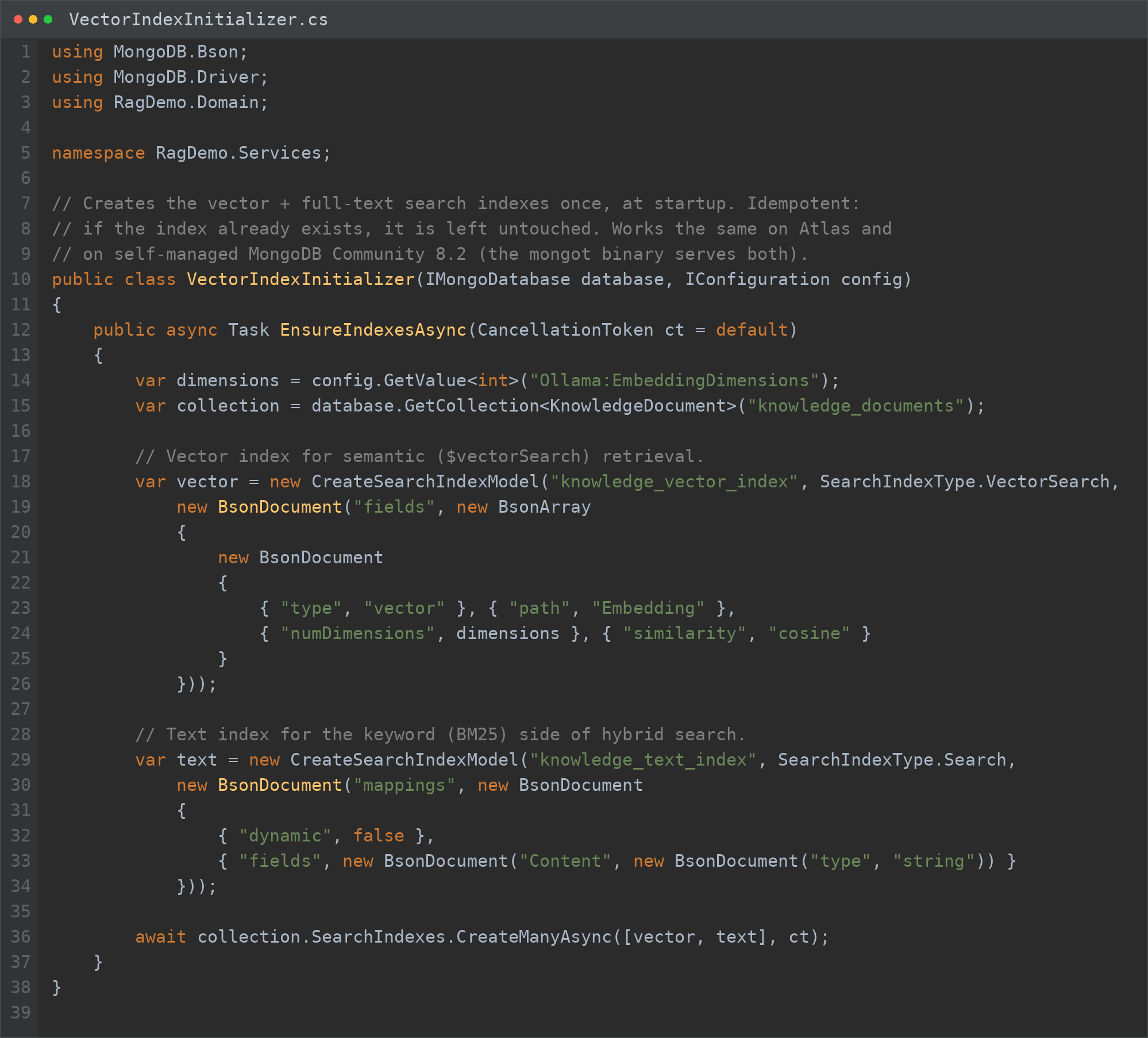
Same API on Atlas and on Community 8.2 (mongot). numDimensions = 768, cosine.
📥 Step 10 · The /documents endpoint: upload and index
The first endpoint accepts a file, splits it into chunks, generates the embeddings in a single batch call and inserts them into MongoDB. It's the ingestion phase of RAG.
All async: the file is read once, the chunks are vectorized together and the insert is bulk with `InsertManyAsync`.
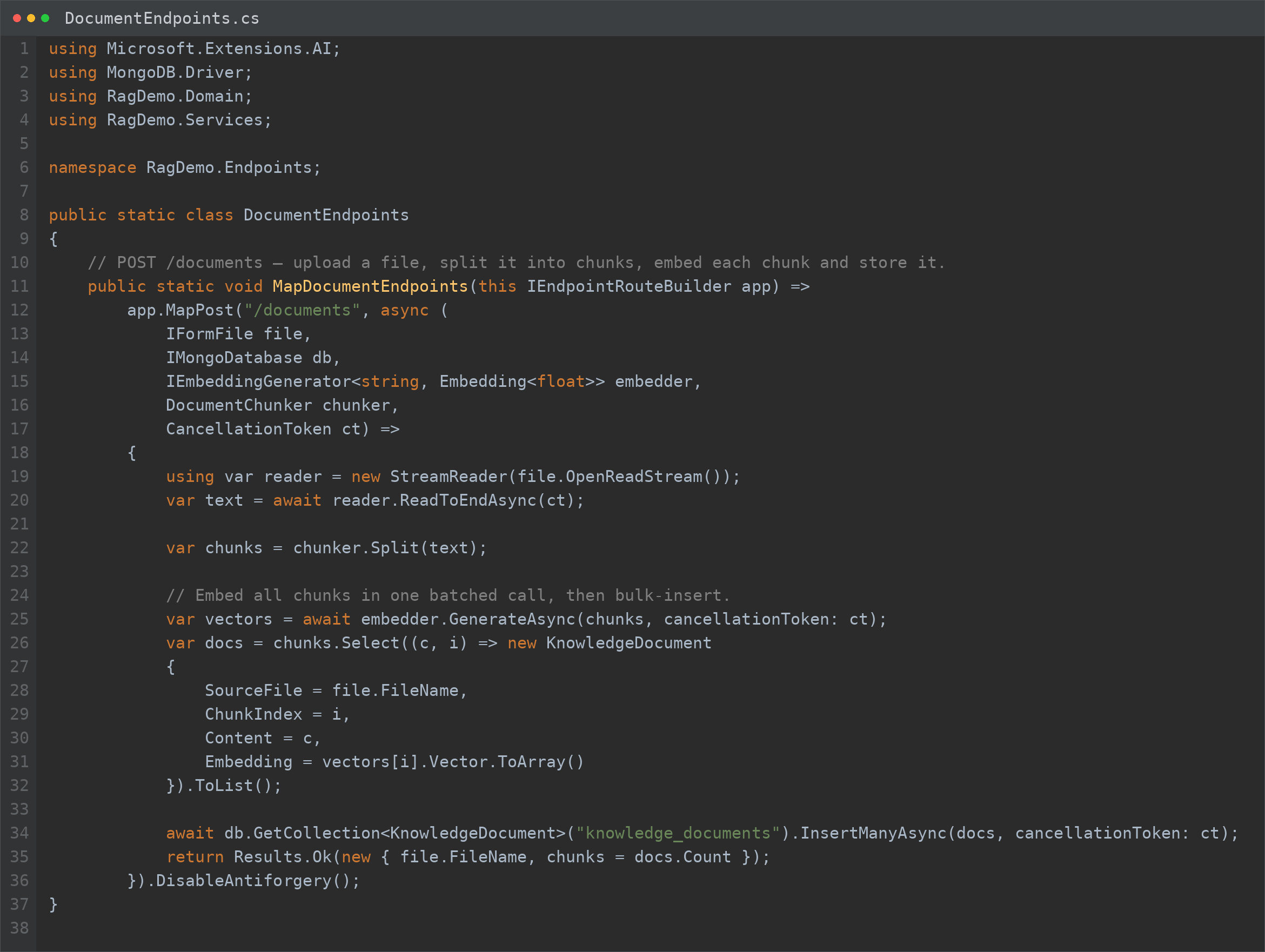
Upload, chunking, batch embedding and InsertMany: ingestion in one shot.
🔎 Step 11 · The RAG service: vector search
The RagService is pure retrieval: it turns the question into a vector and asks MongoDB for the nearest chunks with `$vectorSearch`. A `numCandidates` higher than `limit` casts a wider net before narrowing down.
The `$project` stage returns the text and the similarity score (`vectorSearchScore`), ready to inject into the prompt.
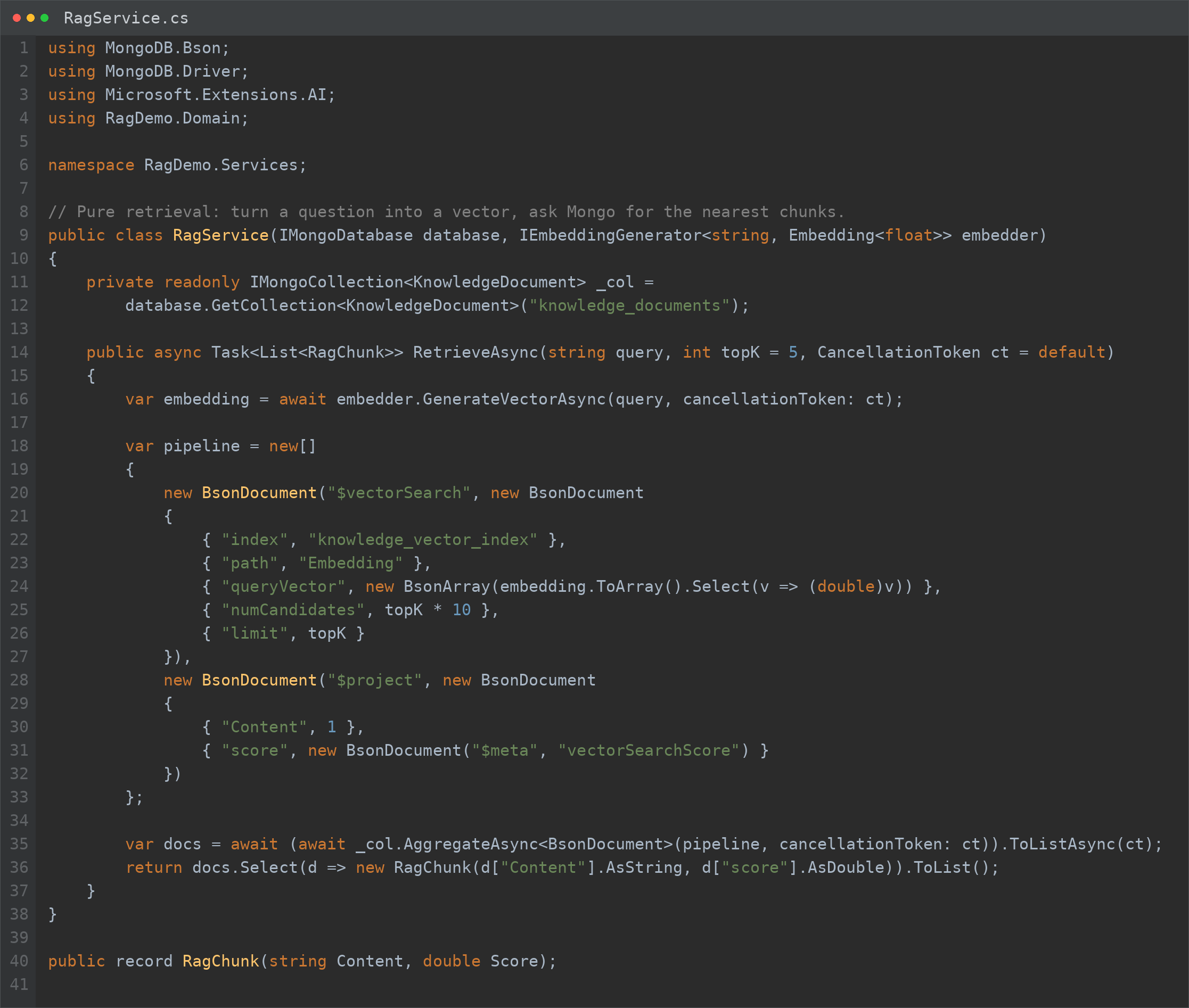
Embed the question, retrieve the top-K, project text and score.
🔀 Step 12 · Hybrid search with $rankFusion
For hybrid search we put full-text search alongside vector search and fuse the two with `$rankFusion` (RRF). We weight the semantic side 0.7 and the keyword side 0.3 — tunable to taste.
It's the extra gear on corpora full of acronyms and codes, and it runs on the self-managed Community 8.2 (you need 8.1 or later for `$rankFusion`).
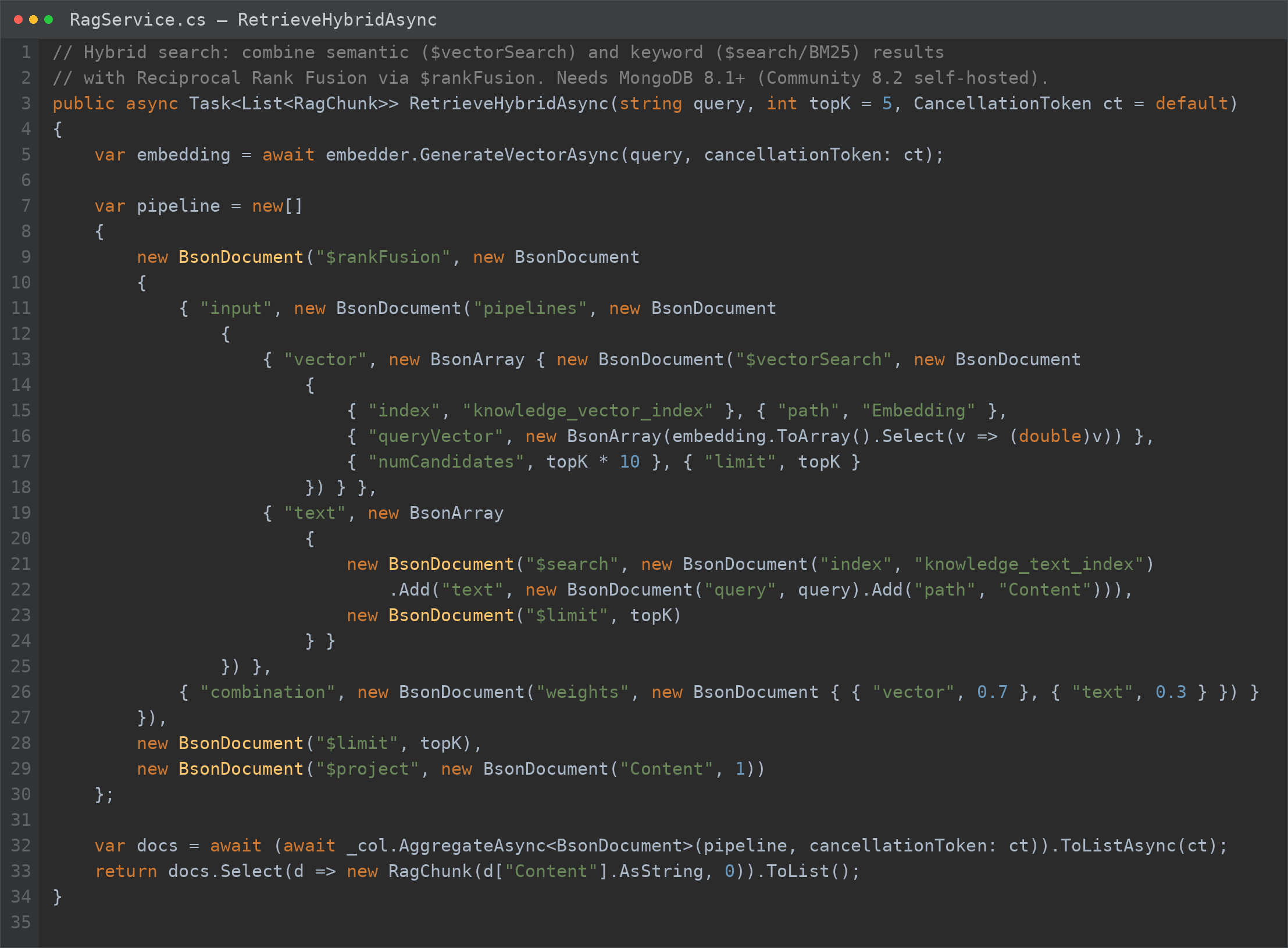
Vector + BM25 fused with RRF: needs MongoDB 8.1+ (Community 8.2).
💬 Step 13 · The /ask endpoint: question with RAG
The second endpoint orchestrates everything: it retrieves the chunks (vector or hybrid), injects them into the prompt as context and asks Ollama for the answer via `IChatClient`. The system prompt requires it to answer only from the context.
The `hybrid` flag lets the caller choose the retrieval strategy, question by question.
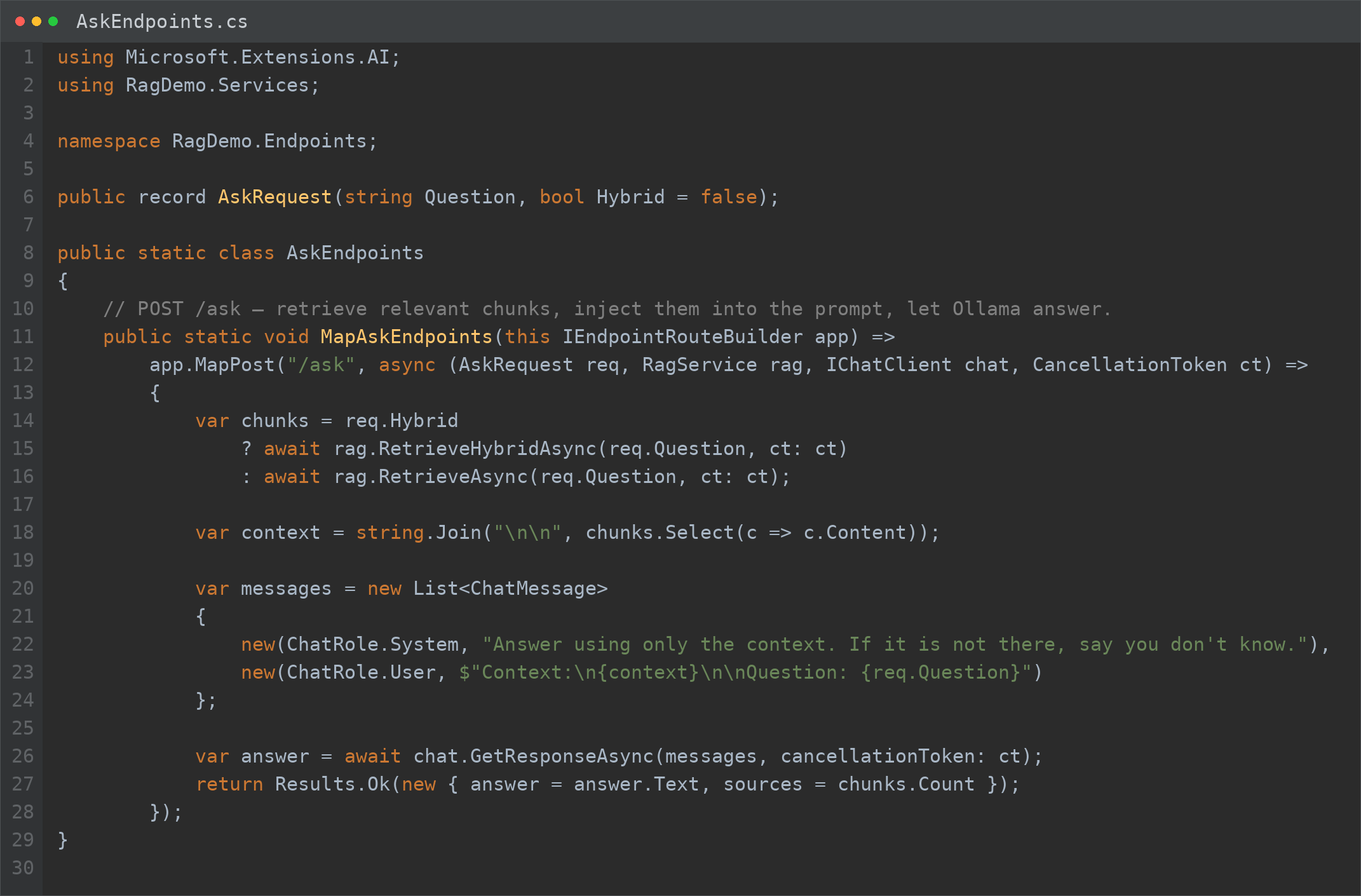
Retrieve, build the context, ask Ollama. RAG in one endpoint.
🧪 Step 14 · Try it from the terminal with curl
Two `curl` calls and RAG is alive: first you upload a document, then you ask. With `hybrid: true` you try hybrid search on the same question.
The first question after startup can be slower: the vector index is built in the background by the mongot binary.
# 1) upload a document (multipart)
$ curl -F "file=@manual.txt" http://localhost:5000/documents

# 2) ask a question (vector search)
$ curl http://localhost:5000/ask \
    -H "Content-Type: application/json" \
    -d '{"question":"how do I configure the backup?"}'

# 3) same question, hybrid search
$ curl http://localhost:5000/ask \
    -H "Content-Type: application/json" \
-d '{"question":"error code E45?","hybrid":true}'✅ Final checklist and next steps
Let's recap the path. If you followed the steps, you now have a Minimal API that runs RAG locally with Ollama and MongoDB, without a token spent in the cloud.
From here you can level up: add re-ranking, move to an agentic approach, or shift the vectors to another database while keeping the same architecture — because you depend on the interfaces, not the providers.
- 01Install Ollamaapp or curl; endpoint 11434
- 02Pull the modelsllama3.1 + nomic-embed-text
- 03MongoDB in Dockercommunity-server 8.2
- 04Project + NuGetExtensions.AI + Ollama + Driver
- 05appsettings + AddRagOllama and Mongo URL, one extension
- 06Entity + indexesvector + text, at startup
- 07/documents endpointchunk, embed, store
- 08/ask endpointretrieve, context, Ollama
From here: re-ranking, agentic, or another vector database with the same structure.
Frequently asked questions about Retrieval-Augmented Generation
What is RAG in simple terms?
RAG (Retrieval-Augmented Generation) makes a model retrieve the relevant documents and then generate the answer using them as context. So it answers on your data, with sources, reducing hallucinations — without retraining the model.
What's the difference between vector and hybrid search?
Vector search finds by meaning (embeddings); hybrid search adds full-text BM25 and fuses the two rankings with Reciprocal Rank Fusion. Hybrid wins when exact words matter, like codes, acronyms and technical jargon.
Do I really need a dedicated vector database?
No. General-purpose databases like MongoDB, PostgreSQL (pgvector) or Redis do vector and hybrid search. A dedicated database (Qdrant, Weaviate, Milvus) pays off at very large scale or for advanced features.
Is MongoDB Community enough for RAG?
Yes, as of 8.2: $vectorSearch and the hybrid $rankFusion are available self-managed too, through the mongot binary. In preview it's Linux-only and not yet GA; for managed production the Atlas option remains.
Can I use Ollama in production?
Ollama is great for development, privacy and zero cost per request. In production weigh hardware (GPU/RAM), concurrency and SLAs; the architecture doesn't change, because you depend on the IChatClient and IEmbeddingGenerator interfaces, not on Ollama.
Which type of RAG should I choose?
Start from simple vector search. Move to hybrid if you have codes and acronyms; to re-ranking if result ordering is poor; to graph for multi-hop or global questions; to agentic for complex multi-source tasks. Level up only when the numbers ask for it.
Let's talk
If this topic is relevant to you, write to me: comparing notes on code and AI is always time well spent.