
Claude Code /agents: creating specialized subagents to delegate tasks without flooding your context
In a long Claude Code session the real hidden cost is sprawl: to understand how authentication works the assistant reads twenty files, and those twenty files stay in the context, weighing on every later message. Subagents flip the script — instead of pouring every search into the main conversation, I delegate the work to an isolated assistant that does its job and comes back with only the result. The entry point is the /agents command: the interface where I create, edit, and manage these specialists. In this article I look at what subagents are, the exact flow I follow to create one, and how I configure them so delegation is automatic and focused.
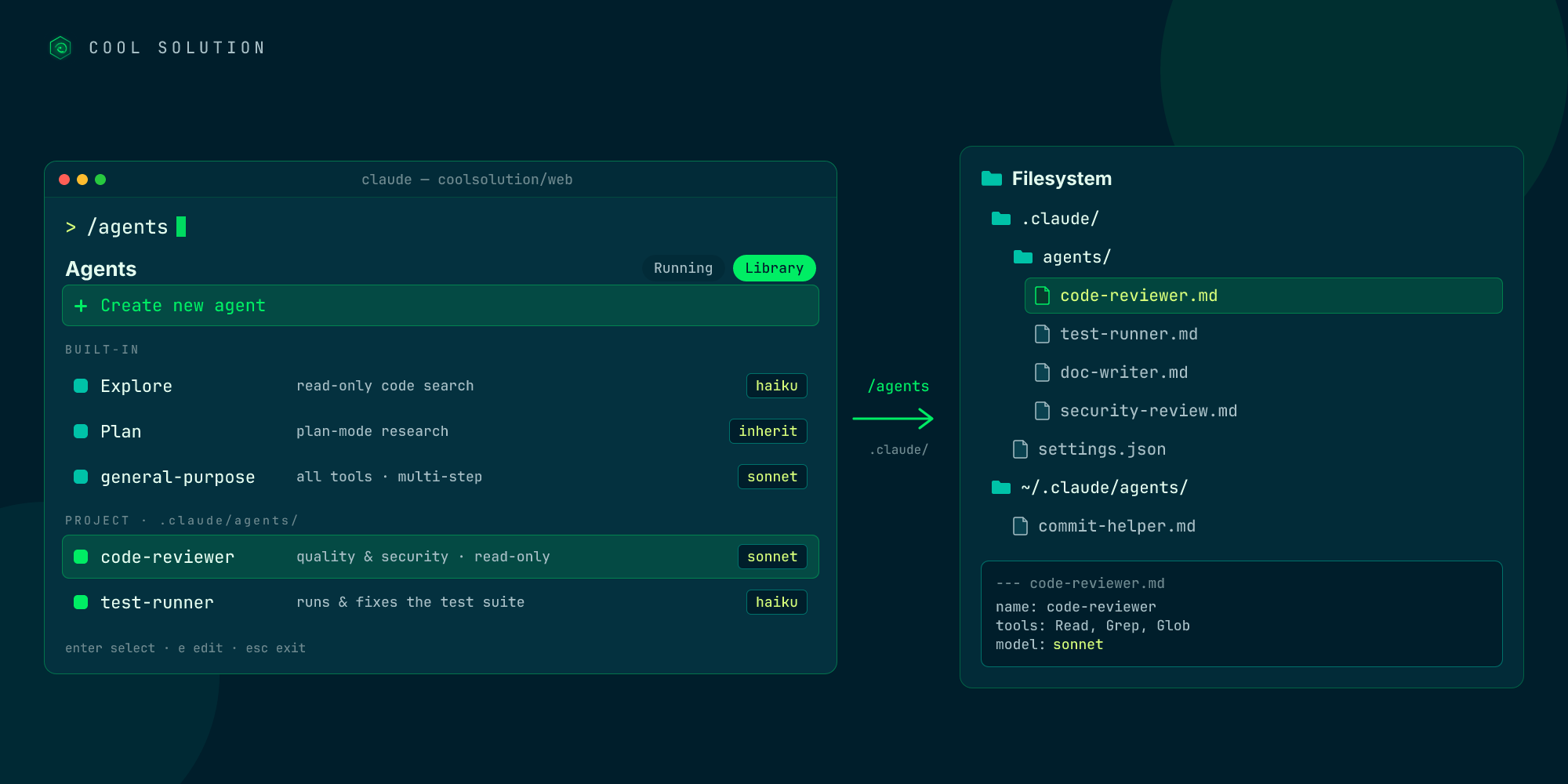
🔍 What subagents are and why I go through the /agents command
A subagent is a specialized instance of Claude Code: it runs in its own context window, with a dedicated system prompt, a restricted tool set, and independent permissions. When a side task would flood the main conversation — search results, test output, the contents of dozens of files I no longer need — I delegate it: the subagent does that work in its own context and returns only the summary.
The difference from the main conversation is right there. Each subagent starts fresh: it doesn't see the history, the skills already loaded, or the files already read. Claude composes a delegation message that summarizes the task, and the subagent works from there. It's precisely this isolation that keeps the main context clean: the 4,000-line stack trace and the fifteen grep results stay in the subagent's transcript and never pollute the session that pays the bills.
To manage all this I use the /agents command, the tabbed interface Claude recommends as the default: a Running tab for active subagents and a Library tab to create, edit, and delete them. That's where I start, instead of writing files by hand.
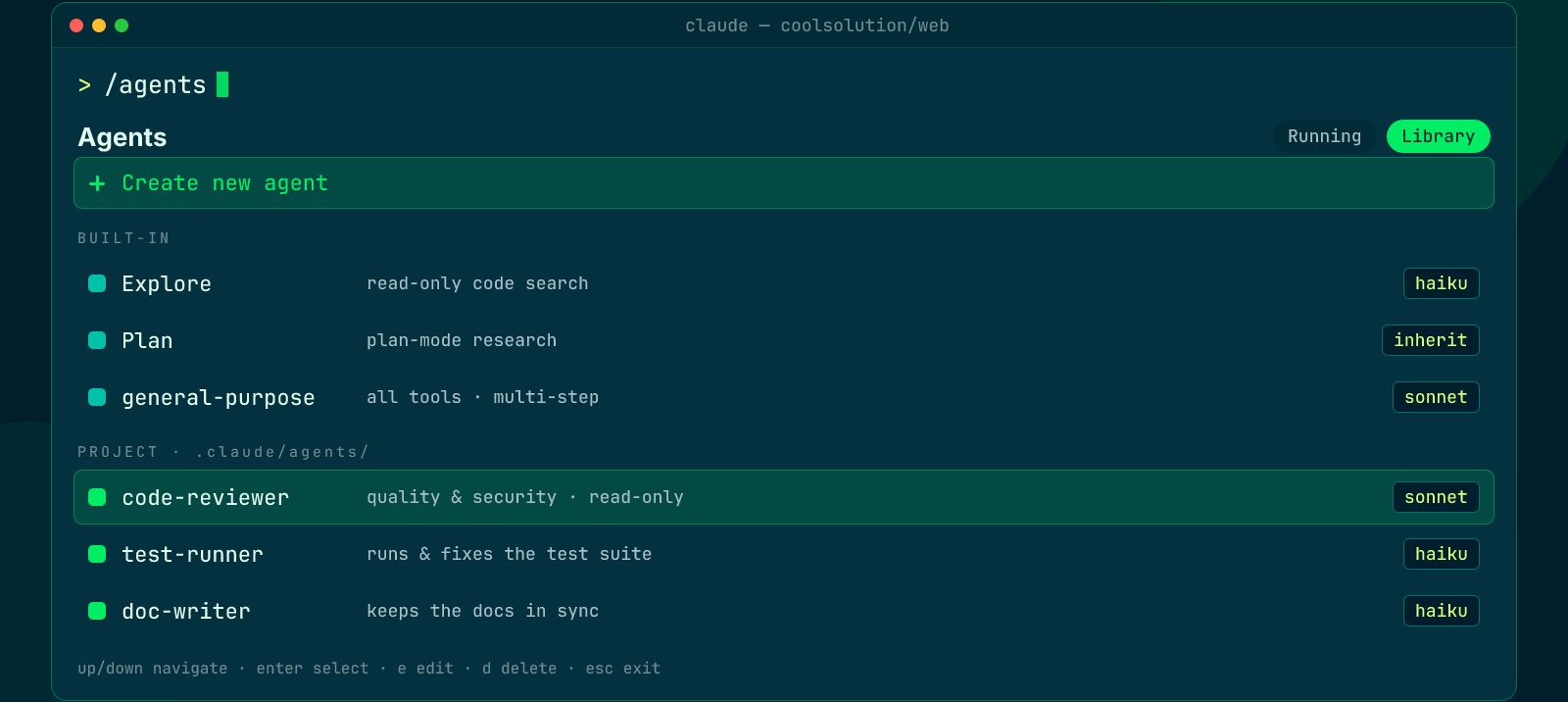
The interface where I create, edit and delete subagents: the three built-ins and the project ones, each with its own model.
🧩 The three built-in subagents: Explore, Plan, and general-purpose
Before I even create my own, Claude Code already ships three, and it delegates to them on its own when needed. Knowing them avoids reinventing the wheel:
- Explore: a read-only agent optimized for searching and analyzing code. It runs on Haiku — fast and cheap — and cannot write or edit files. It's what I use for pure research.
- Plan: the research agent of plan mode. It inherits the conversation's model, stays read-only, and gathers context before presenting a plan.
- general-purpose: the catch-all, with access to all tools, for multi-step tasks that need both exploration and action.
🧱 Creating a subagent with /agents: the flow I follow
When the same kind of work keeps coming back — a security reviewer, a test writer, someone who keeps the docs in sync — I stop re-explaining it every time and define it once. The flow, inside /agents, is always the same and takes me a couple of minutes.
The choice that matters most is scope. A project subagent lives in .claude/agents/ and I commit it to the repo: that way everyone on the team works with the same reviewer and the same test writer. A user subagent lives in ~/.claude/agents/ and follows me across all projects. When two share a name, the higher-priority one wins (project before user).
- 01I run /agentsI open the interface, go to the Library tab, and pick Create new agent.
- 02I choose the scopeProject (.claude/agents/, shared in the repo) or user (~/.claude/agents/, across all projects).
- 03I generate or write the promptI use Generate with Claude from a description, or write the markdown file myself.
- 04I restrict the toolsFor a reviewer I keep only read-only tools: no Write, no Edit.
- 05I pick the model and saveHaiku, Sonnet, or Opus depending on the task. I save: the subagent is available immediately.
Source: official Claude Code documentation (Create custom subagents).
⚙️ description, tools, and model: the fields that decide behavior
A subagent is a markdown file with YAML frontmatter at the top and the system prompt in the body. The only required fields are name and description: everything else inherits sensible defaults. But it's the optional fields that make the difference between delegation that works and delegation that frustrates.
The description field is the most underrated: it's what Claude reads to decide when to delegate automatically. Write it about the trigger conditions, not the capability: "review code before a commit" routes better than "security expert". Adding use proactively encourages spontaneous delegation.
The other two fields I almost always touch:
- tools: an allowlist. If I specify it, the subagent can use only those tools — a read-only reviewer gets Read, Grep, Glob and can't touch files. Alternatively disallowedTools subtracts specific tools from the inherited set.
- model: haiku, sonnet, opus, or inherit (default). This is where much of the saving happens: routing high-volume tasks to Haiku cuts the cost without losing quality where it isn't needed.
- memory: optional, gives the subagent a persistent directory where it accumulates patterns and decisions across conversations.
---
name: code-reviewer
description: quality and security review,
  use it after every code change
tools: Read, Grep, Glob
model: sonnet
---
You are a senior code reviewer: flag bugs, security
risks, and duplicated code. Read-only.
Official docs · Claude Code subagents ↗
⚠️ When I don't use a subagent
Subagents aren't free: each one spins up a new context, consumes tokens, and adds a layer of indirection. They're worth the price when isolation, parallelism, or a fresh perspective genuinely help. Otherwise I stay in the main conversation, and it's the simpler, faster choice.
The cases where I avoid delegation, learned the hard way:
- Sequential, dependent work: if step two needs the full output of step one, a single session is cleaner than a relay of subagents.
- Parallel edits to the same file: two subagents editing the same file is a recipe for conflict.
- Small tasks: for a quick fix the delegation overhead outweighs the benefit.
- Too many specialists: flooding Claude with subagents makes automatic delegation less reliable, because descriptions overlap.
- Work that needs agents to coordinate: subagents report only to the parent, they don't talk to each other. That's where agent teams come in.
I delegate to a subagent
- Verbose output I don't need in my context
- I want to enforce restricted tools or permissions
- The work is self-contained and returns a summary
- I need a fresh, unbiased perspective
I stay in the conversation
- I need continuous back-and-forth
- Multiple phases share a lot of context
- It's a small, targeted change
- Latency matters: a subagent starts from zero
🏢 What changes for a team (and for an SME)
The real value of subagents, for anyone developing in a business, isn't a single cleaner session: it's that the specialists become part of the repo. A code-reviewer, a debugger, and a test writer versioned in .claude/agents/ mean everyone on the team works with the same checks, without anyone having to remember to ask for them.
There's also a governance angle that matters for an SME. Restricting a subagent's tools to read-only means having reviewers that cannot modify code or touch sensitive data: least privilege isn't an intention, it's written into the definition. It's the same principle I apply to shadow AI, brought to the command line.
The advice I give to anyone starting: begin with a single specialist, usually a read-only code-reviewer, measure how often it's invoked, and add the others as patterns emerge. A small team — or a solo developer — ends up with a squad of virtual specialists, at the cost of a few markdown files.
Frequently asked questions about /agents command Claude Code
What's the difference between a subagent and the main conversation?
A subagent runs in an isolated context, doesn't see the history, and returns only a summary; the main conversation keeps everything in one thread. I delegate to a subagent when the work produces verbose output or I want restricted tools; I stay in the conversation when I need back-and-forth or latency matters.
How do I create a subagent in Claude Code?
I run the /agents command, go to the Library tab, and pick Create new agent. I choose the scope (project in .claude/agents/ or user in ~/.claude/agents/), generate the prompt with Claude or write the markdown file myself, restrict the tools, and pick the model. Once saved, it's available immediately, with no session restart.
Do subagents actually save tokens?
Yes, in two ways. First: only the summary returns to the main conversation, while logs and files stay in the subagent's context. Second: I can route high-volume tasks to Haiku, a cheaper model, keeping Sonnet or Opus only where they're really needed.
Subagents, skills, or agent teams: when do I use which?
I use a subagent when I want the noisy work to stay out of the conversation and come back as a summary. I use a skill when I want the same instructions inline, in the main context. I move to agent teams only when one specialist isn't enough and the agents need to talk to each other.
Let's talk
If this topic is relevant to you, write to me: comparing notes on code and AI is always time well spent.