 COOL
COOL 


In this article
- 🧭 What an LLM orchestrator (router) is
- ✅ Prerequisites: what you need before you start
- 1️⃣ Install Ollama and pull a local model
- 2️⃣ Install Claude Code and the Claude Code Router
- 3️⃣ Create and understand config.json
- 📋 The full config.json (copy-paste)
- 4️⃣ Routing rules: which task goes to which model
- 5️⃣ Start the router with ccr code
- 6️⃣ Add Codex / OpenAI (and use it as a fallback)
- 7️⃣ Switch models on the fly and verify routing
- 🔁 Alternative: LiteLLM as a gateway
- ⚖️ When it's worth it: cost, privacy, quality
- 🗓️ Bonus: schedule heavy tasks during off-peak hours
- 🧩 Final checklist and next steps
🧭 What an LLM orchestrator (router) is
An orchestrator (or model router) is a small program that sits between your tool — here Claude Code — and the various model providers. It receives every request and decides where to send it: to a model running on your computer or to a cloud API.
The idea is simple: one interface, several engines behind it. You change model without changing tool and without rewriting anything — you move the needle between cost, privacy and quality depending on the task. The diagram below is the mental map of the whole tutorial.
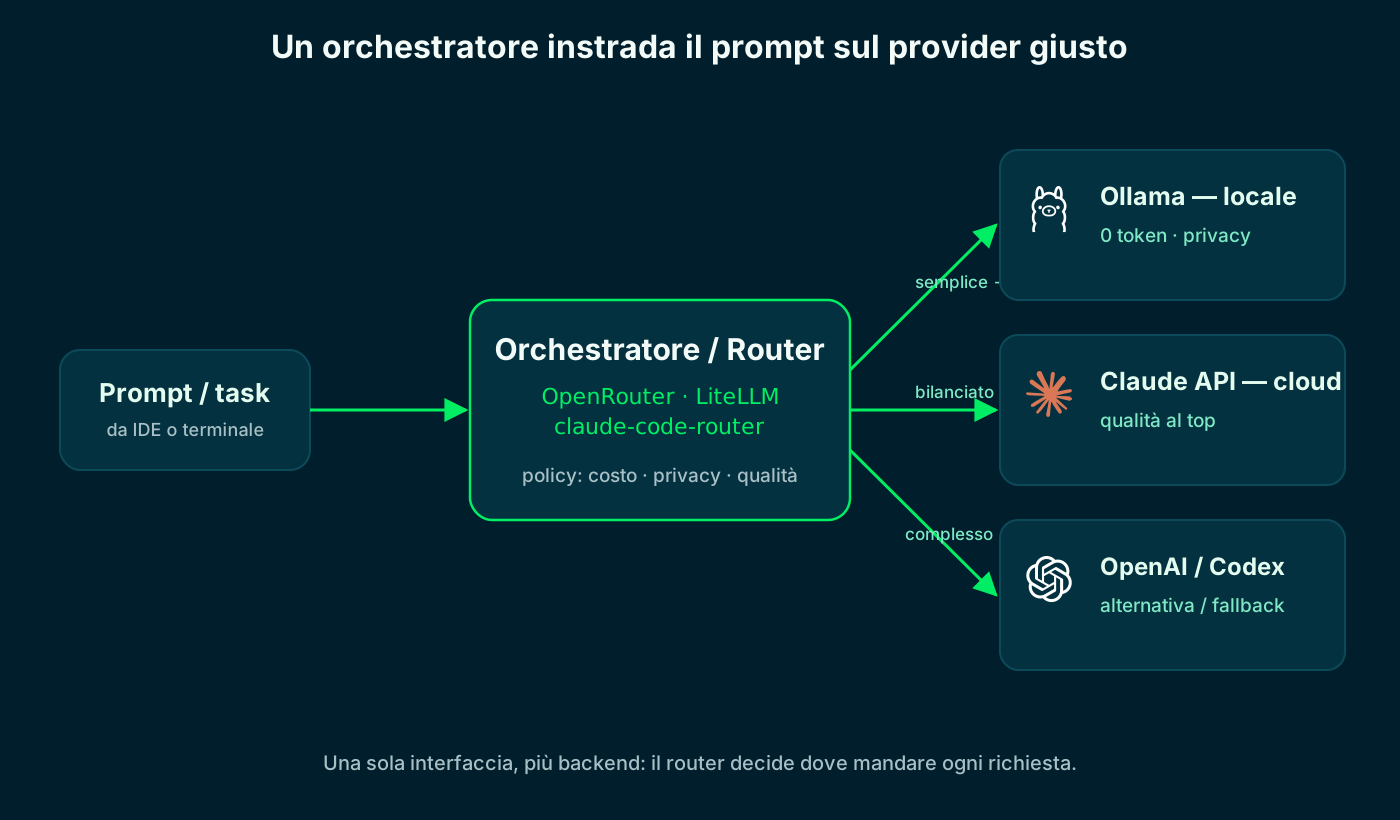
The router picks the provider based on cost, privacy and task difficulty.
✅ Prerequisites: what you need before you start
Before we begin you need four things. Don't worry: they install in a few minutes, and one — the cloud key — is optional if you want to stay 100% local.
- Node.js 18+: both tools install via npm. Check with node -v.
- Claude Code: Anthropic's terminal interface (we install it in step 2).
- Ollama: the engine that runs models locally.
- A cloud API key (Anthropic and/or OpenAI): only needed for the cloud backends.
# Node.js must be installed (version 18 or newer)
$ node -v
v20.11.0

# we install these two in steps 1 and 2, then verify with:
$ ollama --version
$ claude --version1️⃣ Install Ollama and pull a local model
Ollama is the engine that runs models on your computer. It installs with one command, then you pull a coding model that supports function calling (Claude Code needs it to use tools). A good pick is qwen2.5-coder.
Inference runs on your hardware: zero tokens to pay and data that never leaves the machine. Throughput depends on RAM/GPU: with 16 GB you comfortably run 7-8B models.
# 1) install Ollama (macOS/Linux). On Windows use the installer from the site
$ curl -fsSL https://ollama.com/install.sh | sh

# 2) pull a coding model with tool calling
$ ollama pull qwen2.5-coder

# 3) start the server (it usually starts on its own)
$ ollama serve   # endpoint: http://localhost:11434

# 4) quick test
$ ollama run qwen2.5-coder "write a fizzbuzz function in TypeScript"2️⃣ Install Claude Code and the Claude Code Router
Now the two pieces of software. First Claude Code (Anthropic's interface), then the Claude Code Router — the community proxy, command ccr, that intercepts requests and routes them. Both install with npm, globally.
# Claude Code (Anthropic's terminal interface)
$ npm install -g @anthropic-ai/claude-code

# Claude Code Router (the proxy that routes requests)
$ npm install -g @musistudio/claude-code-router

# check that the 'ccr' command is available
$ ccr -v3️⃣ Create and understand config.json
All the logic lives in one file: ~/.claude-code-router/config.json. It has two sections that matter. Providers lists the available backends (Ollama locally, Anthropic and OpenAI in the cloud), each with its endpoint, key and models. Router decides which provider to use for each type of task.
The golden rule on keys: don't write them in plain text. The router supports environment variables with the $VAR_NAME syntax, so secrets stay out of the file. The diagram below is the annotated config, point by point.
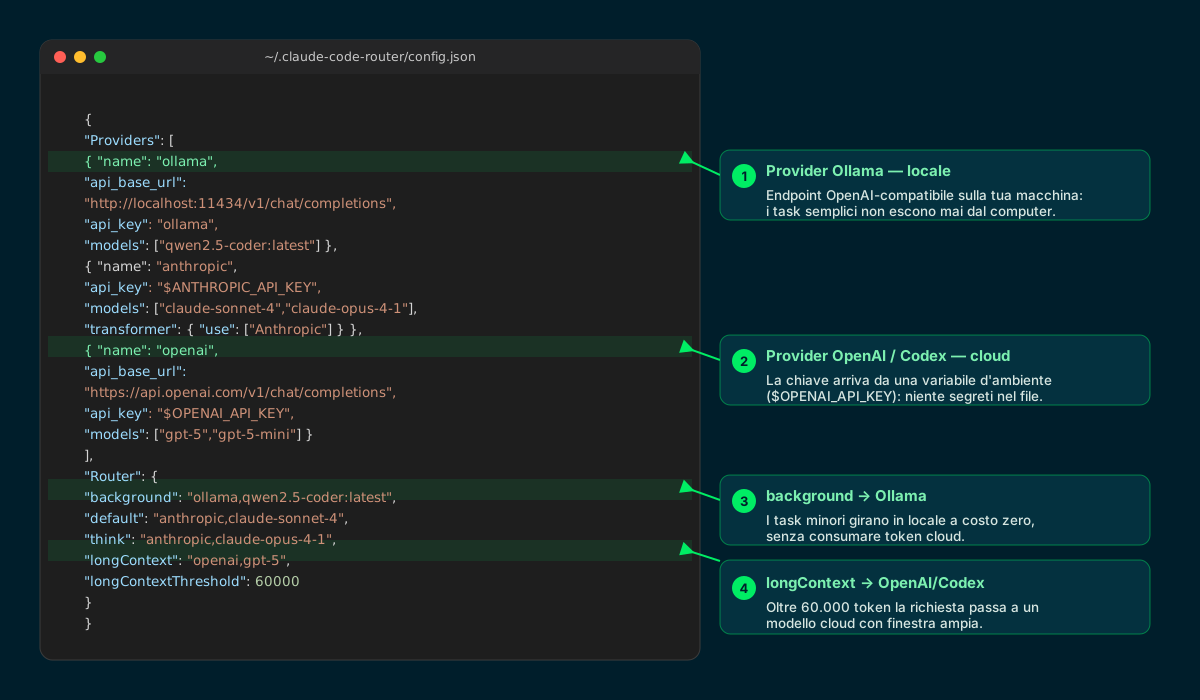
Four key points: local provider, cloud provider with a safe key, and two routing rules.
📋 The full config.json (copy-paste)
Here is a minimal but complete configuration with the three backends from this tutorial. Save it in ~/.claude-code-router/config.json, swap the models for the ones you pulled/enabled, and remember to export the cloud keys as environment variables.
{
  "Providers": [
    {
      "name": "ollama",
      "api_base_url": "http://localhost:11434/v1/chat/completions",
      "api_key": "ollama",
      "models": ["qwen2.5-coder:latest"]
    },
    {
      "name": "anthropic",
      "api_base_url": "https://api.anthropic.com/v1/messages",
      "api_key": "$ANTHROPIC_API_KEY",
      "models": ["claude-sonnet-4", "claude-opus-4-1"],
      "transformer": { "use": ["Anthropic"] }
    },
    {
      "name": "openai",
      "api_base_url": "https://api.openai.com/v1/chat/completions",
      "api_key": "$OPENAI_API_KEY",
      "models": ["gpt-5", "gpt-5-mini"]
    }
  ],
  "Router": {
    "background": "ollama,qwen2.5-coder:latest",
    "default": "anthropic,claude-sonnet-4",
    "think": "anthropic,claude-opus-4-1",
    "longContext": "openai,gpt-5",
    "longContextThreshold": 60000
  }
}
GitHub · config.json example ↗
4️⃣ Routing rules: which task goes to which model
The Router section is the heart of the orchestrator. To each type of request you assign a provider and a model, in the form provider,model. Claude Code labels requests itself, and the router dispatches them.
The strategy we recommend: minor tasks local, hard tasks cloud. That keeps cost down and protects data on repetitive work, and you call the cloud only when you really need the quality.
- background: minor, background tasks → Ollama locally, at zero cost.
- default: day-to-day work → Claude Sonnet in the cloud (or local, if you prefer).
- think: reasoning and Plan Mode → a strong model like Claude Opus.
- longContext: beyond ~60K tokens → a cloud model with a wide window (here gpt-5).
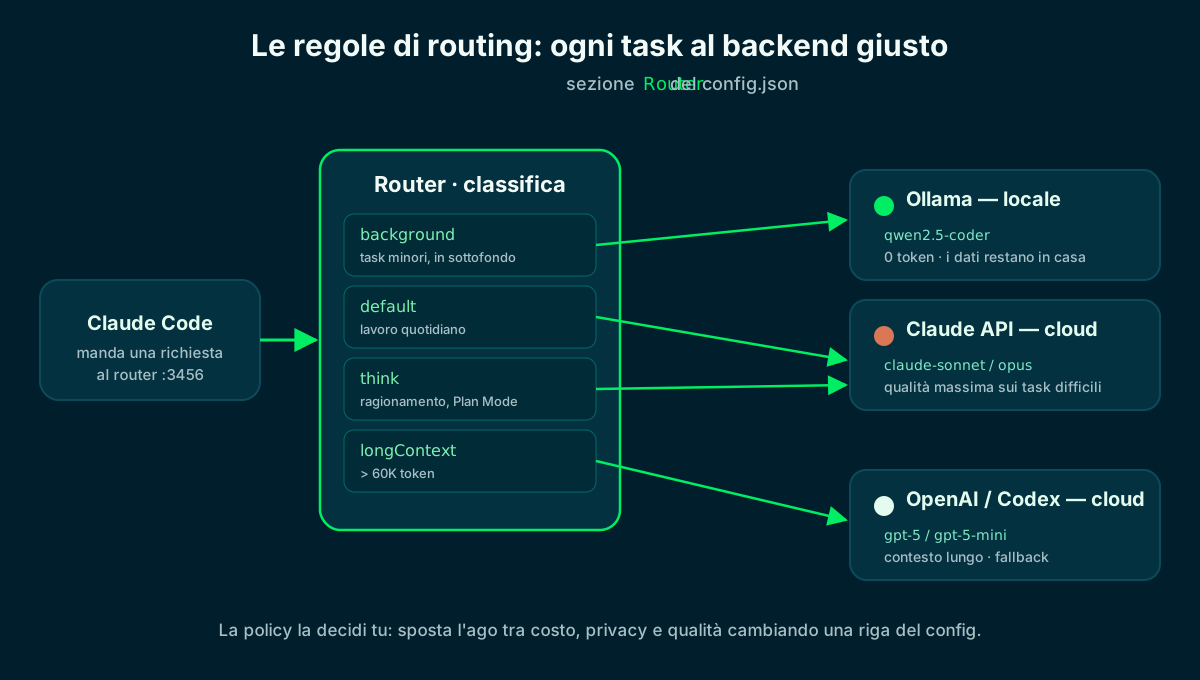
Change one line of the config and move the needle between cost, privacy and quality.
5️⃣ Start the router with ccr code
Everything's ready: let's go. Instead of claude, you run ccr code — you open Claude Code exactly as always, but every request goes through the router (listening on 127.0.0.1:3456). The status line shows which model is working at any moment.
Two handy commands: ccr ui opens a web interface to edit the config without touching the JSON by hand, and ccr restart restarts the service (needed after each change to the file).
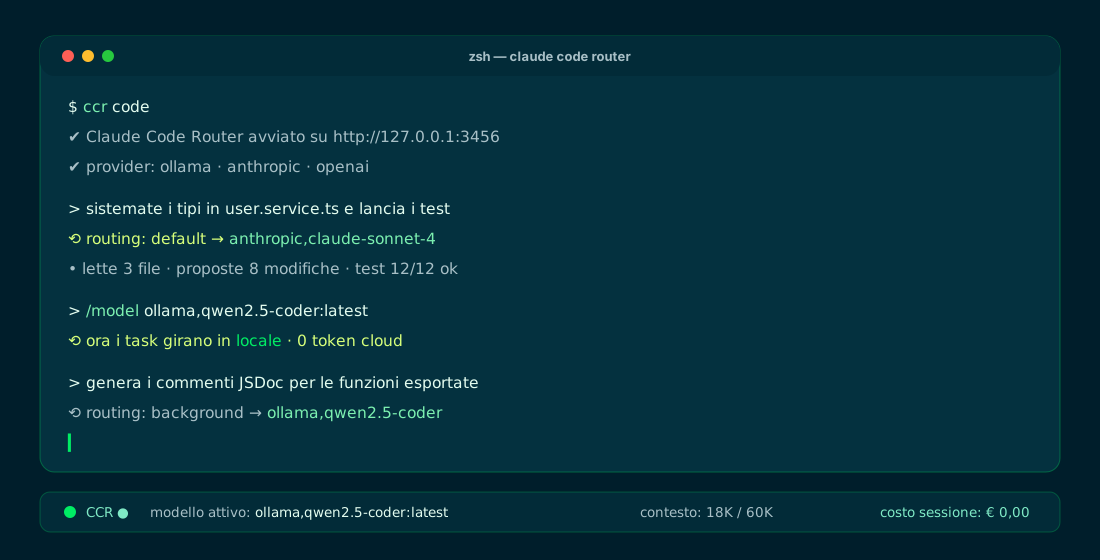
The status line keeps the active model, context and session cost in view.
6️⃣ Add Codex / OpenAI (and use it as a fallback)
To also have OpenAI/Codex as a backend, the openai provider you already have in the config is enough. You export the key once (as an environment variable) and route it wherever you want: typically on long context or as a fallback when another provider doesn't respond.
A useful note: OpenAI's Codex CLI can do the reverse too — you point it at Ollama to run locally — by setting its base URL variables to a compatible endpoint. The orchestrator principle works both ways.
# 1) export the key once (put it in your ~/.zshrc)
$ export OPENAI_API_KEY="sk-..."

# 2) the openai provider is already in config.json (gpt-5 models)
#    use it for longContext or as a fallback in the Router section

# 3) or force it on the fly inside Claude Code
$ ccr code
> /model openai,gpt-5
GitHub · providers and Router ↗
7️⃣ Switch models on the fly and verify routing
Inside Claude Code you can change backend without restarting using the /model provider,model command. To manage providers and models from the terminal there's ccr model, while ccr restart applies config changes.
To be sure requests go where you want, keep an eye on the router's log: it records the routing decisions, one by one.
# switch model on the fly inside Claude Code
> /model ollama,qwen2.5-coder:latest   # local, 0 tokens
> /model anthropic,claude-sonnet-4     # cloud, quality

# interactive management of providers and models
$ ccr model

# after each config change, restart the service
$ ccr restart

# check where requests actually went
$ tail -f ~/.claude-code-router/claude-code-router.log🔁 Alternative: LiteLLM as a gateway
The Claude Code Router is perfect for staying inside Claude Code. If instead you need a shared gateway for several applications — with load balancing, automatic fallback and usage logs — the typical choice is LiteLLM: an open-source proxy with an OpenAI-compatible interface.
The mechanism is the same: you define the models (local and cloud) in a file, start the proxy and point your tools at its endpoint. With Claude Code you just set ANTHROPIC_BASE_URL.
# LiteLLM config.yaml: same goal, OpenAI-compatible gateway
model_list:
  - model_name: local-coder
    litellm_params:
      model: ollama/qwen2.5-coder
      api_base: http://localhost:11434
  - model_name: cloud-claude
    litellm_params:
      model: anthropic/claude-sonnet-4

# start the proxy and point Claude Code at its endpoint
$ litellm --config config.yaml   # http://localhost:4000
$ export ANTHROPIC_BASE_URL=http://localhost:4000⚖️ When it's worth it: cost, privacy, quality
The orchestrator isn't a technical fad: it's how you pay for the cloud only when you need it and keep everything else in-house. Here's how we decide what to send where.
Keep it local (Ollama)
- Repetitive, background tasks
- Sensitive code or data (never leaves)
- Offline work or experimentation
- Cost per request: zero
Send to the cloud (Claude / Codex)
- Hard refactors and reasoning
- Very long context (over 60K tokens)
- When you need top quality
- When the local model isn't enough
No single winner: the policy that balances cost, privacy and quality wins.
🗓️ Bonus: schedule heavy tasks during off-peak hours
An orchestrator is at its best when you pair it with scheduling: heavy, non-urgent tasks — a large refactor, generating tests across the whole repo — you can push them to the night, when APIs cost less and no one is waiting for the answer. It's the same principle as calendar-scheduled jobs.
All it takes is a cron on your computer or a GitHub Action that runs ccr code in non-interactive mode. You route those jobs to the provider you prefer — Ollama locally at zero cost, or the cloud during off-peak hours — and in the morning you find the work already done, ready for human review.
- Local cron: 0 2 * * * fires the job at 2:00, routed by the router.
- GitHub Actions: set NON_INTERACTIVE_MODE: true for CI/CD environments.
- Off-peak: less cost and no queue; the merge always stays a human decision.
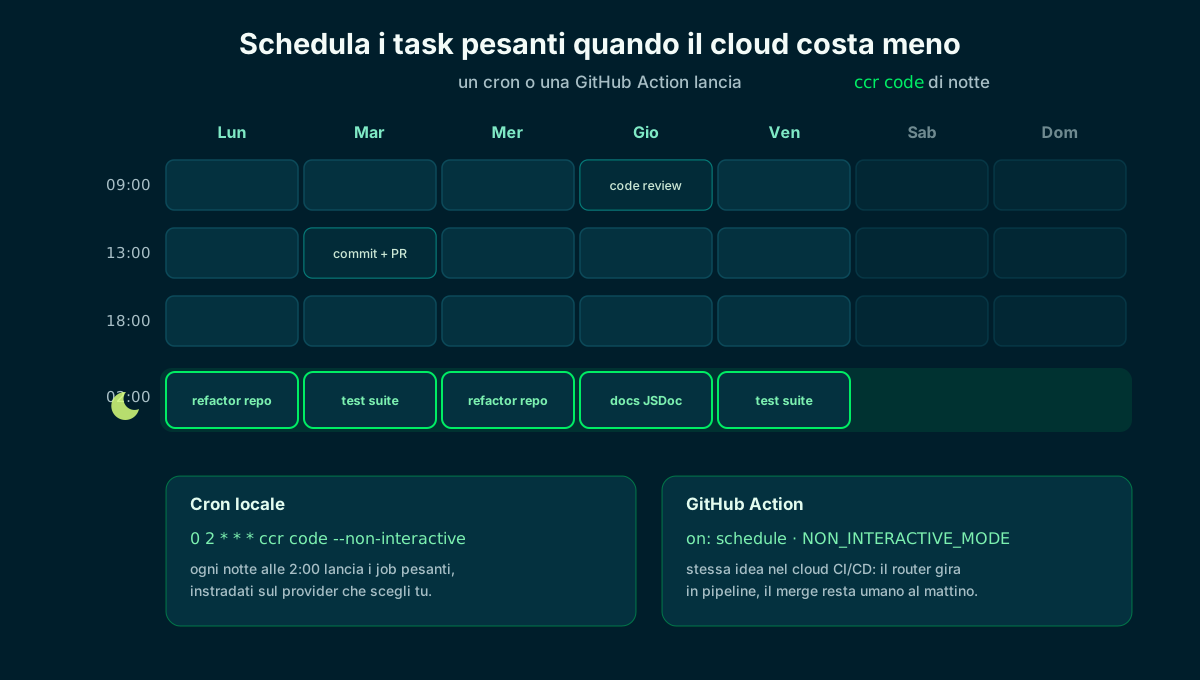
Cron or a GitHub Action runs the router at night: less cost, and the work is ready by morning.
🧩 Final checklist and next steps
Let's recap the path in seven moves. If you followed them, you now have a working orchestrator that routes prompts between local and cloud — and you can fine-tune it any time by changing one line of the config.
- 01Install Ollama + modelollama pull qwen2.5-coder
- 02Install Claude Code + Routernpm i -g claude-code and claude-code-router
- 03Write config.jsonProviders and Router sections
- 04Define the rulesbackground → local, default → cloud
- 05Start ccr codeone UX, several backends
- 06Add Codex/OpenAIlong context and fallback
- 07Verify and optimize/model, logs and ccr restart
From here you can add providers (OpenRouter, Gemini, DeepSeek) with the same logic.
Frequently asked questions about Claude Code Router
What is the Claude Code Router?
It's an open-source community proxy (the ccr command) that routes Claude Code requests to several providers — Ollama locally, Anthropic, OpenAI, OpenRouter and others — while keeping the Claude Code interface. You decide, by task type, where to send each request.
Do I have to use Ollama locally?
No. You can route only to cloud providers. Ollama is there if you want maximum privacy and zero cost on simple tasks: inference runs on your hardware and data never leaves the machine.
Can I use Codex / OpenAI with the Claude Code Router?
Yes: add an openai provider with the gpt-5 models and route it for long context or as a fallback. Alternatively, OpenAI's Codex CLI can point to Ollama to run locally, applying the same principle the other way around.
Is the Claude Code Router free? Does it use tokens?
The tool is open-source and free. You pay tokens only when you route to a cloud API; locally with Ollama the marginal cost per request is zero (you only pay for hardware and energy).
What's the difference between Claude Code Router and LiteLLM?
The Claude Code Router is designed to stay inside Claude Code. LiteLLM is a generic OpenAI-compatible gateway, a better fit when several applications must share models with load balancing, fallback and usage logs.
Does my data stay private with a local model?
With a local model via Ollama, data never leaves your machine. If you route a request to the cloud, the provider's terms apply: consider a DPA and zero-retention options for sensitive data.
Let's talk
If this topic is relevant to you, write to me: comparing notes on code and AI is always time well spent.