

Build your own Claude Code plugin marketplace on GitHub
The word «marketplace» sounds scary, but it is the simplest thing in the world: a GitHub repository with one JSON file. From there Claude Code installs your plugins with a single command, on any machine. In this tutorial I create a private repo, drop in a plugin that saves the session to Obsidian, and expose it with two commands — /salva-session and /salva-session:compact. All installable remotely, not from a local folder.
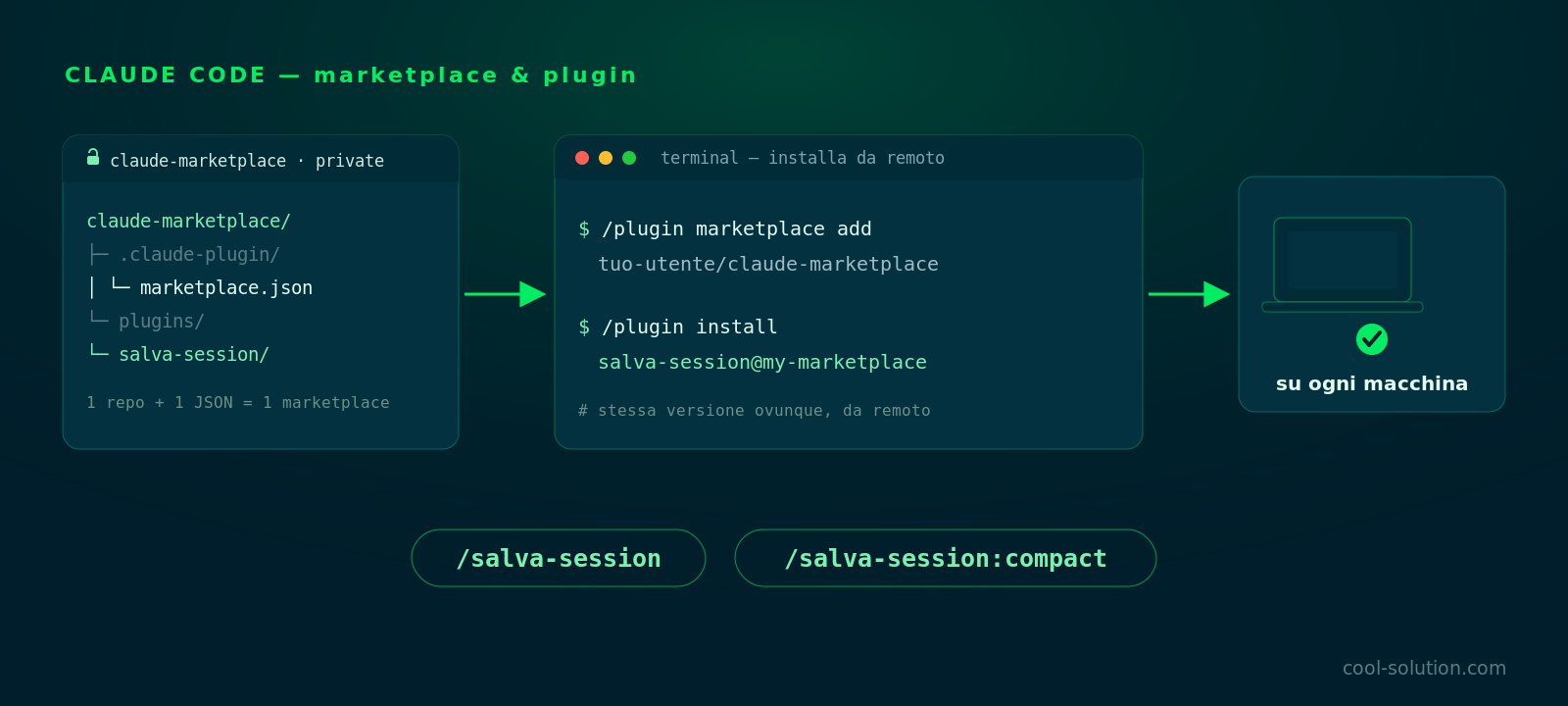
🧩 Marketplace, plugin, commands: the three pieces
Three ideas, from the container to the content. The marketplace is the catalogue: a repo with .claude-plugin/marketplace.json listing what you offer. The plugin is the actual package: commands, hooks, skills, agents. The command is what you type, like /salva-session. A marketplace can hold many plugins, a plugin many commands.
Why a GitHub repo and not a local folder? Because remotely I install the same version on every machine — mine, a colleague's, a brand-new laptop — with a single command, and update everyone the same way. The local folder is only handy while I develop. Let's start with the repo.
Private repo: the marketplace works perfectly well without making it public.
1️⃣ The repo and the marketplace.json file
I create a repository — I call it claude-marketplace — and keep it private. The only required file is .claude-plugin/marketplace.json: it names the catalogue, states the owner and lists the plugins with their path inside the repo.
Here I declare a single plugin, salva-session, living in ./plugins/salva-session. The description is what I'll see when browsing the marketplace. That's it: this file is the marketplace.
{
  "name": "my-marketplace",
  "owner": { "name": "your-username" },
  "plugins": [
    {
      "name": "salva-session",
      "source": "./plugins/salva-session",
      "description": "Save and compact the session to Obsidian"
    }
  ]
}
Official docs · Marketplaces ↗
2️⃣ The plugin structure
Inside plugins/salva-session I put another .claude-plugin/plugin.json (name, version, description, author) and a commands/ folder with one Markdown file per command. The full structure is this.
What matters is the plugin name, salva-session: a plugin's commands always live under its namespace, in the form /plugin-name:command. That's why commands/compact.md is invoked as /salva-session:compact, and the main save command runs as /salva-session. The plugin name is what prevents clashes between different plugins.
This structure is what produces /salva-session and /salva-session:compact.
3️⃣ The two commands: /salva-session and /salva-session:compact
A command is a Markdown file: a small frontmatter with the description and, below it, the natural-language instructions Claude will run. /salva-session does one thing: it summarises the conversation and saves it as a note in the Obsidian vault, at sessions/YYYY-MM-DD.md.
/salva-session:compact goes one step further: it first runs /compact to shrink the context, then saves. I use it when the session is long and I want to close it cleanly without dragging useless tokens along. Two files, two commands, no code to compile.
// commands/salva-session.md   → /salva-session
---
description: Save the current session to Obsidian
---
Summarise the session and save it as a Markdown note
in the vault, at sessions/YYYY-MM-DD.md.

// commands/compact.md          → /salva-session:compact
---
description: Compact, then save the session
---
First run /compact to shrink the context,
then save the session as above.
Official docs · Slash commands ↗
🚀 What happens at the end of a session
Here the loop closes with the settings.json article. I can run /salva-session by hand, or let the Stop hook do it automatically at the end of every turn, calling the same script. The result is identical: the session is compacted and saved without me thinking about it.
In practice this is exactly what I see: the conversation gets compacted (tokens saved and all), the end-of-session skills fire and the note lands in the vault. It's the kind of automation I like best — invisible as long as it works.
The same script called by the Stop hook or by the /salva-session:compact command.
📄 The result in your Obsidian vault
The final product is a tidy Markdown note: what we did, the decisions taken, what's left open for next time. I get the session history as a project logbook, searchable and linkable.
Nothing sensitive in the clear if you set the script up well: project names, paths and secrets stay out or are trimmed to the essentials. Below is an example with generic content.
Example with generic content: the structure is real, the data isn't.
🐙 Install from anywhere (remote, not local)
Here's the part that matters, and that many get wrong by doing everything locally. To use the plugin on any machine, I add the marketplace from the GitHub repo and then install the plugin from the marketplace. Two commands.
Alternatively I register them in settings.json with extraKnownMarketplaces and enabledPlugins, so a fresh machine is ready just by syncing the configuration. The local variant (/plugin marketplace add ./path) I keep only while developing the plugin.
# 1) add the marketplace from the GitHub repo
/plugin marketplace add your-username/claude-marketplace

# 2) install the plugin from the marketplace
/plugin install salva-session@my-marketplace

// or, inside settings.json:
"extraKnownMarketplaces": { "my-marketplace": { "source": {
  "source": "github", "repo": "your-username/claude-marketplace" } } },
"enabledPlugins": { "salva-session@my-marketplace": true }⚖️ Remote or local: when to use which
Here's the choice I always make. Remote when the plugin is ready and I want it everywhere, shared and updatable with one command. Local only in the development loop, when I'm editing files and want to try them without pushing on every change.
Remote (GitHub)
- /plugin marketplace add user/repo
- Same version on every machine
- Updates with one command
- Great for the team
Local (folder)
- /plugin marketplace add ./path
- Only on your machine
- Perfect while developing
- No sharing
Frequently asked questions about Claude Code plugin marketplace
Do I need a public repo to install the plugin?
No. A private repo is fine: Claude Code clones it using your Git credentials, so you (or the team) just need access to the repository. The marketplace stays private and is installable all the same.
How do I update the plugin after a change?
I push the changes to GitHub and refresh the catalogue with /plugin marketplace update. Remotely, every machine picks up the new version with one command, with no manual reinstall.
Can I install remotely instead of locally?
Yes, and that's the point: /plugin marketplace add user/repo adds the catalogue straight from GitHub, then /plugin install name@marketplace installs the plugin. The local path version is only for development.
Let's talk
If this topic is relevant to you, write to me: comparing notes on code and AI is always time well spent.