


MCP transport protocols: stdio, HTTP and authentication in C# .NET
The Model Context Protocol (MCP) standardizes how an app connects a model to external tools and data. But between host and server there are two ways to talk: the transport. Picking it well changes latency, security and deployment. In this article we cover the MCP transport protocols in detail — stdio and Streamable HTTP (plus the old HTTP+SSE) — when to use each, how authentication works, and we put them to work in C# .NET with Microsoft Agent Framework and Microsoft.Extensions.AI: one stdio example without auth and one HTTP example with auth.
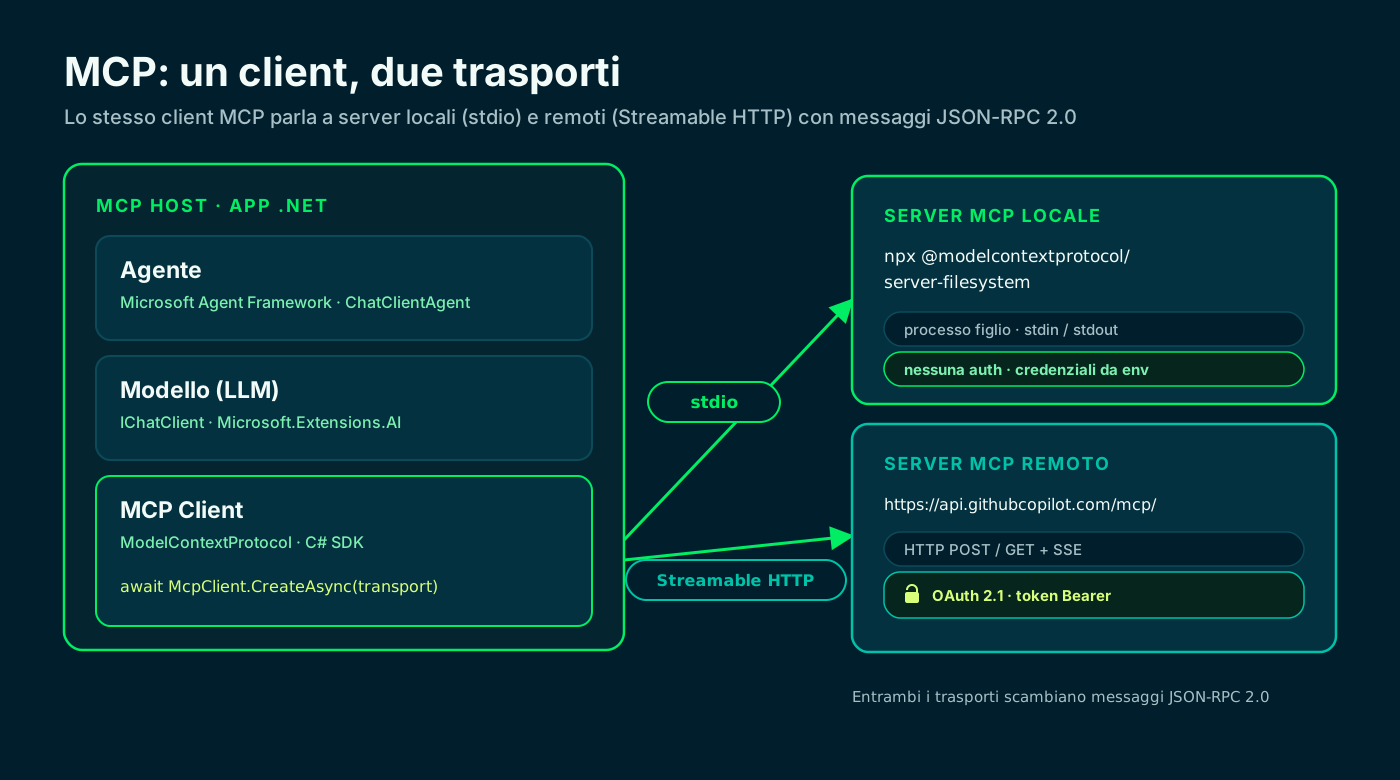
🔌 What MCP transports are (host, client, server)
MCP has three roles: the host (your application), the MCP client that lives inside the host, and the MCP server that exposes tools, resources and prompts. Client and server talk in JSON-RPC 2.0 messages.
The transport is the channel those messages travel on. The spec defines two standard ones: stdio for local servers and Streamable HTTP for remote ones. The message format never changes: only how it gets from one side to the other.
- Host: the app that coordinates model, MCP client and conversation.
- Client: opens one connection to one server and lists its tools.
- Server: exposes capabilities (tools/resources/prompts) in a standard way.
// Request: the client invokes a tool on the MCP server
{ "jsonrpc": "2.0", "id": 1, "method": "tools/call",
  "params": { "name": "read_file",
               "arguments": { "path": "README.md" } } }

// Response: same format on any transport
{ "jsonrpc": "2.0", "id": 1,
  "result": { "content": [ { "type": "text",
                              "text": "# Project..." } ] } }
Transports · MCP specification ↗
🖥️ stdio: the local transport
With stdio the client launches the server as a child process and talks to it by writing to stdin and reading from stdout. No network, no ports: two processes on the same machine exchanging JSON-RPC lines.
It is the recommended transport when possible: minimal latency, zero network surface and a simple lifecycle — when the host exits, the server process dies with it. stderr is left for logging.
- The server is an executable (a binary, `npx`, `dotnet run`, `uvx`).
- One client talks to one process: a one-to-one relationship.
- No network handshake: it just starts.
# The MCP server is a process: the client starts it like this
npx -y @modelcontextprotocol/server-filesystem /Users/you/projects

# From here client and server talk ONLY over
# stdin (requests) and stdout (responses). stderr = logs.🌐 Streamable HTTP: the remote transport
With Streamable HTTP the server is an independent process exposing a single HTTP endpoint. The client sends messages with a POST; the server can reply with a single JSON or open an SSE (Server-Sent Events) stream when it needs to send multiple messages.
It is the transport for anything off the machine: a shared server, a SaaS, a service behind a load balancer. One server handles many clients at once and, when needed, requires authentication.
- POST to send, GET + SSE for server→client streaming.
- Multi-client and scalable: it sits behind a reverse proxy like any API.
- This is where authentication comes into play (see below).
# Streamable HTTP: a POST initializes the session.
# The client accepts both JSON and an SSE stream.
curl -X POST https://api.example.com/mcp \
  -H "Content-Type: application/json" \
  -H "Accept: application/json, text/event-stream" \
  -H "Authorization: Bearer $MCP_TOKEN" \
  -d '{"jsonrpc":"2.0","id":1,"method":"initialize"}'
Streamable HTTP · MCP specification ↗
🕰️ HTTP+SSE: the old transport (deprecated)
Before Streamable HTTP there was HTTP+SSE (spec 2024-11-05): two separate endpoints, an SSE connection kept always open and a separate POST for requests. It worked, but it was awkward to scale and to secure.
Since 2025 it has been replaced by Streamable HTTP and is kept only for backward compatibility. If you write new code, use Streamable HTTP: the old scheme is deprecated and should be avoided for new servers.
HTTP+SSE (2024-11-05)
- Two separate endpoints (SSE + POST)
- An SSE connection always open
- Hard to scale and secure
- Deprecated: backward compatibility only
Streamable HTTP (current)
- A single MCP endpoint
- SSE optional, only when needed
- Fits stateless and load balancers
- The standard from 2025 onward
Same goal, simpler design: the new transport unifies everything on one endpoint.
⚖️ stdio vs HTTP: when to use which
The rule is simple: local → stdio, remote → Streamable HTTP. If the server runs on the same machine as the host (file tools, a CLI, a dev utility), stdio is faster and no-frills.
If the server is shared, network-exposed or third-party managed, you need HTTP: multi-client, scalable and authenticated. Many hosts, in fact, speak both transports and mix them in the same project.
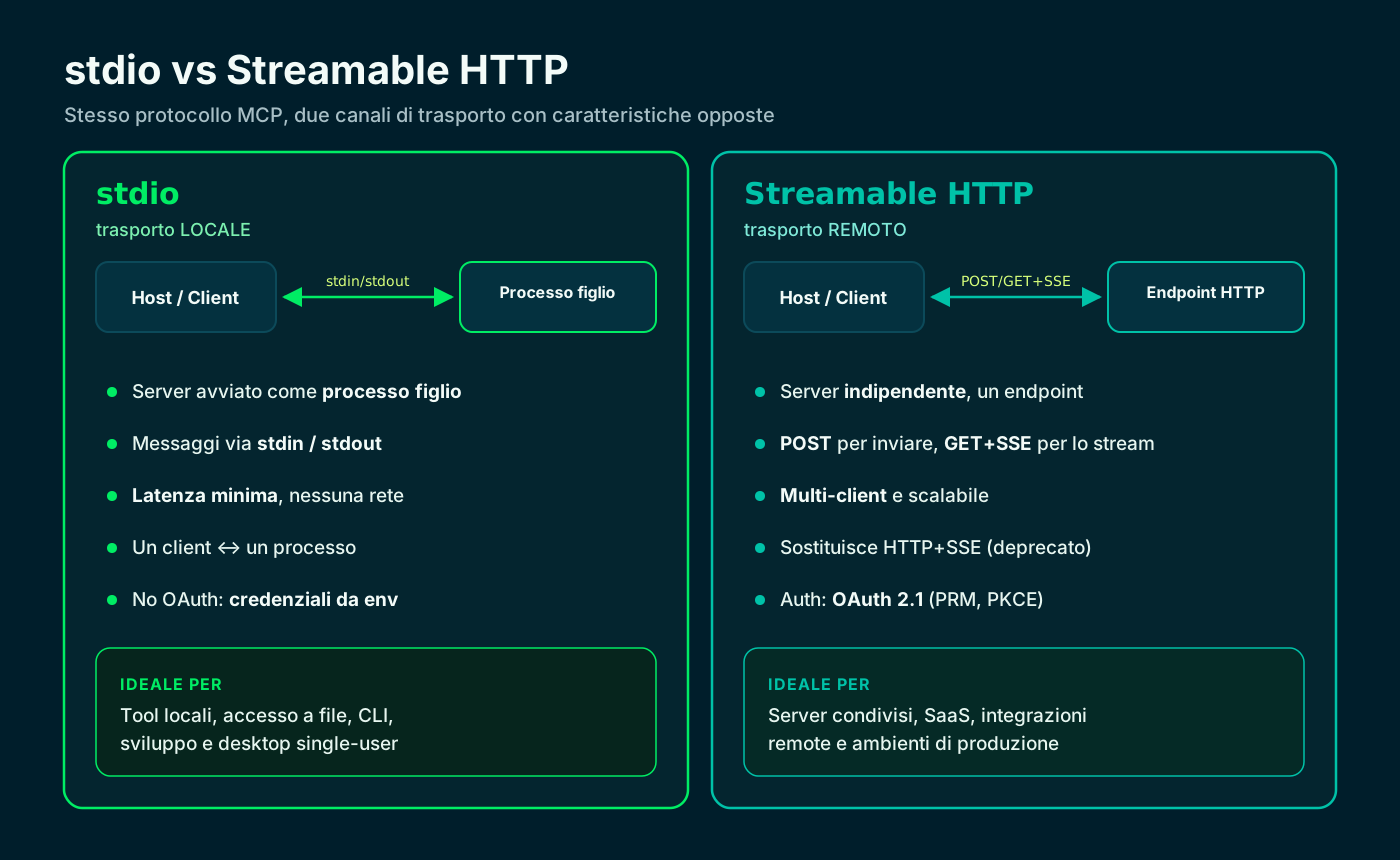
stdio for local, Streamable HTTP for remote: opposite traits, same protocol.
🔐 MCP authentication: when you need it
Here the two transports diverge. With stdio, MCP authentication does not apply: the server is local and trusted, so credentials (API keys, tokens) come from the environment variables you pass at launch. The spec explicitly says not to use OAuth over stdio.
With HTTP, a protected server follows OAuth 2.1. The server publishes a Protected Resource Metadata (PRM, RFC 9728) telling the client which authorization server to use; the client gets an access token with PKCE and Resource Indicators (RFC 8707), then calls the server with the `Authorization: Bearer` header.
- stdio → no OAuth: credentials from environment variables.
- HTTP → OAuth 2.1: PRM for discovery, PKCE required for public clients.
- The token has an audience bound to the resource: it isn't reusable elsewhere.
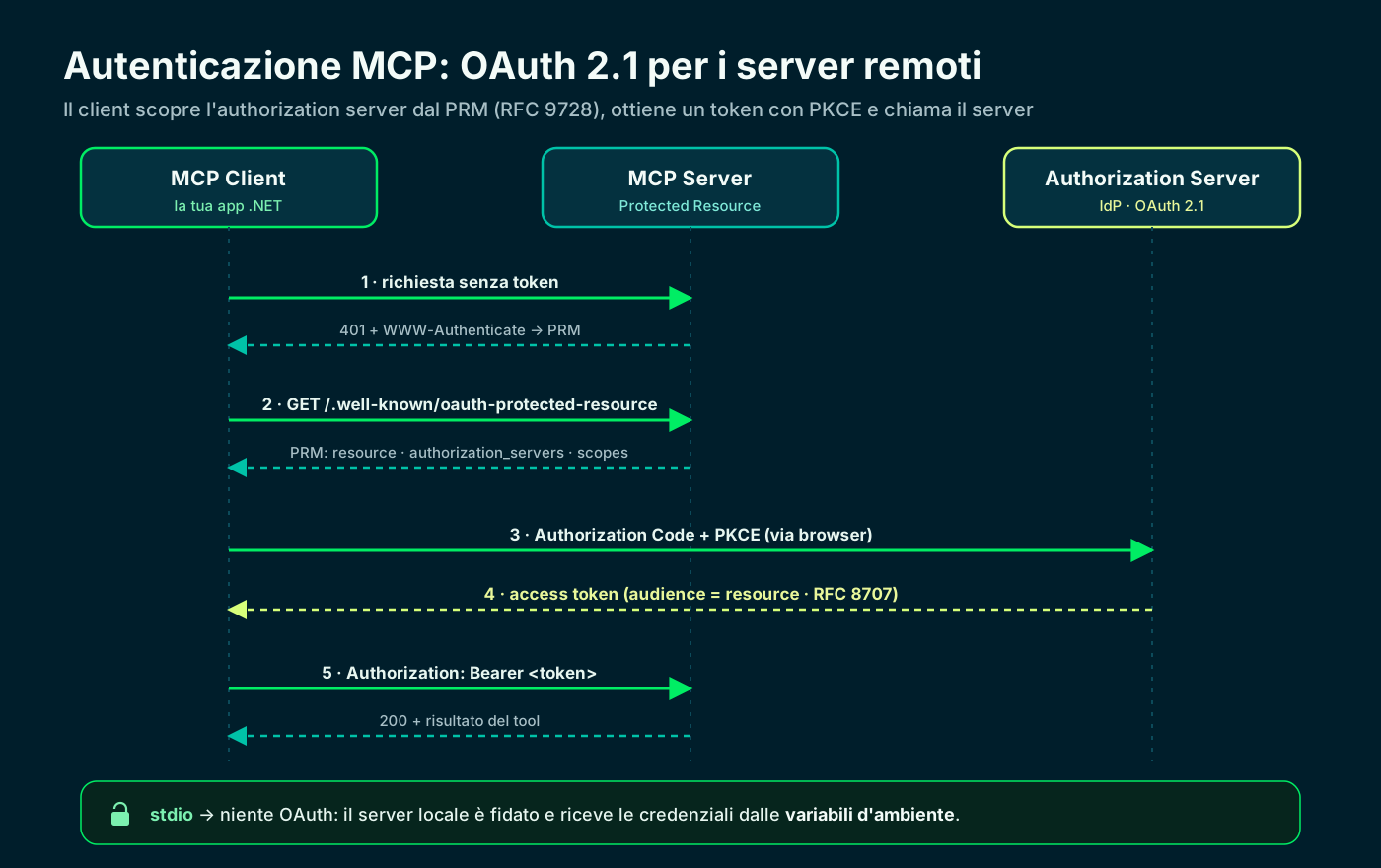
The client discovers the authorization server from the PRM, gets the token with PKCE, then calls the server.
🧩 How a transport is declared (real config)
Before the C# code, here is how the two transports look in a real configuration — the one a host uses to register its MCP servers. The difference is all in the fields.
A stdio server is described with `command` and `args` (what to run). An HTTP server with `type: "http"` and a `url`; any token goes in `headers` as `Authorization`, taken from a variable and never written in clear text.
// Two transports in one MCP config: stdio and http
{
  "mcpServers": {
    // stdio server: describe HOW to launch the process
    "filesystem": {
      "command": "npx",
      "args": ["-y", "@modelcontextprotocol/server-filesystem", "/Users/you/projects"]
    },
    // http server: an endpoint + a Bearer token from a variable
    "github": {
      "type": "http",
      "url": "https://api.githubcopilot.com/mcp/",
      "headers": { "Authorization": "Bearer ${GITHUB_MCP_TOKEN}" }
    }
  }
}🧰 Setting up the .NET project
Let's get practical. We create a console app and add four packages: the Microsoft.Extensions.AI abstractions, a provider for the model, Microsoft Agent Framework for the agent and the official MCP C# SDK (`ModelContextProtocol`).
The Extensions.AI abstractions (`IChatClient`) make the code provider-agnostic: OpenAI today, Azure OpenAI or Ollama tomorrow, by changing one line. The MCP SDK is in preview, so add it with `--prerelease`.
# new console app
dotnet new console -n McpAgentDemo && cd McpAgentDemo

# AI abstractions + provider + agent framework + MCP
dotnet add package Microsoft.Extensions.AI
dotnet add package Microsoft.Extensions.AI.OpenAI --prerelease
dotnet add package Microsoft.Agents.AI --prerelease
dotnet add package ModelContextProtocol --prerelease
MCP client in .NET · Microsoft Learn ↗
🗂️ Example 1 — stdio without auth (Filesystem)
First example: an agent that uses the Filesystem server over stdio. The client starts it with `npx`, lists the tools and passes them to the agent. No authentication: it's all local, and any scope (the folder) is just a command-line argument.
The core is `McpClient.CreateAsync(transport)`: it creates the client and starts the child process. `ListToolsAsync()` returns `McpClientTool`s, which are Extensions.AI `AIFunction`s: you pass them to the agent as-is.
using Microsoft.Agents.AI;
using Microsoft.Extensions.AI;
using ModelContextProtocol.Client;
using OpenAI;

// 1) The model: an IChatClient from Microsoft.Extensions.AI.
var apiKey = Environment.GetEnvironmentVariable("OPENAI_API_KEY")!;
IChatClient chatClient = new OpenAIClient(apiKey)
    .GetChatClient("gpt-4o-mini")
    .AsIChatClient();

// 2) stdio transport: launch the server as a child process.
//    No auth: it's local and trusted.
var transport = new StdioClientTransport(new StdioClientTransportOptions
{
    Name = "Filesystem",
    Command = "npx",
    Arguments = ["-y", "@modelcontextprotocol/server-filesystem", "/Users/you/projects"],
});

await using McpClient mcp = await McpClient.CreateAsync(transport);

// 3) The server tools ARE AIFunctions: pass them to the agent.
IList<McpClientTool> tools = await mcp.ListToolsAsync();

// 4) The agent (Agent Framework) orchestrates model + tools.
AIAgent agent = new ChatClientAgent(chatClient, new ChatClientAgentOptions
{
    Name = "FilesystemAgent",
    Instructions = "Answer only using the files in the working folder.",
    ChatOptions = new ChatOptions { Tools = [.. tools] },
});

Console.WriteLine(await agent.RunAsync("List the .md files and summarize the README."));▶️ Run the stdio example and read the output
On `dotnet run` the client starts the server, completes the handshake and discovers the available tools (for Filesystem: read files, list directories, write). Then the agent decides which to call to answer.
If something won't start, the first place to look is the server log: a common error is `spawn npx ENOENT`, meaning Node/npx isn't on the PATH. With stdio, problems are almost always environment or command issues.
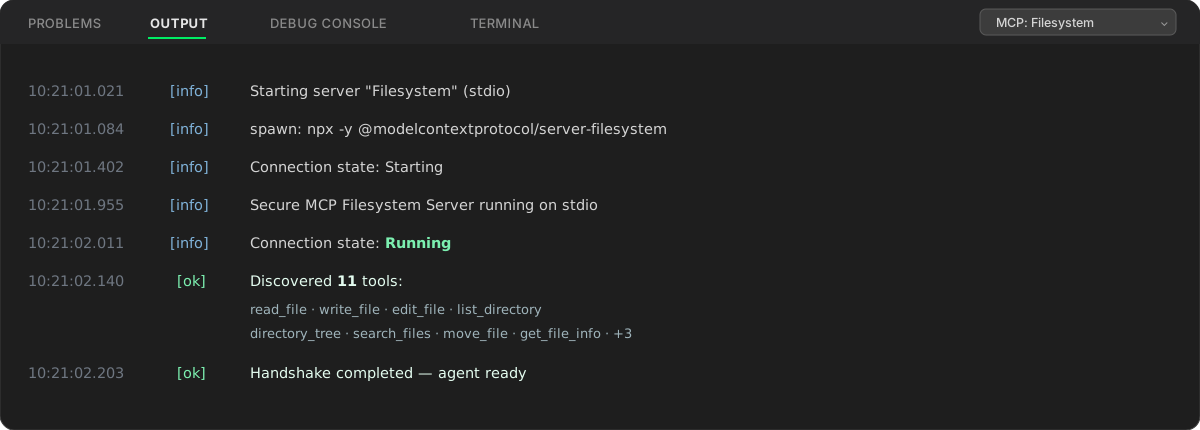
Connection state: Running, then the discovered tools: proof the stdio handshake succeeded.
🔑 Example 2 — HTTP with auth (GitHub MCP)
Second example: the same agent, but pointing at the remote GitHub MCP server over Streamable HTTP and with authentication. Only the transport changes: `SseClientTransport` with `TransportMode = StreamableHttp` and the `Authorization: Bearer` header.
The token is not written in the code: it comes from an environment variable. It's the same rule as stdio (credentials from env) applied to the HTTP header: never secrets in clear text in the source.
using Microsoft.Agents.AI;
using Microsoft.Extensions.AI;
using ModelContextProtocol.Client;
using ModelContextProtocol.Protocol;
using OpenAI;

var apiKey = Environment.GetEnvironmentVariable("OPENAI_API_KEY")!;

// The token comes from an environment variable, never from code.
var githubToken = Environment.GetEnvironmentVariable("GITHUB_MCP_TOKEN")
    ?? throw new InvalidOperationException("GITHUB_MCP_TOKEN is not set.");

IChatClient chatClient = new OpenAIClient(apiKey)
    .GetChatClient("gpt-4o-mini")
    .AsIChatClient();

// Streamable HTTP transport to a remote server, with a Bearer header.
var transport = new SseClientTransport(new SseClientTransportOptions
{
    Name = "GitHub MCP",
    Endpoint = new Uri("https://api.githubcopilot.com/mcp/"),
    TransportMode = HttpTransportMode.StreamableHttp,
    AdditionalHeaders = new Dictionary<string, string>
    {
        ["Authorization"] = $"Bearer {githubToken}",
    },
});

await using McpClient mcp = await McpClient.CreateAsync(transport);
IList<McpClientTool> tools = await mcp.ListToolsAsync();

AIAgent agent = new ChatClientAgent(chatClient, new ChatClientAgentOptions
{
    Name = "GitHubAgent",
    Instructions = "Answer only about GitHub repositories, using the MCP tools.",
    ChatOptions = new ChatOptions { Tools = [.. tools] },
});

Console.WriteLine(await agent.RunAsync(
"Summarize the last 5 commits of modelcontextprotocol/csharp-sdk."));🪪 Beyond the token: OAuth 2.1 with the SDK
A static token is fine for a personal access token. But when the server enforces OAuth 2.1, we don't pass a token by hand: the MCP C# SDK has the flow built in. You just set `OAuth` on the transport options with a `ClientOAuthOptions`.
Under the hood the SDK does it all: it reads the server's PRM, discovers the authorization server, runs Authorization Code with PKCE and manages the token. Your code only needs to open the browser at the authorization URL.
using ModelContextProtocol.Client;

// A server that enforces OAuth 2.1: no static token.
// The SDK handles PRM discovery (RFC 9728), PKCE and the token exchange.
var transport = new SseClientTransport(new SseClientTransportOptions
{
    Name = "Secure MCP",
    Endpoint = new Uri("https://mcp.example.com/"),
    OAuth = new ClientOAuthOptions
    {
        ClientName = "MyMcpClient",
        RedirectUri = new Uri("http://localhost:1179/callback"),
        // Delegate that opens the browser at the authorization URL.
        AuthorizationRedirectDelegate = OpenBrowserAsync,
    },
});

await using McpClient mcp = await McpClient.CreateAsync(transport);
Authorization · MCP specification ↗
✅ Recap and checklist
Let's recap. The transport is the first choice of any MCP integration: stdio for local, Streamable HTTP for remote, and HTTP+SSE only if you must talk to an old server. The agent code, however, stays the same.
Authentication follows the transport: environment variables for stdio, OAuth 2.1 (or a Bearer from env) for HTTP. Thanks to Extensions.AI and Agent Framework, switching provider or transport is a matter of a few lines.
- 01Pick the transportlocal → stdio, remote → HTTP
- 02Project + NuGetExtensions.AI + Agent Framework + MCP
- 03Create the clientMcpClient.CreateAsync(transport)
- 04List the toolsListToolsAsync → AIFunction
- 05Wire the agentChatClientAgent + ChatOptions.Tools
- 06Handle authenv for stdio, OAuth 2.1 for HTTP
Six moves: the transport and auth choice is the only thing that changes between local and remote.
Frequently asked questions about MCP transport protocols
What's the difference between stdio and Streamable HTTP in MCP?
With stdio the client launches the server as a child process and talks over stdin/stdout: local, fast, no network. With Streamable HTTP the server is remote and independent, exposes an HTTP endpoint (POST + optional SSE), handles many clients, and is where authentication comes in.
Do I need to authenticate a local (stdio) MCP server?
No: the MCP spec says not to use OAuth over stdio. The local server is trusted and receives any credentials (API keys, tokens) from the environment variables you pass at launch, not through an authorization flow.
What happened to the HTTP+SSE transport?
The HTTP+SSE transport from spec 2024-11-05 is deprecated: it was replaced by Streamable HTTP, which unifies everything on a single endpoint. It remains only for backward compatibility with old servers; new code uses Streamable HTTP.
How do I pass a token to a remote MCP server in C#?
With the MCP C# SDK you use `SseClientTransport` in `StreamableHttp` mode and set `AdditionalHeaders` with `Authorization: Bearer <token>`. The token should be read from an environment variable, never written in clear text in the code.
What is Protected Resource Metadata (PRM) in MCP?
It's a document (RFC 9728) the MCP server publishes at `/.well-known/oauth-protected-resource`. It tells the client which authorization server to use, which scopes exist and what the resource is. It's the starting point of the OAuth 2.1 flow; the C# SDK discovers it automatically.
Can I use the same .NET code for stdio and HTTP?
Yes. Only the transport object changes (`StdioClientTransport` or `SseClientTransport`): the rest — `ListToolsAsync`, the `McpClientTool`s as `AIFunction`, the Agent Framework `ChatClientAgent` — stays the same, because you depend on the Microsoft.Extensions.AI abstractions.
Let's talk
If this topic is relevant to you, write to me: comparing notes on code and AI is always time well spent.